
Best Laptops for Battery Life in 2026: 12 Picks Compared on Specs
Our top pick for battery life is the 2026 ASUS Vivobook S16 with the Ryzen AI 9 465: a 70 Wh battery feeds an efficient AMD chip with integrated graphics only, in a 16-inch body at 1.7 kg, tied for the lightest in this list. The other 11 picks trade weight for capacity, up to a 99.9 Wh battery. We chose every pick from stated battery size, processor class and graphics, not from rundown tests.
12 picks from 38 laptops that match this guide with a price we can quote today. Every price below is live and carries the moment it was read.
The picks at a glance
Which one should you buy?
- For all-day work on a light laptop: The Vivobook S16 (2026) weighs 1.7 kg and relies on integrated graphics, so nothing extra competes for its 70 Wh battery. See pick 1
- For the biggest battery you can get: The GEEKOM GeekBook M16 carries a 99.9 Wh battery, the largest in this list, at 1.72 kg. See pick 2
- For pen and tablet use: The Vivobook 16 Flip pairs Intel's efficiency-focused Core Ultra 7 258V with a 75 Wh battery in a 2-in-1 design. See pick 3
- For professional graphics away from a desk: The ThinkPad P16v Gen 2 has a 90 Wh battery, the largest among the workstation picks, and a 60Hz screen. See pick 5
The 12 picks
1 Best overall
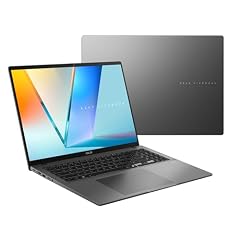
ASUS Vivobook S16 Laptop
- CPU
- AMD Ryzen AI 9 465
- RAM
- 32 GB
- Storage
- 1000 GB
- Screen
- 16 in
- Weight
- 1.7 kg
- Battery
- 70 Wh
- OS
- Windows 11 Home
$1,664.19 (as of 10/20/2026 15:20 PDT - Details)
It is the only pick that combines a current AMD Ryzen AI chip, integrated graphics only and a 1.7 kg weight with a 16-inch screen. Its 70 Wh battery is the smallest in this list, but it does not have to feed a dedicated GPU, unlike six of the other picks. It also comes with 32GB of memory and 1TB of storage, and the listing is under the ASUS brand rather than a reseller.
Pros
- No dedicated GPU drawing power
- 1.7 kg, tied for the lightest pick
- 32GB of memory and 1TB of storage
- Sold as an ASUS listing, not a reseller configuration
Cons
- 70 Wh battery, the smallest in this list
- Not suited to demanding games or GPU rendering
Good fit if
- Students and remote workers who work unplugged through the day
- Buyers who want a 16-inch screen without a heavy bag
Skip if
- You want the largest battery regardless of weight: the GeekBook M16 has 99.9 Wh
- You need a dedicated GPU for 3D or gaming
Verdict: The best balance of efficient hardware, weight and screen size in this list.
2 Largest battery

GEEKOM GeekBook M16 Laptop
- CPU
- Intel Core Ultra 9
- RAM
- 16 GB
- Storage
- 512 GB
- Screen
- 16 in
- Weight
- 1.72 kg
- Battery
- 99.9 Wh
- OS
- Windows 11
$849.00 (as of 10/20/2026 15:21 PDT - Details)
Its 99.9 Wh battery is the largest in this list, and at 1.72 kg it is only 0.02 kg heavier than the lightest picks. It has integrated graphics only. The exact Intel Core Ultra 9 model is not stated by the seller, so its power class cannot be confirmed from the listing.
Pros
- 99.9 Wh battery, the largest in this list
- 1.72 kg for a 16-inch laptop
- No dedicated GPU
Cons
- Exact processor model not stated by the seller
- 16GB of memory, tied with the Scar 15 for the least in this list
- Storage not stated by the seller
Good fit if
- Travelers who want the most stored energy in a light 16-inch machine
- Office workers whose apps fit in 16GB
Skip if
- You want a well-known laptop maker with published spec pages
- You need to confirm the exact processor before buying
Verdict: The most battery capacity per kilogram here, from a less established laptop maker.
3 Best 2-in-1 for battery life

ASUS Vivobook 16 Flip
- CPU
- Intel Core Ultra 7 258V
- RAM
- 32 GB
- Storage
- 1000 GB
- Screen
- 16 in
- Touchscreen
- Yes
- Battery
- 75 Wh
- OS
- Windows 11
- Convertible 2-in-1
- Yes
$1,449.99 (as of 10/20/2026 15:20 PDT - Details) Typical price: $1,799.99, 19% off
It uses the Intel Core Ultra 7 258V, which Intel lists with a 17 W processor base power. The 75 Wh battery is mid-pack, and there is no dedicated GPU. It is sold by a reseller rather than by ASUS.
Pros
- Core Ultra 7 258V: 17 W base power per Intel
- 75 Wh battery with no dedicated GPU
- 2-in-1 design with a 16-inch screen
- 32GB of memory and 1TB of storage
Cons
- Sold by a reseller
- Weight not stated by the seller
Good fit if
- Note-takers and students who want to fold the screen back
- Buyers who value an efficiency-focused Intel chip
Skip if
- You prefer a listing sold by the maker itself
- You need a dedicated GPU
Verdict: The efficiency-first Intel pick, with the flexibility of a convertible.
4 Best 17-inch for battery life

HP OmniBook 7 AI Laptop
- CPU
- Intel Core Ultra 7 258V
- GPU
- RTX 4050
- GPU memory
- 6 GB
- RAM
- 32 GB
- Storage
- 1000 GB
- Screen
- 17.3 in
- Touchscreen
- Yes
- Weight
- 2.35 kg
$1,599.99 (as of 10/20/2026 15:21 PDT - Details)
It pairs the same 17 W base-power Core Ultra 7 258V as the Vivobook Flip with an 83 Wh battery and a 17.3-inch touchscreen. It adds an RTX 4050 with 6GB of graphics memory, which helps creative apps but costs runtime when it is active.
Pros
- Core Ultra 7 258V: 17 W base power per Intel
- 83 Wh battery
- 17.3-inch touchscreen and Windows 11 Pro
- 32GB of memory and 1TB of storage
Cons
- 2.35 kg, the heaviest stated weight in this list
- RTX 4050 draws extra power when in use
Good fit if
- Buyers who want a large screen and light creative work unplugged
- Business users who need Windows 11 Pro
Skip if
- You carry your laptop all day
- You do not need a dedicated GPU: the Vivobook S16 is lighter
Verdict: The large-screen pick with an efficient chip and a bigger-than-average battery.
5 Best workstation for battery life

Lenovo ThinkPad P16v Gen 2 Mobile Workstation Laptop
- CPU
- Intel Core Ultra 7 165H
- GPU
- RTX 2000 Ada
- GPU memory
- 8 GB
- RAM
- 64 GB
- Storage
- 1000 GB
- Screen
- 16 in
- Refresh
- 60 Hz
- Battery
- 90 Wh
$2,999.99 (as of 10/20/2026 15:22 PDT - Details)
Its 90 Wh battery is the largest among the three workstation picks, and it runs a 60Hz screen, the lowest refresh rate stated in this list. It carries an Intel Core Ultra 7 165H and an RTX 2000 Ada with 8GB for professional graphics work.
Pros
- 90 Wh battery, the largest among workstation picks
- 60Hz screen, the lowest stated refresh in this list
- 64GB of memory and Windows 11 Pro
- RTX 2000 Ada with 8GB of graphics memory
Cons
- Weight not stated by the seller
- 1TB of storage, half of the ZBook X G1i picks
Good fit if
- Engineers and designers who work away from a desk
- IT buyers who want a ThinkPad workstation with a large battery
Skip if
- You do not need a professional GPU
- You want a stated weight before buying
Verdict: The workstation to pick when runtime matters as much as certified graphics.
6 Lightest workstation

HP ZBook X G1i Laptop
- CPU
- Intel Core Ultra 7 265H
- GPU
- RTX PRO 1000
- GPU memory
- 8 GB
- RAM
- 64 GB
- Storage
- 2000 GB
- Screen
- 16 in
- Weight
- 2.04 kg
- Battery
- 83 Wh
$5,099.00 (as of 10/20/2026 15:21 PDT - Details)
At 2.04 kg it ties with its sibling configuration for the lightest stated weight among picks with a dedicated GPU, and it has an 83 Wh battery. It pairs an Intel Core Ultra 7 265H with an NVIDIA RTX PRO 1000 with 8GB, plus 64GB of memory and 2TB of storage.
Pros
- 2.04 kg, tied for the lightest stated weight with a dedicated GPU
- 83 Wh battery
- 64GB of memory and 2TB of storage
- Sold as an HP listing
Cons
- Smaller battery than the ThinkPad P16v's 90 Wh
- Dedicated GPU costs runtime when active
Good fit if
- CAD and data users who carry a workstation between sites
- Buyers who want 2TB of local storage
Skip if
- Your work runs fine on integrated graphics
- You want the largest workstation battery: see the ThinkPad P16v
Verdict: The most portable way to get professional graphics with a large battery here.
7 Entry workstation configuration

HP ZBook X G1i Laptop
- CPU
- Intel Core Ultra 7 255H
- GPU
- RTX PRO 500
- GPU memory
- 6 GB
- RAM
- 64 GB
- Storage
- 2000 GB
- Screen
- 16 in
- Weight
- 2.04 kg
- Battery
- 83 Wh
$2,999.99 (as of 10/20/2026 15:21 PDT - Details)
Same 2.04 kg ZBook X G1i body and 83 Wh battery as the HP-sold configuration, with an Intel Core Ultra 7 255H and a smaller RTX PRO 500 with 6GB. It is sold by a reseller, so check the warranty terms on the listing.
Pros
- 2.04 kg with a dedicated GPU
- 83 Wh battery
- 64GB of memory and 2TB of storage
Cons
- Sold by a reseller
- RTX PRO 500 has 6GB of graphics memory, 2GB less than the RTX PRO 1000
Good fit if
- Buyers whose professional apps need only an entry workstation GPU
- Users who want the ZBook X G1i chassis in a lower GPU tier
Skip if
- You want the listing sold by HP
- Your models need more than 6GB of graphics memory
Verdict: The lower GPU tier of the lightest workstation here, from a reseller.
8 Biggest battery in a 14-inch
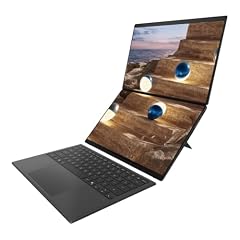
Mavark Zenbook Duo Dual 14” OLED 3K 144Hz Touch Laptop
- RAM
- 32 GB
- Storage
- 8000 GB
- Screen
- 14 in
- Battery
- 99 Wh
- OS
- Windows 11 Pro
A 99 Wh battery in a 14-inch dual-screen laptop is the most capacity per inch of screen in this list. The listing is a reseller configuration of the ASUS Zenbook Duo; its title names an Intel Core Ultra X9 388H with Intel Arc graphics, but the processor is not stated in the spec data. It carries 32GB of memory and 8TB of storage.
Pros
- 99 Wh battery in a 14-inch laptop
- 8TB of storage, the most in this list
- 32GB of memory and Windows 11 Pro
Cons
- Reseller configuration, not sold by ASUS directly
- Weight not stated by the seller
- Two screens draw more power than one when both are on
Good fit if
- Writers and analysts who want two screens on the road
- Travelers who need a lot of local storage
Skip if
- You want a single-screen laptop sold by the maker
- You need a stated weight
Verdict: A near-100 Wh battery in the smallest screen size here, as a reseller build.
9 Best gaming laptop for battery life

Lenovo Legion 5a Gaming Laptop
- CPU
- AMD Ryzen 7 250
- GPU
- GeForce RTX 5060
- GPU memory
- 8 GB
- RAM
- 32 GB
- Storage
- 1000 GB
- Screen
- 15.3 in
- Refresh
- 165 Hz
- Weight
- 2.27 kg
$1,999.99 (as of 10/20/2026 15:21 PDT - Details)
It avoids HX processors by using an AMD Ryzen 7 250, and it has an 80 Wh battery. The GeForce RTX 5060 with 8GB is an NVIDIA Blackwell laptop GPU, a generation NVIDIA says it optimized with Max-Q technologies for efficiency.
Pros
- Non-HX Ryzen 7 250 processor
- 80 Wh battery
- RTX 5060 with 8GB of graphics memory
- 32GB of memory
Cons
- 2.27 kg
- 165Hz screen draws more power than a 60Hz panel
Good fit if
- Students who game in the evening and work unplugged by day
- Buyers who want one laptop for both uses
Skip if
- You will never play games: the Vivobook S16 is lighter
- You want the highest frame rates, which need an HX chip and a bigger GPU
Verdict: The gaming pick that stays closest to battery-first design.
10 Lightest 15.6-inch

NIMO 15.6" FHD AI-Creator-Laptop
- CPU
- AMD Ryzen 7 8745HS
- GPU
- Radeon 780M
- RAM
- 64 GB
- Storage
- 1000 GB
- Screen
- 15.6 in
- Weight
- 1.7 kg
- Battery
- 75 Wh
$1,699.99 (as of 10/20/2026 15:22 PDT - Details)
At 1.7 kg it ties for the lightest pick and carries a 75 Wh battery with integrated Radeon 780M graphics. It has 64GB of memory, double the Vivobook S16's 32GB.
Pros
- 1.7 kg, tied for the lightest pick
- 75 Wh battery with integrated graphics only
- 64GB of memory and 1TB of storage
Cons
- Operating system not stated by the seller
- Older Ryzen 7 8745HS chip than the Ryzen AI picks
Good fit if
- Buyers who want a lot of memory in a light laptop
- Users who keep many browser tabs and apps open
Skip if
- You want a maker with published spec pages
- You want the most current processor generation
Verdict: A light 15.6-inch option with plenty of memory, from a smaller maker.
11 Lightest 17-inch

NIMO 17.3 AI Gaming-Laptop Ryzen 9 8945HS
- CPU
- AMD Ryzen 9 8945HS
- GPU
- Radeon 780M
- RAM
- 32 GB
- Storage
- 1000 GB
- Screen
- 17.3 in
- Weight
- 2.09 kg
- Battery
- 75 Wh
It puts a 75 Wh battery and a Ryzen 9 8945HS with integrated Radeon 780M graphics into a 17.3-inch laptop at 2.09 kg, lighter than the 17.3-inch OmniBook 7 at 2.35 kg. Despite the word gaming in its name, it has no dedicated GPU.
Pros
- 17.3-inch screen at 2.09 kg
- 75 Wh battery with integrated graphics only
- 32GB of memory and 1TB of storage
Cons
- Operating system not stated by the seller
- Smaller battery than the OmniBook 7's 83 Wh
Good fit if
- Buyers who want a big screen for spreadsheets and video
- Users who prefer integrated graphics for runtime
Skip if
- You need a dedicated GPU
- You want a maker with published spec pages
Verdict: The lighter 17-inch route to long unplugged sessions.
12 Largest battery among gaming picks

ASUS ROG Strix Scar 15 Gaming Laptop
- CPU
- Intel Core i9-12900H
- GPU
- GeForce RTX 3070 Ti
- RAM
- 16 GB
- Storage
- 1000 GB
- Screen
- 15.6 in
- Refresh
- 240 Hz
- Weight
- 2.3 kg
- Battery
- 90 Wh
$1,799.00 (as of 10/20/2026 15:20 PDT - Details)
Its 90 Wh battery is the largest of the two gaming picks, and its Intel Core i9-12900H is an H-series chip, not HX. Intel lists a 45 W base power for it, and the RTX 3070 Ti and 240Hz screen will drain the battery quickly under load, so this is a pick for gamers who want the biggest battery, not for maximum runtime.
Pros
- 90 Wh battery
- Core i9-12900H: 14 cores per Intel
- 240Hz screen for fast games
Cons
- Core i9-12900H: 45 W base power per Intel, far above the 258V's 17 W
- RTX 3070 Ti is an older GPU generation than the Legion 5a's RTX 5060
- 16GB of memory
Good fit if
- Gamers who want a large battery for light work between sessions
- Buyers who want a 15.6-inch 240Hz screen
Skip if
- Battery life is your main priority: pick any of the integrated-graphics machines
- You want a current GPU generation
Verdict: A gaming machine with a big battery, not a battery-first laptop.
Side by side
| # | Laptop | CPU | GPU | GPU memory | Rentable GPU model | RAM | Storage |
|---|---|---|---|---|---|---|---|
| 1 | ASUS Vivobook S16 Laptop | AMD Ryzen AI 9 465 | not stated | not stated | not stated | 32 GB | 1000 GB |
| 2 | GEEKOM GeekBook M16 Laptop | Intel Core Ultra 9 | not stated | not stated | not stated | 16 GB | 512 GB |
| 3 | ASUS Vivobook 16 Flip | Intel Core Ultra 7 258V | not stated | not stated | not stated | 32 GB | 1000 GB |
| 4 | HP OmniBook 7 AI Laptop | Intel Core Ultra 7 258V | RTX 4050 | 6 GB | not stated | 32 GB | 1000 GB |
| 5 | Lenovo ThinkPad P16v Gen 2 Mobile Workstation Laptop | Intel Core Ultra 7 165H | RTX 2000 Ada | 8 GB | not stated | 64 GB | 1000 GB |
| 6 | HP ZBook X G1i Laptop | Intel Core Ultra 7 265H | RTX PRO 1000 | 8 GB | not stated | 64 GB | 2000 GB |
| 7 | HP ZBook X G1i Laptop | Intel Core Ultra 7 255H | RTX PRO 500 | 6 GB | not stated | 64 GB | 2000 GB |
| 8 | Mavark Zenbook Duo Dual 14” OLED 3K 144Hz Touch Laptop | not stated | not stated | not stated | not stated | 32 GB | 8000 GB |
| 9 | Lenovo Legion 5a Gaming Laptop | AMD Ryzen 7 250 | GeForce RTX 5060 | 8 GB | not stated | 32 GB | 1000 GB |
| 10 | NIMO 15.6" FHD AI-Creator-Laptop | AMD Ryzen 7 8745HS | Radeon 780M | not stated | not stated | 64 GB | 1000 GB |
| 11 | NIMO 17.3 AI Gaming-Laptop Ryzen 9 8945HS | AMD Ryzen 9 8945HS | Radeon 780M | not stated | not stated | 32 GB | 1000 GB |
| 12 | ASUS ROG Strix Scar 15 Gaming Laptop | Intel Core i9-12900H | GeForce RTX 3070 Ti | not stated | not stated | 16 GB | 1000 GB |
How we picked
How we picked: our catalogue places 31 laptops in the battery-life group, and we worked from the 24 current listings among them. Battery life depends on capacity and on how fast the processor, graphics and screen drain it, so we dropped every listing with an HX-series processor (eight in all), since those chips are built for peak performance. We also skipped three configurations of one gaming model whose exact processor is not stated, and one listing whose stated processor and GPU contradict its own title. The remaining 12 are all here. Processor facts come from Intel's published specifications and GPU facts from NVIDIA. Prices on this page are live: each one is read from the store listing and shown with the time it was read. Nobody at wikilaptop.org has tested these units or measured their runtime.
How to choose
Battery capacity: watt-hours set the tank size
Capacity in watt-hours (Wh) is the energy on board. In this list it runs from 70 Wh (Vivobook S16) to 99.9 Wh (GeekBook M16). Two picks carry 99 Wh or more, two have 90 Wh, three have 83 Wh, one has 80 Wh, three have 75 Wh and one has 70 Wh.
Capacity alone does not decide runtime. A 70 Wh battery feeding an efficient chip and integrated graphics can outlast a 90 Wh battery feeding a fast GPU and a 240Hz screen.
Processor class: avoid HX for long unplugged days
HX processors are built for peak performance and draw a lot of power, so we left all of them out. Intel publishes a processor base power for each chip: 17 W for the Core Ultra 7 258V in the Vivobook 16 Flip and OmniBook 7, against 45 W for the Core i9-12900H in the ROG Strix Scar 15.
Low-power chips such as Intel's V-series and AMD's Ryzen AI series are the better match when you work away from an outlet. The exact processor matters, so check it on the listing; the GeekBook M16 names only a Core Ultra 9 without a model number.
Graphics: integrated or dedicated
Six picks have integrated graphics only (Vivobook S16, GeekBook M16, Vivobook 16 Flip, Zenbook Duo configuration and both NIMO models). The other six add a dedicated NVIDIA GPU, which helps creative and 3D work but uses more power whenever it is active.
NVIDIA says its RTX 50 laptop GPUs use Max-Q technologies designed for efficiency, and many laptops can switch to integrated graphics for light tasks. If you only browse, write and join video calls, integrated graphics are the better choice for runtime.
Screen: size, refresh rate and brightness
Larger, higher-refresh screens draw more power. The ThinkPad P16v runs at 60Hz, the lowest stated refresh here, while the ROG Strix Scar 15 runs at 240Hz. Turning brightness down and setting a lower refresh rate in Windows are two of the easiest ways to stretch a charge.
A 14-inch or 16-inch screen is a sensible middle ground; the 17.3-inch picks give more space but add weight.
Weight: bigger batteries weigh more
Among the nine picks with a stated weight, the range is 1.7 kg (Vivobook S16 and NIMO 15.6-inch) to 2.35 kg (OmniBook 7). The GeekBook M16 stands out by fitting the largest battery here into 1.72 kg.
Remember the charger. A laptop with a dedicated GPU usually needs a larger power adapter, which adds to what you carry.
Questions
Does a bigger battery always mean longer battery life?
No. Watt-hours tell you how much energy is stored, while the processor, graphics and screen decide how fast it drains. In this list the Vivobook S16 has the smallest battery at 70 Wh but uses integrated graphics and an efficient AMD chip, while the ROG Strix Scar 15 has 90 Wh feeding an RTX 3070 Ti and a 240Hz screen.
Why did you leave out HX processors?
Intel's HX chips are designed for peak performance while plugged in, and they suit gaming and heavy rendering at a desk. For a guide about working unplugged, we applied a simple rule to every chip with HX in its name, including AMD's Ryzen AI 9 HX 370, and removed all eight such listings. The picks use H-series, V-series and Ryzen AI processors instead.
How many hours will these laptops last?
We do not quote hours, because we have not tested these units and runtime depends heavily on what you do, screen brightness and power settings. Maker runtime claims are measured under light, controlled workloads and are best-case figures. Use the stated battery capacity and processor class in this guide to compare, then check the maker's own figure for the exact model.
What drains a laptop battery fastest?
Sustained heavy loads such as gaming, video export and 3D rendering, especially on a dedicated GPU. Screen brightness and high refresh rates come next. Lowering brightness, dropping the refresh rate, closing unused apps and using the Windows power mode that favors efficiency all help stretch a charge.
Did you test these laptops?
No. Nobody at wikilaptop.org has used these units or run battery rundown tests on them. We chose them from the specifications stated on each listing, cross-checked with Intel and NVIDIA published data, and we say so wherever it matters. Prices are read live from the store listing and shown with the time they were read.
Recent updates
- : First published.