
Best 8GB RAM Laptops in 2026: 14 Picks Compared on Specs
Our top pick is the 13-inch MacBook Neo with 512GB of storage: Apple builds both MacBook Neo models around 8GB of unified memory and an A18 Pro chip, and at 1.23 kg it is the lightest laptop in this list. The other 13 picks cover Windows laptops from Acer, ASUS, Dell, HP and Lenovo, two Chromebooks and four entry gaming models. We chose all 14 from stated specifications and makers' published data, not lab tests.
14 picks from 68 laptops that match this guide with a price we can quote today. Every price below is live and carries the moment it was read.
The picks at a glance
Which one should you buy?
- For students who carry a laptop all day: The MacBook Neo weighs 1.23 kg, the lightest in this list, and has 512GB of storage. See pick 1
- For a sharp screen on Windows: The Acer Swift 16 AI lists a 3200 x 2000 OLED at 120Hz and 1TB of storage. See pick 2
- For browser-first schoolwork: The Acer Chromebook Plus 514 runs ChromeOS on an Intel Core i3-1315U with a 14-inch touchscreen at 1.41 kg. See pick 5
- For esports on a tight budget: The Acer Nitro V pairs an RTX 4050 with a 165Hz screen, the fastest refresh in this list. See pick 6
The 14 picks
1 Best overall

Apple 2026 MacBook Neo 13-inch Laptop with A18 Pro chip
- CPU
- Apple A18 Pro
- RAM
- 8 GB
- Storage
- 512 GB
- Screen
- 13 in
- Weight
- 1.23 kg
- OS
- macOS
$789.99 (as of 10/20/2026 15:20 PDT - Details)
Apple lists 8GB of unified memory for both MacBook Neo models, so the system is designed around that amount rather than cut down to it. At 1.23 kg it is the lightest pick, and this 512GB version has double the storage of the 256GB model in our catalogue.
Pros
- 1.23 kg, the lightest laptop in this list
- Apple A18 Pro with a 6-core CPU and 5-core GPU per Apple
- 512GB of storage
- 13-inch 2408 x 1506 display per Apple
Cons
- 13-inch screen, the smallest among the picks
- macOS only: check that your school or work apps run on it
Good fit if
- Students who carry a laptop between classes
- Writers and home users who want a light, simple machine
Skip if
- You need Windows-only software
- You want a large screen for spreadsheets
Verdict: The most balanced 8GB laptop here, if macOS suits you.
2 Best screen

Acer Swift 16 AI Laptop 16" WQXGA+ 3200x2000 OLED 120Hz Intel 14-core
- CPU
- Intel Core Ultra 5 125H
- RAM
- 8 GB
- Storage
- 1000 GB
- Screen
- 16 in
- Refresh
- 120 Hz
- OS
- Windows 11 Pro
$909.00 (as of 10/20/2026 15:20 PDT - Details)
Its title lists a 16-inch 3200 x 2000 OLED at 120Hz, the sharpest Windows screen described in this list, plus 1TB of storage and an Intel Core Ultra 5 125H. The 8GB of memory is the main limit on an otherwise well-equipped machine.
Pros
- 16-inch 3200 x 2000 OLED at 120Hz per the title
- 1TB of storage, among the largest here
- Intel Core Ultra 5 125H, 14 cores per the title
- Windows 11 Pro stated by the seller
Cons
- Weight not stated by the seller
- 8GB of memory on a machine suited to heavier work
Good fit if
- Home users who watch a lot of video
- Office workers who want a large, sharp workspace
Skip if
- You edit photos or video, where more memory helps
- You need a stated weight before buying
Verdict: The screen pick; check whether a higher-memory version fits your budget.
3 Best 16-inch everyday Windows laptop

ASUS Vivobook 16 Laptop
- CPU
- AMD Ryzen 5 150
- RAM
- 8 GB
- Storage
- 512 GB
- Screen
- 16 in
- Weight
- 1.88 kg
- OS
- Windows 11 Home
$571.81 (as of 10/20/2026 15:20 PDT - Details)
It pairs a 16-inch WUXGA 16:10 screen with an AMD Ryzen 5 150 and 512GB of storage at 1.88 kg. The 16:10 shape shows more of a document than a 16:9 panel of the same width.
Pros
- 16-inch 1920 x 1200 16:10 screen per the title
- 512GB of storage
- AMD Ryzen 5 150
- Windows 11 Home stated by the seller
Cons
- 1.88 kg, heavier than the 14-inch picks
- No touchscreen
Good fit if
- Students who write and research on a large screen
- Home offices focused on documents and email
Skip if
- You carry your laptop every day
- You want touch input
Verdict: A sensible large-screen Windows laptop for everyday work.
4 Best for business

HP 15.6" FHD Touchscreen Business Laptop
- CPU
- Intel Core 7 150U
- RAM
- 8 GB
- Storage
- 256 GB
- Screen
- 15.6 in
- Touchscreen
- Yes
- Weight
- 1.66 kg
- OS
- Windows 11 Pro
$999.99 (as of 10/20/2026 15:21 PDT - Details)
It is one of three picks with Windows 11 Pro, and it adds a 15.6-inch FHD touchscreen and an Intel Core 7 150U at 1.66 kg. Storage is 256GB.
Pros
- Intel Core 7 150U with Iris Xe graphics per the title
- 15.6-inch FHD touchscreen
- Windows 11 Pro stated by the seller
- 1.66 kg
Cons
- 256GB of storage
- 8GB of memory limits heavy multitasking
Good fit if
- Small businesses that need Windows 11 Pro
- Office users who like touch input
Skip if
- You store many large files locally
- You run many apps at once
Verdict: A business-ready Windows laptop with touch.
5 Best Chromebook

Acer Chromebook Plus 514 Laptop with Google AI
- CPU
- Intel Core i3-1315U
- RAM
- 8 GB
- Storage
- 256 GB
- Screen
- 14 in
- Weight
- 1.41 kg
- OS
- ChromeOS
$599.99 (as of 10/20/2026 15:20 PDT - Details)
It runs ChromeOS on an Intel Core i3-1315U, a stronger processor than the Celeron N4500 in the other Chromebook pick, with a 14-inch touchscreen and 256GB of storage at 1.41 kg.
Pros
- Intel Core i3-1315U
- 14-inch IPS touchscreen per the title
- 256GB of storage, double the ASUS Chromebook CX14
- 1.41 kg
Cons
- ChromeOS does not run Windows desktop apps
- The title gives the resolution as WUXGA and 1920 x 1080, which disagree; confirm the panel
Good fit if
- Students whose school work lives in the browser
- Families who want a simple, shared laptop
Skip if
- You need Windows or macOS software
- You edit large media files
Verdict: The Chromebook to pick if you want more processor headroom.
6 Best for esports

Acer Nitro V 15.6" FHD IPS 165Hz Gaming Laptop
- CPU
- Intel Core i5-13420H
- GPU
- GeForce RTX 4050
- RAM
- 8 GB
- Storage
- 512 GB
- Screen
- 15.6 in
- Refresh
- 165 Hz
- Weight
- 2.11 kg
- OS
- Windows 11 Pro
$979.99 (as of 10/20/2026 15:20 PDT - Details)
It pairs an RTX 4050, which NVIDIA lists with 6GB of graphics memory, with a 15.6-inch 165Hz screen, the fastest refresh in this list. 8GB of system memory is tight for newer games, so plan to check upgrade options.
Pros
- RTX 4050 with 6GB of graphics memory per NVIDIA
- 165Hz refresh, the fastest in this list
- Intel Core i5-13420H
- 512GB of storage and Windows 11 Pro
Cons
- 8GB of memory is below what many new games ask for
- 2.11 kg
Good fit if
- Players who mostly run esports titles at 1080p
- Buyers who plan to add memory later
Skip if
- You play demanding new releases
- You do not want to upgrade parts yourself
Verdict: The fastest gaming screen here, best with a memory upgrade.
7 Best 16-inch gaming pick

ASUS TUF Gaming F16
- CPU
- Intel Core 5 210H
- GPU
- GeForce RTX 4050
- RAM
- 8 GB
- Screen
- 16 in
- Refresh
- 144 Hz
- Weight
- 2.2 kg
- OS
- Windows 11 Home
$1,099.00 (as of 10/20/2026 15:20 PDT - Details)
It is the only 16-inch gaming pick: an RTX 4050 with a 16-inch FHD+ 144Hz 16:10 screen and an Intel Core 5 210H at 2.2 kg. Storage is not stated in the specifications.
Pros
- RTX 4050 with 6GB of graphics memory per NVIDIA
- 16-inch FHD+ 16:10 screen at 144Hz
- Intel Core 5 210H
Cons
- Storage not stated by the seller
- 144Hz refresh, below the Nitro V's 165Hz
- 8GB of memory is tight for newer games
Good fit if
- Players who want a larger screen at the RTX 4050 tier
- Students who game and study on one machine
Skip if
- You need to know storage size before buying
- You want the fastest refresh at this tier
Verdict: The larger-screen RTX 4050 option.
8 RTX 3050 gaming pick

HP Victus Gaming 15 Laptop
- CPU
- Intel Core i5-13420H
- GPU
- GeForce RTX 3050
- GPU memory
- 6 GB
- RAM
- 8 GB
- Storage
- 512 GB
- Screen
- 15.6 in
- Refresh
- 144 Hz
- Weight
- 2.3 kg
$794.99 (as of 10/20/2026 15:21 PDT - Details)
It pairs an Intel Core i5-13420H with an RTX 3050 that the listing states has 6GB of graphics memory, and a 15.6-inch 144Hz screen. It is a step below the RTX 4050 picks.
Pros
- RTX 3050 with 6GB of graphics memory per the listing
- 15.6-inch FHD screen at 144Hz
- Intel Core i5-13420H
- 512GB of storage
Cons
- 2.3 kg, the heaviest pick
- Previous-generation RTX 30-series GPU
- 8GB of DDR4 memory per the title
Good fit if
- Players who run older and esports titles
- Buyers who want a dedicated GPU for light creative work
Skip if
- You want a current-generation GPU
- You carry your laptop daily
Verdict: A basic dedicated-GPU laptop that needs more memory to age well.
9 Entry gaming pick

HP - Victus 15.6" Gaming Laptop
- CPU
- AMD Ryzen 5 7535HS
- GPU
- GeForce RTX 2050
- RAM
- 8 GB
- Storage
- 512 GB
- Screen
- 15.6 in
- Refresh
- 144 Hz
- Weight
- 2.2 kg
- OS
- Windows 11
$779.99 (as of 10/20/2026 15:21 PDT - Details)
It is the entry point for dedicated graphics in this list, with an RTX 2050, an AMD Ryzen 5 7535HS and a 144Hz 15.6-inch screen at 2.2 kg.
Pros
- Dedicated GeForce RTX 2050
- 15.6-inch screen at 144Hz
- AMD Ryzen 5 7535HS
- 512GB of storage
Cons
- RTX 2050, the lowest GPU tier among the picks
- 8GB of memory is tight for newer games
Good fit if
- Casual players of lighter and older games
- Students who want a dedicated GPU for learning 3D basics
Skip if
- You play new releases
- You need a light laptop
Verdict: A starting point for light gaming, not for new releases.
10 Best 16-inch touchscreen
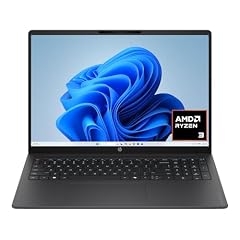
HP OmniBook 3 16 inch Laptop PC
- GPU
- Radeon 610M
- RAM
- 8 GB
- Storage
- 256 GB
- Screen
- 16 in
- Touchscreen
- Yes
- Weight
- 1.64 kg
- OS
- Windows 11 Home
$649.99 (as of 10/20/2026 15:21 PDT - Details)
It combines a 16-inch 2K touchscreen with a 1.64 kg weight, lighter than the other 16-inch picks with a stated weight. It uses an AMD Ryzen 3 30 with Radeon 610M graphics per the title.
Pros
- 16-inch 2K touchscreen per the title
- 1.64 kg, lightest of the 16-inch picks with a stated weight
- Windows 11 Home stated by the seller
Cons
- 256GB of storage
- AMD Ryzen 3 30 is an entry processor for light tasks
Good fit if
- Home users who browse, stream and write
- Buyers who want touch on a large screen
Skip if
- You run heavier apps or many tabs
- You keep large media libraries locally
Verdict: A light large-screen laptop for everyday home use.
11 Biggest screen
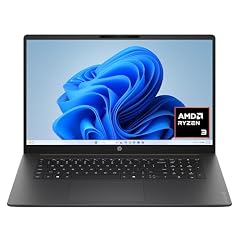
HP OmniBook 3 17.3 inch Laptop PC
- GPU
- Radeon 610M
- RAM
- 8 GB
- Storage
- 512 GB
- Screen
- 17.3 in
- Weight
- 2.01 kg
- OS
- Windows 11 Home
$509.60 (as of 10/20/2026 15:21 PDT - Details)
It is the only 17.3-inch pick, with an FHD screen, 512GB of storage and an AMD Ryzen 3 30 with Radeon 610M graphics per the title. It weighs 2.01 kg.
Pros
- 17.3-inch FHD screen, the largest here
- 512GB of storage
- Windows 11 Home stated by the seller
Cons
- 2.01 kg for an entry-class machine
- AMD Ryzen 3 30 is an entry processor for light tasks
Good fit if
- People who read or work on a large screen at home
- Older users who prefer a bigger screen
Skip if
- You carry your laptop often
- You run demanding software
Verdict: The big-screen pick for light home use.
12 Most stated storage

Lenovo IdeaPad Slim 3 Laptop
- CPU
- Intel N150
- RAM
- 8 GB
- Storage
- 1120 GB
- Screen
- 15.6 in
- Weight
- 1.55 kg
- OS
- Windows 11
$469.00 (as of 10/20/2026 15:21 PDT - Details)
It lists 1.12TB of storage, which the title describes as 128GB of UFS plus a further 1TB, on an Intel N150 at 1.55 kg. Check how the extra 1TB is supplied before relying on it as internal storage.
Pros
- 1.12TB total storage per the listing
- 1.55 kg, light for a 15.6-inch laptop
- 15.6-inch FHD screen
Cons
- Only 128GB of that storage is built-in UFS per the title
- Intel N150 is a low-power processor for light tasks
Good fit if
- Students who need room for files on a light 15.6-inch laptop
- Home users who mostly browse and write
Skip if
- You want all storage on one fast internal drive
- You run heavier apps
Verdict: A light 15.6-inch laptop; confirm how the storage is split.
13 Best simple Dell

Dell 15.6 Laptop
- CPU
- Intel Core 3 100U
- RAM
- 8 GB
- Storage
- 512 GB
- OS
- Windows 11 Home
$499.00 (as of 10/20/2026 15:20 PDT - Details)
It is the only Dell pick: a 15.6-inch FHD laptop with an Intel Core 3 100U and Windows 11 Home per the listing. The seller does not state storage or weight.
Pros
- Intel Core 3 100U
- 15.6-inch FHD screen per the title
- Windows 11 Home stated by the seller
Cons
- Storage not stated by the seller
- Weight not stated by the seller
Good fit if
- Home users who want a plain Windows laptop from a major maker
- Buyers who mainly write, browse and join calls
Skip if
- You need to know storage before buying
- You want touch or a faster screen
Verdict: A basic Dell for light work; confirm the storage size.
14 Light Chromebook

ASUS Chromebook CX14 Laptop
- CPU
- Intel Celeron N4500
- RAM
- 8 GB
- Storage
- 128 GB
- Screen
- 14 in
- Touchscreen
- Yes
- Weight
- 1.39 kg
- OS
- ChromeOS
$389.99 (as of 10/20/2026 15:20 PDT - Details)
At 1.39 kg it is the second lightest pick after the MacBook Neo, with a 14-inch touchscreen and ChromeOS on an Intel Celeron N4500.
Pros
- 1.39 kg, second lightest in this list
- 14-inch touchscreen
- ChromeOS, suited to browser-based schoolwork
Cons
- 128GB of storage, the least among the picks that state it
- Intel Celeron N4500 is a low-power processor
Good fit if
- Younger students with browser-based classes
- Travelers who want a light second laptop
Skip if
- You need Windows or macOS apps
- You want more processor headroom: the Chromebook Plus 514 has a Core i3
Verdict: A light, simple Chromebook for the basics.
Side by side
| # | Laptop | CPU | GPU | GPU memory | Rentable GPU model | RAM | Storage |
|---|---|---|---|---|---|---|---|
| 1 | Apple 2026 MacBook Neo 13-inch Laptop with A18 Pro chip | Apple A18 Pro | not stated | not stated | not stated | 8 GB | 512 GB |
| 2 | Acer Swift 16 AI Laptop 16" WQXGA+ 3200x2000 OLED 120Hz Intel 14-core | Intel Core Ultra 5 125H | not stated | not stated | not stated | 8 GB | 1000 GB |
| 3 | ASUS Vivobook 16 Laptop | AMD Ryzen 5 150 | not stated | not stated | not stated | 8 GB | 512 GB |
| 4 | HP 15.6" FHD Touchscreen Business Laptop | Intel Core 7 150U | not stated | not stated | not stated | 8 GB | 256 GB |
| 5 | Acer Chromebook Plus 514 Laptop with Google AI | Intel Core i3-1315U | not stated | not stated | not stated | 8 GB | 256 GB |
| 6 | Acer Nitro V 15.6" FHD IPS 165Hz Gaming Laptop | Intel Core i5-13420H | GeForce RTX 4050 | not stated | not stated | 8 GB | 512 GB |
| 7 | ASUS TUF Gaming F16 | Intel Core 5 210H | GeForce RTX 4050 | not stated | not stated | 8 GB | not stated |
| 8 | HP Victus Gaming 15 Laptop | Intel Core i5-13420H | GeForce RTX 3050 | 6 GB | not stated | 8 GB | 512 GB |
| 9 | HP - Victus 15.6" Gaming Laptop | AMD Ryzen 5 7535HS | GeForce RTX 2050 | not stated | not stated | 8 GB | 512 GB |
| 10 | HP OmniBook 3 16 inch Laptop PC | not stated | Radeon 610M | not stated | not stated | 8 GB | 256 GB |
| 11 | HP OmniBook 3 17.3 inch Laptop PC | not stated | Radeon 610M | not stated | not stated | 8 GB | 512 GB |
| 12 | Lenovo IdeaPad Slim 3 Laptop | Intel N150 | not stated | not stated | not stated | 8 GB | 1120 GB |
| 13 | Dell 15.6 Laptop | Intel Core 3 100U | not stated | not stated | not stated | 8 GB | 512 GB |
| 14 | ASUS Chromebook CX14 Laptop | Intel Celeron N4500 | not stated | not stated | not stated | 8 GB | 128 GB |
How we picked
How we picked: our catalogue holds 38 laptops whose listing states 8GB of memory. We preferred established makers and new units, so we skipped renewed and older business models and most unbranded machines. We also dropped listings whose data contradicts itself: a Legion 5i that lists 32GB of graphics memory for an RTX 4060, which NVIDIA lists with 8GB, and a Chromebook whose title and specifications disagree on storage. Where a model appears twice (the MacBook Neo in 256GB and 512GB, the Acer Nitro V twice), we kept one. We then chose picks that cover macOS, Windows and ChromeOS, screen sizes from 13 to 17.3 inches, and entry gaming. Prices are live: each is read from the store listing and shown with the time it was read. Nobody at wikilaptop.org has tested these units.
How to choose
What 8GB of memory handles
8GB covers browsing, email, office documents, streaming and video calls, and light photo editing if you keep the number of open apps reasonable. It starts to feel tight with many browser tabs, heavy multitasking, modern games and creative apps, where 16GB is smoother and lasts more years.
Microsoft lists 4GB as the minimum for Windows 11, so 8GB is above the floor but not generous. ChromeOS and macOS picks here are built around lighter or more tightly managed workloads.
Match the processor to the memory
Low-power chips such as the Intel N150 and Celeron N4500 are made for light tasks, and 8GB fits them well. Newer Core, Core Ultra and Ryzen chips can do more, so on those machines memory is more likely to be the limit. Apple's MacBook Neo uses an A18 Pro chip that Apple pairs with 8GB of unified memory on both models.
Gaming laptops with 8GB
Four picks have a dedicated GPU: two with an RTX 4050, one with an RTX 3050 and one with an RTX 2050. NVIDIA lists 6GB of graphics memory for the laptop RTX 4050. With 8GB of system memory, these laptops suit esports and older games best. Before buying one, check the maker's spec page to see whether memory sits in a slot you can upgrade.
Storage
Among the picks that state storage, it runs from 128GB to 1TB of built-in storage, and the Lenovo IdeaPad Slim 3 lists 1.12TB in total. Two listings do not state storage. On Windows, 256GB fills quickly with updates and apps; 512GB is a more comfortable floor. Chromebooks store more in the cloud, so 128GB to 256GB is common there.
Operating system and weight
Eleven picks run Windows, two run ChromeOS and one runs macOS. Stated weights run from 1.23 kg for the MacBook Neo to 2.3 kg for the HP Victus 15 with an RTX 3050; two listings do not state weight. If you carry your laptop daily, the 13-inch and 14-inch picks are the easiest to live with.
Questions
Is 8GB of RAM enough today?
For browsing, documents, streaming and video calls, yes. For heavier multitasking, creative work or modern games, 16GB is the better choice and stays comfortable for longer. Microsoft's Windows 11 minimum is 4GB, so 8GB is above the floor but leaves less headroom than 16GB as apps and websites grow.
Is 8GB of RAM enough for gaming?
It runs lighter and older games, and four picks here pair 8GB with a dedicated GPU for that purpose. Many newer games ask for more memory. If you buy one of these gaming laptops, check the maker's specifications for a free or replaceable memory slot so you can move to 16GB later.
Is 8GB enough for students?
For note taking, online classes, research and office apps it works well, and the MacBook Neo and the two Chromebooks here are built around that kind of work. Students in design, engineering or programming courses should consider 16GB, because their tools often open large files and many windows at once.
Can I upgrade the memory later?
It depends on the model. Some laptops have memory in a replaceable slot; others have it soldered to the board, which makes 8GB final. The listings here rarely say which. Check the maker's spec or service page for the exact model before you buy if you plan to upgrade.
Did you test these laptops?
No. Nobody at wikilaptop.org has used these units. We chose them from the specifications stated on each listing, cross-checked with Apple, NVIDIA and Microsoft published data. We do not describe battery hours, heat, noise or keyboard feel, because those claims would need testing we have not done.
Recent updates
- : First published.