
Best 4GB RAM Laptops: 12 Picks Compared on Specs
Our top pick among 4GB RAM laptops is the HP 14-dq6015dx: it uses an Intel N150, the newest chip in this list per Intel, states a 41Wh battery and weighs 1.47 kg with Windows 11 Home. 4GB is the Windows 11 minimum per Microsoft, so every laptop here suits browsing, email, documents and video rather than heavy multitasking; three Chromebooks are included for browser-first users. We chose all 12 from stated specifications and maker data, not lab tests.
12 picks from 40 laptops that match this guide with a price we can quote today. Every price below is live and carries the moment it was read.
The picks at a glance
Which one should you buy?
- For a current Windows laptop: The HP 14-dq6015dx pairs an Intel N150, launched in 2025 per Intel, with a stated 41Wh battery. See pick 1
- For a larger screen: The Lenovo IdeaPad Slim 3i gives you a 15.6-inch FHD screen with an Intel N100. See pick 2
- For browser-first schoolwork: The HP Chromebook 14 runs ChromeOS with 128GB of storage, twice the Acer Chromebook 315's 64GB. See pick 4
- For the lightest carry: The ASUS Vivobook 14 with a 256GB SSD weighs 1.3 kg, the lightest pick. See pick 3
The 12 picks
1 Best overall

HP HP-14-DQ6015DX 14" WXGA HD
- CPU
- Intel N150
- RAM
- 4 GB
- Storage
- 128 GB
- Screen
- 14 in
- Weight
- 1.47 kg
- Battery
- 41 Wh
- OS
- Windows 11 Home
$269.00 (as of 10/20/2026 15:21 PDT - Details)
It uses an Intel N150, which Intel lists as launched in Q1 2025 with 4 cores and 6W base power, the newest processor in this list. It is also one of only two picks that state a battery size, 41Wh, and it ships with Windows 11 Home at 1.47 kg.
Pros
- Intel N150: 4 cores and 6W per Intel, launched Q1 2025
- 41Wh battery stated
- Windows 11 Home at 1.47 kg
- Intel lists up to 16GB of memory support for the N150
Cons
- 14-inch WXGA HD screen at 1366 x 768 per the title, below the FHD picks
- 128GB of storage
Good fit if
- Students who need Windows for school apps
- Home users who browse, write and stream video
Skip if
- You want a sharp FHD screen
- You keep many local files
Verdict: The most current Windows pick at 4GB, with a basic screen.
2 Best 15.6-inch Windows pick
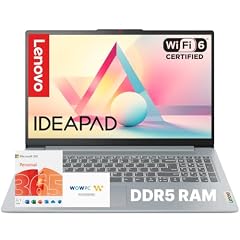
Lenovo IdeaPad Slim 3i • 15.6" FHD Laptop
- CPU
- Intel N100
- RAM
- 4 GB
- Screen
- 15.6 in
- Weight
- 1.68 kg
- OS
- Windows 11
$339.99 (as of 10/20/2026 15:21 PDT - Details)
It is the only pick with an Intel N100, which Intel lists with 4 cores and support for up to 16GB of memory, and its title states DDR5 memory and a 15.6-inch FHD screen. The title also mentions Microsoft Office included.
Pros
- Intel N100: 4 cores and 6W per Intel
- 15.6-inch FHD screen per the title
- DDR5 memory per the title
- Windows 11 stated
Cons
- 1.68 kg, the heaviest pick
- 128GB of storage
Good fit if
- Home users who want a larger screen for documents
- Families who want an office suite included
Skip if
- You carry the laptop every day
- You need more storage out of the box
Verdict: The larger-screen Windows choice from an established maker.
3 Lightest pick

ASUS Vivobook 14" FHD Laptop
- CPU
- Intel Celeron N5030
- RAM
- 4 GB
- Storage
- 256 GB
- Screen
- 14 in
- Weight
- 1.3 kg
$309.99 (as of 10/20/2026 15:20 PDT - Details)
At 1.3 kg it is the lightest laptop here, and it has a 256GB SSD, the second most in this list after the HP 14 whose total includes an SD card. It uses an Intel Celeron N4500 and a 14-inch FHD screen per the title.
Pros
- 1.3 kg, the lightest in this list
- 256GB SSD
- 14-inch FHD screen per the title
- Celeron N4000 series, on Microsoft's Windows 11 processor list
Cons
- Celeron N4500 is an older design than the N100 and N150 picks
- The same model is also sold with a 64GB drive; check which one you order
Good fit if
- Students who carry a laptop all day
- Buyers who want an SSD and an FHD screen at 4GB
Skip if
- You want the newest processor here
- You want a larger screen
Verdict: The pick to carry, with more storage than most.
4 Best Chromebook

HP Chromebook 14 Laptop
- CPU
- Intel Celeron N4500
- RAM
- 4 GB
- Storage
- 128 GB
- Screen
- 14 in
- Refresh
- 30 Hz
- Weight
- 1.52 kg
- OS
- ChromeOS
$259.98 (as of 10/20/2026 15:21 PDT - Details)
Of the three Chromebooks here it pairs the Celeron N4500 with 128GB of storage and states a weight of 1.52 kg, which the two Acer Chromebooks do not. ChromeOS runs a browser-first system, which fits 4GB better than a full Windows install.
Pros
- ChromeOS stated
- 128GB of storage, twice the Acer Chromebook 315
- 1.52 kg stated weight
Cons
- 14-inch HD screen, below the Acer Chromebooks' FHD
- Check the automatic update end date for this model in Google's published list
Good fit if
- Students whose schoolwork lives in a browser
- Families who want a simple shared laptop
Skip if
- You need Windows-only software
- You want an FHD screen
Verdict: The most complete Chromebook here, with a basic screen.
5 Best Chromebook screen at 14 inches

Acer Gateway Chromebook 314 CBO314 Intel Celeron N4500 14" Full HD
- CPU
- Intel Celeron N4500
- RAM
- 4 GB
- Storage
- 128 GB
- Screen
- 14 in
- OS
- ChromeOS
It is a 14-inch Chromebook with a Full HD 1920 x 1080 screen per the title, sharper than the HP Chromebook 14's HD panel, with a Celeron N4500 and 128GB of eMMC storage.
Pros
- 14-inch FHD screen per the title
- 128GB of storage
- ChromeOS stated
Cons
- Weight not stated by the seller
- eMMC storage per the title, usually slower than an SSD
Good fit if
- Browser-first users who read and write a lot on screen
- Students who want FHD in a 14-inch Chromebook
Skip if
- You need Windows software
- You want to know the weight before buying
Verdict: The sharper-screen alternative to the HP Chromebook 14.
6 Largest Chromebook screen

acer Chromebook 315 CB315-4H-C0BR 15.6" Full HD Laptop
- CPU
- Intel Celeron N4500
- RAM
- 4 GB
- Storage
- 64 GB
- Screen
- 15.6 in
- OS
- ChromeOS
$218.99 (as of 10/20/2026 15:20 PDT - Details)
It is the only 15.6-inch Chromebook here, with a Full HD screen per the title and a Celeron N4500. Its 64GB eMMC drive is the smallest of the Chromebooks, which matters less when files live in the cloud.
Pros
- 15.6-inch FHD screen per the title
- ChromeOS stated
- Celeron N4500
Cons
- 64GB of storage, half the other two Chromebooks
- Weight not stated by the seller
Good fit if
- Users who want a large screen for browsing and video
- Households that keep files in cloud storage
Skip if
- You store files locally
- You want a compact laptop to carry
Verdict: The big-screen Chromebook, with little local storage.
7 Largest stated battery

ASUS 15.6” Vivobook Go Slim Laptop
- CPU
- Intel Celeron N4500
- RAM
- 4 GB
- Storage
- 128 GB
- Screen
- 15.6 in
- Refresh
- 60 Hz
- Weight
- 1.57 kg
- Battery
- 42 Wh
- OS
- Windows 11
$279.99 (as of 10/20/2026 15:20 PDT - Details)
It states a 42Wh battery, the larger of the only two battery sizes stated in this list, along with a 15.6-inch 60Hz screen, a Celeron N4500, 128GB of storage and Windows 11 at 1.57 kg.
Pros
- 42Wh battery, the largest stated here
- 15.6-inch screen
- Windows 11 stated
- 1.57 kg, tied for the lightest stated 15.6-inch pick
Cons
- Celeron N4500 is older than the N100 and N150 picks
- 128GB of storage
Good fit if
- Students who want a larger Windows screen
- Buyers who want a stated battery capacity
Skip if
- You want the newest processor here
- You keep large files locally
Verdict: The 15.6-inch Windows option with a known battery size.
8 Smallest screen

Acer TravelMate B3 11 TMB311-34 TMB311-34-C6MZ 11.6" Notebook
- CPU
- Intel N150
- RAM
- 4 GB
- Screen
- 11.6 in
- Refresh
- 60 Hz
- Weight
- 1.45 kg
It is the only 11.6-inch laptop here, with an Intel N150, a 60Hz HD screen and a stated 1.45 kg.
Pros
- Intel N150: 4 cores and 6W per Intel
- 11.6-inch screen, the most compact here
- 1.45 kg
Cons
- Operating system not stated in the spec fields
- Storage not stated in the spec fields; the title mentions 128GB of flash
Good fit if
- Younger students
- Buyers who want the smallest footprint
Skip if
- You work on long documents or spreadsheets
- You want the OS confirmed on the spec sheet
Verdict: A compact N150 laptop for school bags.
9 Most stated storage

HP 14 inch Laptop
- CPU
- Intel N150
- RAM
- 4 GB
- Storage
- 384 GB
- Screen
- 14 in
- Weight
- 1.47 kg
- OS
- Windows 11 Home
$319.00 (as of 10/20/2026 15:21 PDT - Details)
It states 384GB of storage, the most in this list, though its title says that total combines UFS storage with an SD card. It shares the Intel N150, 14-inch size and 1.47 kg of our top pick.
Pros
- 384GB of storage stated, the most here
- Intel N150: 4 cores and 6W per Intel
- 1.47 kg
Cons
- Storage total includes an SD card per the title
- Operating system not stated by the seller
Good fit if
- Users who want room for offline files
- Buyers who want the N150 in a 14-inch HP
Skip if
- You want all storage built in
- You want a stated battery size, which the 14-dq6015dx gives
Verdict: The N150 HP with extra storage on a card.
10 Only Celeron N4120 pick

HP Latest Stream 14" HD Laptop
- CPU
- Intel Celeron N4120
- RAM
- 4 GB
- Storage
- 64 GB
- Screen
- 14 in
- Weight
- 1.47 kg
- OS
- Windows 11
$257.90 (as of 10/20/2026 15:21 PDT - Details)
It uses an Intel Celeron N4120 with a 14-inch HD screen, 64GB of eMMC storage and Windows 11 at 1.47 kg. The title mentions fast charging, but no charging figure is stated.
Pros
- Windows 11 stated
- 1.47 kg
- Celeron N4000 series, on Microsoft's Windows 11 processor list
Cons
- 64GB of storage, exactly the Windows 11 minimum per Microsoft
- 14-inch HD screen
Good fit if
- Light users who keep files in the cloud
- A spare laptop for email and video
Skip if
- You install many apps
- You want an FHD screen
Verdict: A basic Windows laptop that needs cloud storage.
11 Lightest HP pick

HP 14-dq3000dx 14" HD Laptop
- CPU
- Intel Celeron N4500
- RAM
- 4 GB
- Storage
- 64 GB
- Screen
- 14 in
- Weight
- 1.4 kg
- OS
- Windows 11 Home
$229.99 (as of 10/20/2026 15:21 PDT - Details)
At 1.4 kg it is the lightest HP here, with a Celeron N4500, a 14-inch HD screen and Windows 11 Home. Like the Stream, it has 64GB of eMMC storage, so plan on cloud storage.
Pros
- 1.4 kg, second lightest in this list
- Windows 11 Home stated
- Celeron N4500
Cons
- 64GB of storage, exactly the Windows 11 minimum per Microsoft
- 14-inch HD screen
Good fit if
- Students who carry a laptop between classes
- Users whose files already live in the cloud
Skip if
- You need local storage for apps and files
- You want an FHD screen
Verdict: Light and simple, with very little storage.
12 Windows 11 in S mode

ASUS 15.6” FHD Laptop
- CPU
- Intel Celeron N4020
- RAM
- 4 GB
- Storage
- 128 GB
- Screen
- 15.6 in
- Weight
- 1.57 kg
- OS
- Windows 11 Home
$220.00 (as of 10/20/2026 15:20 PDT - Details)
It ships with Windows 11 Home in S mode per the title, a Celeron N4020 and a 15.6-inch FHD screen at 1.57 kg. Intel lists the N4020 with 2 cores and 2 threads.
Pros
- 15.6-inch FHD screen per the title
- 128GB of storage
- S mode limits apps to the Microsoft Store, per Microsoft
Cons
- Celeron N4020: 2 cores and 2 threads per Intel
- Leaving S mode requires an internet connection, per Microsoft
Good fit if
- Parents who want a locked-down first laptop
- Users who only need Store apps and a browser
Skip if
- You need software from outside the Microsoft Store
- You want more processor cores
Verdict: A large-screen laptop set up for simple, controlled use.
Side by side
| # | Laptop | CPU | GPU | GPU memory | Rentable GPU model | RAM | Storage |
|---|---|---|---|---|---|---|---|
| 1 | HP HP-14-DQ6015DX 14" WXGA HD | Intel N150 | not stated | not stated | not stated | 4 GB | 128 GB |
| 2 | Lenovo IdeaPad Slim 3i • 15.6" FHD Laptop | Intel N100 | not stated | not stated | not stated | 4 GB | not stated |
| 3 | ASUS Vivobook 14" FHD Laptop | Intel Celeron N5030 | not stated | not stated | not stated | 4 GB | 256 GB |
| 4 | HP Chromebook 14 Laptop | Intel Celeron N4500 | not stated | not stated | not stated | 4 GB | 128 GB |
| 5 | Acer Gateway Chromebook 314 CBO314 Intel Celeron N4500 14" Full HD | Intel Celeron N4500 | not stated | not stated | not stated | 4 GB | 128 GB |
| 6 | acer Chromebook 315 CB315-4H-C0BR 15.6" Full HD Laptop | Intel Celeron N4500 | not stated | not stated | not stated | 4 GB | 64 GB |
| 7 | ASUS 15.6” Vivobook Go Slim Laptop | Intel Celeron N4500 | not stated | not stated | not stated | 4 GB | 128 GB |
| 8 | Acer TravelMate B3 11 TMB311-34 TMB311-34-C6MZ 11.6" Notebook | Intel N150 | not stated | not stated | not stated | 4 GB | not stated |
| 9 | HP 14 inch Laptop | Intel N150 | not stated | not stated | not stated | 4 GB | 384 GB |
| 10 | HP Latest Stream 14" HD Laptop | Intel Celeron N4120 | not stated | not stated | not stated | 4 GB | 64 GB |
| 11 | HP 14-dq3000dx 14" HD Laptop | Intel Celeron N4500 | not stated | not stated | not stated | 4 GB | 64 GB |
| 12 | ASUS 15.6” FHD Laptop | Intel Celeron N4020 | not stated | not stated | not stated | 4 GB | 128 GB |
How we picked
How we picked: our catalogue holds 30 laptops whose listing states 4GB of memory. We kept machines from established makers (HP, ASUS, Acer and Lenovo) sold new, and skipped most unbranded or small-brand listings and the listings sold as customized or reseller configurations. We dropped a Chromebook whose storage figure contradicts its title, a Chromebook bundle whose storage and weight include a docking set, a listing whose stated weight looked out of line with its twin model, and a second ASUS Vivobook 14 that differs from our pick only in a smaller drive. Processor facts come from Intel and operating system facts from Microsoft and Google. Prices on this page are live: each one is read from the store listing and shown with the time it was read. Nobody at wikilaptop.org has tested these units.
How to choose
What 4GB of memory can do
Microsoft lists 4GB of memory as the minimum for Windows 11, so a 4GB Windows laptop has little room beyond the operating system. It handles web browsing with a few tabs, email, documents, video streaming and video calls. It fills up when you open more apps, and the system then slows down while it uses storage as overflow.
It suits a child's school laptop, a backup machine or a very light web user. Anyone who multitasks, edits photos or plays games will be better served by 8GB or more.
Windows or ChromeOS
Seven picks state Windows 11, three are Chromebooks, and two do not state an operating system. ChromeOS is built around the browser, which suits 4GB if your work lives online. Google gives ChromeOS devices up to 10 years of automatic updates from the platform's release and publishes each model's end date, so check the date before buying a Chromebook.
One pick ships with Windows 11 Home in S mode, which only runs Microsoft Store apps. Microsoft notes that S mode is a Home feature and that switching out of it needs an internet connection.
Processor: N150, N100 or Celeron
Intel lists the N150 (launched Q1 2025) and the N100 with 4 cores, 6W base power and up to 16GB of memory support. The Celeron N4020 has 2 cores, 2 threads and up to 8GB of memory per Intel. Microsoft's list of Intel processors for Windows 11 names the Celeron N4000 series, which covers the N4020, N4120 and N4500 here. All of these are entry chips made for light tasks.
Storage: size and type
Storage in this list runs from 64GB to 384GB, and the 384GB figure includes an SD card. Microsoft lists 64GB as the Windows 11 minimum, so the three 64GB picks leave little room after updates. Several listings name eMMC storage, which is usually slower than an SSD; when memory is short, the laptop leans on storage, so a slow drive makes the slowdown more noticeable.
Can you add memory later?
Budget laptops often solder their memory to the board, which means 4GB is final. None of these listings states whether the memory is soldered or socketed, so check the maker's specification sheet before counting on an upgrade. The processor sets a ceiling too: Intel lists 16GB for the N100 and N150 and 8GB for the N4020.
Questions
Is 4GB of RAM enough for Windows 11?
It meets Microsoft's minimum of 4GB, but the operating system and a browser use most of it. Expect slowdowns with several tabs or apps open. For simple tasks such as email, documents and video it works; for a smoother Windows experience, 8GB is a better floor. Chromebooks in this list use their 4GB more lightly.
What can I do on a 4GB RAM laptop?
Web browsing with a few tabs, email, online documents, video streaming and video calls all work. Photo editing, modern games and heavy multitasking will struggle. If your needs go beyond browser work and office documents, look at laptops with 8GB or 16GB of memory instead of the picks on this page.
Can I add more memory to a 4GB laptop?
Only if the laptop has a free or replaceable memory slot, and budget models often solder the memory. None of these listings says which, so check the maker's specification sheet first. The processor also caps memory: Intel lists up to 16GB for the N100 and N150 and up to 8GB for the Celeron N4020.
Should I choose a Chromebook with 4GB?
If your work lives in the browser and you do not need Windows-only software, a Chromebook is a sensible choice at 4GB. Google gives ChromeOS devices up to 10 years of automatic updates from the platform release and publishes each model's end date, so check how many years remain on the model you choose.
Did you test these laptops?
No. Nobody at wikilaptop.org has used these units. We chose them from the specifications stated on each listing, cross-checked with Intel, Microsoft and Google published pages. We do not describe speed in daily use, battery hours, heat or keyboard feel, because those claims need testing we have not done.
Recent updates
- : First published.