
Best 4TB Storage Laptops in 2026: 14 Picks Compared on Specs
Our top pick among 4TB laptops is the MSI Vector 16 HX AI: it pairs the 4TB drive with an RTX 5080, 64GB of memory and a 240Hz 16-inch screen, a strong all-round mix for games, video and AI work. The other 13 picks run from a 1.37 kg Lenovo business laptop to RTX PRO mobile workstations with 128GB of memory. We chose all 14 from stated specifications and the makers' published data, not from lab tests.
14 picks from 34 laptops that match this guide with a price we can quote today. Every price below is live and carries the moment it was read.
The picks at a glance
Which one should you buy?
- For gaming and video with room to spare: The Vector 16 HX AI brings an RTX 5080 with 16GB of graphics memory, 64GB of memory and 4TB of storage. See pick 1
- For certified engineering and 3D work: The ThinkPad P16 Gen 3 with an RTX PRO 5000 pairs 24GB of graphics memory with 128GB of system memory. See pick 5
- For Mac video and audio work: The 16-inch MacBook Pro with M5 Max has 128GB of unified memory, the configuration Apple lists as its maximum. See pick 4
- For carrying a large archive daily: The Lenovo V-Series 14-inch weighs 1.37 kg, the lightest laptop in this list, with 64GB of memory. See pick 14
The 14 picks
1 Best overall

msi Vector 16 HX AI 16" QHD+ 240Hz Gaming Laptop
- CPU
- Intel Core Ultra 9 275HX
- GPU
- GeForce RTX 5080
- GPU memory
- 16 GB
- RAM
- 64 GB
- Storage
- 4000 GB
- Screen
- 16 in
- Refresh
- 240 Hz
- Weight
- 2.7 kg
$4,699.00 (as of 10/20/2026 15:22 PDT - Details)
It combines the 4TB drive with an RTX 5080, which NVIDIA lists with 16GB of GDDR7, plus 64GB of memory and a 240Hz 16-inch QHD+ screen. That covers large game libraries, video projects and local AI models without a workstation's weight or professional-GPU premium.
Pros
- RTX 5080 with 16GB of graphics memory
- 64GB of memory
- 16-inch QHD+ screen at 240Hz, per the listing
- Core Ultra 9 275HX: 24 cores per Intel
Cons
- 2.7 kg, among the heavier picks
- No battery size stated by the seller
Good fit if
- Players with large game libraries who also edit video
- Buyers running local AI models that use 16GB of graphics memory
Skip if
- You carry your laptop every day
- You need certified professional GPU drivers: the RTX PRO picks fit better
Verdict: The most complete all-round 4TB configuration in this list.
2 Fastest gaming GPU

Eluktronics HYDROC 16 G2R RTX 5090 Gaming Laptop
- CPU
- Intel Core Ultra 9 290HX
- GPU
- RTX 5090
- GPU memory
- 24 GB
- RAM
- 64 GB
- Storage
- 4000 GB
- Screen
- 16 in
- Refresh
- 300 Hz
- Weight
- 2.83 kg
$6,999.00 (as of 10/20/2026 15:21 PDT - Details)
It carries an RTX 5090, NVIDIA's top laptop GPU with 24GB of GDDR7, and the fastest screen here at 300Hz. It also states a 99Wh battery, the largest stated by any seller in this list.
Pros
- RTX 5090 with 24GB of graphics memory
- 300Hz 16-inch screen, the fastest refresh in this list
- 99Wh battery, the largest stated by a seller here
- 64GB of memory
Cons
- 2.83 kg, among the heavier picks
- Eluktronics is a smaller maker: confirm warranty and support terms
Good fit if
- Players who want the top laptop GPU and a very fast screen
- Creators who render or run AI models that need 24GB of graphics memory
Skip if
- You want a mainstream maker's service network
- You need a light laptop
Verdict: The high-refresh RTX 5090 option for buyers who want everything at once.
3 Lightest RTX 5090 pick
![HIDevolution [2025] ASUS ProArt P16 H7606WX Black 16" 4K 120Hz OLED](https://m.media-amazon.com/images/I/41BUZNaAIUL._SL240_.jpg)
HIDevolution [2025] ASUS ProArt P16 H7606WX Black 16" 4K 120Hz OLED
- CPU
- AMD Ryzen AI 9 HX 370
- GPU
- RTX 5090
- GPU memory
- 24 GB
- RAM
- 64 GB
- Storage
- 4000 GB
- Screen
- 16 in
- Refresh
- 120 Hz
- Touchscreen
- Yes
$6,199.00 (as of 10/20/2026 15:21 PDT - Details)
This is an ASUS ProArt P16 configured and sold by a reseller. At 1.85 kg it is the lightest pick with a dedicated GPU, and it still carries an RTX 5090 with 24GB, plus a 4K 120Hz OLED touch screen per the listing.
Pros
- RTX 5090 with 24GB of graphics memory
- 1.85 kg, the lightest pick with a dedicated GPU
- 16-inch 4K OLED touch screen at 120Hz, per the listing
- 64GB of memory
Cons
- Reseller configuration: confirm who provides the warranty
- 120Hz refresh, below the 240Hz and 300Hz gaming picks
Good fit if
- Photo and video creators who want a color-focused OLED screen
- Buyers who want top GPU power in a portable body
Skip if
- You prefer buying directly from the original maker
- You play fast competitive games and want more than 120Hz
Verdict: The portable RTX 5090 creator laptop, bought through a reseller.
4 Best for macOS

Apple MacBook Pro Laptop with M5 Max
- CPU
- Apple M5 Max
- RAM
- 128 GB
- Storage
- 4000 GB
- Screen
- 16.2 in
- OS
- macOS
$7,999.00 (as of 10/20/2026 15:20 PDT - Details)
It is the only macOS pick: a 16-inch MacBook Pro with M5 Max and 128GB of unified memory, the maximum Apple lists. Apple lists an 18-core CPU, a 40-core GPU option, a 100Wh battery and 2.15 kg for this model.
Pros
- 128GB of unified memory, tied for the most in this list
- M5 Max: 18-core CPU per Apple
- 100Wh battery per Apple, the largest capacity among the picks
- macOS for Final Cut Pro and Logic Pro users
Cons
- No NVIDIA GPU, so CUDA-only software will not run
- Weight and refresh rate not stated by the seller
Good fit if
- Video editors and music producers working in Apple's apps
- Developers who build for Apple platforms
Skip if
- You rely on Windows-only engineering software
- You play PC games
Verdict: The 4TB choice for anyone who works in macOS.
5 Best mobile workstation

Lenovo ThinkPad P16 Gen 3 Intel Core Ultra 9 275HX
- CPU
- Intel Core Ultra 9 275HX
- GPU
- RTX PRO 5000
- GPU memory
- 24 GB
- RAM
- 128 GB
- Storage
- 4000 GB
- Screen
- 16 in
- Refresh
- 120 Hz
- Weight
- 2.54 kg
$8,299.00 (as of 10/20/2026 15:22 PDT - Details)
Its RTX PRO 5000 is an NVIDIA Blackwell professional GPU with 24GB of graphics memory, the top GPU tier among the ThinkPad picks. It pairs that with 128GB of memory and a 3.2K tandem OLED touch screen per the listing.
Pros
- RTX PRO 5000 with 24GB of graphics memory
- 128GB of memory, tied for the most in this list
- 16-inch 3.2K OLED touch screen at 120Hz, per the listing
- Core Ultra 9 275HX: 24 cores per Intel
Cons
- 2.54 kg
- Operating system not stated by the seller
Good fit if
- Engineers and architects using certified CAD and simulation software
- 3D artists with large scenes and textures
Skip if
- You mostly game: the GeForce picks target games
- You need a light daily laptop
Verdict: The top professional-GPU configuration in this list.
6 Mid-tier RTX PRO pick

Lenovo ThinkPad P16 Gen 3
- CPU
- Intel Core Ultra 9 285HX
- GPU
- RTX PRO 4000
- GPU memory
- 16 GB
- RAM
- 128 GB
- Storage
- 4000 GB
- Screen
- 16 in
- Refresh
- 120 Hz
- Touchscreen
- Yes
$7,899.00 (as of 10/20/2026 15:22 PDT - Details)
It steps down to an RTX PRO 4000 with 16GB of graphics memory, per the listing, while keeping 128GB of memory and a touch screen. It uses the Core Ultra 9 285HX and states Windows 11 Pro.
Pros
- RTX PRO 4000 with 16GB of graphics memory, per the listing
- 128GB of memory
- Windows 11 Pro stated
- 16-inch touch screen at 120Hz
Cons
- 2.54 kg
- Two-thirds of the RTX PRO 5000's graphics memory
Good fit if
- CAD and BIM users with mid-size models
- Teams that need Windows 11 Pro for device management
Skip if
- Your scenes need 24GB of graphics memory
- You do not use certified professional software
Verdict: A balanced professional configuration below the top GPU tier.
7 Entry RTX PRO pick
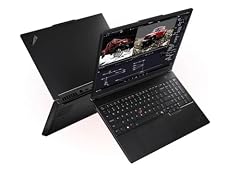
Lenovo ThinkPad P16 Gen 3 Intel
- CPU
- Intel Core Ultra 9 285HX
- GPU
- RTX PRO 2000
- GPU memory
- 8 GB
- RAM
- 128 GB
- Storage
- 4000 GB
- Screen
- 16 in
- Weight
- 2.54 kg
- OS
- Windows 11 Pro
It carries the RTX PRO 2000 with 8GB of graphics memory, the entry tier of the professional GPUs here, with the same 128GB of memory and Core Ultra 9 285HX. It suits work where the CPU, memory and storage matter more than the GPU.
Pros
- 128GB of memory
- Core Ultra 9 285HX with vPro, per the listing
- Windows 11 Pro stated
- OLED touch screen, per the listing
Cons
- 8GB of graphics memory, the least of the RTX PRO picks
- Refresh rate not stated by the seller
Good fit if
- Data scientists and developers who need memory and storage more than GPU power
- Photo editors who want certified drivers
Skip if
- You render large 3D scenes
- You need a light laptop
Verdict: The ThinkPad P16 for CPU- and memory-bound work.
8 Best 17-inch workstation

Dell Precision 7780 Laptop
- CPU
- Intel Core i9-13950HX
- GPU
- RTX 3500 Ada
- GPU memory
- 12 GB
- RAM
- 128 GB
- Storage
- 4000 GB
- Screen
- 17.3 in
- Weight
- 3.05 kg
- OS
- Windows 11 Pro
$6,299.99 (as of 10/20/2026 15:21 PDT - Details)
It is the only 17.3-inch workstation here, with an RTX 3500 Ada (Ada Lovelace generation) with 12GB of graphics memory and 128GB of system memory. Its Core i9-13950HX is an HX-class chip built for performance while plugged in.
Pros
- 17.3-inch screen, tied for the largest in this list
- 128GB of memory
- RTX 3500 Ada with 12GB of graphics memory
- Windows 11 Pro stated
Cons
- 3.05 kg, the heaviest pick here
- Previous-generation Ada GPU, one generation behind the RTX PRO Blackwell picks
Good fit if
- Engineers who want the largest screen for CAD work
- Buyers who use the laptop mostly on a desk
Skip if
- You carry your laptop often
- You want the current Blackwell professional GPUs
Verdict: The big-screen workstation for a desk that rarely moves.
9 Best 240Hz OLED pick

acer Predator Helios Neo 16S AI Gaming Laptop
- CPU
- Intel Core Ultra 9 275HX
- GPU
- GeForce RTX 5070 Ti
- GPU memory
- 12 GB
- RAM
- 64 GB
- Storage
- 4000 GB
- Screen
- 16 in
- Refresh
- 240 Hz
- Weight
- 2.3 kg
It pairs an RTX 5070 Ti with 12GB of graphics memory and 64GB of memory with a 16-inch 240Hz OLED screen per the listing, at 2.3 kg. That makes it lighter than the other 240Hz pick, the Vector 16 HX AI at 2.7 kg.
Pros
- RTX 5070 Ti with 12GB of graphics memory
- 16-inch 240Hz OLED screen, per the listing
- 64GB of memory
- 2.3 kg, lighter than the Vector 16 HX AI and HYDROC 16
Cons
- One GPU tier below the RTX 5080 of our top pick
- No battery size stated by the seller
Good fit if
- Players who want an OLED screen with a high refresh rate
- Creators who want a fast screen for video review
Skip if
- You want the top GPU tier
- You need certified professional drivers
Verdict: A lighter, OLED-screen alternative to our top pick.
10 Mid-tier gaming pick

HP OMEN HyperX AI Gaming Laptop 15.3" 180Hz IPS WQXGA 32GB/4TBSSD/W11H
- CPU
- Intel Core Ultra 9
- GPU
- GeForce RTX 5070
- GPU memory
- 8 GB
- RAM
- 32 GB
- Storage
- 4000 GB
- Screen
- 15.3 in
- Refresh
- 180 Hz
- Weight
- 2.31 kg
$3,499.99 (as of 10/20/2026 15:21 PDT - Details)
It carries an RTX 5070 with 8GB of graphics memory and a 15.3-inch WQXGA screen at 180Hz. It is one of only two picks with 32GB of memory, and it states a 70Wh battery.
Pros
- RTX 5070 with 8GB of graphics memory
- 15.3-inch WQXGA screen at 180Hz, per the listing
- 70Wh battery stated
- 2.31 kg
Cons
- 32GB of memory, tied for the least in this list
- Exact Core Ultra 9 model not stated by the seller
Good fit if
- Players who want 4TB for a large game library
- Buyers who want a smaller screen than 16 inches
Skip if
- You edit large video projects that need 64GB or more
- You want 12GB of graphics memory or more
Verdict: A mid-tier gaming machine with plenty of room for games.
11 Best light entry gaming pick

Lenovo LOQ 15.3" AMD Ryzen 7 250 RTX 5060 Gaming Laptop
- CPU
- AMD Ryzen 7 250
- GPU
- RTX 5060
- GPU memory
- 8 GB
- RAM
- 64 GB
- Storage
- 4000 GB
- Screen
- 15.3 in
- Refresh
- 165 Hz
- Weight
- 1.98 kg
At 1.98 kg it is one of only two picks with a dedicated GPU under 2 kg, with an RTX 5060 and 8GB of graphics memory. It also brings 64GB of memory and a 165Hz 15.3-inch screen.
Pros
- 1.98 kg, under 2 kg with a dedicated GPU
- RTX 5060 with 8GB of graphics memory
- 64GB of memory
- 165Hz screen
Cons
- RTX 5060 is the lowest GPU tier among the gaming picks
- Windows 11 Home, without Pro's BitLocker and device management
Good fit if
- Students who game and carry their laptop to class
- Buyers who want 4TB and 64GB without a heavy chassis
Skip if
- You play new releases at high settings
- Your employer requires Windows 11 Pro
Verdict: The portable entry into 4TB gaming.
12 Best big screen without a dedicated GPU

NIMO 17.3" AI Laptop
- CPU
- AMD Ryzen AI 9 HX 370
- GPU
- Radeon 890M
- RAM
- 64 GB
- Storage
- 4000 GB
- Screen
- 17.3 in
- Refresh
- 144 Hz
- Weight
- 2.09 kg
- Battery
- 75 Wh
$2,099.99 (as of 10/20/2026 15:22 PDT - Details) Typical price: $2,569.99, 18% off
It pairs a 17.3-inch 144Hz screen with the Ryzen AI 9 HX 370 and Radeon 890M integrated graphics, 64GB of memory and a 75Wh battery. At 2.09 kg it is lighter than the 17.3-inch Dell Precision.
Pros
- 17.3-inch screen at 144Hz
- 64GB of memory
- 75Wh battery stated
- 2.09 kg, lighter than the other 17.3-inch pick
Cons
- Integrated Radeon 890M graphics, no separate GPU
- NIMO is a smaller brand: confirm warranty and support; operating system not stated
Good fit if
- Home users who want a large screen and a big archive
- Coders and office users who do not need a dedicated GPU
Skip if
- You play current games
- You need GPU-accelerated 3D or AI work
Verdict: A big-screen 4TB laptop for everyday and coding work.
13 Best business pick
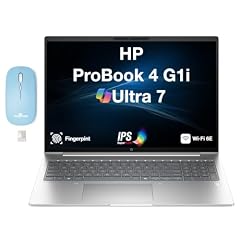
HP ProBook 4 G1i AI Business Laptop 16.0" 60Hz IPS WUXGA
- CPU
- Intel Core Ultra 7
- RAM
- 32 GB
- Storage
- 4000 GB
- Screen
- 16 in
- Refresh
- 60 Hz
- Weight
- 1.72 kg
- Battery
- 56 Wh
- OS
- Windows 11 Pro
$2,317.99 (as of 10/20/2026 15:21 PDT - Details)
It is a 16-inch business laptop with Windows 11 Pro, 32GB of memory, a 56Wh battery and 1.72 kg weight. It is the pick for office users who want a large archive on a light, conventional laptop.
Pros
- 1.72 kg, the second lightest pick
- Windows 11 Pro stated
- 56Wh battery stated
- 16-inch WUXGA IPS screen
Cons
- 60Hz screen, the slowest refresh in this list
- 32GB of memory, tied for the least here; Core Ultra 7 model not stated
Good fit if
- Office and finance users with large local archives
- Company buyers who need Windows 11 Pro
Skip if
- You play games
- You need a dedicated GPU for creative work
Verdict: A conventional business laptop with an unusually large drive.
14 Lightest pick

Lenovo New Gen V-Series Business Laptop
- CPU
- Intel Core 7 240H
- RAM
- 64 GB
- Storage
- 4000 GB
- Screen
- 14 in
- Weight
- 1.37 kg
- Battery
- 47 Wh
- OS
- Windows 11 Pro
$1,899.99 (as of 10/20/2026 15:22 PDT - Details)
At 1.37 kg it is the lightest laptop in this list, with a 14-inch screen, an Intel Core 7 240H, 64GB of memory and Windows 11 Pro. Lenovo's V-Series is a business line; 64GB and 4TB is an unusual configuration for it, so ask the seller whether the memory and drive were fitted after manufacture and who covers the warranty.
Pros
- 1.37 kg, the lightest pick
- 64GB of memory
- Windows 11 Pro stated
- 14-inch screen for daily carrying
Cons
- 47Wh battery, the smallest stated here
- No dedicated GPU; refresh rate not stated
Good fit if
- Travelers who need large files offline
- Consultants and students who carry a laptop all day
Skip if
- You need GPU power for video or 3D
- You want the original maker's full factory warranty without checking
Verdict: The carry-everywhere 4TB laptop.
Side by side
| # | Laptop | CPU | GPU | GPU memory | Rentable GPU model | RAM | Storage |
|---|---|---|---|---|---|---|---|
| 1 | msi Vector 16 HX AI 16" QHD+ 240Hz Gaming Laptop | Intel Core Ultra 9 275HX | GeForce RTX 5080 | 16 GB | not stated | 64 GB | 4000 GB |
| 2 | Eluktronics HYDROC 16 G2R RTX 5090 Gaming Laptop | Intel Core Ultra 9 290HX | RTX 5090 | 24 GB | not stated | 64 GB | 4000 GB |
| 3 | HIDevolution [2025] ASUS ProArt P16 H7606WX Black 16" 4K 120Hz OLED | AMD Ryzen AI 9 HX 370 | RTX 5090 | 24 GB | not stated | 64 GB | 4000 GB |
| 4 | Apple MacBook Pro Laptop with M5 Max | Apple M5 Max | not stated | not stated | not stated | 128 GB | 4000 GB |
| 5 | Lenovo ThinkPad P16 Gen 3 Intel Core Ultra 9 275HX | Intel Core Ultra 9 275HX | RTX PRO 5000 | 24 GB | not stated | 128 GB | 4000 GB |
| 6 | Lenovo ThinkPad P16 Gen 3 | Intel Core Ultra 9 285HX | RTX PRO 4000 | 16 GB | not stated | 128 GB | 4000 GB |
| 7 | Lenovo ThinkPad P16 Gen 3 Intel | Intel Core Ultra 9 285HX | RTX PRO 2000 | 8 GB | not stated | 128 GB | 4000 GB |
| 8 | Dell Precision 7780 Laptop | Intel Core i9-13950HX | RTX 3500 Ada | 12 GB | not stated | 128 GB | 4000 GB |
| 9 | acer Predator Helios Neo 16S AI Gaming Laptop | Intel Core Ultra 9 275HX | GeForce RTX 5070 Ti | 12 GB | not stated | 64 GB | 4000 GB |
| 10 | HP OMEN HyperX AI Gaming Laptop 15.3" 180Hz IPS WQXGA 32GB/4TBSSD/W11H | Intel Core Ultra 9 | GeForce RTX 5070 | 8 GB | not stated | 32 GB | 4000 GB |
| 11 | Lenovo LOQ 15.3" AMD Ryzen 7 250 RTX 5060 Gaming Laptop | AMD Ryzen 7 250 | RTX 5060 | 8 GB | not stated | 64 GB | 4000 GB |
| 12 | NIMO 17.3" AI Laptop | AMD Ryzen AI 9 HX 370 | Radeon 890M | not stated | not stated | 64 GB | 4000 GB |
| 13 | HP ProBook 4 G1i AI Business Laptop 16.0" 60Hz IPS WUXGA | Intel Core Ultra 7 | not stated | not stated | not stated | 32 GB | 4000 GB |
| 14 | Lenovo New Gen V-Series Business Laptop | Intel Core 7 240H | not stated | not stated | not stated | 64 GB | 4000 GB |
How we picked
How we picked: 33 laptops in our catalogue state 4TB of storage and had a current listing when we read the data. We dropped the Lenovo Legion Pro 7i listing because its title says 5TB while its specifications say 4TB, and an HP OMEN listing whose title calls a 1920 x 1200 screen 2K. We preferred established makers sold new, so we skipped reseller-customized builds except one reseller configuration of the ASUS ProArt P16, which we label. We kept one Apple MacBook Pro listing out of two near-identical ones, and three of the many ThinkPad P16 Gen 3 configurations, one per GPU tier. GPU facts come from NVIDIA, CPU facts from Intel, Mac facts from Apple. Prices are live, read from the store listing and shown with the time read. Nobody at wikilaptop.org has tested these units.
How to choose
Who needs 4TB inside a laptop
4TB suits people who work with large files away from a fast network: video editors with raw footage, 3D artists with big scene libraries, engineers with large models, data scientists with local datasets, and players with large game libraries. For office work and browsing it is far more than you need.
Internal capacity is not a backup. Keep a copy of important projects on a separate drive or a cloud service.
GeForce, RTX PRO or no dedicated GPU
Six picks use GeForce RTX 50 GPUs, from the RTX 5060 to the RTX 5090. NVIDIA lists 8GB of GDDR7 for the RTX 5060, 16GB for the RTX 5080 and 24GB for the RTX 5090. These target games and also run creative and AI software.
Four picks use NVIDIA professional GPUs: three RTX PRO Blackwell chips in the ThinkPad P16 Gen 3 and an RTX 3500 Ada in the Dell Precision. NVIDIA positions its professional laptop GPUs for design, engineering and content creation, with up to 24GB of GDDR7. Choose them when your software vendor certifies them. The MacBook Pro and three Intel or AMD laptops have no NVIDIA GPU.
Memory: match it to the drive
Five picks come with 128GB of memory, seven with 64GB and two with 32GB. A large drive often means large files, and large files often need memory: video timelines, 3D scenes and datasets load into it. If you choose 4TB for a game library, 32GB is enough; for heavy creative and data work, 64GB or 128GB fits better.
HX processors and power
Most workstation and gaming picks use HX-class processors. Intel lists the Core Ultra 9 275HX with 24 cores and 55W base power, up to 160W turbo. HX chips are built for performance while plugged in, not for battery life. For a laptop you use away from the outlet, look at the business picks with lower-power chips and a stated battery.
Weight and battery
Weight in this list runs from 1.37 kg (Lenovo V-Series) to 3.05 kg (Dell Precision 7780). Five sellers state a battery, from 47Wh to 99Wh, and Apple lists 100Wh for the MacBook Pro. The TSA allows lithium-ion batteries up to 100 watt-hours per battery on planes, so every stated battery here is within that limit.
Questions
Is 4TB of storage worth it in a laptop?
It is worth it when you work with large files away from fast storage: raw video, 3D scenes, engineering models, datasets or a large game library. For documents, browsing and streaming, 512GB to 1TB is plenty. If you only occasionally need more space, an external drive can cover it instead of a 4TB internal configuration.
What is the difference between RTX PRO and GeForce laptops?
RTX PRO GPUs are NVIDIA's professional line, aimed at certified drivers for design, engineering and content creation software, with up to 24GB of graphics memory per NVIDIA. GeForce GPUs target gaming and also run most creative apps. Check which GPUs your software vendor certifies before paying for a professional card.
Is one 4TB drive or two 2TB drives better?
Most listings in this list state only the total, not how it is built. One drive keeps things simple; two drives let you separate projects from the system or set up mirroring on some laptops. Ask the seller or check the maker's spec page if the layout matters to you, and whether a slot is free for later expansion.
Why did you include a reseller configuration?
The reseller-built ASUS ProArt P16 is the lightest laptop in the pool with an RTX 5090 and 4TB, so it fills a need no other pick does. A reseller configures and sells it, so confirm who covers the warranty and repairs before buying. We skipped other reseller builds where a maker's own configuration covered the same need.
Did you test these laptops?
No. Nobody at wikilaptop.org has used these units. We chose them from the specifications stated on each listing, cross-checked with NVIDIA, Intel and Apple published data. We do not describe heat, noise, drive speed or build quality, because those claims need testing we have not done.
Recent updates
- : First published.