
Best macOS Laptops in 2026: 12 MacBooks Compared on Specs
Our top pick is the 13-inch MacBook Air with the M5 chip, 16GB of memory and 512GB of storage: it weighs 1.23 kg, and Apple states up to 18 hours of video streaming from its 53.8 Wh battery. The other 11 picks run from the entry MacBook Neo to a MacBook Pro with an M5 Max and 128GB of memory. Every pick is chosen from the stated configuration and Apple's published specifications, not from lab tests.
12 picks from 38 laptops that match this guide with a price we can quote today. Every price below is live and carries the moment it was read.
The picks at a glance
Which one should you buy?
- For most people: The 13-inch MacBook Air with the M5 chip covers study, office work and photo editing at 1.23 kg, with 16GB of memory. See pick 1
- For a first Mac or a student: The MacBook Neo with the A18 Pro chip is the entry point to macOS, at the same 1.23 kg as the 13-inch Air. See pick 4
- For photo, code and audio work: The 14-inch MacBook Pro with the M5 chip adds a Liquid Retina XDR screen and, per Apple, up to 24 hours of video streaming. See pick 6
- For video, 3D and local AI: The 16-inch MacBook Pro with the M5 Max, a 40-core GPU and 128GB of memory is the largest configuration in this list. See pick 12
The 12 picks
1 Best overall
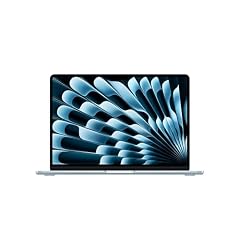
Apple 2026 MacBook Air 13-inch Laptop with M5 chip
- CPU
- Apple M5
- RAM
- 16 GB
- Storage
- 512 GB
- Screen
- 13 in
- Weight
- 1.23 kg
- OS
- macOS
$1,149.00 (as of 10/20/2026 15:20 PDT - Details)
It pairs the M5 chip with 16GB of memory and 512GB of storage in a 13.6-inch body that weighs 1.23 kg, tied for the lightest in this list. Apple states a 53.8 Wh battery and up to 18 hours of video streaming, and the Air supports up to two external displays, one more than the MacBook Neo.
Pros
- Apple M5 chip with a 10-core CPU, per Apple
- 16GB of memory, double the MacBook Neo's 8GB
- 1.23 kg, tied for the lightest pick
- Up to two external displays, per Apple
Cons
- 512GB of storage, a quarter of the M5 Max picks' 2TB
- No XDR display: the Liquid Retina XDR panels are on the MacBook Pro picks
Good fit if
- Students and office workers who carry their laptop every day
- Buyers who want the M5 chip without paying for Pro features they will not use
Skip if
- You edit long 4K video or large photo libraries and need more than 512GB inside
- You want a screen larger than 13.6 inches
Verdict: The MacBook most buyers should start from: current chip, 16GB of memory and the lightest weight in this list.
2 Best Air for heavier multitasking
Apple 2026 MacBook Air 13-inch Laptop with M5 chip
- CPU
- Apple M5
- RAM
- 24 GB
- Storage
- 1000 GB
- Screen
- 13 in
- Weight
- 1.23 kg
- OS
- macOS
$1,649.00 (as of 10/20/2026 15:20 PDT - Details)
It keeps the 1.23 kg 13-inch body of our top pick but steps up to 24GB of memory and 1TB of storage. Memory cannot be added to a MacBook after purchase, so this configuration suits buyers who expect larger projects over the life of the machine.
Pros
- 24GB of memory, 8GB more than the other 13-inch Air pick
- 1TB of storage, double the other Air picks
- 1.23 kg, tied for the lightest pick
Cons
- Same M5 chip as the 16GB Air: the extra is memory and storage, not speed
- 13.6-inch screen only
Good fit if
- Developers running several tools and browsers at once
- Buyers who plan to keep one Mac for many years
Skip if
- Your work is mostly email, documents and web apps, where 16GB is comfortable
- You need sustained GPU power for video or 3D: look at the M5 Pro and M5 Max picks
Verdict: The Air to buy when you want headroom in memory and storage without leaving the 13-inch size.
3 Best large-screen Air

Apple 2026 MacBook Air 15-inch Laptop with M5 chip
- CPU
- Apple M5
- RAM
- 16 GB
- Storage
- 512 GB
- Screen
- 15 in
- Weight
- 1.51 kg
- OS
- macOS
$1,446.00 (as of 10/20/2026 15:20 PDT - Details)
It gives the M5 chip a 15.3-inch screen at 1.51 kg, lighter than the 14-inch MacBook Pro picks at 1.55 kg and 1.63 kg. Apple lists a 10-core GPU and a 66.5 Wh battery for the 15-inch Air, with the same up to 18 hours of video streaming as the 13-inch.
Pros
- 15.3-inch screen, the largest outside the 16-inch MacBook Pro picks
- 1.51 kg, lighter than both 14-inch MacBook Pro picks with a stated weight
- 10-core GPU and 66.5 Wh battery, per Apple
Cons
- 512GB of storage
- 16GB of memory, the same as the 13-inch base Air
Good fit if
- Buyers who want more screen for spreadsheets and side-by-side windows
- Anyone moving from a 15-inch Windows laptop who wants a similar size
Skip if
- You travel light and prefer the 1.23 kg 13-inch models
- You need an XDR display for HDR photo or video grading
Verdict: The most screen per kilogram among these MacBooks.
4 Best entry MacBook

Apple 2026 MacBook Neo 13-inch Laptop with A18 Pro chip
- CPU
- Apple A18 Pro
- RAM
- 8 GB
- Storage
- 256 GB
- Screen
- 13 in
- Weight
- 1.23 kg
- OS
- macOS
$689.99 (as of 10/20/2026 15:20 PDT - Details)
The MacBook Neo runs macOS on Apple's A18 Pro chip with a 6-core CPU and 5-core GPU, per Apple, in a 13-inch body at 1.23 kg. It is the entry point to macOS in this list, with 8GB of memory and 256GB of storage.
Pros
- 1.23 kg, tied for the lightest pick
- Apple states up to 16 hours of video streaming from a 36.5 Wh battery
- Runs the same macOS apps as the other picks
Cons
- 8GB of memory, the least in this list, and it cannot be upgraded
- 256GB of storage, the smallest drive here
- One external display and one USB 2 port, per Apple
Good fit if
- Students whose work is browser, documents and video calls
- A first Mac for someone moving from a tablet or Chromebook
Skip if
- You plan to edit photos or video regularly
- You need two external monitors: the Air picks support two
Verdict: The simplest way into macOS for light work, if you accept 8GB of memory.
5 Best entry MacBook with more storage
Apple 2026 MacBook Neo 13-inch Laptop with A18 Pro chip
- CPU
- Apple A18 Pro
- RAM
- 8 GB
- Storage
- 512 GB
- Screen
- 13 in
- Weight
- 1.23 kg
- OS
- macOS
$789.99 (as of 10/20/2026 15:20 PDT - Details)
Same A18 Pro chip, 8GB of memory and 1.23 kg body as the 256GB Neo, with 512GB of storage instead. For a machine whose storage cannot be expanded internally, doubling the drive is the most useful step within the Neo line.
Pros
- 512GB of storage, double the other Neo
- 1.23 kg, tied for the lightest pick
- Same 36.5 Wh battery as the 256GB Neo, per Apple
Cons
- Still 8GB of memory
- One external display, per Apple
Good fit if
- Students who keep coursework, photos and offline media on the laptop
- Buyers who want the Neo but worry about a 256GB drive filling up
Skip if
- You need more than 8GB of memory: the 16GB Air is the next step
- You work with large creative files
Verdict: The Neo configuration to choose if you store more than a semester of files locally.
6 Best MacBook Pro for most

Apple 2025 MacBook Pro Laptop
- CPU
- Apple M5
- RAM
- 16 GB
- Storage
- 1000 GB
- Screen
- 14.2 in
- Weight
- 1.55 kg
- OS
- macOS
$1,837.00 (as of 10/20/2026 15:20 PDT - Details)
It puts the same M5 chip as the Air into the MacBook Pro with a 14.2-inch Liquid Retina XDR display and a 72.4 Wh battery, which Apple states lasts up to 24 hours of video streaming, tied for the longest figure Apple gives for any pick here. It also brings 1TB of storage at 1.55 kg.
Pros
- Up to 24 hours of video streaming, per Apple
- 14.2-inch Liquid Retina XDR display
- 1TB of storage
- Apple M5 with a 10-core CPU and 10-core GPU
Cons
- 16GB of memory, the same as the base Air
- 1.55 kg, 0.32 kg heavier than the 13-inch Air
Good fit if
- Photographers and writers who want the XDR screen and long runtime
- Developers who want Pro ports and display without the M5 Pro tier
Skip if
- You need the extra GPU cores and memory bandwidth of the M5 Pro or M5 Max
- Weight matters more than the screen: the Air is lighter
Verdict: The Pro to pick when the display and battery matter more than raw chip tier.
7 Best 16-inch MacBook Pro

Apple 2026 MacBook Pro Laptop
- CPU
- Apple M5 Pro
- RAM
- 24 GB
- Storage
- 1000 GB
- Screen
- 16.2 in
- Weight
- 2.14 kg
- OS
- macOS
It brings the M5 Pro with an 18-core CPU and 20-core GPU to the 16.2-inch MacBook Pro, with 24GB of memory and 1TB of storage. Apple lists a 100 Wh battery, up to 24 hours of video streaming and support for up to three external displays for this chip in the 16-inch.
Pros
- M5 Pro: 18-core CPU and 20-core GPU
- 16.2-inch Liquid Retina XDR display
- 100 Wh battery and up to three external displays, per Apple
Cons
- 2.14 kg, much heavier than the 1.23 kg Air picks
- 24GB of memory, half the other M5 Pro pick's 48GB
Good fit if
- Video editors and music producers who want a large screen
- Buyers who drive three external monitors at a desk
Skip if
- You carry the laptop daily
- You work with large datasets or local AI models that need 48GB or more
Verdict: The large-screen MacBook with a strong chip and tied for the longest Apple runtime figure in this list.
8 Best M5 Pro for large projects

Apple 2026 MacBook Pro Laptop
- CPU
- Apple M5 Pro
- RAM
- 48 GB
- Storage
- 1000 GB
- Screen
- 16.2 in
- Weight
- 2.14 kg
- OS
- macOS
$3,369.00 (as of 10/20/2026 15:20 PDT - Details)
Same 16.2-inch M5 Pro machine as the 24GB pick, but with 48GB of memory. Apple lists 307GB/s of memory bandwidth for the M5 Pro, double the plain M5's 153GB/s, and the larger memory pool helps with long video timelines, big sample libraries and virtual machines.
Pros
- 48GB of memory, the most below the M5 Max picks
- M5 Pro memory bandwidth of 307GB/s, per Apple
- 16.2-inch XDR display and 1TB of storage
Cons
- 2.14 kg
- 1TB of storage for a machine aimed at large projects
Good fit if
- Editors and developers who run several heavy apps side by side
- Buyers who want room for local AI models without the M5 Max
Skip if
- Your work fits comfortably in 24GB
- You need the M5 Max GPU for 3D or high-resolution color grading
Verdict: The configuration for memory-hungry work that does not need the M5 Max GPU.
9 Best 14-inch M5 Max

Apple 2026 MacBook Pro Laptop
- CPU
- Apple M5 Max
- RAM
- 36 GB
- Storage
- 2000 GB
- Screen
- 14.2 in
- Weight
- 1.63 kg
- OS
- macOS
$3,844.99 (as of 10/20/2026 15:20 PDT - Details)
It fits the M5 Max with an 18-core CPU and 32-core GPU into the 14.2-inch MacBook Pro at 1.63 kg, with 36GB of memory and 2TB of storage. Apple lists 460GB/s of memory bandwidth for this chip and support for up to four external displays.
Pros
- M5 Max with a 32-core GPU in a 14-inch body
- 2TB of storage, tied for the most in this list
- Up to four external displays, per Apple
Cons
- 36GB of memory, well below the 128GB M5 Max picks
- 1.63 kg, heavier than the M5 MacBook Pro
Good fit if
- Creators who travel and want M5 Max graphics in a small bag
- Buyers who connect several displays at a desk
Skip if
- You need more than 36GB of memory
- Your apps do not use the extra GPU cores
Verdict: The most portable way to get the M5 Max among the picks with a stated weight.
10 Best 16-inch M5 Max for most creators
Apple 2026 MacBook Pro Laptop
- CPU
- Apple M5 Max
- RAM
- 36 GB
- Storage
- 2000 GB
- Screen
- 16.2 in
- Weight
- 2.15 kg
- OS
- macOS
It pairs the M5 Max with a 32-core GPU, 36GB of memory and 2TB of storage with the 16.2-inch XDR display. Apple lists a 100 Wh battery and up to 22 hours of video streaming for this configuration, two hours less than the 16-inch M5 Pro figure.
Pros
- M5 Max with 460GB/s memory bandwidth, per Apple
- 2TB of storage
- 16.2-inch XDR display and 100 Wh battery
Cons
- 2.15 kg, the heaviest stated weight in this list
- 36GB of memory, less than the 48GB M5 Pro pick
Good fit if
- Video editors and 3D artists who want a large screen and GPU headroom
- Buyers who need 2TB inside for project files
Skip if
- You need more memory than GPU: the 48GB M5 Pro offers more memory
- You travel daily
Verdict: A large-screen M5 Max for GPU-heavy work that fits in 36GB.
11 Most memory in a 14-inch

Apple MacBook Pro with M5 Max
- CPU
- Apple M5 Max
- RAM
- 128 GB
- Storage
- 2000 GB
- Screen
- 14.2 in
- OS
- macOS
$6,699.00 (as of 10/20/2026 15:20 PDT - Details)
The 14.2-inch MacBook Pro with the M5 Max, 40-core GPU and 128GB of memory ties for the most memory in this list. Apple lists 614GB/s of memory bandwidth for the 40-core GPU version of the chip, the highest among these MacBooks.
Pros
- 128GB of memory, tied for the most in this list
- M5 Max with a 40-core GPU and 614GB/s memory bandwidth, per Apple
- 2TB of storage
Cons
- Weight not stated by the seller
- 14.2-inch screen for work that often benefits from more space
Good fit if
- Developers running large local AI models on the go
- Researchers with big datasets who travel
Skip if
- Your work fits in 36GB to 48GB, where the other Pro picks already cover it
- You prefer a 16-inch screen for long editing sessions
Verdict: The most capable MacBook here that still fits a 14-inch bag.
12 Most powerful overall
Apple MacBook Pro Laptop with M5 Max
- CPU
- Apple M5 Max
- RAM
- 128 GB
- Storage
- 2000 GB
- Screen
- 16.2 in
- OS
- macOS
$6,999.00 (as of 10/20/2026 15:20 PDT - Details)
It combines the M5 Max with a 40-core GPU, 128GB of memory and 2TB of storage with the 16.2-inch XDR screen. With the top chip, the most memory in this list and the larger display, it is the configuration for the heaviest macOS workloads.
Pros
- 128GB of memory, tied for the most in this list
- M5 Max with a 40-core GPU, per Apple
- 16.2-inch Liquid Retina XDR display
- 2TB of storage
Cons
- Weight not stated by the seller
- Far more machine than office or study work needs
Good fit if
- Professional video, 3D and visual effects work
- Running large local language models that need a big memory pool
Skip if
- You mostly write, browse and edit photos
- You need a light laptop to carry every day
Verdict: The top of this list for anyone whose apps can use every GPU core and gigabyte.
Side by side
| # | Laptop | CPU | GPU | GPU memory | Rentable GPU model | RAM | Storage |
|---|---|---|---|---|---|---|---|
| 1 | Apple 2026 MacBook Air 13-inch Laptop with M5 chip | Apple M5 | not stated | not stated | not stated | 16 GB | 512 GB |
| 2 | Apple 2026 MacBook Air 13-inch Laptop with M5 chip | Apple M5 | not stated | not stated | not stated | 24 GB | 1000 GB |
| 3 | Apple 2026 MacBook Air 15-inch Laptop with M5 chip | Apple M5 | not stated | not stated | not stated | 16 GB | 512 GB |
| 4 | Apple 2026 MacBook Neo 13-inch Laptop with A18 Pro chip | Apple A18 Pro | not stated | not stated | not stated | 8 GB | 256 GB |
| 5 | Apple 2026 MacBook Neo 13-inch Laptop with A18 Pro chip | Apple A18 Pro | not stated | not stated | not stated | 8 GB | 512 GB |
| 6 | Apple 2025 MacBook Pro Laptop | Apple M5 | not stated | not stated | not stated | 16 GB | 1000 GB |
| 7 | Apple 2026 MacBook Pro Laptop | Apple M5 Pro | not stated | not stated | not stated | 24 GB | 1000 GB |
| 8 | Apple 2026 MacBook Pro Laptop | Apple M5 Pro | not stated | not stated | not stated | 48 GB | 1000 GB |
| 9 | Apple 2026 MacBook Pro Laptop | Apple M5 Max | not stated | not stated | not stated | 36 GB | 2000 GB |
| 10 | Apple 2026 MacBook Pro Laptop | Apple M5 Max | not stated | not stated | not stated | 36 GB | 2000 GB |
| 11 | Apple MacBook Pro with M5 Max | Apple M5 Max | not stated | not stated | not stated | 128 GB | 2000 GB |
| 12 | Apple MacBook Pro Laptop with M5 Max | Apple M5 Max | not stated | not stated | not stated | 128 GB | 2000 GB |
How we picked
How we picked: our catalogue lists 25 laptops that run macOS, and this guide draws on the 15 current MacBook listings among them. Every one is an Apple machine sold new, so the choice came down to configuration. We kept one pick per useful step in chip, memory and storage, and dropped listings that differ from a kept pick only by a storage step (for example a second 16GB MacBook Air with a larger drive). Chip, battery and display facts come from Apple's own specification pages. Prices on this page are live: each one is read from the store listing and shown with the time it was read. Nobody at wikilaptop.org has tested these units; every comparison below is drawn from the stated specifications.
How to choose
Memory: choose it once
MacBook memory is part of the chip package and cannot be upgraded after purchase, so the amount you order is the amount you keep. In this list, two picks have 8GB (both MacBook Neo), three have 16GB, two have 24GB, two have 36GB, one has 48GB and two have 128GB.
16GB is comfortable for study, office work, coding and photo editing. 24GB to 48GB suits heavier multitasking, long video timelines and virtual machines. 128GB is for local AI models, very large datasets and high-end visual effects.
Chip tiers: A18 Pro, M5, M5 Pro, M5 Max
The MacBook Neo uses the A18 Pro, which Apple lists with a 6-core CPU and 5-core GPU. The M5 in the Air and base MacBook Pro has a 10-core CPU. The M5 Pro in this list has an 18-core CPU and 20-core GPU, and the M5 Max has an 18-core CPU with a 32-core or 40-core GPU.
Memory bandwidth rises with the tier: Apple lists 153GB/s for the M5, 307GB/s for the M5 Pro, 460GB/s for the 32-core M5 Max and 614GB/s for the 40-core M5 Max. Bandwidth matters most for GPU work, video effects and local AI.
Storage: plan for the whole life of the laptop
Internal storage is also fixed at purchase. In this list one pick has 256GB, three have 512GB, four have 1TB and four have 2TB. 512GB works for documents and a modest photo library; 1TB or more makes sense for video, audio sample libraries and large codebases.
External drives and cloud storage help, but a machine that constantly runs out of internal space is frustrating. If you are between two sizes, the larger one is usually the safer choice.
Air or Pro: screen, ports and runtime
The MacBook Air picks weigh 1.23 kg (13-inch) and 1.51 kg (15-inch), and only the Neo matches the 13-inch Air's weight. The MacBook Pro picks add Liquid Retina XDR displays, support for more external displays with the higher chips (three on the M5 Pro and four on the M5 Max, per Apple, against two on the M5) and larger batteries.
Apple states up to 18 hours of video streaming for both M5 Air sizes, up to 24 hours for the 14-inch MacBook Pro with the M5 and for the 16-inch with the M5 Pro, and up to 22 hours for the 16-inch with the 32-core M5 Max. These are Apple's best-case figures for one light task, not a full workday of mixed use.
Check your software first
macOS runs Apple's own creative apps, such as Final Cut Pro, Logic Pro and Xcode, alongside most major cross-platform tools. Some Windows-only business software and many PC games do not run natively on a Mac. Before you buy, check that every app you depend on has a macOS version, or plan for a web or virtualized alternative.
Questions
Which MacBook is best for most people?
The 13-inch MacBook Air with the M5 chip and 16GB of memory. It weighs 1.23 kg, Apple states up to 18 hours of video streaming, and 16GB leaves room for everyday multitasking. If you need more storage or memory, the 24GB and 1TB Air in this list keeps the same size and weight.
Is 8GB of memory enough on the MacBook Neo?
For browsing, documents, streaming and video calls, 8GB can work. It is the least memory in this list and it cannot be upgraded later, so it becomes a limit if you move into photo editing, video or heavy multitasking. If you expect that, the 16GB MacBook Air is the next step up.
Do I need a MacBook Pro instead of an Air?
Only if you use what the Pro adds: the Liquid Retina XDR display, support for more external displays, larger batteries and the M5 Pro or M5 Max chips. For study, office work and light creative work, the Air offers the same M5 chip as the base 14-inch MacBook Pro.
Did you test these MacBooks?
No. Nobody at wikilaptop.org has tested these units. We chose them from the configuration stated on each listing and from Apple's published specifications, and every battery figure quoted here is Apple's own claim, linked in the sources. We do not describe heat, noise or keyboard feel, because those claims need testing we have not done.
Why do prices on this page change?
Each price is read live from the store listing and shown with the time it was read. MacBook prices shift with promotions and new configurations, so we never write price comparisons into the text. Check the time next to each price, and confirm the exact memory and storage on the listing before you buy.
Recent updates
- : First published.