
Best Intel Core Ultra 9 Laptops in 2026: 13 Picks Compared on Specs
Our top pick is the Lenovo Legion Pro 7i with an Intel Core Ultra 9 275HX and an RTX 5080: it pairs 16GB of graphics memory and a 240Hz screen with at least 4TB of storage in a 16-inch body. The other 12 picks run from 275HX, 285HX and 290HX desktop replacements to thin 285H workstations and a 1.31 kg ThinkPad. We name the suffix of every chip, and we chose all 13 from published specifications and Intel and NVIDIA data, not from lab tests.
13 picks from 77 laptops that match this guide with a price we can quote today. Every price below is live and carries the moment it was read.
The picks at a glance
Which one should you buy?
- For high-end gaming: The Legion Pro 7i pairs a Core Ultra 9 275HX with an RTX 5080, 16GB of graphics memory and a 240Hz screen. See pick 1
- For 3D and engineering work: The ThinkPad P16 Gen 3 combines a Core Ultra 9 285HX, an RTX PRO 4000 with 16GB and 128GB of memory. See pick 10
- For photo and video creators: The Yoga Pro 9i puts an RTX 5060 behind a 16-inch 3.2K tandem OLED screen named in the listing at 1.93 kg. See pick 9
- For carrying every day: The ThinkPad P14s Gen 6 weighs 1.31 kg with a Core Ultra 9 285H and 64GB of memory. See pick 12
The 13 picks
1 Best overall
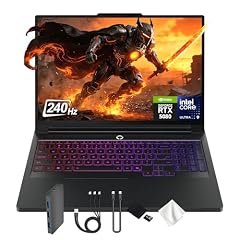
Lenovo Legion Pro 7i 16" WQXGA 240Hz Gaming Laptop
- CPU
- Intel Core Ultra 9 275HX
- GPU
- GeForce RTX 5080
- GPU memory
- 16 GB
- RAM
- 32 GB
- Storage
- 4000 GB
- Screen
- 16 in
- Refresh
- 240 Hz
- Weight
- 2.57 kg
$4,949.00 (as of 10/20/2026 15:21 PDT - Details)
It pairs the Core Ultra 9 275HX, which Intel lists with 24 cores and 55W base power, with an RTX 5080 and its 16GB of GDDR7. The 16-inch WQXGA screen runs at 240Hz, and its storage is tied for the largest among the picks.
Pros
- RTX 5080 with 16GB of GDDR7 per NVIDIA
- At least 4TB of storage, tied for the most here
- 16-inch WQXGA screen at 240Hz
- Core Ultra 9 275HX: 24 cores per Intel
Cons
- 275HX is a high-power HX chip: built for plugged-in performance, not battery life
- 32GB of memory, half of the 64GB picks
Good fit if
- Players who want high frame rates at 1440p-class resolutions
- Creators who render on the GPU and need space for projects
Skip if
- You want the top GPU tier: the SCAR 18 and HYDROC 16 carry an RTX 5090
- You work unplugged for long stretches
Verdict: The most balanced high-end Core Ultra 9 machine among these 13.
2 Best 18-inch RTX 5090 pick

ASUS ROG Strix SCAR 18
- CPU
- Intel Core Ultra 9 275HX
- GPU
- GeForce RTX 5090
- RAM
- 32 GB
- Storage
- 2000 GB
- Screen
- 18 in
- Refresh
- 240 Hz
- Weight
- 2.85 kg
- OS
- Windows 11 Pro
$4,499.99 (as of 10/20/2026 15:20 PDT - Details)
It pairs a Core Ultra 9 275HX with an RTX 5090, which NVIDIA lists with 24GB of GDDR7, and an 18-inch 2.5K screen at 240Hz. At 2.85 kg it is lighter than the other 18-inch pick, the ROG Strix G18 at 3.0 kg.
Pros
- RTX 5090: 24GB of GDDR7 per NVIDIA
- 18-inch 2.5K screen at 240Hz per the listing
- 2TB of storage and Windows 11 Pro
- 2.85 kg, lighter than the ROG Strix G18
Cons
- 32GB of memory
- Large 18-inch footprint and a high-power 275HX chip
Good fit if
- Players who want the top NVIDIA laptop GPU on a big screen
- Creators running local AI models that need 24GB of graphics memory
Skip if
- You carry your laptop daily
- You mainly play esports titles, where a lower GPU tier is enough
Verdict: The big-screen flagship for buyers who want an RTX 5090.
3 Best 16-inch RTX 5090 pick

Eluktronics HYDROC 16 G2R RTX 5090 Gaming Laptop
- CPU
- Intel Core Ultra 9 290HX
- GPU
- RTX 5090
- GPU memory
- 24 GB
- RAM
- 64 GB
- Storage
- 4000 GB
- Screen
- 16 in
- Refresh
- 300 Hz
- Weight
- 2.83 kg
$6,999.00 (as of 10/20/2026 15:21 PDT - Details)
It is the only 16-inch pick with an RTX 5090, and it uses the Core Ultra 9 290HX Plus, the only 290HX in this list. Its 16-inch screen runs at 300Hz, the fastest here, and its 99Wh battery is the largest stated among the picks.
Pros
- RTX 5090 with 24GB of GDDR7
- 300Hz 16-inch screen, the fastest refresh in this list
- 99Wh battery, the largest stated here
- 64GB of memory and 4TB of storage
Cons
- 290HX is a high-power HX chip, not a battery-life choice
- Eluktronics is a boutique maker; check its warranty and service terms before buying
Good fit if
- Players who want RTX 5090 performance without an 18-inch body
- Creators who need both 64GB of memory and 24GB of graphics memory
Skip if
- You prefer a large-maker service network
- You do not need the top GPU tier
Verdict: The compact route to an RTX 5090 with a Core Ultra 9.
4 Best RTX 5070 Ti pick

Acer Predator Helios Neo 16S AI Gaming Laptop
- CPU
- Intel Core Ultra 9 275HX
- GPU
- GeForce RTX 5070 Ti
- GPU memory
- 12 GB
- RAM
- 64 GB
- Storage
- 2000 GB
- Screen
- 16 in
- Refresh
- 240 Hz
- Weight
- 2.3 kg
It pairs a Core Ultra 9 275HX with an RTX 5070 Ti and 12GB of graphics memory, plus 64GB of system memory, at 2.3 kg. It is the lightest 16-inch pick with a 275HX.
Pros
- RTX 5070 Ti with 12GB of graphics memory
- 64GB of memory and 2TB of storage
- 2.3 kg, the lightest 16-inch 275HX pick
- 240Hz 16-inch screen
Cons
- 12GB of graphics memory, below the RTX 5080 and RTX 5090 picks
- High-power HX chip: expect to work plugged in
Good fit if
- Players who stream or record while gaming
- Creators who want 64GB of memory with a strong GPU
Skip if
- You want 16GB or more of graphics memory
- You want a 14-inch machine
Verdict: A 64GB, RTX 5070 Ti machine at 2.3 kg.
5 Best 18-inch without an RTX 5090

ASUS ROG Strix G18 18” Gaming Laptop
- CPU
- Intel Core Ultra 9 275HX
- GPU
- RTX 5070 Ti
- GPU memory
- 12 GB
- RAM
- 32 GB
- Storage
- 2000 GB
- Screen
- 18 in
- Refresh
- 240 Hz
- Weight
- 3 kg
$3,199.99 (as of 10/20/2026 15:20 PDT - Details)
It gives you an 18-inch 240Hz screen with a Core Ultra 9 275HX and an RTX 5070 Ti with 12GB, plus 2TB of storage. It is the big-screen alternative to the SCAR 18 for buyers who do not need an RTX 5090.
Pros
- 18-inch screen at 240Hz
- RTX 5070 Ti with 12GB of graphics memory
- 2TB of storage and 32GB of memory
Cons
- 3.0 kg, the heaviest pick in this list
- Operating system not stated by the seller
Good fit if
- Players who use a laptop as a desktop replacement
- Editors who want a large screen area
Skip if
- You travel with your laptop
- You want the top GPU tier
Verdict: A large-screen 275HX machine one GPU tier below the flagships.
6 Best 275HX pick with an RTX 5060

Lenovo Legion 5 16" WQXGA 240Hz Gaming Laptop
- CPU
- Intel Core Ultra 9 275HX
- GPU
- GeForce RTX 5060
- GPU memory
- 8 GB
- RAM
- 32 GB
- Storage
- 1000 GB
- Screen
- 16 in
- Refresh
- 240 Hz
$2,249.00 (as of 10/20/2026 15:21 PDT - Details)
It pairs the full Core Ultra 9 275HX with an RTX 5060 and 8GB of GDDR7, the lowest GPU tier among the 275HX picks, and still offers a 16-inch WQXGA screen at 240Hz. It weighs 2.45 kg.
Pros
- Core Ultra 9 275HX: 24 cores per Intel
- 16-inch WQXGA screen at 240Hz
- RTX 5060 with 8GB of GDDR7
- 32GB of memory
Cons
- RTX 5060, a lower GPU tier than the other 275HX picks
- 1TB of storage and no operating system stated by the seller
Good fit if
- Developers and editors who need CPU power more than GPU power
- Players at 1080p-class settings who want a fast screen
Skip if
- You play demanding games at high settings
- You want the battery-friendly H-series chip
Verdict: A CPU-first Core Ultra 9 machine with a mid-range GPU.
7 Best 15-inch gaming pick

HP OMEN HyperX AI Gaming Laptop 15.3" 180Hz IPS WQXGA 32GB/1TBSSD/W11H
- CPU
- Intel Core Ultra 9
- GPU
- GeForce RTX 5070
- GPU memory
- 8 GB
- RAM
- 32 GB
- Storage
- 1000 GB
- Screen
- 15.3 in
- Refresh
- 180 Hz
- Weight
- 2.31 kg
$2,679.99 (as of 10/20/2026 15:21 PDT - Details)
It brings a Core Ultra 9 and an RTX 5070 with 8GB to a 15.3-inch WQXGA screen at 180Hz, and states a 70Wh battery. It weighs 2.31 kg with 32GB of memory and 1TB of storage.
Pros
- RTX 5070 with 8GB of graphics memory
- 15.3-inch WQXGA screen at 180Hz per the listing
- 70Wh battery stated
- 32GB of memory
Cons
- Core Ultra 9 suffix not stated by the seller
- Windows 11 Home rather than Pro
Good fit if
- Players who want a mid-size screen
- Students who game and study on one machine
Skip if
- You need to know the exact processor model
- You want 12GB or more of graphics memory
Verdict: A mid-size RTX 5070 gaming laptop; confirm the chip suffix before buying.
8 Most compact gaming pick

Acer Predator Helios Neo 14 AI Gaming Laptop
- CPU
- Intel Core Ultra 9 285H
- GPU
- GeForce RTX 5070
- RAM
- 32 GB
- Storage
- 1000 GB
- Screen
- 14.5 in
- Refresh
- 165 Hz
- Weight
- 1.9 kg
$1,897.49 (as of 10/20/2026 15:20 PDT - Details)
It fits a Core Ultra 9 285H, a non-HX chip, and an RTX 5070 into a 14.5-inch body at 1.9 kg, the lightest gaming pick here. The screen runs at 165Hz.
Pros
- 1.9 kg, the lightest pick with a GeForce GPU
- RTX 5070 with a 14.5-inch 165Hz screen
- Core Ultra 9 285H, an H chip for thinner designs
- 32GB of memory and 1TB of storage
Cons
- Graphics memory and operating system not stated by the seller
- RTX 5070, below the 5070 Ti and higher picks
Good fit if
- Students who game between classes
- Players who want a small bag-friendly laptop
Skip if
- You want a large screen
- You want the most GPU power
Verdict: The small, light Core Ultra 9 gaming option.
9 Best for creators

Lenovo Yoga Pro 9i
- CPU
- Intel Core Ultra 9 285H
- GPU
- GeForce RTX 5060
- GPU memory
- 8 GB
- RAM
- 32 GB
- Storage
- 1000 GB
- Screen
- 16 in
- Refresh
- 120 Hz
- Weight
- 1.93 kg
$3,449.99 (as of 10/20/2026 15:22 PDT - Details)
It pairs a Core Ultra 9 and an RTX 5060 with 8GB with a 16-inch 3.2K tandem OLED screen named in the listing, at 1.93 kg. Its 120Hz OLED screen per the listing is aimed at color work more than fast games.
Pros
- 16-inch 3.2K tandem OLED at 120Hz per the listing
- RTX 5060 with 8GB of graphics memory
- 1.93 kg
- 32GB of memory and Windows 11 Pro
Cons
- Core Ultra 9 suffix not stated by the seller
- 1TB of storage
Good fit if
- Photographers and video editors who want an OLED screen
- Creators who carry a 16-inch laptop
Skip if
- You play fast games and want a 240Hz screen
- You need a professional workstation GPU
Verdict: The creator's Core Ultra 9 laptop with a sharp OLED screen.
10 Best workstation

Lenovo ThinkPad P16 Gen 3
- CPU
- Intel Core Ultra 9 285HX
- GPU
- RTX PRO 4000
- GPU memory
- 16 GB
- RAM
- 128 GB
- Storage
- 4000 GB
- Screen
- 16 in
- Refresh
- 120 Hz
- Touchscreen
- Yes
$7,899.00 (as of 10/20/2026 15:22 PDT - Details)
It pairs the Core Ultra 9 285HX with an NVIDIA RTX PRO 4000 and 16GB, plus 128GB of memory, the most in this list, and 4TB of storage. The 16-inch touch screen runs at 120Hz.
Pros
- 128GB of memory, the most here
- RTX PRO 4000 professional GPU with 16GB
- 4TB of storage, tied for the most
- Windows 11 Pro and a touch screen
Cons
- 285HX is a high-power HX chip
- 2.54 kg
Good fit if
- Engineers and 3D artists using certified professional software
- Data scientists working with large datasets in memory
Skip if
- You mainly game
- You carry your laptop daily
Verdict: The top professional configuration among the Core Ultra 9 picks.
11 Lightest workstation with a professional GPU

Lenovo 2026 ThinkPad P1 Gen 8 w Core Ultra 9 285H
- CPU
- Intel Core Ultra 9 285H
- GPU
- RTX PRO 2000
- RAM
- 64 GB
- Screen
- 16 in
- Refresh
- 120 Hz
- Touchscreen
- Yes
- Weight
- 1.84 kg
$4,548.80 (as of 10/20/2026 15:21 PDT - Details)
At 1.84 kg it pairs a Core Ultra 9 285H with an NVIDIA RTX PRO 2000 professional GPU and 64GB of memory. The listing names a 16-inch OLED touch screen.
Pros
- 1.84 kg, lightest pick with a professional GPU
- RTX PRO 2000 professional GPU
- 64GB of memory
- 16-inch OLED touch screen per the listing
Cons
- Storage and operating system not stated by the seller
- Graphics memory not stated by the seller
Good fit if
- Designers who travel with a workstation
- Engineers who want a pro GPU in a thin 16-inch body
Skip if
- You need the RTX PRO 4000 tier of the ThinkPad P16
- You need to confirm storage before buying
Verdict: A thin 16-inch workstation that keeps a professional GPU.
12 Lightest laptop in this list

Lenovo ThinkPad P14s Gen 6 Intel Core Ultra 9 285H
- CPU
- Intel Core Ultra 9 285H
- RAM
- 64 GB
- Storage
- 2000 GB
- Screen
- 14.5 in
- Refresh
- 60 Hz
- Touchscreen
- No
- Weight
- 1.31 kg
- OS
- Windows 11 Pro
$2,895.00 (as of 10/20/2026 15:22 PDT - Details)
At 1.31 kg it is the lightest pick, pairing a Core Ultra 9 285H with 64GB of memory and 2TB of storage. It has no separate graphics card, so it suits CPU and memory-heavy work on the move.
Pros
- 1.31 kg, the lightest in this list
- 64GB of memory and 2TB of storage
- Core Ultra 9 285H, an H chip for thin designs
- Windows 11 Pro
Cons
- No separate graphics card stated by the seller
- 14.5-inch WUXGA screen at 60Hz, non-touch
Good fit if
- Developers running containers and builds on the road
- Business travelers who keep many applications open
Skip if
- You game or render on the GPU
- You want a high-refresh screen
Verdict: The carry-everywhere Core Ultra 9 laptop.
13 Best non-gaming 16-inch

Dell 16 Plus AI Powered Laptop 16.0" Touchscreen IPS WUXGA Display
- CPU
- Intel Core Ultra 9
- RAM
- 32 GB
- Storage
- 2000 GB
- Screen
- 16 in
- Refresh
- 60 Hz
- Touchscreen
- Yes
- Battery
- 64 Wh
- OS
- Windows 11 Pro
$1,619.00 (as of 10/20/2026 15:20 PDT - Details)
The listing names a Core Ultra 9 288V, a V-series chip, in a 16-inch touch laptop with 32GB of memory, 2TB of storage and a stated 64Wh battery. It is the only pick built around a V-series Core Ultra 9 rather than an H or HX chip.
Pros
- Core Ultra 9 288V per the listing, the only V-series chip here
- 16-inch WUXGA touch screen
- 2TB of storage and 32GB of memory
- 64Wh battery stated and Windows 11 Pro
Cons
- 60Hz refresh
- Weight not stated by the seller
- No separate graphics card
Good fit if
- Office and home users who want a large touch screen
- Buyers who do not need gaming or HX power
Skip if
- You game or edit video on the GPU
- You want the lightest 16-inch option
Verdict: The everyday 16-inch Core Ultra 9 option without a gaming GPU.
Side by side
| # | Laptop | CPU | GPU | GPU memory | Rentable GPU model | RAM | Storage |
|---|---|---|---|---|---|---|---|
| 1 | Lenovo Legion Pro 7i 16" WQXGA 240Hz Gaming Laptop | Intel Core Ultra 9 275HX | GeForce RTX 5080 | 16 GB | not stated | 32 GB | 4000 GB |
| 2 | ASUS ROG Strix SCAR 18 | Intel Core Ultra 9 275HX | GeForce RTX 5090 | not stated | not stated | 32 GB | 2000 GB |
| 3 | Eluktronics HYDROC 16 G2R RTX 5090 Gaming Laptop | Intel Core Ultra 9 290HX | RTX 5090 | 24 GB | not stated | 64 GB | 4000 GB |
| 4 | Acer Predator Helios Neo 16S AI Gaming Laptop | Intel Core Ultra 9 275HX | GeForce RTX 5070 Ti | 12 GB | not stated | 64 GB | 2000 GB |
| 5 | ASUS ROG Strix G18 18” Gaming Laptop | Intel Core Ultra 9 275HX | RTX 5070 Ti | 12 GB | not stated | 32 GB | 2000 GB |
| 6 | Lenovo Legion 5 16" WQXGA 240Hz Gaming Laptop | Intel Core Ultra 9 275HX | GeForce RTX 5060 | 8 GB | not stated | 32 GB | 1000 GB |
| 7 | HP OMEN HyperX AI Gaming Laptop 15.3" 180Hz IPS WQXGA 32GB/1TBSSD/W11H | Intel Core Ultra 9 | GeForce RTX 5070 | 8 GB | not stated | 32 GB | 1000 GB |
| 8 | Acer Predator Helios Neo 14 AI Gaming Laptop | Intel Core Ultra 9 285H | GeForce RTX 5070 | not stated | not stated | 32 GB | 1000 GB |
| 9 | Lenovo Yoga Pro 9i | Intel Core Ultra 9 285H | GeForce RTX 5060 | 8 GB | not stated | 32 GB | 1000 GB |
| 10 | Lenovo ThinkPad P16 Gen 3 | Intel Core Ultra 9 285HX | RTX PRO 4000 | 16 GB | not stated | 128 GB | 4000 GB |
| 11 | Lenovo 2026 ThinkPad P1 Gen 8 w Core Ultra 9 285H | Intel Core Ultra 9 285H | RTX PRO 2000 | not stated | not stated | 64 GB | not stated |
| 12 | Lenovo ThinkPad P14s Gen 6 Intel Core Ultra 9 285H | Intel Core Ultra 9 285H | not stated | not stated | not stated | 64 GB | 2000 GB |
| 13 | Dell 16 Plus AI Powered Laptop 16.0" Touchscreen IPS WUXGA Display | Intel Core Ultra 9 | not stated | not stated | not stated | 32 GB | 2000 GB |
How we picked
How we picked: 80 laptops in our catalogue list an Intel Core Ultra 9 processor, and we read the specifications of 60 of those listings. We kept only machines whose stated processor is a Core Ultra 9 of any suffix, preferred established makers sold new, and skipped reseller rebuilds and duplicate configurations of the same model; one boutique maker, Eluktronics, stays in because it sells the most complete RTX 5090 configuration in a 16-inch body. We then kept one strong option per use: gaming at each GPU tier, creative work, professional workstations and light travel. CPU facts come from Intel and GPU facts from NVIDIA. Prices on this page are live: each one is read from the store listing and shown with the time it was read. Nobody at wikilaptop.org has tested these units; every comparison below is drawn from the stated specifications.
How to choose
The suffix matters more than the 9
Core Ultra 9 is a tier, not a single chip. Intel's naming guide classes H chips as highest performance and HX chips as highest performance with all models unlocked; Core Ultra mobile chips also come in U and V versions. In this list, seven picks use an HX chip (275HX, 285HX or 290HX), three use the 285H, one names a 288V, and two listings do not state the suffix.
HX chips are high-power parts built for plugged-in use in large gaming laptops and workstations. They are not a battery-life choice. If you want a thinner laptop, look at the 285H and 288V picks.
What Intel lists for the 275HX
Intel lists the Core Ultra 9 275HX with 24 cores (8 performance and 16 efficient), 24 threads, 55W base power, up to 160W maximum turbo power and support for up to 256GB of memory. It also includes an NPU, Intel AI Boost, with 13 peak TOPS (Int8), and integrated Intel Graphics. Five of the 13 picks use this chip.
Graphics decides games and GPU work
The processor keeps up with any current game; the graphics card sets frame rates and detail. NVIDIA's RTX 50 laptop GPUs use the Blackwell architecture, and NVIDIA lists 8GB of GDDR7 for the RTX 5060, 8GB or 12GB for the RTX 5070, 12GB for the RTX 5070 Ti, 16GB for the RTX 5080 and 24GB for the RTX 5090. The power limit a maker sets varies between laptops, so the same GPU name can perform differently.
Professional RTX PRO GPUs, in the ThinkPad P16 and P1 here, target certified workstation software.
Memory and storage
32GB is a solid base for creative apps, and eight picks have it. Four have 64GB and the ThinkPad P16 Gen 3 has 128GB. Storage runs from 1TB to at least 4TB, apart from the ThinkPad P1 Gen 8, whose listing does not state it.
Weight and screen
Weight in this list runs from 1.31 kg (ThinkPad P14s Gen 6) to 3.0 kg (ROG Strix G18). A figure like 2.5 kg plus a large power adapter is heavy to carry daily. Screens run from 60Hz office panels to 300Hz on the HYDROC 16; a 240Hz screen suits fast games, and the Yoga Pro 9i and ThinkPad P1 Gen 8 list OLED panels for creative work.
Questions
Is the Intel Core Ultra 9 good for gaming?
Yes, when the laptop has a separate graphics card. The processor keeps up with current games, and the card sets frame rates and detail. In this list, gaming picks run from an RTX 5060 in the Legion 5 to an RTX 5090 in the SCAR 18 and HYDROC 16. Pick the GPU tier first, then the chip suffix.
What is the difference between Core Ultra 9 H and HX?
HX chips such as the 275HX, 285HX and 290HX are high-power parts for large gaming laptops and workstations, used mostly plugged in. H chips such as the 285H fit slimmer designs like the ThinkPad P14s Gen 6 and Helios Neo 14. Intel's naming guide classes HX as highest performance with all models unlocked. If battery life matters, avoid HX.
Does the Core Ultra 9 have integrated graphics and an NPU?
Yes. Intel lists integrated Intel Graphics and an NPU called Intel AI Boost, with 13 peak TOPS (Int8), for the Core Ultra 9 275HX. The integrated graphics handle desktop work and video playback; demanding games and GPU-heavy creative work call for a separate graphics card, which 11 of the 13 picks here have.
Is a Core Ultra 9 worth it for office work?
Usually not. Buyers who mainly write, browse and join video calls will not use that power and may prefer a lighter laptop with a lower-power chip. If you do want a Core Ultra 9 for office use, the ThinkPad P14s Gen 6 (285H) and Dell 16 Plus (288V per the listing) are the non-HX picks without a gaming GPU.
Did you test these laptops?
No. Nobody at wikilaptop.org has used these units. We chose them from the specifications stated on each listing, cross-checked with Intel and NVIDIA published data. We do not describe heat, noise, keyboard feel or battery hours, because those claims need testing we have not done. Where a spec is missing, we say it is not stated by the seller.
Recent updates
- : First published.