
Best 64GB RAM Laptops in 2026: 14 Picks Compared on Specs
Our top pick is the Lenovo ThinkPad P16 Gen 3 with an Intel Core Ultra 9 275HX and an NVIDIA RTX PRO 4000: it pairs 64GB of memory with a professional graphics chip, 4TB of storage and a 16-inch 3.2K OLED touch screen named in the listing. The other 13 picks cover gaming machines, thin 14-inch workstations and business laptops. We chose all 14 from published specifications and maker data, not from lab tests.
14 picks from 68 laptops that match this guide with a price we can quote today. Every price below is live and carries the moment it was read.
The picks at a glance
Which one should you buy?
- For 3D, CAD and simulation: The ThinkPad P16 Gen 3 pairs a Core Ultra 9 275HX with an RTX PRO 4000 professional GPU and 4TB of storage. See pick 1
- For running local AI models: The Eluktronics HYDROC 16 carries an RTX 5090, which NVIDIA lists with 24GB of GDDR7, the most graphics memory in this list. See pick 2
- For developers who travel: The ThinkPad P14s Gen 7 AMD weighs 1.29 kg, the lightest laptop in this list, and keeps 64GB of memory with 2TB of storage. See pick 11
- For gaming plus creative work: The Predator Helios Neo 16S AI brings an RTX 5070 Ti with 12GB of graphics memory and a 240Hz screen at 2.3 kg. See pick 4
The 14 picks
1 Best overall

Lenovo ThinkPad P16 Gen 3 Intel Core Ultra 9 275HX
- CPU
- Intel Core Ultra 9 275HX
- GPU
- RTX PRO 4000
- RAM
- 64 GB
- Storage
- 4000 GB
- Screen
- 16 in
- Refresh
- 120 Hz
- Weight
- 2.54 kg
$6,299.00 (as of 10/20/2026 15:22 PDT - Details)
This is the most complete workstation configuration in the list: a Core Ultra 9 275HX, which Intel lists with 24 cores and support for up to 256GB of memory, an NVIDIA RTX PRO 4000 professional GPU and 4TB of storage. The 16-inch 3.2K tandem OLED touch screen named in the listing suits color and detail work.
Pros
- RTX PRO 4000, the highest professional GPU tier among the picks
- 4TB of storage, tied for the most in this list
- Core Ultra 9 275HX: 24 cores per Intel
- 16-inch 3.2K tandem OLED touch screen per the listing
Cons
- 2.54 kg, heavier than the 14-inch workstations here
- Graphics memory and operating system not stated by the seller
- HX processor: a high-power chip built for plugged-in work, not battery life
Good fit if
- Engineers and 3D artists who use certified professional applications
- Video editors who want a large OLED panel and room for projects on the internal drive
Skip if
- You carry your laptop all day: the P14s models weigh about half as much
- You mainly game, where a GeForce pick serves you better
Verdict: The strongest all-round 64GB workstation among these 14.
2 Most graphics memory

Eluktronics HYDROC 16 G2R RTX 5090 Gaming Laptop
- CPU
- Intel Core Ultra 9 290HX
- GPU
- RTX 5090
- GPU memory
- 24 GB
- RAM
- 64 GB
- Storage
- 4000 GB
- Screen
- 16 in
- Refresh
- 300 Hz
- Weight
- 2.83 kg
$6,999.00 (as of 10/20/2026 15:21 PDT - Details)
It is the only pick with an RTX 5090, which NVIDIA lists with 24GB of GDDR7, double the RTX 5070 Ti in the Helios Neo 16S. Its 99Wh battery is the largest stated in this list and its 16-inch screen runs at 300Hz, the fastest refresh here.
Pros
- RTX 5090 with 24GB of GDDR7 per NVIDIA, the most graphics memory of any pick
- 300Hz 16-inch screen, the fastest refresh in this list
- 99Wh battery, the largest stated among the picks
- 4TB of storage
Cons
- Core Ultra 9 290HX is a high-power HX chip: expect to work plugged in
- 2.83 kg, the second heaviest pick with a stated weight
Good fit if
- People running local AI models that need to fit in graphics memory
- Players and 3D artists who want the top NVIDIA laptop GPU
Skip if
- You need certified professional drivers: the ThinkPad P16 Gen 3 and ZBooks use RTX PRO or Ada workstation GPUs
- You want a light machine for daily carrying
Verdict: The pick for buyers whose work lives in graphics memory as much as in system memory.
3 Best RTX 5080 pick

Lenovo Legion Pro 7i Gen 10 16" Gaming Laptop
- CPU
- Intel Core Ultra 9 275HX
- GPU
- GeForce RTX 5080
- GPU memory
- 16 GB
- RAM
- 64 GB
- Storage
- 2000 GB
- Screen
- 16 in
- Refresh
- 240 Hz
- OS
- Windows 11 Pro
$4,398.00 (as of 10/20/2026 15:21 PDT - Details)
It combines a Core Ultra 9 275HX with an RTX 5080 and its 16GB of graphics memory, one step below the HYDROC 16's RTX 5090. The 16-inch screen runs at 240Hz, so it serves both gaming and GPU-accelerated creative work.
Pros
- RTX 5080 with 16GB of graphics memory
- Core Ultra 9 275HX: 24 cores per Intel
- 16-inch screen at 240Hz
- 2TB of storage and Windows 11 Pro
Cons
- Weight not stated by the seller
- HX processor: plugged-in performance first, battery life second
Good fit if
- Players who also edit video or render
- Buyers who want 16GB of graphics memory without going to the RTX 5090 tier
Skip if
- You need the largest graphics memory: the HYDROC 16 has 24GB
- You want to know the carrying weight before buying
Verdict: A high-end 16-inch machine that splits its time between games and creative work.
4 Lightest 16-inch with an RTX 5070 Ti or faster

Acer Predator Helios Neo 16S AI Gaming Laptop
- CPU
- Intel Core Ultra 9 275HX
- GPU
- GeForce RTX 5070 Ti
- GPU memory
- 12 GB
- RAM
- 64 GB
- Storage
- 2000 GB
- Screen
- 16 in
- Refresh
- 240 Hz
- Weight
- 2.3 kg
At 2.3 kg it is lighter than every other 16-inch pick with a GeForce RTX 5070 Ti or faster GPU and a stated weight. It keeps the Core Ultra 9 275HX, a 240Hz screen and 2TB of storage.
Pros
- RTX 5070 Ti with 12GB of graphics memory
- 2.3 kg, lighter than the HYDROC 16 at 2.83 kg
- 240Hz 16-inch screen
- 2TB of storage and Windows 11 Pro
Cons
- 12GB of graphics memory, below the RTX 5080 and RTX 5090 picks
- HX processor: a high-power chip, not a battery-life choice
Good fit if
- Players who stream or record alongside games
- Creators who want a strong GPU without a desktop-replacement weight
Skip if
- You want 16GB or more of graphics memory
- You want a 14-inch machine
Verdict: The balanced gaming and creation pick among the 64GB machines.
5 Best 18-inch screen

ASUS ROG Strix G18 G815 Gaming AI Laptop | 18" WUXGA 144Hz
- CPU
- Intel Core i9-14900HX
- GPU
- GeForce RTX 5070
- GPU memory
- 8 GB
- RAM
- 64 GB
- Storage
- 2000 GB
- Screen
- 18 in
- Refresh
- 144 Hz
- Weight
- 3.2 kg
It is the only 18-inch pick, pairing an Intel Core i9-14900HX (24 cores and 32 threads per Intel) with an RTX 5070 and 2TB of storage. The large panel suits timelines and multiple windows at a desk.
Pros
- 18-inch screen, the largest in this list
- Core i9-14900HX: 24 cores and 32 threads per Intel
- RTX 5070 with 8GB of graphics memory
- 2TB of storage and Windows 11 Pro
Cons
- 3.2 kg, the heaviest pick with a stated weight
- 144Hz refresh, below the 240Hz gaming picks
- Previous-generation Core i9 14th gen HX chip, a high-power design
Good fit if
- Buyers who use a laptop as a desktop replacement
- Editors who want the largest screen area
Skip if
- You travel with your laptop
- You want more than 8GB of graphics memory
Verdict: The big-screen 64GB choice for a desk that rarely moves.
6 Lightest gaming pick

Lenovo LOQ 15.3" AMD Ryzen 7 250 RTX 5060 Gaming Laptop
- CPU
- AMD Ryzen 7 250
- GPU
- RTX 5060
- GPU memory
- 8 GB
- RAM
- 64 GB
- Storage
- 4000 GB
- Screen
- 15.3 in
- Refresh
- 165 Hz
- Weight
- 1.98 kg
At 1.98 kg it is the lightest pick with a GeForce GPU, and it still carries 4TB of storage, tied for the most in this list. The RTX 5060 and 165Hz screen cover mainstream gaming next to 64GB of memory.
Pros
- 1.98 kg, the lightest pick with a GeForce GPU
- 4TB of storage, tied for the most here
- RTX 5060: 8GB of GDDR7 per NVIDIA
- 15.3-inch screen at 165Hz
Cons
- RTX 5060 is an entry-to-mid GPU tier
- Windows 11 Home, where business buyers may want Pro
Good fit if
- Students who game and run large projects on one machine
- Buyers who want lots of storage in a portable body
Skip if
- You need more than 8GB of graphics memory
- Your workplace requires Windows 11 Pro
Verdict: A portable 64GB gaming laptop with room for a large library.
7 Best 15-inch Alienware option

Dell Alienware 15 AI Gaming Laptop 15.3" WUXGA 165Hz FreeSync AMD 8-core
- CPU
- AMD Ryzen 7 260
- GPU
- GeForce RTX 5060
- GPU memory
- 8 GB
- RAM
- 64 GB
- Storage
- 2000 GB
- Screen
- 15.3 in
- Refresh
- 165 Hz
- Weight
- 2.25 kg
$2,749.00 (as of 10/20/2026 15:20 PDT - Details)
It pairs an AMD Ryzen 7 260 with an RTX 5060 and 2TB of storage in a 15.3-inch body at 2.25 kg. Compared with the LOQ 15.3 it adds Windows 11 Pro but halves the storage.
Pros
- RTX 5060 with 8GB of graphics memory
- 15.3-inch screen at 165Hz
- 2TB of storage and Windows 11 Pro
- 2.25 kg
Cons
- Heavier than the LOQ 15.3 with the same GPU
- Half the storage of the LOQ 15.3
Good fit if
- Players who want Windows 11 Pro out of the box
- Buyers who prefer a compact 15-inch gaming laptop
Skip if
- You want the lightest RTX 5060 option: the LOQ 15.3 is 1.98 kg
- You need a faster GPU for 3D work
Verdict: A mid-size RTX 5060 machine with 64GB and Windows 11 Pro.
8 Best 180Hz RTX 5070 pick

HP OMEN HyperX AI Gaming Laptop 15.3" 180Hz IPS WQXGA 64GB/2TBSSD/W11H
- CPU
- Intel Core Ultra 9
- GPU
- GeForce RTX 5070
- GPU memory
- 8 GB
- RAM
- 64 GB
- Storage
- 2000 GB
- Screen
- 15.3 in
- Refresh
- 180 Hz
- Weight
- 2.31 kg
$3,499.99 (as of 10/20/2026 15:21 PDT - Details)
It brings an Intel Core Ultra 9 and an RTX 5070 to a 15.3-inch WQXGA screen at 180Hz. It is one of only four picks whose listing states a battery size, 70Wh.
Pros
- RTX 5070 with 8GB of graphics memory
- 15.3-inch WQXGA screen at 180Hz per the listing
- 70Wh battery stated
- 2TB of storage at 2.31 kg
Cons
- Exact Core Ultra 9 model not stated by the seller
- Windows 11 Home rather than Pro
Good fit if
- Players who want a sharp mid-size screen
- Creators who want an RTX 5070 without an 18-inch body
Skip if
- You need to know the exact processor model before buying
- You want 12GB or more of graphics memory
Verdict: A mid-size RTX 5070 option with a known battery capacity.
9 Largest battery among the workstations

HP ZBook Fury 16 G11 Laptop
- CPU
- Intel Core i9-13950HX
- GPU
- RTX 2000 Ada
- GPU memory
- 8 GB
- RAM
- 64 GB
- Storage
- 2000 GB
- Screen
- 16 in
- Weight
- 2.35 kg
- Battery
- 95 Wh
$4,999.99 (as of 10/20/2026 15:21 PDT - Details)
Its 95Wh battery is the largest stated among the workstation picks, and it pairs an Intel Core i9-13950HX with an NVIDIA RTX 2000 Ada professional GPU with 8GB. It sits at 2.35 kg with 2TB of storage.
Pros
- 95Wh battery stated, second largest in this list
- RTX 2000 Ada professional GPU with 8GB
- 2TB of storage and Windows 11 Pro
- 2.35 kg, lighter than the ThinkPad P16 Gen 3
Cons
- Core i9-13950HX is a 13th gen HX chip, a high-power design
- Refresh rate not stated by the seller
Good fit if
- Engineers who need a professional GPU with workstation drivers
- IT-managed teams that standardize on HP workstations
Skip if
- You want the higher RTX PRO 4000 tier of the ThinkPad P16 Gen 3
- You want a current-generation processor
Verdict: A professional GPU and a large battery in a 16-inch workstation.
10 Lightest 16-inch workstation GPU pick

HP ZBook X G1i Laptop
- CPU
- Intel Core Ultra 7 265H
- GPU
- RTX PRO 1000
- GPU memory
- 8 GB
- RAM
- 64 GB
- Storage
- 2000 GB
- Screen
- 16 in
- Weight
- 2.04 kg
- Battery
- 83 Wh
$5,099.00 (as of 10/20/2026 15:21 PDT - Details)
At 2.04 kg it is the lightest pick with a professional workstation GPU, an NVIDIA RTX PRO 1000 that the listing names as Blackwell, with 8GB. It uses a non-HX Intel Core Ultra 7 and states an 83Wh battery.
Pros
- RTX PRO 1000 with 8GB of graphics memory
- 2.04 kg, lightest pick with a professional GPU
- 83Wh battery stated
- 2TB of storage and Windows 11 Pro
Cons
- Core Ultra 7, a tier below the Core Ultra 9 and Core i9 picks
- The listing names both a Core Ultra 7 255H and a 265H; confirm the exact chip before buying
- Refresh rate not stated by the seller
Good fit if
- Designers who want a professional GPU without a heavy chassis
- Consultants who carry a 16-inch workstation between sites
Skip if
- You need the most GPU power for large scenes
- You want an OLED screen
Verdict: The portable entry point to professional graphics with 64GB.
11 Lightest laptop in this list

Lenovo ThinkPad P14s Gen 7 AMD Ryzen AI 9 PRO 470
- CPU
- AMD Ryzen AI 9 PRO 470
- GPU
- Radeon 890M
- RAM
- 64 GB
- Storage
- 2000 GB
- Screen
- 14 in
- Refresh
- 60 Hz
- Weight
- 1.29 kg
- OS
- Windows 11 Pro
$3,199.00 (as of 10/20/2026 15:22 PDT - Details)
At 1.29 kg it is the lightest pick, and no laptop in the whole pool with a stated weight is lighter. It uses an AMD Ryzen AI 9 PRO 470 with integrated Radeon 890M graphics and 2TB of storage.
Pros
- 1.29 kg, the lightest in this list
- AMD Ryzen AI 9 PRO 470 processor
- 2TB of storage and Windows 11 Pro
- 14-inch WUXGA touch screen per the listing
Cons
- Integrated Radeon 890M only, no separate graphics card
- 60Hz refresh, tied for the lowest here
Good fit if
- Developers running containers and virtual machines on the road
- Analysts who work with large datasets away from a desk
Skip if
- You render 3D or train models on the GPU
- You want a screen larger than 14 inches
Verdict: The carry-everywhere 64GB machine for CPU and memory-bound work.
12 Best Intel 14-inch workstation

Lenovo ThinkPad P14s Gen 6 Intel Core Ultra 9 285H
- CPU
- Intel Core Ultra 9 285H
- RAM
- 64 GB
- Storage
- 2000 GB
- Screen
- 14.5 in
- Refresh
- 60 Hz
- Touchscreen
- No
- Weight
- 1.31 kg
- OS
- Windows 11 Pro
$2,895.00 (as of 10/20/2026 15:22 PDT - Details)
It is the Intel alternative to the P14s Gen 7 AMD: a Core Ultra 9 285H, a non-HX chip, in a 14.5-inch body at 1.31 kg with 2TB of storage. Pick it if your tools favor Intel platforms.
Pros
- 1.31 kg, second lightest in this list
- Intel Core Ultra 9 285H, a non-HX chip for thin designs
- 2TB of storage and Windows 11 Pro
- 14.5-inch WUXGA screen
Cons
- No separate graphics card stated by the seller
- 60Hz non-touch screen
Good fit if
- Developers who need Intel-specific tooling
- Business travelers who keep many applications open
Skip if
- You need GPU acceleration for creative apps
- You want a touch screen: the P14s Gen 7 AMD has one
Verdict: A light Intel workstation for memory-heavy work without a GPU.
13 Best 16-inch OLED without a gaming GPU

HP OmniBook 7 16" 2K OLED Touchscreen Laptop
- CPU
- Intel Core 9 270H
- RAM
- 64 GB
- Storage
- 1000 GB
- Screen
- 16 in
- Refresh
- 120 Hz
- Touchscreen
- Yes
- Weight
- 1.92 kg
- OS
- Windows 11 Pro
It puts 64GB of memory behind a 16-inch 2K OLED touch screen named in the listing at 120Hz, and weighs 1.92 kg. The Intel Core 9 270H is a non-HX chip, so it suits photo work and heavy browser or office loads more than 3D.
Pros
- 16-inch 2K OLED touch screen at 120Hz per the listing
- 1.92 kg, the lightest 16-inch pick
- Intel Core 9 270H processor
- Windows 11 Pro
Cons
- 1TB of storage, the least among the picks
- No separate graphics card stated by the seller
Good fit if
- Photographers who edit large RAW batches
- Office power users with many large files open
Skip if
- You edit high-resolution video with GPU effects
- You need more than 1TB of internal storage
Verdict: A light 16-inch OLED laptop for memory-heavy work that does not need a graphics card.
14 Best business laptop
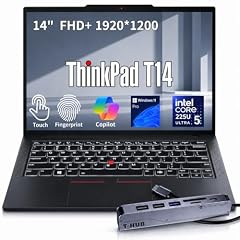
Lenovo ThinkPad T14 Business AI Laptop
- CPU
- Intel Core Ultra 5 225U
- RAM
- 64 GB
- Storage
- 2000 GB
- Screen
- 14 in
- Touchscreen
- Yes
- Weight
- 1.46 kg
- OS
- Windows 11 Pro
$2,149.00 (as of 10/20/2026 15:22 PDT - Details)
It is a mainstream ThinkPad T14 with an Intel Core Ultra 5 225U, a power-efficient U chip, 64GB of memory and 2TB of storage at 1.46 kg. It suits heavy multitasking in office and browser tools more than creative work.
Pros
- 1.46 kg, third lightest in this list
- 2TB of storage and Windows 11 Pro
- 14-inch FHD+ touch screen per the listing
- Core Ultra 5 225U: a U chip Intel classes as power efficient
Cons
- Core Ultra 5, the lowest processor tier among the picks
- No separate graphics card stated by the seller
Good fit if
- Office workers who keep many browser tabs, spreadsheets and calls open
- Companies that standardize on ThinkPads
Skip if
- You render, compile large codebases or run virtual machines all day
- You want a larger screen
Verdict: The 64GB pick for business multitasking rather than heavy compute.
Side by side
| # | Laptop | CPU | GPU | GPU memory | Rentable GPU model | RAM | Storage |
|---|---|---|---|---|---|---|---|
| 1 | Lenovo ThinkPad P16 Gen 3 Intel Core Ultra 9 275HX | Intel Core Ultra 9 275HX | RTX PRO 4000 | not stated | not stated | 64 GB | 4000 GB |
| 2 | Eluktronics HYDROC 16 G2R RTX 5090 Gaming Laptop | Intel Core Ultra 9 290HX | RTX 5090 | 24 GB | not stated | 64 GB | 4000 GB |
| 3 | Lenovo Legion Pro 7i Gen 10 16" Gaming Laptop | Intel Core Ultra 9 275HX | GeForce RTX 5080 | 16 GB | not stated | 64 GB | 2000 GB |
| 4 | Acer Predator Helios Neo 16S AI Gaming Laptop | Intel Core Ultra 9 275HX | GeForce RTX 5070 Ti | 12 GB | not stated | 64 GB | 2000 GB |
| 5 | ASUS ROG Strix G18 G815 Gaming AI Laptop | 18" WUXGA 144Hz | Intel Core i9-14900HX | GeForce RTX 5070 | 8 GB | not stated | 64 GB | 2000 GB |
| 6 | Lenovo LOQ 15.3" AMD Ryzen 7 250 RTX 5060 Gaming Laptop | AMD Ryzen 7 250 | RTX 5060 | 8 GB | not stated | 64 GB | 4000 GB |
| 7 | Dell Alienware 15 AI Gaming Laptop 15.3" WUXGA 165Hz FreeSync AMD 8-core | AMD Ryzen 7 260 | GeForce RTX 5060 | 8 GB | not stated | 64 GB | 2000 GB |
| 8 | HP OMEN HyperX AI Gaming Laptop 15.3" 180Hz IPS WQXGA 64GB/2TBSSD/W11H | Intel Core Ultra 9 | GeForce RTX 5070 | 8 GB | not stated | 64 GB | 2000 GB |
| 9 | HP ZBook Fury 16 G11 Laptop | Intel Core i9-13950HX | RTX 2000 Ada | 8 GB | not stated | 64 GB | 2000 GB |
| 10 | HP ZBook X G1i Laptop | Intel Core Ultra 7 265H | RTX PRO 1000 | 8 GB | not stated | 64 GB | 2000 GB |
| 11 | Lenovo ThinkPad P14s Gen 7 AMD Ryzen AI 9 PRO 470 | AMD Ryzen AI 9 PRO 470 | Radeon 890M | not stated | not stated | 64 GB | 2000 GB |
| 12 | Lenovo ThinkPad P14s Gen 6 Intel Core Ultra 9 285H | Intel Core Ultra 9 285H | not stated | not stated | not stated | 64 GB | 2000 GB |
| 13 | HP OmniBook 7 16" 2K OLED Touchscreen Laptop | Intel Core 9 270H | not stated | not stated | not stated | 64 GB | 1000 GB |
| 14 | Lenovo ThinkPad T14 Business AI Laptop | Intel Core Ultra 5 225U | not stated | not stated | not stated | 64 GB | 2000 GB |
How we picked
How we picked: 79 laptops in our catalogue list 64GB of memory, and we read the specifications of 60 of those listings. We preferred machines from established makers sold new, skipped reseller rebuilds and duplicate configurations of the same model, and dropped listings that do not state which graphics chip they carry. We then kept one strong option for each common reason to buy 64GB: 3D and CAD work, local AI models, video editing, heavy development and virtual machines, and gaming alongside creative work. CPU facts come from Intel and GPU facts from NVIDIA. Prices on this page are live: each one is read from the store listing and shown with the time it was read. Nobody at wikilaptop.org has tested these units; every comparison below is drawn from the stated specifications.
How to choose
Do you actually need 64GB?
64GB of memory helps when your work regularly fills 32GB: long high-resolution video timelines, large 3D scenes or CAD assemblies, big datasets, several virtual machines, large code builds and local AI models. If you do not already run out of 32GB, doubling it will not make the laptop feel faster.
For gaming, office work and everyday creative tasks, the money is usually better spent on the graphics card, screen or storage.
Processor: HX, H or U
Intel's own naming guide calls U chips power efficient, H chips highest performance and HX chips highest performance with all models unlocked. In this list the HX chips (Core Ultra 9 275HX and 290HX, Core i9-14900HX and 13950HX) sit in heavier machines built for plugged-in work; they are not a battery-life choice.
The H chips (Core Ultra 9 285H, Core 9 270H and the Core Ultra 7 in the ZBook X) appear in thinner designs, and the Core Ultra 5 225U in the business pick. Intel lists up to 256GB of supported memory for the Core Ultra 9 275HX and 192GB for the Core i9-14900HX, so 64GB is well within range.
Graphics memory matters as much as system memory
For AI, 3D and video effects, the graphics card's own memory often limits you first. NVIDIA lists 24GB of GDDR7 for the laptop RTX 5090, 16GB for the RTX 5080, 12GB for the RTX 5070 Ti and 8GB for the RTX 5060. In this list the HYDROC 16 has the most graphics memory.
Professional GPUs (RTX PRO and RTX Ada) target certified workstation applications. If your software vendor certifies specific GPUs, check its list before choosing a GeForce model.
Slots or soldered memory
Check whether the memory sits in slots or is soldered to the board. Slotted memory can be replaced or repaired later; soldered memory is fixed for the life of the laptop. The seller's listing rarely says which, so open the maker's spec page for the exact model before you buy.
Weight and screen size
Weight in this list runs from 1.29 kg (ThinkPad P14s Gen 7 AMD) to 3.2 kg (ROG Strix G18). The 14-inch ThinkPads suit people who carry their laptop daily; the 16-inch workstations and gaming machines are the middle ground; the 18-inch ROG Strix G18 works best on a desk. High-power machines also come with larger power adapters, which add to the carried weight.
Questions
Who actually needs a 64GB RAM laptop?
Video editors with long high-resolution timelines, 3D and CAD users, data scientists, developers running several virtual machines or large builds, and people running local AI models. Typical gamers and office users do not need it. Our business pick, the ThinkPad T14, suits people who keep a very large number of applications and tabs open, which is the lightest use case where 64GB still makes sense.
Is 64GB of RAM good for running local AI models?
It lets larger models load into system memory, which helps. Speed still depends heavily on the graphics card and its own memory, since models run fastest when they fit in graphics memory. NVIDIA lists 24GB for the laptop RTX 5090, which the HYDROC 16 in this list carries. Check both numbers before buying for AI work.
Does 64GB of RAM improve gaming performance?
Not in a noticeable way for current games, which depend mainly on the graphics card and processor. Extra memory helps only when you run heavy applications next to the game, such as recording, streaming or editing tools. That is why the gaming picks here pair 64GB with an RTX 5060 or faster GPU, and why we suggest them to people who create as well as play.
Did you test these laptops?
No. Nobody at wikilaptop.org has used these units. We chose them from the specifications stated on each listing, cross-checked with Intel and NVIDIA published data. We do not describe heat, noise, keyboard feel or battery hours, because those claims need testing we have not done. Where a spec is missing, we say it is not stated by the seller.
Why do some picks lack a weight or refresh rate?
The seller did not state it on the listing, and we never guess missing specs. The Legion Pro 7i in this list has no stated weight, and several workstations have no stated refresh rate. Open the maker's spec page for the exact model number if that figure matters to you, and confirm the configuration on the listing before you buy.
Recent updates
- : First published.