
Best 256GB Storage Laptops: 13 Picks for Everyday Work, Compared
Our top pick is the Apple MacBook Neo 13-inch: its A18 Pro chip, 1.23 kg weight and macOS make it the lightest and most complete everyday machine in this list, and Apple sells it with 256GB or 512GB, so the smaller drive is a deliberate choice rather than a leftover. The other 12 picks cover Windows, ChromeOS, business and even one gaming laptop, all with 256GB. We chose them from stated specifications and maker data, not from lab tests.
13 picks from 50 laptops that match this guide with a price we can quote today. Every price below is live and carries the moment it was read.
The picks at a glance
Which one should you buy?
- For a light everyday laptop: The MacBook Neo weighs 1.23 kg, the lightest pick here, and Apple builds it around its A18 Pro chip. See pick 1
- For students who live in the browser: The Acer Chromebook Plus 514 runs ChromeOS with an Intel Core i3-1315U and 8GB of memory, where cloud storage makes 256GB go further. See pick 2
- For business work on a budget of space: The renewed Dell Latitude 5440 brings an Intel Core i7-1365U, 16GB of memory and Windows 11 Pro in a 1.5 kg body. See pick 3
- For light gaming: The Lenovo IdeaPad Gaming 3 is the only pick with a dedicated GPU, an RTX 3050 Ti, and a 120Hz screen. See pick 8
The 13 picks
1 Best overall

Apple 2026 MacBook Neo 13-inch Laptop with A18 Pro chip
- CPU
- Apple A18 Pro
- RAM
- 8 GB
- Storage
- 256 GB
- Screen
- 13 in
- Weight
- 1.23 kg
- OS
- macOS
$699.00 (as of 10/20/2026 15:20 PDT - Details)
It is the lightest pick at 1.23 kg and the only one running macOS. Apple lists the A18 Pro with a 6-core CPU and 5-core GPU and offers the Neo with 256GB or 512GB, so this is the base storage option of a current model. Its 13-inch screen is the smallest here.
Pros
- 1.23 kg, the lightest laptop in this list
- Apple A18 Pro: 6-core CPU and 5-core GPU per Apple
- 13-inch 2408 by 1506 display per Apple
- macOS, the only Mac in this list
Cons
- 8GB of memory, which Apple does not offer in a larger size for this model
- 13-inch screen, the smallest among the picks
Good fit if
- Students and writers who carry their laptop every day
- Mac users who keep photos and files in iCloud or another cloud service
Skip if
- You need Windows-only software
- You want more than 8GB of memory
Verdict: The most portable everyday machine here, built by a maker that sells 256GB as a standard size.
2 Best Chromebook

Acer Chromebook Plus 514 Laptop with Google AI
- CPU
- Intel Core i3-1315U
- RAM
- 8 GB
- Storage
- 256 GB
- Screen
- 14 in
- Weight
- 1.41 kg
- OS
- ChromeOS
$599.99 (as of 10/20/2026 15:20 PDT - Details)
It is the only ChromeOS pick, and ChromeOS leans on cloud storage, which makes 256GB feel roomier than on Windows. It uses an Intel Core i3-1315U with 8GB of memory and a 14-inch touch screen at 1.41 kg. Google sets 8GB of memory and 128GB of storage as the Chromebook Plus floor, and this model doubles that storage.
Pros
- ChromeOS, the only Chromebook in this list
- Intel Core i3-1315U with 8GB of memory
- 14-inch touch screen per the listing title
- 1.41 kg
Cons
- Runs Android and web apps, not Windows desktop software
- 8GB of memory, half the 16GB of six picks
Good fit if
- Students whose schoolwork runs in Google Workspace or the browser
- Households that want a simple shared laptop
Skip if
- You need Windows or macOS software
- You keep large media libraries offline
Verdict: The pick that makes the most of 256GB, because most of its work lives online.
3 Best business pick

Dell Latitude 5440 14" Laptop i7-1365U 16GB Ram 256GB SSD Windows 11 Pro
- CPU
- Intel Core i7-1365U
- RAM
- 16 GB
- Storage
- 256 GB
- Screen
- 14 in
- Weight
- 1.5 kg
- OS
- Windows 11 Pro
It is a renewed Dell Latitude 5440 with an Intel Core i7-1365U, 16GB of memory and Windows 11 Pro at 1.5 kg. We included one renewed unit because no new laptop in this pool pairs a business line, an i7 processor and Windows 11 Pro at 256GB. Confirm the renewal terms and warranty before buying.
Pros
- Intel Core i7-1365U with 16GB of memory
- Windows 11 Pro
- 14-inch screen at 1.5 kg
Cons
- Renewed, not new: check the seller's warranty and battery condition
- Battery size not stated by the seller
Good fit if
- Small offices that want a business-line laptop with Windows 11 Pro
- Users who work in company cloud storage
Skip if
- You want a new unit with the maker's full warranty
- You store large files locally
Verdict: A business-class laptop at 256GB, with the renewed caveat stated plainly.
4 Best 15.6-inch Windows pick

HP 2026 Edition Business Laptop
- CPU
- AMD Ryzen 7 7730U
- RAM
- 16 GB
- Storage
- 256 GB
- Screen
- 15.6 in
- Touchscreen
- Yes
- Weight
- 1.7 kg
- OS
- Windows 11
$699.99 (as of 10/20/2026 15:21 PDT - Details)
It pairs an AMD Ryzen 7 7730U, which the listing title describes as 8 cores and 16 threads, with 16GB of memory and a 15.6-inch touch screen at 1.7 kg.
Pros
- AMD Ryzen 7 7730U, 8 cores and 16 threads per the listing title
- 16GB of memory
- 15.6-inch FHD touch screen
- 1.7 kg
Cons
- Operating system stated as Windows 11 without the edition
- Battery size not stated by the seller
Good fit if
- Home and office users who keep many browser tabs and apps open
- Buyers who want a large touch screen
Skip if
- You want the lightest possible laptop
- You need a dedicated GPU
Verdict: A well-balanced 15.6-inch Windows laptop for everyday multitasking.
5 Best Intel Core 7 pick

HP 15.6" FHD Touchscreen Business Laptop
- CPU
- Intel Core 7 150U
- RAM
- 8 GB
- Storage
- 256 GB
- Screen
- 15.6 in
- Touchscreen
- Yes
- Weight
- 1.66 kg
- OS
- Windows 11 Pro
$999.99 (as of 10/20/2026 15:21 PDT - Details)
It uses an Intel Core 7 150U, a current mainstream chip, with Windows 11 Pro and a 15.6-inch FHD touch screen at 1.66 kg. Its 8GB of memory is its weak spot next to the 16GB HP with the Ryzen 7 7730U.
Pros
- Intel Core 7 150U
- Windows 11 Pro
- 15.6-inch FHD touch screen
- 1.66 kg
Cons
- 8GB of memory, half the 16GB of six picks
- Battery size not stated by the seller
Good fit if
- Office users who need Windows 11 Pro features
- Buyers who work mostly in office apps and the browser
Skip if
- You run many apps at once and want 16GB
- You need local space for media
Verdict: A current Intel business laptop that would be stronger with more memory.
6 Best 16-inch pick
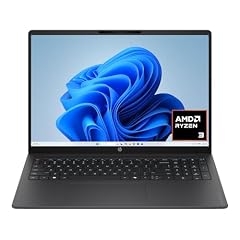
HP OmniBook 3 16 inch Laptop PC
- GPU
- Radeon 610M
- RAM
- 8 GB
- Storage
- 256 GB
- Screen
- 16 in
- Touchscreen
- Yes
- Weight
- 1.64 kg
- OS
- Windows 11 Home
$649.99 (as of 10/20/2026 15:21 PDT - Details)
It is the only 16-inch pick, with a 2K touch screen per the listing title, at 1.64 kg. It runs an AMD Ryzen 3 chip per the title with Radeon 610M graphics and 8GB of memory, so it suits documents and browsing on a large screen.
Pros
- 16-inch 2K touch screen per the listing title
- 1.64 kg, lighter than every 15.6-inch pick that states a weight
- Windows 11 Home
Cons
- Processor model not stated in the specifications
- 8GB of memory
- Radeon 610M integrated graphics
Good fit if
- Home users who want a large, sharp screen for documents and video
- Students who write and research on a big display
Skip if
- You need strong processing power
- You want 16GB of memory
Verdict: A large-screen everyday laptop for light work.
7 Largest screen

HP 17.3" Large Screen Laptop
- RAM
- 16 GB
- Storage
- 256 GB
- Screen
- 17.3 in
- Weight
- 2.09 kg
- OS
- Windows 11
$649.99 (as of 10/20/2026 15:21 PDT - Details)
Its 17.3-inch screen is the largest in this list, and it comes with 16GB of memory and a full-size keyboard per the listing title. At 2.09 kg it is also the heaviest pick, so it suits a desk more than a bag.
Pros
- 17.3-inch screen, the largest in this list
- 16GB of memory
- Full-size keyboard per the listing title
Cons
- 2.09 kg, the heaviest pick
- Processor model not stated in the specifications (the title says Intel Core 5)
Good fit if
- Home offices that want a large screen without a monitor
- Users who value a numeric keypad for spreadsheets
Skip if
- You carry your laptop daily
- You need a precisely stated processor
Verdict: The big-screen desk laptop of this list.
8 Only dedicated GPU

Lenovo IdeaPad Gaming 3 Laptop
- CPU
- AMD Ryzen 5 5600H
- GPU
- RTX 3050 Ti
- RAM
- 8 GB
- Storage
- 256 GB
- Refresh
- 120 Hz
- Battery
- 45 Wh
- OS
- Windows 11
$827.00 (as of 10/20/2026 15:21 PDT - Details)
It is the only pick with a dedicated graphics chip, an RTX 3050 Ti, which NVIDIA lists with 4GB of GDDR6 on its Ampere architecture, plus a 120Hz 15.6-inch screen per the title. 256GB fills fast with games, so plan on an external or second drive.
Pros
- RTX 3050 Ti: 4GB of GDDR6 per NVIDIA
- 120Hz screen, the only refresh rate stated among the picks
- AMD Ryzen 5 5600H
- 45Wh battery stated
Cons
- 256GB holds few modern games
- 8GB of memory
- Previous-generation RTX 30-series GPU; weight not stated by the seller
Good fit if
- Players of esports and older titles
- Students who want light gaming next to schoolwork
Skip if
- You play new releases at high settings
- You want to install many games at once
Verdict: A light-gaming option that needs more storage to be comfortable.
9 Best AMD HS-series pick

Lenovo Gaming Laptop
- CPU
- AMD Ryzen 5 7535HS
- GPU
- Radeon 660M
- RAM
- 8 GB
- Storage
- 256 GB
- Screen
- 15 in
- OS
- Windows 11 Home
$579.99 (as of 10/20/2026 15:21 PDT - Details)
It uses an AMD Ryzen 5 7535HS, a 6-core chip per the listing title, with Radeon 660M integrated graphics and 8GB of memory on a 15-inch screen. Despite the word gaming in its title, it has no dedicated GPU.
Pros
- AMD Ryzen 5 7535HS, 6 cores per the listing title
- Radeon 660M integrated graphics
- Windows 11 Home
Cons
- No dedicated GPU despite the gaming label
- 8GB of memory
- Weight not stated by the seller
Good fit if
- Users who want an AMD HS-series processor
- Casual players of light games
Skip if
- You want real gaming performance: the IdeaPad Gaming 3 has an RTX 3050 Ti
- You need a known weight for travel
Verdict: A capable everyday processor in a listing that oversells its gaming side.
10 Most basic light laptop

ASUS Vivobook 14" FHD Laptop
- CPU
- Intel Celeron N5030
- RAM
- 4 GB
- Storage
- 256 GB
- Screen
- 14 in
- Weight
- 1.3 kg
$309.99 (as of 10/20/2026 15:20 PDT - Details)
At 1.3 kg it is the second lightest pick, behind the MacBook Neo. It uses an Intel Celeron N4500 with 4GB of memory, the least in this list, so it fits browsing, email and documents only.
Pros
- 1.3 kg, second lightest pick
- 14-inch FHD screen
- Cloud storage offer per the listing title
Cons
- 4GB of memory, the least in this list and the Windows 11 minimum per Microsoft
- Intel Celeron N4500, an entry processor
Good fit if
- Buyers who need email, browsing and documents only
- A second laptop for travel
Skip if
- You keep many tabs open
- You plan to use the laptop for several years
Verdict: Light and basic; buy it only for simple tasks.
11 Small-maker AMD pick

NIMO 15.6" IPS FHD-Light Gaming-Laptop
- CPU
- AMD Ryzen 5 6600H
- GPU
- Radeon 660M
- RAM
- 16 GB
- Storage
- 256 GB
- Screen
- 15.6 in
- Weight
- 1.7 kg
- Battery
- 53.58 Wh
NIMO is a smaller maker, and this model pairs an AMD Ryzen 5 6600H with 16GB of memory, Radeon 660M graphics and a stated 53.58Wh battery at 1.7 kg. Check NIMO's warranty terms and support channel before buying.
Pros
- AMD Ryzen 5 6600H with 16GB of memory
- 53.58Wh battery stated
- 1.7 kg
Cons
- Operating system not stated in the specifications
- Smaller maker: confirm warranty and support
Good fit if
- Buyers who want 16GB and an H-class processor
- Users who check warranty terms before buying
Skip if
- You prefer an established maker's support network
- You need a dedicated GPU despite the listing's light-gaming label
Verdict: A solid spec sheet from a smaller brand; check the support terms.
12 Small-maker Intel pick

NIMO 15.6" IPS FHD-Business-Laptop
- CPU
- Intel Core i3-1215U
- RAM
- 16 GB
- Storage
- 256 GB
- Screen
- 15.6 in
- Weight
- 1.72 kg
- OS
- Windows 11
$649.99 (as of 10/20/2026 15:22 PDT - Details)
It uses an Intel Core i3-1215U, a 6-core chip per the listing title, with 16GB of memory and Windows 11 on a 15.6-inch screen at 1.72 kg. It is a different model from the other NIMO pick, with an Intel chip instead of AMD.
Pros
- Intel Core i3-1215U with 16GB of memory
- Windows 11
- 15.6-inch FHD IPS screen per the listing title
Cons
- 1.72 kg, the heaviest 15.6-inch pick that states a weight
- Smaller maker: confirm warranty and support
Good fit if
- Office users who want 16GB of memory
- Buyers who prefer an Intel processor
Skip if
- You prefer an established maker's support network
- You carry your laptop daily
Verdict: A 16GB office laptop from a smaller brand.
13 Best Intel N150 pick

15.6" Student Laptops Computer 2026 Office 365 Intel CPU 16GB RAM 256GB
- CPU
- Intel N150
- RAM
- 16 GB
- Storage
- 256 GB
- Screen
- 15.6 in
- Weight
- 1.7 kg
- OS
- Windows 11 Home
This Blackview laptop pairs the efficient Intel N150 with 16GB of memory, double the 8GB of the MacBook Neo and the Chromebook, and Windows 11 Home at 1.7 kg. It suits schoolwork and office apps.
Pros
- 16GB of memory with an Intel N150
- Windows 11 Home
- 15.6-inch screen
Cons
- Intel N150, an entry processor
- Battery size not stated by the seller
Good fit if
- Students who work in office apps and the browser
- Families that want a simple shared laptop
Skip if
- You edit photos or video
- You want a known battery capacity
Verdict: An entry laptop with more memory than most at its level.
Side by side
| # | Laptop | CPU | GPU | GPU memory | Rentable GPU model | RAM | Storage |
|---|---|---|---|---|---|---|---|
| 1 | Apple 2026 MacBook Neo 13-inch Laptop with A18 Pro chip | Apple A18 Pro | not stated | not stated | not stated | 8 GB | 256 GB |
| 2 | Acer Chromebook Plus 514 Laptop with Google AI | Intel Core i3-1315U | not stated | not stated | not stated | 8 GB | 256 GB |
| 3 | Dell Latitude 5440 14" Laptop i7-1365U 16GB Ram 256GB SSD Windows 11 Pro | Intel Core i7-1365U | not stated | not stated | not stated | 16 GB | 256 GB |
| 4 | HP 2026 Edition Business Laptop | AMD Ryzen 7 7730U | not stated | not stated | not stated | 16 GB | 256 GB |
| 5 | HP 15.6" FHD Touchscreen Business Laptop | Intel Core 7 150U | not stated | not stated | not stated | 8 GB | 256 GB |
| 6 | HP OmniBook 3 16 inch Laptop PC | not stated | Radeon 610M | not stated | not stated | 8 GB | 256 GB |
| 7 | HP 17.3" Large Screen Laptop | not stated | not stated | not stated | not stated | 16 GB | 256 GB |
| 8 | Lenovo IdeaPad Gaming 3 Laptop | AMD Ryzen 5 5600H | RTX 3050 Ti | not stated | not stated | 8 GB | 256 GB |
| 9 | Lenovo Gaming Laptop | AMD Ryzen 5 7535HS | Radeon 660M | not stated | not stated | 8 GB | 256 GB |
| 10 | ASUS Vivobook 14" FHD Laptop | Intel Celeron N5030 | not stated | not stated | not stated | 4 GB | 256 GB |
| 11 | NIMO 15.6" IPS FHD-Light Gaming-Laptop | AMD Ryzen 5 6600H | Radeon 660M | not stated | not stated | 16 GB | 256 GB |
| 12 | NIMO 15.6" IPS FHD-Business-Laptop | Intel Core i3-1215U | not stated | not stated | not stated | 16 GB | 256 GB |
| 13 | 15.6" Student Laptops Computer 2026 Office 365 Intel CPU 16GB RAM 256GB | Intel N150 | not stated | not stated | not stated | 16 GB | 256 GB |
How we picked
How we picked: the catalogue data we worked from holds 35 laptops that state 256GB of storage. We dropped a listing whose 256GB is really 128GB of internal storage plus a 128GB memory card, a renewed unit sold with low battery health, and a listing whose title describes its processor inconsistently with its specifications. We then preferred established makers and new units, kept one renewed business laptop because no new laptop in the pool pairs a business line, an Intel Core i7 and Windows 11 Pro, and chose picks across operating systems, screen sizes and processor classes. Prices on this page are live: each one is read from the store listing and shown with the time it was read. Nobody at wikilaptop.org has tested these units; every comparison below is drawn from the stated specifications.
How to choose
Who 256GB suits
256GB covers the operating system, office apps, a browser and a modest set of documents and photos. It suits students, home users and anyone whose files live in the cloud. It does not suit gamers, video editors or anyone with a large local media library, because the drive fills quickly as big apps and updates arrive.
Microsoft lists 64GB of storage as the minimum to install Windows 11 and notes that updates and some features need more over time, so part of a 256GB drive is always taken by the system.
Match the operating system to the drive
ChromeOS and macOS are built around cloud storage. Google sets 128GB of storage and 8GB of memory as the floor for a Chromebook Plus, so the Acer Chromebook Plus 514 has twice the storage floor. Apple sells the MacBook Neo with 256GB or 512GB. On Windows, 256GB is workable if you keep documents in OneDrive or another cloud service.
Memory matters more than a little extra storage
Memory in this list runs from 4GB to 16GB: six picks have 16GB, six have 8GB and one has 4GB. Microsoft's minimum for Windows 11 is 4GB. For daily comfort with many browser tabs and apps, 16GB gives more headroom than 8GB, and more than extra storage would.
Processor classes in this list
The picks span entry chips (Intel Celeron N4500, Intel N150), mainstream U-series chips (Intel Core i3-1215U, Core 7 150U, Core i7-1365U, AMD Ryzen 7 7730U), AMD H and HS-series chips (Ryzen 5 6600H, 7535HS and 5600H) and Apple's A18 Pro. Entry chips suit browsing and documents; U-series chips handle office multitasking; H and HS-series chips are built for more sustained power for heavier apps.
Plan for more space
Check whether the drive can be replaced or whether there is a spare slot; the maker's spec sheet or manual says so. Otherwise, an external drive or cloud storage keeps photos and video off the internal drive. If you know you will store games or video locally, choose a 512GB or larger laptop from the start.
Questions
Is 256GB enough for a laptop?
For browsing, office work, schoolwork and streaming, yes, especially if you use cloud storage. Microsoft lists 64GB as the minimum to install Windows 11, and updates take more over time, so plan on part of the drive being used by the system. For games, video editing or large photo libraries, choose 512GB or more.
Can I upgrade a 256GB laptop later?
Often, but not always. Many laptops use a replaceable SSD, while some entry-level and thin models have storage fixed to the board. Check the maker's specifications or service manual before you rely on an upgrade. An external drive is the fallback that works with every pick here.
Is a Chromebook with 256GB better than a Windows laptop with 256GB?
For storage alone, the Chromebook stretches further, because ChromeOS keeps most files and apps in the cloud. Google's Chromebook Plus floor is 128GB, so 256GB is roomy there. A Windows laptop runs more desktop software, but its system files and updates take a larger share of the same drive.
What matters more than storage at this level?
Memory, the processor and the screen. In this list, memory runs from 4GB to 16GB and processors from entry Intel Celeron chips to AMD H and HS-series chips. A laptop with 16GB of memory and a mainstream processor will feel quicker in daily use than one with more storage and less memory.
Did you test these laptops?
No. Nobody at wikilaptop.org has used these units. We chose them from the specifications stated on each listing, cross-checked with Apple, NVIDIA, Microsoft and Google published data. We do not describe speed, keyboard feel or build quality from our own use, because those claims need testing we have not done.
Recent updates
- : First published.