
Best 16 Inch Laptops in 2026: 13 Picks Compared on Specs
Our top pick is the Acer Predator Helios Neo 16S AI: it pairs an RTX 5070 Ti with 12GB of graphics memory, 64GB of system memory, 2TB of storage and a 240Hz screen at 2.3 kg. For macOS work, the MacBook Pro 16 with M5 Max and 128GB of memory leads, and for everyday carrying the 1.6 kg Acer Swift 16 AI does. The other 10 picks cover workstation, business and entry gaming needs. We chose all 13 from stated specifications and makers' published data, not from lab tests.
13 picks from 215 laptops that match this guide with a price we can quote today. Every price below is live and carries the moment it was read.
The picks at a glance
Which one should you buy?
- For gaming and heavy work on one machine: The Helios Neo 16S AI brings an RTX 5070 Ti, 64GB of memory and a 240Hz screen without going past 2.3 kg. See pick 1
- For video and photo work on macOS: The MacBook Pro 16 with M5 Max has 128GB of unified memory, the most in this list, and a 40-core GPU per Apple. See pick 3
- For a big screen you still carry: The Swift 16 AI weighs 1.6 kg, the lightest pick here, with a touchscreen and 32GB of memory. See pick 5
- For office fleets and business use: The Dell Pro 16 pairs a 2K anti-glare screen with 32GB of memory and Windows 11 Pro. See pick 7
The 13 picks
1 Best overall

Acer Predator Helios Neo 16S AI Gaming Laptop
- CPU
- Intel Core Ultra 9 275HX
- GPU
- GeForce RTX 5070 Ti
- GPU memory
- 12 GB
- RAM
- 64 GB
- Storage
- 2000 GB
- Screen
- 16 in
- Refresh
- 240 Hz
- Weight
- 2.3 kg
It combines an RTX 5070 Ti, which NVIDIA lists with 12GB of GDDR7, with 64GB of memory and 2TB of storage, the most memory of any Windows pick. The 240Hz screen and Core Ultra 9 275HX (24 cores per Intel) suit gaming and heavy creative work, and 2.3 kg is light for this class.
Pros
- RTX 5070 Ti with 12GB of graphics memory
- 64GB of memory, the most among the Windows picks
- 16-inch screen at 240Hz
- Core Ultra 9 275HX: 24 cores per Intel
Cons
- HX processor is a high-power chip built for plugged-in use
- 2.3 kg, heavier than every everyday pick
Good fit if
- Players who also edit video or stream
- Buyers who want one 16-inch machine for both work and play
Skip if
- You mainly work on battery away from a desk
- You work in macOS
Verdict: The most complete 16-inch laptop in this list for mixed gaming and creative work.
2 Only RTX 5080 pick

ASUS ROG Strix G16
- CPU
- Intel Core Ultra 9 290HX
- GPU
- GeForce RTX 5080
- RAM
- 32 GB
- Screen
- 16 in
- Refresh
- 300 Hz
- Weight
- 1.76 kg
- OS
- Windows 11 Home
$3,899.99 (as of 10/20/2026 15:20 PDT - Details)
It is the only pick with an RTX 5080, which NVIDIA lists with 16GB of GDDR7, paired with an Intel Core Ultra 9 290HX Plus. Its listing has inconsistencies worth checking before you buy, noted below.
Pros
- RTX 5080: 16GB of GDDR7 per NVIDIA, the most graphics memory here
- ROG Nebula HDR 2.5K screen per the listing
- 32GB of memory
Cons
- The listing title says 240Hz while the specifications say 300Hz; confirm on ASUS's page
- The stated 1.76 kg is well below the 2.5 to 2.65 kg of the other Strix G16 listings we reviewed; confirm it
- Storage not stated by the seller
Good fit if
- Players who want the highest GPU tier in a 16-inch body
- Creators who need 16GB of graphics memory for GPU rendering
Skip if
- You do not want to verify a listing before buying
- An RTX 5070 Ti already covers your games
Verdict: The top GPU tier in this list, once you confirm the configuration.
3 Best for macOS creative work

(CTO) Apple 16-inch MacBook Pro
- CPU
- Apple M5 Max
- RAM
- 128 GB
- Storage
- 2000 GB
- Screen
- 16 in
$6,911.00 (as of 10/20/2026 15:20 PDT - Details)
Apple lists the M5 Max with an 18-core CPU and a 40-core GPU, and this configuration has 128GB of unified memory, the most in this list, plus 2TB of storage. Apple states a 16.2-inch 3456 x 2234 display with refresh rates up to 120Hz and a 100Wh battery.
Pros
- 128GB of unified memory, the most in this list
- M5 Max: 18-core CPU and 40-core GPU per Apple
- 16.2-inch 3456 x 2234 display up to 120Hz per Apple
- 100Wh battery per Apple
Cons
- Memory cannot be added later, so the configuration you buy is final
- Runs macOS, so Windows-only apps and many games are out
Good fit if
- Video editors and 3D artists working in macOS apps
- Developers who run large local AI models in unified memory
Skip if
- You rely on Windows-only software
- Your work never needs more than 32GB
Verdict: The memory-heavy creative workstation of this list.
4 Best OLED everyday pick
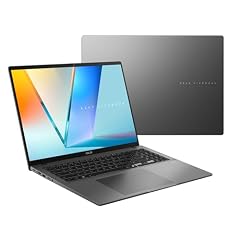
ASUS Vivobook S16 Laptop
- CPU
- AMD Ryzen AI 9 465
- RAM
- 32 GB
- Storage
- 1000 GB
- Screen
- 16 in
- Weight
- 1.7 kg
- Battery
- 70 Wh
- OS
- Windows 11 Home
$1,664.19 (as of 10/20/2026 15:20 PDT - Details)
It is the only pick with an OLED screen, a 16-inch WUXGA panel per the listing, paired with an AMD Ryzen AI 9 465, 32GB of memory and 1TB of storage. At 1.7 kg with a stated 70Wh battery, it is built for carrying.
Pros
- 16-inch WUXGA OLED screen, the only OLED in this list
- 1.7 kg, second lightest pick
- 70Wh battery stated
- 32GB of memory and 1TB of storage
Cons
- Integrated graphics only
- WUXGA resolution, below the 2K and 2.5K picks
Good fit if
- Students and office users who watch a lot of video
- Buyers who want deep blacks without a heavy machine
Skip if
- You want to play current games
- You need a touchscreen
Verdict: A light, OLED-screened 16-inch for daily use.
5 Lightest pick

Acer Swift 16 AI Laptop 16" WUXGA 120Hz Touchscreen
- CPU
- AMD Ryzen AI 9 465
- GPU
- Radeon 880M
- RAM
- 32 GB
- Storage
- 1000 GB
- Screen
- 16 in
- Refresh
- 120 Hz
- Touchscreen
- Yes
- Weight
- 1.6 kg
$1,241.49 (as of 10/20/2026 15:20 PDT - Details)
At 1.6 kg it is the lightest laptop in this list. It has a 120Hz WUXGA touchscreen listed with 100% sRGB, an AMD Ryzen AI 9 465 with Radeon 880M graphics, 32GB of memory and 1TB of storage.
Pros
- 1.6 kg, the lightest in this list
- 120Hz WUXGA touchscreen, 100% sRGB per the listing
- 32GB of memory and 1TB of storage
- Ryzen AI 9 465: 10 cores per the listing
Cons
- Integrated Radeon 880M graphics only
- Battery size not stated by the seller
Good fit if
- Commuters who want a 16-inch screen
- Students who take notes on a touchscreen
Skip if
- You play demanding games
- You want an OLED screen: the Vivobook S16 has one
Verdict: The easiest 16-inch pick to carry.
6 Best Intel everyday pick

Dell 16 Plus Laptop DB16250 Intel Core Ultra 7 258V 32GB LPDDR5X 2TB SSD
- CPU
- Intel Core Ultra 7 258V
- RAM
- 32 GB
- Storage
- 2000 GB
- Screen
- 16 in
- Weight
- 1.87 kg
- OS
- Windows 11 Pro
$1,599.99 (as of 10/20/2026 15:20 PDT - Details)
It uses an Intel Core Ultra 7 258V, which Intel lists with 8 cores, a 17W base power and an NPU that reaches 47 TOPS. This configuration pairs it with 32GB of memory, 2TB of storage and a touchscreen at 1.87 kg.
Pros
- Core Ultra 7 258V: 8 cores and a 47 TOPS NPU per Intel
- 2TB of storage
- Touchscreen
- 1.87 kg
Cons
- Intel lists 32GB as the maximum memory for this chip, so no upgrade path
- Integrated graphics only
Good fit if
- Office users who want a low-power Intel chip
- Buyers with large local file libraries
Skip if
- You need more than 32GB of memory
- You want a dedicated GPU
Verdict: A low-power Intel touchscreen laptop with plenty of storage.
7 Best for business

Dell Pro 16 PC16250 Business Laptop
- CPU
- Intel Core 5 120U
- RAM
- 32 GB
- Storage
- 1000 GB
- Screen
- 16 in
- OS
- Windows 11 Pro
$1,229.99 (as of 10/20/2026 15:21 PDT - Details)
The listing presents it as a business laptop, with a 2K IPS anti-glare screen, Windows 11 Pro, 32GB of memory and 1TB of storage. The Core 5 120U is a 10-core chip per the listing, aimed at office work rather than heavy rendering.
Pros
- 16-inch 2K IPS anti-glare screen per the listing
- Windows 11 Pro
- 32GB of memory and 1TB of storage
Cons
- Weight and battery size not stated by the seller
- Core 5 120U is a low-power chip, a step below the Core Ultra and Ryzen AI picks
Good fit if
- Small offices that want Windows 11 Pro out of the box
- Users who work in bright rooms and want an anti-glare screen
Skip if
- You edit video or run heavy creative apps
- You need to know the weight before buying
Verdict: A straightforward business 16-inch with room for multitasking.
8 Best mobile workstation

Dell Precision 7680 Laptop
- CPU
- Intel Core i7-13850HX
- GPU
- RTX 2000 Ada
- GPU memory
- 8 GB
- RAM
- 32 GB
- Storage
- 1000 GB
- Screen
- 16 in
- Weight
- 2.68 kg
- OS
- Windows 11 Pro
$2,599.99 (as of 10/20/2026 15:21 PDT - Details)
It is the only pick with a professional NVIDIA RTX 2000 Ada GPU (8GB), which targets CAD and design apps that certify workstation graphics. It pairs it with an Intel Core i7-13850HX and 32GB of memory.
Pros
- NVIDIA RTX 2000 Ada professional GPU with 8GB
- Core i7-13850HX processor
- 32GB of memory and 1TB of storage
- Windows 11 Pro
Cons
- 2.68 kg, the heaviest pick
- HX processor built for plugged-in use
- Screen resolution and refresh not stated by the seller
Good fit if
- Engineers running CAD software that lists workstation GPUs
- IT buyers standardizing on Dell Precision
Skip if
- You mainly game: GeForce picks give more for play
- You carry your laptop every day
Verdict: The workstation choice for certified professional apps.
9 Only AMD Radeon GPU pick

ASUS TUF Gaming A16 Laptop 16" WUXGA 165Hz 100% sRGB AMD 8-core Ryzen 7
- CPU
- AMD Ryzen 7 7735HS
- GPU
- Radeon RX 7700S
- GPU memory
- 8 GB
- RAM
- 32 GB
- Storage
- 1000 GB
- Screen
- 16 in
- Refresh
- 165 Hz
- Weight
- 2.2 kg
$1,659.00 (as of 10/20/2026 15:20 PDT - Details)
It is the only pick with an AMD graphics chip, a Radeon RX 7700S with 8GB, next to 32GB of memory and a 16-inch 165Hz screen listed with 100% sRGB. It weighs 2.2 kg.
Pros
- Radeon RX 7700S with 8GB of graphics memory
- 165Hz WUXGA screen, 100% sRGB per the listing
- 32GB of memory and 1TB of storage
Cons
- No NVIDIA DLSS support, since that is an NVIDIA feature
- Ryzen 7 7735HS rather than a current Ryzen AI or Core Ultra chip
Good fit if
- Buyers who prefer AMD graphics
- Players who want an accurate sRGB screen
Skip if
- You rely on DLSS in supported games
- You want the newest processor generation
Verdict: The AMD graphics alternative among the 16-inch gaming picks.
10 Best RTX 5060 pick
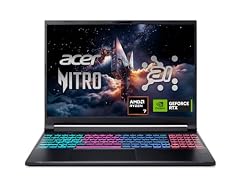
Acer Nitro V 16S AI Gaming Laptop
- CPU
- AMD Ryzen 7 260
- GPU
- GeForce RTX 5060 Laptop
- RAM
- 32 GB
- Storage
- 1000 GB
- Screen
- 16 in
- Refresh
- 180 Hz
- Weight
- 2.1 kg
$1,505.94 (as of 10/20/2026 15:20 PDT - Details)
It carries an RTX 5060, which NVIDIA lists with 8GB of GDDR7, with a 180Hz screen, the fastest among the mid-tier picks. It adds 32GB of memory and 1TB of storage at 2.1 kg.
Pros
- RTX 5060: 8GB of GDDR7 per NVIDIA
- 180Hz 16-inch screen
- 32GB of memory and 1TB of storage
- 2.1 kg
Cons
- Operating system not stated by the seller
- 8GB of graphics memory limits top texture settings in some newer games
Good fit if
- Players who run esports and 1080p-class settings
- Students who game and study on one machine
Skip if
- You want 1440p at high settings
- You want the lightest gaming pick
Verdict: A well-rounded mid-tier 16-inch gaming laptop.
11 Largest stated battery

ASUS TUF F16 Gaming Laptop RTX 5050 115W
- CPU
- Intel Core i5-13450HX
- GPU
- RTX 5050
- RAM
- 32 GB
- Storage
- 2000 GB
- Screen
- 16 in
- Refresh
- 165 Hz
- Weight
- 2.18 kg
- Battery
- 90 Wh
$1,699.99 (as of 10/20/2026 15:20 PDT - Details)
Its 90Wh battery is the largest any seller states in this list (Apple lists 100Wh for the MacBook Pro on its own page). It pairs an RTX 5050, listed at 115W, with 32GB of memory and 2TB of storage, and the listing names a MUX switch and G-SYNC.
Pros
- 90Wh battery stated
- 32GB of memory and 2TB of storage
- 165Hz WUXGA screen, 100% sRGB per the listing
- MUX switch and G-SYNC named in the listing
Cons
- RTX 5050, the entry tier of NVIDIA's RTX 50 laptop range
- Core i5-13450HX is a 13th-gen chip
Good fit if
- First-time gaming laptop buyers
- Players with a large game library who want 2TB
Skip if
- You want high settings in demanding new games
- You want the newest processor generation
Verdict: An entry gaming pick with generous memory, storage and battery capacity.
12 Lightest RTX 5070 pick

ASUS V16 16" WUXGA 144Hz Gaming Laptop
- CPU
- Intel Core 7 240H
- GPU
- RTX 5070
- RAM
- 16 GB
- Storage
- 1000 GB
- Screen
- 16 in
- Refresh
- 144 Hz
- Weight
- 1.95 kg
- OS
- Windows 11
$1,549.49 (as of 10/20/2026 15:20 PDT - Details)
At 1.95 kg it carries an RTX 5070, making it the lightest dedicated-GPU pick here apart from the Strix G16 2026, whose stated weight we flag for confirmation. It uses an Intel Core 7 240H with 16GB of memory and 1TB of storage.
Pros
- RTX 5070 at 1.95 kg
- 144Hz WUXGA screen
- 1TB of storage
Cons
- 16GB of memory, among the least in this list
- 144Hz refresh, the lowest of the gaming picks
Good fit if
- Players who carry their laptop to class or work
- Buyers who want a mid-tier GPU without a heavy chassis
Skip if
- You multitask heavily and want 32GB
- You want a 240Hz screen
Verdict: A lighter route to RTX 5070 graphics.
13 Best 2K touchscreen for home use

Dell 16 Laptop DC16251-16.0-inch 16
- CPU
- Intel Core 7 150U
- RAM
- 16 GB
- Storage
- 1000 GB
- Screen
- 16 in
- Touchscreen
- Yes
- Weight
- 1.9 kg
- OS
- Windows 11 Home
$1,079.86 (as of 10/20/2026 15:20 PDT - Details)
It pairs a 16-inch 16:10 2K touchscreen with an Intel Core 7 150U, 16GB of memory and 1TB of storage at 1.9 kg. It is a simpler alternative to the Dell 16 Plus for home and study.
Pros
- 16-inch 16:10 2K touchscreen per the listing
- 1TB of storage
- 1.9 kg
Cons
- 16GB of memory, among the least in this list
- Battery size not stated by the seller
Good fit if
- Home users who want a sharp, large touchscreen
- Students doing documents and research
Skip if
- You run heavy creative apps
- You want the lightest 16-inch: the Swift 16 AI is 1.6 kg
Verdict: A sensible home 16-inch with a sharp touchscreen.
Side by side
| # | Laptop | CPU | GPU | GPU memory | Rentable GPU model | RAM | Storage |
|---|---|---|---|---|---|---|---|
| 1 | Acer Predator Helios Neo 16S AI Gaming Laptop | Intel Core Ultra 9 275HX | GeForce RTX 5070 Ti | 12 GB | not stated | 64 GB | 2000 GB |
| 2 | ASUS ROG Strix G16 | Intel Core Ultra 9 290HX | GeForce RTX 5080 | not stated | not stated | 32 GB | not stated |
| 3 | (CTO) Apple 16-inch MacBook Pro | Apple M5 Max | not stated | not stated | not stated | 128 GB | 2000 GB |
| 4 | ASUS Vivobook S16 Laptop | AMD Ryzen AI 9 465 | not stated | not stated | not stated | 32 GB | 1000 GB |
| 5 | Acer Swift 16 AI Laptop 16" WUXGA 120Hz Touchscreen | AMD Ryzen AI 9 465 | Radeon 880M | not stated | not stated | 32 GB | 1000 GB |
| 6 | Dell 16 Plus Laptop DB16250 Intel Core Ultra 7 258V 32GB LPDDR5X 2TB SSD | Intel Core Ultra 7 258V | not stated | not stated | not stated | 32 GB | 2000 GB |
| 7 | Dell Pro 16 PC16250 Business Laptop | Intel Core 5 120U | not stated | not stated | not stated | 32 GB | 1000 GB |
| 8 | Dell Precision 7680 Laptop | Intel Core i7-13850HX | RTX 2000 Ada | 8 GB | not stated | 32 GB | 1000 GB |
| 9 | ASUS TUF Gaming A16 Laptop 16" WUXGA 165Hz 100% sRGB AMD 8-core Ryzen 7 | AMD Ryzen 7 7735HS | Radeon RX 7700S | 8 GB | not stated | 32 GB | 1000 GB |
| 10 | Acer Nitro V 16S AI Gaming Laptop | AMD Ryzen 7 260 | GeForce RTX 5060 Laptop | not stated | not stated | 32 GB | 1000 GB |
| 11 | ASUS TUF F16 Gaming Laptop RTX 5050 115W | Intel Core i5-13450HX | RTX 5050 | not stated | not stated | 32 GB | 2000 GB |
| 12 | ASUS V16 16" WUXGA 144Hz Gaming Laptop | Intel Core 7 240H | RTX 5070 | not stated | not stated | 16 GB | 1000 GB |
| 13 | Dell 16 Laptop DC16251-16.0-inch 16 | Intel Core 7 150U | not stated | not stated | not stated | 16 GB | 1000 GB |
How we picked
How we picked: 198 laptops in our catalogue list a 16-inch screen, and we reviewed 60 of those listings in detail. We preferred established makers (Acer, Apple, ASUS, Dell) sold new, skipped reseller rebuilds, and kept one configuration per model where several listings differ only in memory or storage. We then kept one strong option per need: all-round gaming, top GPU tier, macOS creative work, light everyday use, business, mobile workstation and entry gaming. GPU facts come from NVIDIA, processor facts from Intel and MacBook Pro facts from Apple. Prices on this page are live: each is read from the store listing and shown with the time it was read. Nobody at wikilaptop.org has tested these units; every comparison below is drawn from the stated specifications.
How to choose
Decide first: performance or portability
The 16-inch size now covers two very different kinds of laptop. Performance models (gaming laptops and mobile workstations) mostly weigh 2.1 kg to 2.68 kg in this list (the ASUS V16 lists 1.95 kg) and often use Intel or AMD HX processors, which are high-power parts made for plugged-in use. Everyday Windows models run from 1.6 kg to 1.9 kg where stated and use low-power chips such as the Core Ultra 7 258V, which Intel lists at a 17W base power.
If you carry the laptop daily, start with the everyday picks. If it lives on a desk, a performance model gives more for the same screen size.
Graphics: GeForce, Radeon or professional RTX
Seven picks have a dedicated GPU. NVIDIA's RTX 50 laptop range runs from the RTX 5050 to the RTX 5090, and NVIDIA lists 8GB of GDDR7 for the RTX 5050 and 5060, 12GB for the RTX 5070 Ti and 16GB for the RTX 5080.
Professional GPUs such as the RTX 2000 Ada in the Dell Precision target design and engineering apps whose vendors certify workstation graphics. For games, a GeForce chip is the usual choice.
Memory and storage
Eleven of the 13 picks have 32GB of memory or more; the MacBook Pro has 128GB and the Helios Neo 16S AI has 64GB. Some chips fix memory at purchase: Intel lists 32GB as the maximum for the Core Ultra 7 258V, and MacBook Pro memory is chosen when you order. Buy the amount you will need for the life of the machine.
Storage in this list runs from 1TB to 2TB where stated.
Screen: resolution, panel and refresh rate
Many 16-inch laptops use a taller 16:10 shape, which shows more lines of text than 16:9. In this list, resolutions run from WUXGA (1920 x 1200) to 2K, 2.5K and Apple's 3456 x 2234.
Refresh rates matter for games: the gaming picks run from 144Hz to 240Hz or more. The Vivobook S16 is the only OLED pick, and three picks have a touchscreen.
Battery and power adapter
Only a few sellers state battery size: 90Wh for the TUF F16 and 70Wh for the Vivobook S16. Apple lists 100Wh for the MacBook Pro. Gaming and workstation models draw more power, so expect a larger adapter in the bag on top of the stated weight.
Questions
Is 16 inch better than 15.6 inch?
Often, yes, for screen space. Many 16-inch laptops use a 16:10 screen that is taller than the 16:9 panel of most 15.6-inch models, so documents and timelines show more lines. The bodies can be similar in size. Compare the exact weight and resolution: in this list, the lightest 16-inch pick weighs 1.6 kg.
Is a 16-inch laptop too heavy to carry?
It depends on the type. The everyday Windows picks here weigh 1.6 kg to 1.9 kg where stated. Most gaming and workstation picks weigh 2.1 kg to 2.68 kg before the power adapter. If you commute every day, start with the Swift 16 AI or Vivobook S16.
Is a 16-inch laptop good for gaming?
It is one of the most common gaming laptop sizes, with room for a dedicated GPU and a fast screen. In this list, the gaming picks run from an RTX 5050 to an RTX 5080, with screens from 144Hz to 240Hz or more. Match the GPU tier to the games you play and the resolution you want.
Did you test these laptops?
No. Nobody at wikilaptop.org has used these units. We chose them from the specifications stated on each listing and cross-checked GPU, processor and MacBook Pro facts with NVIDIA, Intel and Apple. We do not describe keyboard feel, heat or noise, because those claims need testing we have not done.
Why do prices on this page change?
Each price is read live from the store listing and shown with the time it was read. Prices on 16-inch laptops move often, especially for gaming models, so we never write price comparisons into the text. Check the time next to each price and confirm the configuration on the listing before you buy.
Recent updates
- : First published.