
Best RTX 5070 Ti Laptops in 2026: 12 Picks Compared on Specs
Our top pick is the Acer Predator Helios Neo 16S AI with 32GB of memory: it pairs the RTX 5070 Ti with an Intel Core Ultra 9 275HX and a 240Hz 16-inch screen, and at 2.3 kg it is the lightest 16-inch laptop in this list. If you carry your laptop every day, the 14-inch ASUS ROG Zephyrus G14 is the lightest pick at 1.57 kg. We chose all 12 from stated specifications and the makers' published data, not from lab tests.
12 picks from 6 laptops that match this guide with a price we can quote today. Every price below is live and carries the moment it was read.
The picks at a glance
Which one should you buy?
- For most players: The Helios Neo 16S AI with 32GB gives you the RTX 5070 Ti, a 240Hz 16-inch screen and a Core Ultra 9 275HX at 2.3 kg, the lightest 16-inch pick here. See pick 1
- For carrying every day: The Zephyrus G14 puts the same GPU tier in a 14-inch, 1.57 kg body, 0.73 kg lighter than the lightest 16-inch pick. See pick 2
- For creators who need memory: The Helios Neo 16S AI with 64GB and 4TB doubles the memory and quadruples the storage of the 32GB version at the same stated 2.3 kg. See pick 3
- For a big screen: The ASUS ROG Strix G18 gives you an 18-inch 240Hz screen, 32GB and 2TB, at 3 kg the lightest stated weight among the 18-inch picks. See pick 5
The 12 picks
1 Best overall

acer Predator Helios Neo 16S AI Gaming Laptop
- CPU
- Intel Core Ultra 9 275HX
- GPU
- GeForce RTX 5070 Ti
- GPU memory
- 12 GB
- RAM
- 32 GB
- Storage
- 1000 GB
- Screen
- 16 in
- Refresh
- 240 Hz
- Weight
- 2.3 kg
It combines the RTX 5070 Ti and its 12GB of graphics memory with a Core Ultra 9 275HX, 32GB of memory and a 240Hz screen. At 2.3 kg it is lighter than the Strix G16 (2.65 kg), the Vector 16 HX AI (2.7 kg) and the Helios Neo 16 AI (2.7 kg), the other 16-inch picks with the same refresh rate.
Pros
- 2.3 kg, the lightest 16-inch pick in this list
- Intel Core Ultra 9 275HX: 24 cores per Intel
- 240Hz 16-inch screen
- 32GB of memory and Windows 11 Pro
Cons
- 1TB of storage, tied for the least in this list
- HX processor built for performance, not battery life
Good fit if
- Players who want a 240Hz 16-inch screen without a desktop-replacement weight
- Buyers who want the full 12GB RTX 5070 Ti in a machine they can still move around
Skip if
- You need more than 1TB for a large game library or video projects
- You want long unplugged sessions: HX chips favor performance
Verdict: The most balanced mix of processor, screen speed and weight among these 12.
2 Most portable

ASUS ROG Zephyrus G14 14" 3K OLED 120Hz Copilot+ PC Gaming Laptop
- CPU
- AMD Ryzen AI 9 HX 370
- GPU
- GeForce RTX 5070 Ti
- GPU memory
- 12 GB
- RAM
- 32 GB
- Storage
- 1000 GB
- Screen
- 14 in
- Refresh
- 120 Hz
- Weight
- 1.57 kg
At 1.57 kg it is the only pick under 2.3 kg, and the only 14-inch one. It uses an AMD Ryzen AI 9 HX 370 and a 120Hz 3K OLED screen (per the listing title) instead of the 240Hz panels of the 16-inch and 18-inch picks.
Pros
- 1.57 kg, the lightest pick by 0.73 kg
- 14-inch 3K OLED screen per the listing
- 32GB of memory and 1TB of storage
- 12GB of graphics memory stated
Cons
- 120Hz refresh, half the 240Hz of most picks
- GPU power limit not stated by the seller; check ASUS's spec page
Good fit if
- Students and travelers who game or render on the road
- Buyers who want an OLED screen with strong graphics in a small bag
Skip if
- You play fast shooters and want 240Hz
- You want the biggest screen for long sessions at a desk
Verdict: The pick for people who carry their laptop every day and still want this GPU tier.
3 Most memory under 2.5 kg

acer Predator Helios Neo 16S AI Gaming Laptop
- CPU
- Intel Core Ultra 9 275HX
- GPU
- GeForce RTX 5070 Ti
- GPU memory
- 12 GB
- RAM
- 64 GB
- Storage
- 4000 GB
- Screen
- 16 in
- Refresh
- 240 Hz
- Weight
- 2.3 kg
It keeps the stated 2.3 kg and 240Hz screen of our top pick but doubles memory to 64GB and raises storage to 4TB. The listing also describes an OLED panel, which suits color and contrast work.
Pros
- 64GB of memory, twice our top pick's
- 4TB of storage, the most of any maker-sold pick
- 2.3 kg with a 240Hz 16-inch screen
- OLED panel per the listing
Cons
- Heavier creative work can still hit the 12GB graphics memory limit before the 16GB of an RTX 5080
- HX processor built for performance, not battery life
Good fit if
- Video editors and 3D artists who keep many apps open
- Players who also keep a large local library
Skip if
- You only game, where 32GB is usually enough
- You need more than 12GB of graphics memory for large AI models
Verdict: The memory-heavy version of our top pick, at the same stated weight.
4 Best 16-inch from ASUS

ASUS ROG Strix G16
- CPU
- Intel Core Ultra 9 275HX
- GPU
- GeForce RTX 5070 Ti
- RAM
- 32 GB
- Storage
- 1000 GB
- Screen
- 16 in
- Refresh
- 240 Hz
- Weight
- 2.65 kg
- OS
- Windows 11 Home
It matches our top pick on processor, memory, storage and refresh rate, with a 2.5K 16:10 screen per the listing. It is 0.35 kg heavier, so it suits buyers who prefer the ROG design and ASUS software.
Pros
- Intel Core Ultra 9 275HX with 32GB of memory
- 240Hz 2.5K 16:10 screen per the listing
- Sold new in the maker's configuration
Cons
- 2.65 kg, heavier than the 2.3 kg Helios Neo 16S AI
- 1TB of storage
- Windows 11 Home rather than Pro
Good fit if
- Players who want a 16-inch 240Hz machine from ASUS
- Buyers who stay near a desk most of the time
Skip if
- Every gram counts: the Helios Neo 16S AI is lighter
- You need Windows 11 Pro for work device management
Verdict: A like-for-like alternative to our top pick for ASUS buyers.
5 Best 18-inch

ASUS ROG Strix G18 18” Gaming Laptop
- CPU
- Intel Core Ultra 9 275HX
- GPU
- RTX 5070 Ti
- GPU memory
- 12 GB
- RAM
- 32 GB
- Storage
- 2000 GB
- Screen
- 18 in
- Refresh
- 240 Hz
- Weight
- 3 kg
$3,199.99 (as of 10/20/2026 16:20 PDT - Details)
It is the only 18-inch pick sold in the maker's own configuration with a stated weight of 3 kg, lighter than the Helios Neo 18 AI (3.3 kg) and the reseller-built Strix G18 (3.2 kg). It pairs a Core Ultra 9 275HX with 32GB and 2TB.
Pros
- 18-inch 240Hz screen
- 3 kg, the lightest stated 18-inch weight here
- 32GB of memory and 2TB of storage
- 12GB of graphics memory stated
Cons
- Operating system not stated by the seller
- Still heavy to carry daily
Good fit if
- Players who mostly sit at a desk and want a large screen
- Creators who want more workspace for timelines and 3D viewports
Skip if
- You travel often with your laptop
- Your bag or desk does not fit an 18-inch machine
Verdict: The most sensible 18-inch RTX 5070 Ti in this list.
6 18-inch alternative from Acer
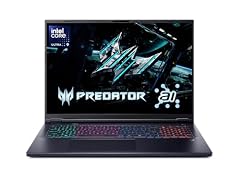
Acer Predator Helios Neo 18 AI Gaming Laptop
- CPU
- Intel Core Ultra 9 275HX
- GPU
- GeForce RTX 5070 Ti
- RAM
- 32 GB
- Storage
- 2000 GB
- Screen
- 18 in
- Refresh
- 240 Hz
- Weight
- 3.3 kg
It mirrors the Strix G18 on processor, memory, storage and refresh rate, with a Core Ultra 9 275HX, 32GB, 2TB and 240Hz. It is 0.3 kg heavier at a stated 3.3 kg.
Pros
- 18-inch 240Hz screen
- 32GB of memory and 2TB of storage
- Intel Core Ultra 9 275HX
Cons
- 3.3 kg, the heaviest stated weight among the picks
- Operating system not stated by the seller
- Graphics memory not stated by the seller
Good fit if
- Buyers who prefer Acer's Predator line
- Desk-bound players who want a large 240Hz screen
Skip if
- You want the lightest 18-inch option: the Strix G18 is 0.3 kg lighter
- You carry the laptop often
Verdict: A close equal to the Strix G18 if you prefer Acer.
7 Highest refresh rate
![EXCaliberPC [2026] ASUS ROG Strix G18 G815LR-DB96 Pro Extreme](https://m.media-amazon.com/images/I/31GQLarES5L._SL240_.jpg)
EXCaliberPC [2026] ASUS ROG Strix G18 G815LR-DB96 Pro Extreme
- CPU
- Intel Core Ultra 9 290HX
- GPU
- GeForce RTX 5070 Ti
- GPU memory
- 12 GB
- RAM
- 64 GB
- Storage
- 8000 GB
- Screen
- 18 in
- Refresh
- 300 Hz
- Weight
- 3.2 kg
This is a reseller build of the 2026 ASUS ROG Strix G18. It is the only pick with a 300Hz screen, and it adds 64GB of memory and 8TB of storage around an Intel Core Ultra 9 290HX.
Pros
- 300Hz 18-inch screen, the fastest in this list
- 64GB of memory
- 8TB of storage
- Intel Core Ultra 9 290HX
Cons
- Reseller configuration, not the maker's own listing
- 3.2 kg
Good fit if
- Competitive players who want the highest refresh rate
- Users who want a lot of storage without external drives
Skip if
- You prefer buying the maker's standard configuration
- You do not need 300Hz or 8TB
Verdict: The pick for maximum screen speed, sold as a reseller upgrade.
8 Most memory
![HIDevolution [2026] ASUS ROG Strix G18 G815LR 18" WQXGA 240Hz IPS](https://m.media-amazon.com/images/I/41KySGXJbgL._SL240_.jpg)
HIDevolution [2026] ASUS ROG Strix G18 G815LR 18" WQXGA 240Hz IPS
- CPU
- Intel Core Ultra 9
- GPU
- RTX 5070 Ti
- GPU memory
- 12 GB
- RAM
- 96 GB
- Storage
- 16000 GB
- Screen
- 18 in
- Refresh
- 240 Hz
- OS
- Windows 11 Pro
$9,339.00 (as of 10/20/2026 16:21 PDT - Details)
A reseller build of the 2026 ASUS ROG Strix G18 with 96GB of memory and 16TB of storage, the most of both in this list. The listing names the Core Ultra 9 290HX Plus and a 240Hz WQXGA screen.
Pros
- 96GB of memory, the most in this list
- 16TB of storage, tied for the most
- 18-inch 240Hz screen
Cons
- Reseller configuration, not the maker's own listing
- Weight not stated by the seller
Good fit if
- Creators who work with very large projects or datasets
- Users who want every file on one machine
Skip if
- You mainly game: 96GB will go unused
- You want a maker-sold configuration
Verdict: Maximum memory and storage around the RTX 5070 Ti, from a reseller.
9 Only dual-screen pick
![HIDevolution [2026] ASUS ROG Zephyrus Duo 16 GX651AR Gray Dual 16" 3K](https://m.media-amazon.com/images/I/31eOapA5HSL._SL240_.jpg)
HIDevolution [2026] ASUS ROG Zephyrus Duo 16 GX651AR Gray Dual 16" 3K
- CPU
- Intel Core Ultra 9
- GPU
- RTX 5070 Ti
- RAM
- 32 GB
- Storage
- 16000 GB
- Screen
- 16 in
- Refresh
- 120 Hz
- Touchscreen
- Yes
- Weight
- 2.82 kg
$8,769.00 (as of 10/20/2026 16:21 PDT - Details)
A reseller build of the ASUS ROG Zephyrus Duo 16, which the listing describes as having two 16-inch 3K 120Hz OLED touch screens. It is the only pick with touch input, with 32GB of memory and 16TB of storage.
Pros
- Two 16-inch screens per the listing
- Touch input, the only pick with it
- 16TB of storage, tied for the most
- 32GB of memory
Cons
- 120Hz refresh, half the 240Hz of most picks
- 2.82 kg, heavy for a 16-inch machine
- Reseller configuration, not the maker's own listing
Good fit if
- People who edit, code or stream and want a second screen built in
- Buyers who want touch input on a powerful machine
Skip if
- You mainly play fast games and want 240Hz
- You want the lightest 16-inch option
Verdict: A multitasking machine first, with the RTX 5070 Ti as a bonus for games.
10 Best with an AMD processor

msi Vector 16 HX AI 16" 240Hz QHD+ Gaming Laptop
- CPU
- AMD Ryzen 9 8940HX
- GPU
- GeForce RTX 5070 Ti
- GPU memory
- 12 GB
- RAM
- 32 GB
- Storage
- 1000 GB
- Screen
- 16 in
- Refresh
- 240 Hz
- Weight
- 2.7 kg
It is the only 16-inch pick with an AMD Ryzen 9 8940HX, a high-power chip, paired with 32GB, 1TB and a 240Hz QHD+ screen. Buyers who favor AMD processors get the same GPU tier as the Intel picks.
Pros
- AMD Ryzen 9 8940HX
- 240Hz QHD+ 16-inch screen per the listing
- 32GB of memory
- 12GB of graphics memory stated
Cons
- 2.7 kg, 0.4 kg heavier than the Helios Neo 16S AI
- 1TB of storage
Good fit if
- Buyers who prefer an AMD processor
- Players who want a 240Hz 16-inch screen from MSI
Skip if
- You want the lightest 16-inch option
- You need more storage out of the box
Verdict: The AMD route to a 16-inch RTX 5070 Ti.
11 Core Ultra 7 option

msi Vector 16 HX AI A2XWHG-285US 16" WQXGA 240Hz Gaming Laptop
- CPU
- Intel Core Ultra 7 255HX
- GPU
- RTX 5070 Ti
- Storage
- 1000 GB
- Screen
- 16 in
- Refresh
- 240 Hz
- Weight
- 2.7 kg
$2,199.00 (as of 10/20/2026 16:22 PDT - Details)
It is the only pick with an Intel Core Ultra 7 255HX instead of a Core Ultra 9. The screen is a 240Hz WQXGA 16-inch panel per the listing, with 1TB of storage.
Pros
- Intel Core Ultra 7 255HX
- 240Hz 16-inch WQXGA screen
- Model number stated (A2XWHG-285US), so you can check MSI's spec page
Cons
- Memory not stated by the seller
- Operating system not stated by the seller
- 2.7 kg
Good fit if
- Players whose games lean on the GPU more than the processor
- Buyers who will confirm the full configuration on MSI's page
Skip if
- You render or compile heavily and want a Core Ultra 9
- You want every spec stated on the listing
Verdict: A Core Ultra 7 route to the same GPU, with some specs left for you to confirm.
12 16GB setup for gaming only

acer Predator Helios Neo 16 AI Gaming Laptop
- CPU
- Intel Core Ultra 9 275HX
- GPU
- GeForce RTX 5070 Ti
- RAM
- 16 GB
- Storage
- 1000 GB
- Screen
- 16 in
- Refresh
- 240 Hz
- Weight
- 2.7 kg
$2,199.99 (as of 10/20/2026 16:20 PDT - Details)
It pairs the RTX 5070 Ti with a Core Ultra 9 275HX and a 240Hz 16-inch screen, but only 16GB of memory, the least in this list. It suits players who want this GPU and do little else on the machine.
Pros
- Intel Core Ultra 9 275HX
- 240Hz 16-inch screen
- 1TB of storage
Cons
- 16GB of memory, the least in this list
- 2.7 kg, heavier than the Helios Neo 16S AI
- Operating system not stated by the seller
Good fit if
- Players who mainly run one game at a time
- Buyers who plan to check memory upgrade options with Acer
Skip if
- You edit video or run creative apps alongside games
- You want the lighter 16S chassis
Verdict: A gaming-focused configuration; most other buyers should look at 32GB picks.
Side by side
| # | Laptop | CPU | GPU | GPU memory | Rentable GPU model | RAM | Storage |
|---|---|---|---|---|---|---|---|
| 1 | acer Predator Helios Neo 16S AI Gaming Laptop | Intel Core Ultra 9 275HX | GeForce RTX 5070 Ti | 12 GB | not stated | 32 GB | 1000 GB |
| 2 | ASUS ROG Zephyrus G14 14" 3K OLED 120Hz Copilot+ PC Gaming Laptop | AMD Ryzen AI 9 HX 370 | GeForce RTX 5070 Ti | 12 GB | not stated | 32 GB | 1000 GB |
| 3 | acer Predator Helios Neo 16S AI Gaming Laptop | Intel Core Ultra 9 275HX | GeForce RTX 5070 Ti | 12 GB | not stated | 64 GB | 4000 GB |
| 4 | ASUS ROG Strix G16 | Intel Core Ultra 9 275HX | GeForce RTX 5070 Ti | not stated | not stated | 32 GB | 1000 GB |
| 5 | ASUS ROG Strix G18 18” Gaming Laptop | Intel Core Ultra 9 275HX | RTX 5070 Ti | 12 GB | not stated | 32 GB | 2000 GB |
| 6 | Acer Predator Helios Neo 18 AI Gaming Laptop | Intel Core Ultra 9 275HX | GeForce RTX 5070 Ti | not stated | not stated | 32 GB | 2000 GB |
| 7 | EXCaliberPC [2026] ASUS ROG Strix G18 G815LR-DB96 Pro Extreme | Intel Core Ultra 9 290HX | GeForce RTX 5070 Ti | 12 GB | not stated | 64 GB | 8000 GB |
| 8 | HIDevolution [2026] ASUS ROG Strix G18 G815LR 18" WQXGA 240Hz IPS | Intel Core Ultra 9 | RTX 5070 Ti | 12 GB | not stated | 96 GB | 16000 GB |
| 9 | HIDevolution [2026] ASUS ROG Zephyrus Duo 16 GX651AR Gray Dual 16" 3K | Intel Core Ultra 9 | RTX 5070 Ti | not stated | not stated | 32 GB | 16000 GB |
| 10 | msi Vector 16 HX AI 16" 240Hz QHD+ Gaming Laptop | AMD Ryzen 9 8940HX | GeForce RTX 5070 Ti | 12 GB | not stated | 32 GB | 1000 GB |
| 11 | msi Vector 16 HX AI A2XWHG-285US 16" WQXGA 240Hz Gaming Laptop | Intel Core Ultra 7 255HX | RTX 5070 Ti | not stated | not stated | not stated | 1000 GB |
| 12 | acer Predator Helios Neo 16 AI Gaming Laptop | Intel Core Ultra 9 275HX | GeForce RTX 5070 Ti | not stated | not stated | 16 GB | 1000 GB |
How we picked
How we picked: our catalogue holds 17 listings that state an RTX 5070 Ti. We dropped one ASUS Strix G16 listing that describes 8GB of graphics memory, which conflicts with the 12GB NVIDIA lists for this GPU, and states only 12GB of system memory. We then merged duplicate listings of the same configuration (the Helios Neo 16S AI appears four times, the Zephyrus G14 twice) and kept one entry per clearly different setup. Three picks are reseller builds of ASUS machines from two resellers; we say so on each. GPU facts come from NVIDIA and CPU facts from Intel. Prices on this page are live: each one is read from the store listing and shown with the time it was read. Nobody at wikilaptop.org has tested these units; every comparison below is drawn from the stated specifications.
How to choose
What the RTX 5070 Ti is
The RTX 5070 Ti is an upper-midrange NVIDIA laptop GPU from the RTX 50 series, built on the Blackwell architecture. NVIDIA lists 12GB of GDDR7 graphics memory and a boost clock range of 1,447 to 2,220 MHz for it. It sits above the RTX 5070 and below the RTX 5080, which NVIDIA gives 16GB.
It targets high settings in modern games, 1440p play and GPU-heavy creative work such as 3D rendering and video effects. It also supports DLSS 4 with Multi Frame Generation, an RTX 50 series feature that NVIDIA describes as using AI to raise frame rates.
Same GPU name, different performance
NVIDIA publishes a clock range, not a single number, and each laptop maker sets the power limit its design runs at. Two laptops that both say RTX 5070 Ti can therefore perform differently, and a thin 14-inch chassis can run at a lower limit than a thick 18-inch one. The listings here rarely state the GPU power, so check the maker's spec page when two options look equal.
Processor: HX chips are for performance
Eleven of the 12 picks have HX in the processor name, such as the Intel Core Ultra 9 275HX (24 cores per Intel) or the AMD Ryzen 9 8940HX. These chips keep up with the GPU in games and rendering, but they are built for performance, not battery life. Plan to stay plugged in for games and heavy work.
Memory and storage
32GB of system memory is a comfortable level for games, creative apps and multitasking; 7 of the 12 picks have exactly that. 64GB or more helps with large video projects and 3D scenes. Storage in this list runs from 1TB to 16TB; modern games take a lot of space, so 2TB or more saves you from juggling installs.
Screen size, refresh rate and weight
Nine picks have a 240Hz screen, one has 300Hz and two have 120Hz. A higher refresh rate lets you see high frame rates in fast games. The 16-inch picks weigh 2.3 to 2.82 kg and the 18-inch picks 3 to 3.3 kg where stated, while the 14-inch Zephyrus G14 is 1.57 kg. Pick the size you will actually carry.
Questions
How does the RTX 5070 Ti compare with the RTX 5070?
The RTX 5070 Ti is the higher tier of the pair. NVIDIA lists 12GB of graphics memory for the RTX 5070 Ti, while the RTX 5070 comes with 8GB or 12GB depending on the laptop. The Ti handles higher settings and resolutions more comfortably, but real results still depend on each laptop's power limit and cooling.
Is the RTX 5070 Ti good for 1440p gaming?
It is aimed at high settings at 1440p in many modern games, and DLSS 4 can raise frame rates in the heaviest titles. For demanding 4K play at high settings, an RTX 5080 laptop gives more room.
Will an RTX 5070 Ti laptop last long on battery?
Not while gaming or rendering. The GPU and the HX processors in most of these picks draw a lot of power, so plan to stay plugged in for heavy work. For light tasks on battery, switch to the integrated graphics or a power-saving mode if the laptop offers one.
Why are some picks sold by resellers?
Three picks are reseller builds of ASUS machines with more memory or storage than the maker's standard configuration. We include them where they offer something no maker listing does, such as a 300Hz screen or 96GB of memory, and label each one. If you prefer a standard configuration, choose a pick sold under the maker's name.
Is 12GB of graphics memory enough?
For most games at 1440p, 12GB gives room for high texture settings. It can become a limit for large local AI models or very heavy 3D scenes, where the 16GB of an RTX 5080 or the 24GB of an RTX 5090 helps. Graphics memory cannot be upgraded later, so buy for your heaviest workload.
Recent updates
- : First published.