
Best 24GB RAM Laptops: 7 MacBook and Windows Picks Compared
Our top pick among 24GB RAM laptops is the 13-inch MacBook Air with the M5 chip: at 1.23 kg it is the lightest here, and its 24GB of unified memory is shared by the processor and graphics. For heavier creative work, the 16-inch MacBook Pro with the M5 Pro is the step up. Five Windows laptops from ASUS, Lenovo, HP and KAIGERR complete the list. We chose from stated specifications and Apple and Intel published data, not from lab tests.
7 picks from 12 laptops that match this guide with a price we can quote today. Every price below is live and carries the moment it was read.
The picks at a glance
| # | Pick | Laptop | Price |
|---|---|---|---|
| 1 | Best overall | Apple 2026 MacBook Air 13-inch Laptop with M5 chip | $1,649.00 (as of 10/20/2026 15:20 PDT - Details) |
| 2 | Best for creative work | Apple 2026 MacBook Pro Laptop | |
| 3 | Best Windows pick for CPU work | ASUS Vivobook 15 Laptop | $1,099.00 (as of 10/20/2026 15:20 PDT - Details) |
| 4 | Lightest Windows pick | Lenovo IdeaPad Slim 3 15.3" Touchscreen Laptop | $919.99 (as of 10/20/2026 15:21 PDT - Details) |
| 5 | Best for office work | HP 15.6" FHD IPS Touchscreen Laptop | $899.99 (as of 10/20/2026 15:21 PDT - Details) |
| 6 | 1TB Windows touch pick | HP 2026 Edition Business Laptop | $849.99 (as of 10/20/2026 15:21 PDT - Details) |
| 7 | Largest Windows screen | KAIGERR Gaming Laptop |
Which one should you buy?
- For students and daily carry: The MacBook Air M5 weighs 1.23 kg and pairs 24GB of unified memory with 1TB of storage. See pick 1
- For photo, video and music production: The 16-inch MacBook Pro with the M5 Pro brings an 18-core CPU and 20-core GPU per Apple. See pick 2
- For a Windows laptop with a strong processor: The ASUS Vivobook 15 has a Core i9-13900H with 14 cores and 20 threads per Intel, plus 1TB of storage. See pick 3
- For office work with touch and a keypad: The HP 15.6-inch with a Core 7 150U states Windows 11 Pro, a touch screen and a numeric keypad. See pick 5
The 7 picks
1 Best overall
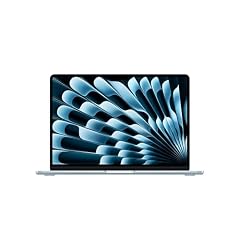
Apple 2026 MacBook Air 13-inch Laptop with M5 chip
- CPU
- Apple M5
- RAM
- 24 GB
- Storage
- 1000 GB
- Screen
- 13 in
- Weight
- 1.23 kg
- OS
- macOS
$1,649.00 (as of 10/20/2026 15:20 PDT - Details)
It is the lightest laptop here at 1.23 kg, and its 24GB of unified memory is an upgrade over the 16GB base configuration Apple lists for this model. It also has 1TB of storage and a 13.6-inch display per Apple.
Pros
- 1.23 kg, the lightest in this list
- 24GB of unified memory shared by CPU and GPU
- 1TB of storage
- Apple M5 chip
Cons
- 13.6-inch screen, the smallest in this list
- Memory cannot be added later, so 24GB is what you keep
Good fit if
- Students and writers who carry a laptop all day
- Hobby photographers and musicians who want headroom on macOS
Skip if
- You need Windows-only software
- You want a large screen for long editing sessions
Verdict: The easiest 24GB laptop to carry, with room to grow into.
2 Best for creative work

Apple 2026 MacBook Pro Laptop
- CPU
- Apple M5 Pro
- RAM
- 24 GB
- Storage
- 1000 GB
- Screen
- 16.2 in
- Weight
- 2.14 kg
- OS
- macOS
It has the most capable chip in this list: the M5 Pro with an 18-core CPU and a 20-core GPU per Apple, with 24GB of unified memory as its standard configuration. The 16.2-inch Liquid Retina XDR display is the largest screen here.
Pros
- M5 Pro: 18-core CPU and 20-core GPU per Apple
- 16.2-inch display, the largest in this list
- 24GB of unified memory and 1TB of storage
Cons
- 2.14 kg, the heaviest in this list
- 24GB is the base memory Apple lists for this model; heavy video work may want more
Good fit if
- Photo and video editors on macOS
- Music producers who run many plugins at once
Skip if
- You want the lightest laptop
- You work with very large video projects that need more than 24GB
Verdict: The most powerful 24GB laptop here, for macOS creators.
3 Best Windows pick for CPU work
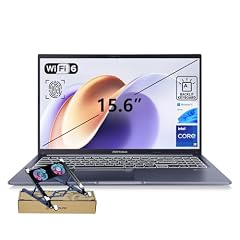
ASUS Vivobook 15 Laptop
- CPU
- Intel Core i9-13900H
- RAM
- 24 GB
- Storage
- 1000 GB
- Screen
- 15.6 in
- Touchscreen
- No
- Weight
- 1.7 kg
- OS
- Windows 11 Home
$1,099.00 (as of 10/20/2026 15:20 PDT - Details)
Its Core i9-13900H has 14 cores and 20 threads per Intel, the strongest Windows processor in this list, and it comes with 1TB of storage. It has a 15.6-inch FHD screen and weighs 1.7 kg.
Pros
- Core i9-13900H: 14 cores and 20 threads per Intel
- 1TB of storage
- Physical webcam shield per the listing
Cons
- No touch screen, per the listing
- Windows 11 Home rather than Pro
Good fit if
- Students and developers who compile code or run many apps
- Buyers who want a strong Windows CPU with 24GB
Skip if
- You need Windows 11 Pro for work management features
- You want a touch screen
Verdict: The Windows pick with the most processor power.
4 Lightest Windows pick

Lenovo IdeaPad Slim 3 15.3" Touchscreen Laptop
- CPU
- AMD Ryzen 7 8840HS
- GPU
- Radeon 780M
- RAM
- 24 GB
- Storage
- 512 GB
- Screen
- 15.3 in
- Touchscreen
- Yes
- Weight
- 1.6 kg
- OS
- Windows 11
$919.99 (as of 10/20/2026 15:21 PDT - Details)
At 1.6 kg it is the lightest Windows laptop here, with a 15.3-inch touch screen and an AMD Ryzen 7 8840HS with Radeon 780M graphics. The integrated graphics share system memory, so the 24GB leaves room for both.
Pros
- 1.6 kg, the lightest Windows pick
- Touch screen
- Radeon 780M integrated graphics
Cons
- 512GB of storage
- 15.3-inch screen, smaller than the 15.6-inch Windows picks
Good fit if
- Students who want a light Windows laptop with touch
- Hobby photo editors
Skip if
- You keep large files locally and need 1TB
- You want the strongest Windows processor here
Verdict: A light Windows touch laptop with memory to spare.
5 Best for office work

HP 15.6" FHD IPS Touchscreen Laptop
- CPU
- Intel Core 7 150U
- RAM
- 24 GB
- Storage
- 512 GB
- Screen
- 15.6 in
- Touchscreen
- Yes
- Weight
- 1.7 kg
- OS
- Windows 11 Pro
$899.99 (as of 10/20/2026 15:21 PDT - Details)
It pairs an Intel Core 7 150U with Windows 11 Pro, a 15.6-inch FHD IPS touch screen and a numeric keypad per the listing. It is the only Windows pick whose listing states the Pro edition.
Pros
- Windows 11 Pro, the only Windows pick that states it
- 15.6-inch FHD IPS touch screen
- Numeric keypad per the listing
Cons
- 512GB of storage
- Low-power U-series processor, not built for heavy creative work
Good fit if
- Office and spreadsheet work with a numeric keypad
- Small businesses that manage laptops with Windows 11 Pro
Skip if
- You edit video or run heavy creative apps
- You need 1TB of storage
Verdict: A straightforward office laptop with 24GB and touch.
6 1TB Windows touch pick
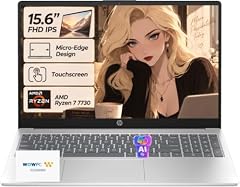
HP 2026 Edition Business Laptop
- CPU
- AMD Ryzen 7 7730U
- RAM
- 24 GB
- Storage
- 1000 GB
- Screen
- 15.6 in
- Touchscreen
- Yes
- Weight
- 1.7 kg
- OS
- Windows 11
$849.99 (as of 10/20/2026 15:21 PDT - Details)
It pairs a Ryzen 7 7730U, with 8 cores and 16 threads per the listing, with a 15.6-inch FHD IPS touch screen and 1TB of storage. It is the only Windows touch pick with 1TB.
Pros
- 1TB of storage, the only Windows touch pick with it
- 15.6-inch FHD IPS touch screen
- 8 cores and 16 threads per the listing
Cons
- Ryzen 7 7730U is a low-power U-series chip, not built for heavy creative work
- Windows 11 edition not stated by the seller
Good fit if
- Business users who keep many documents locally
- Buyers who want touch and 1TB in one laptop
Skip if
- You need a current-generation processor
- You run heavy creative workloads
Verdict: Touch, 24GB and 1TB for everyday business work.
7 Largest Windows screen

Its 16-inch screen is the largest among the Windows picks, and it weighs 1.75 kg. The title names an AMD Ryzen 7 H255 with 8 cores and 16 threads, but the specifications do not state a processor or graphics chip, so confirm both with the seller.
Pros
- 16-inch screen, the largest among the Windows picks
- 24GB of DDR5 memory
- 1.75 kg
Cons
- Processor named only in the title, not in the specifications
- 512GB of storage
- Titled a gaming laptop, but no dedicated graphics chip is stated
Good fit if
- Buyers who want a bigger Windows screen
- Home users who confirm the configuration first
Skip if
- You want to play demanding games
- You prefer a laptop from a larger maker with a known support network
Verdict: A big-screen option from a small maker; check the details.
Side by side
| # | Laptop | CPU | GPU | GPU memory | Rentable GPU model | RAM | Storage |
|---|---|---|---|---|---|---|---|
| 1 | Apple 2026 MacBook Air 13-inch Laptop with M5 chip | Apple M5 | not stated | not stated | not stated | 24 GB | 1000 GB |
| 2 | Apple 2026 MacBook Pro Laptop | Apple M5 Pro | not stated | not stated | not stated | 24 GB | 1000 GB |
| 3 | ASUS Vivobook 15 Laptop | Intel Core i9-13900H | not stated | not stated | not stated | 24 GB | 1000 GB |
| 4 | Lenovo IdeaPad Slim 3 15.3" Touchscreen Laptop | AMD Ryzen 7 8840HS | Radeon 780M | not stated | not stated | 24 GB | 512 GB |
| 5 | HP 15.6" FHD IPS Touchscreen Laptop | Intel Core 7 150U | not stated | not stated | not stated | 24 GB | 512 GB |
| 6 | HP 2026 Edition Business Laptop | AMD Ryzen 7 7730U | not stated | not stated | not stated | 24 GB | 1000 GB |
| 7 | KAIGERR Gaming Laptop | not stated | not stated | not stated | not stated | 24 GB | 512 GB |
How we picked
How we picked: seven laptops in our catalogue state 24GB of memory, and all seven are on this page. Two are Apple MacBooks with unified memory and five run Windows 11. We compared them on processor, storage, screen size and weight, using Apple's and Intel's published specifications. One listing, from KAIGERR, names a Ryzen 7 H255 processor in its title but not in its specifications; we flag that. None of the picks is a reseller build. Prices on this page are live: each one is read from the store listing and shown with the time it was read. Nobody at wikilaptop.org has tested these units; every comparison below is drawn from the stated specifications.
How to choose
Why 24GB is a useful middle step
24GB sits between the common 16GB and 32GB tiers. It leaves room for a busy browser, office apps, photo editing and light coding at the same time without the system leaning on the drive for swap. Microsoft lists 4GB as the minimum for Windows 11 and 16GB for Copilot+ PCs, so 24GB is well above both.
If you plan heavy video work, large virtual machines or local AI models, look at the 32GB tier or higher instead.
Unified memory on MacBooks
On the two MacBooks here, the 24GB is unified memory: the CPU and GPU draw from the same pool. Apple lists 16GB as the base for the 13-inch MacBook Air with M5, with 24GB and 32GB as options, and 24GB as the standard memory of the 16-inch MacBook Pro with M5 Pro.
Unified memory cannot be upgraded later, so 24GB is what you keep for the life of the machine.
Upgradability on Windows laptops
Thin Windows laptops often solder their memory, while others have slots. The listings here do not state which, so check the maker's specification sheet before counting on an upgrade. The Radeon 780M integrated graphics in the Lenovo IdeaPad Slim 3 draw on system memory too, which makes 24GB more useful there.
Processor class
The processors here range widely. Intel lists the Core i9-13900H with 14 cores and 20 threads at 45W base power, the strongest Windows chip in this list. The Core 7 150U and Ryzen 7 7730U are low-power U-series chips suited to office work. Apple lists an 18-core CPU for the M5 Pro.
Screen, storage and weight
Screens run from 13.6 inches (MacBook Air) to 16.2 inches (MacBook Pro), and weights from 1.23 kg to 2.14 kg. Four picks have 1TB of storage and three have 512GB. Three Windows picks have touch screens. Choose the size you will carry, then check that the storage fits your files.
Questions
Is 24GB of RAM enough for photo and video editing?
For photo editing and light to moderate video editing it gives comfortable headroom. Long 4K timelines with heavy effects benefit from more memory, so heavy video editors should also look at 32GB or larger options. The MacBook Pro with the M5 Pro here is the strongest pick for editing among these seven.
Can I upgrade a 24GB RAM laptop later?
It depends on the model. MacBooks use unified memory that cannot be changed, and many thin Windows laptops solder memory to the board. Some larger Windows laptops have slots. None of the Windows listings here states whether memory is soldered, so check the maker's specification sheet before counting on an upgrade.
Why do some laptops have 24GB instead of 16GB or 32GB?
Makers offer 24GB as a middle step, using memory configurations that add up to 24GB. On the MacBook Air with M5, Apple lists 24GB as an option above the 16GB base; on the 16-inch MacBook Pro with M5 Pro, it is the standard configuration. For the buyer, it simply means more headroom than 16GB.
Who does not need 24GB of RAM?
People who mainly browse, stream, write documents and join video calls will do fine with 16GB. For them, a better screen, battery or storage can matter more than extra memory. If you are unsure, 24GB is a safe margin that keeps a laptop comfortable for longer.
Did you test these laptops?
No. Nobody at wikilaptop.org has used these units. We compared them on the specifications stated in each listing, cross-checked with Apple, Intel and Microsoft published data. We do not describe battery life, heat, noise or keyboard feel, because those claims need testing we have not done.
Recent updates
- : First published.