
Best 1TB Storage Laptops in 2026: 14 Picks Compared on Specs
Our top pick among laptops with 1TB of storage is the 13-inch MacBook Air with the M5 chip and 24GB of memory: at 1.23 kg it is the lightest laptop in this list, and 1TB is double the 512GB Apple fits as standard. The other 13 picks cover business, big screens, creative work and gaming, from integrated graphics up to an RTX 5070 Ti. 1TB suits most people who keep files, photos and a handful of games locally. We chose all 14 from stated specifications and makers' data, not lab tests.
14 picks from 222 laptops that match this guide with a price we can quote today. Every price below is live and carries the moment it was read.
The picks at a glance
Which one should you buy?
- For carrying everywhere: The 13-inch MacBook Air with M5 weighs 1.23 kg per Apple and pairs 1TB with 24GB of unified memory. See pick 1
- For photo and video work on a Mac: The 16-inch MacBook Pro with M5 Pro states 48GB of memory, the most in this list. See pick 2
- For gaming with room for a library: The ASUS ROG Strix G16 pairs an RTX 5070 Ti with a 240Hz 16-inch screen and 32GB of memory. See pick 8
- For business on Windows 11 Pro: The Lenovo ThinkPad T16 Gen 4 states 32GB of memory and a Core Ultra 7 255U on a 16-inch screen. See pick 4
The 14 picks
1 Best overall
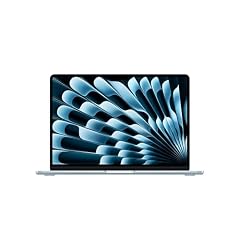
Apple 2026 MacBook Air 13-inch Laptop with M5 chip
- CPU
- Apple M5
- RAM
- 24 GB
- Storage
- 1000 GB
- Screen
- 13 in
- Weight
- 1.23 kg
- OS
- macOS
$1,649.00 (as of 10/20/2026 15:20 PDT - Details)
It is the lightest laptop in this list at 1.23 kg, which Apple confirms for the 13-inch model, and it pairs 1TB with 24GB of unified memory. Apple fits 512GB as standard on this model, so this configuration doubles the base storage.
Pros
- 1.23 kg, the lightest pick in this list
- 24GB of unified memory
- 1TB, double Apple's standard 512GB for this model
- Apple M5 chip with macOS
Cons
- 13-inch class screen, among the smallest here
- No dedicated GPU for Windows games
Good fit if
- Students and travelers who keep files locally
- Mac users who want storage room without a heavy laptop
Skip if
- You need Windows-only software
- You want a large screen for editing
Verdict: The best mix of storage, memory and low weight in this list.
2 Best for creative work on a Mac

Apple 2026 MacBook Pro Laptop
- CPU
- Apple M5 Pro
- RAM
- 48 GB
- Storage
- 1000 GB
- Screen
- 16.2 in
- Weight
- 2.14 kg
- OS
- macOS
$3,369.00 (as of 10/20/2026 15:20 PDT - Details)
It states 48GB of memory, the most in this list, with an M5 Pro that the listing title gives an 18-core CPU and a 20-core GPU. Apple lists 1TB as the standard storage on the 16-inch M5 Pro model, with 2.14 kg weight.
Pros
- 48GB of unified memory, the most in this list
- 16.2-inch screen, the largest Mac here
- M5 Pro with an 18-core CPU and 20-core GPU per the listing title
Cons
- 2.14 kg, much heavier than the MacBook Air
- 1TB is Apple's base storage for this model; large video projects may need more
Good fit if
- Photo and video editors on macOS
- Developers who run many tools and containers
Skip if
- You carry your laptop all day
- You mainly write and browse, where the Air is enough
Verdict: The Mac for heavy creative work in this list.
3 Best light Windows pick

Microsoft Surface Laptop
- CPU
- Qualcomm Snapdragon X2 Elite
- RAM
- 16 GB
- Storage
- 1000 GB
- Screen
- 13.8 in
- Refresh
- 120 Hz
- Touchscreen
- Yes
- Weight
- 1.36 kg
- OS
- Windows 11
$1,689.00 (as of 10/20/2026 15:22 PDT - Details)
At 1.36 kg it is the lightest Windows laptop in this list. It uses a Qualcomm Snapdragon X2 Elite with a 13.8-inch 120Hz touchscreen and 16GB of memory.
Pros
- 1.36 kg, the lightest Windows pick
- 13.8-inch touchscreen at 120Hz
- Snapdragon X2 Elite processor
Cons
- 16GB of memory, below the 32GB picks
- Arm-based chip: check that your Windows apps run on Arm
Good fit if
- Windows users who travel daily
- Writers and students who want a touchscreen
Skip if
- You rely on older x86-only software or drivers
- You want more than 16GB of memory
Verdict: A light Windows laptop with a full 1TB of local storage.
4 Best for business

Lenovo ThinkPad T16 Gen 4 AI Business Laptop 16" FHD+ Display
- CPU
- Intel Core Ultra 7 255U
- RAM
- 32 GB
- Storage
- 1000 GB
- Screen
- 16 in
- Touchscreen
- No
- OS
- Windows 11 Pro
$1,879.95 (as of 10/20/2026 15:22 PDT - Details)
It states Windows 11 Pro, 32GB of memory and an Intel Core Ultra 7 255U on a 16-inch FHD+ screen. Intel describes the U suffix as its power-efficient class, suited to a work laptop used on battery.
Pros
- 32GB of memory
- Windows 11 Pro
- Power-efficient U-series Intel processor
- 16-inch FHD+ screen
Cons
- Weight not stated by the seller
- No dedicated GPU
Good fit if
- Office workers who keep large local files
- Businesses that manage devices on Windows 11 Pro
Skip if
- You need a light laptop and want the weight confirmed first
- You do GPU-heavy creative work
Verdict: The business configuration with the most memory among the office picks.
5 Best light Windows with 32GB
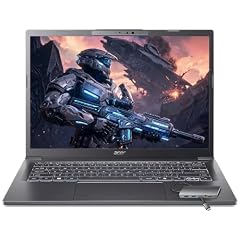
Acer Aspire Laptop 2026
- CPU
- Intel Core Ultra 7 258V
- RAM
- 32 GB
- Storage
- 1000 GB
- Screen
- 14 in
- Touchscreen
- Yes
- Weight
- 1.4 kg
- OS
- Windows 11 Home
$1,149.99 (as of 10/20/2026 15:20 PDT - Details)
It combines 32GB of memory with a 1.4 kg weight and a 14-inch touchscreen, lighter than every other 32GB pick with a stated weight. It uses an Intel Core Ultra 7 258V.
Pros
- 32GB of memory at 1.4 kg
- 14-inch touchscreen
- Intel Core Ultra 7 258V
Cons
- No dedicated GPU
- Screen resolution not stated by the seller
Good fit if
- Students who multitask heavily and carry the laptop daily
- Writers who want touch input
Skip if
- You play modern games
- You want a larger screen
Verdict: The lightest way in this list to get 32GB alongside 1TB.
6 Best everyday 16-inch

Dell 16 Laptop DC16251-16.0-inch 16
- CPU
- Intel Core 7 150U
- RAM
- 16 GB
- Storage
- 1000 GB
- Screen
- 16 in
- Touchscreen
- Yes
- Weight
- 1.9 kg
- OS
- Windows 11 Home
$1,079.86 (as of 10/20/2026 15:20 PDT - Details)
It pairs a 16-inch 2K touchscreen with an Intel Core 7 150U and 16GB of memory at 1.9 kg. It is a straightforward home and office laptop with Windows 11 Home.
Pros
- 16-inch 2K touchscreen per the listing
- 1.9 kg for a 16-inch screen
- Windows 11 Home stated
Cons
- 16GB of memory
- No dedicated GPU
Good fit if
- Home users who want a large touchscreen
- Students who keep course files locally
Skip if
- You edit video or run heavy tools
- You need Windows 11 Pro
Verdict: A large-screen everyday laptop from Dell with room for files.
7 Best big screen

HP 17" Copilot AI Business Laptop
- CPU
- Intel Core Ultra 5 255U
- RAM
- 32 GB
- Storage
- 1000 GB
- Screen
- 17 in
- Weight
- 2.08 kg
- OS
- Windows 11 Home
$999.00 (as of 10/20/2026 15:21 PDT - Details)
It is the largest non-gaming screen in this list at 17 inches, with 32GB of memory and an Intel Core Ultra 5 255U. It weighs 2.08 kg.
Pros
- 17-inch screen, the largest non-gaming screen here
- 32GB of memory
- Power-efficient U-series Intel processor
Cons
- 2.08 kg, heavy for daily carrying
- No dedicated GPU
Good fit if
- Home office users who work with spreadsheets side by side
- Buyers who want a large screen at a desk
Skip if
- You travel with your laptop often
- You play modern games
Verdict: The desk-first pick for a big screen and 32GB.
8 Best for gaming

ASUS ROG Strix G16
- CPU
- Intel Core Ultra 9 275HX
- GPU
- GeForce RTX 5070 Ti
- RAM
- 32 GB
- Storage
- 1000 GB
- Screen
- 16 in
- Refresh
- 240 Hz
- Weight
- 2.65 kg
- OS
- Windows 11 Home
It carries an RTX 5070 Ti, which NVIDIA lists with 12GB of GDDR7, the highest GPU tier in this list, with a 240Hz 2.5K 16-inch screen and an Intel Core Ultra 9 275HX.
Pros
- RTX 5070 Ti with 12GB of GDDR7 per NVIDIA, the top GPU here
- 16-inch 2.5K screen at 240Hz
- 32GB of memory
Cons
- 2.65 kg
- 1TB fills quickly with modern games
- HX processor: built for plugged-in performance, not battery life
Good fit if
- Players who want high frame rates at 1440p-class resolutions
- Streamers who need a strong CPU and GPU
Skip if
- You carry your laptop daily
- You keep dozens of large games installed at once
Verdict: The strongest gaming configuration among these 1TB laptops.
9 Best 240Hz RTX 5070 pick
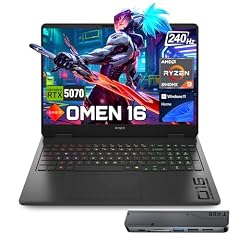
HP OMEN 16 RTX 5070 AMD Ryzen 9 8940HX 240Hz Gaming Laptop
- CPU
- AMD Ryzen 9 8940HX
- GPU
- RTX 5070
- GPU memory
- 8 GB
- RAM
- 32 GB
- Storage
- 1000 GB
- Screen
- 16 in
- Refresh
- 240 Hz
- Weight
- 2.45 kg
$2,199.00 (as of 10/20/2026 15:21 PDT - Details)
It pairs an RTX 5070 with 8GB of graphics memory and an AMD Ryzen 9 8940HX with a 240Hz 16-inch screen and 32GB of memory, one GPU tier below the Strix G16 at 2.45 kg.
Pros
- 240Hz 16-inch screen
- RTX 5070 with 8GB of graphics memory stated
- 32GB of memory
Cons
- 8GB of graphics memory, below the Strix G16's 12GB
- Battery size not stated by the seller
Good fit if
- Competitive players who want a very fast screen
- Buyers who want a mid-tier GPU with 32GB
Skip if
- You want the highest GPU tier here
- You need a light laptop
Verdict: A fast-screen gaming pick one step below the Strix G16.
10 Best OLED gaming pick

Lenovo Legion 5a Gaming Laptop
- CPU
- AMD Ryzen 7 250
- GPU
- GeForce RTX 5060
- GPU memory
- 8 GB
- RAM
- 32 GB
- Storage
- 1000 GB
- Screen
- 15.3 in
- Refresh
- 165 Hz
- Weight
- 2.27 kg
$1,999.99 (as of 10/20/2026 15:21 PDT - Details)
Its 15.3-inch 2560 x 1600 OLED runs at 165Hz, and it is the only pick whose listing states a battery size, 80Wh. It pairs an RTX 5060 with 8GB of graphics memory and 32GB of memory at 2.27 kg.
Pros
- 15.3-inch 2560 x 1600 OLED at 165Hz
- 80Wh battery, the only battery size stated among the picks
- 32GB of memory
- RTX 5060 with 8GB of graphics memory
Cons
- RTX 5060, below the RTX 5070 picks
- 2.27 kg
Good fit if
- Players who value contrast and color
- Buyers who also edit photos on the same screen
Skip if
- You want a 240Hz screen
- You need RTX 5070 or higher
Verdict: The screen-first gaming pick with a known battery capacity.
11 Lightest with an RTX 5070

GIGABYTE AERO X16
- CPU
- AMD Ryzen AI 9 HX 370
- GPU
- GeForce RTX 5070
- RAM
- 32 GB
- Storage
- 1000 GB
- Screen
- 16 in
- Weight
- 1.9 kg
- OS
- Windows 11 Home
At 1.9 kg it is the lightest pick with an RTX 5070 or faster, lighter than the HP OMEN 16 (2.45 kg). It pairs the GPU with an AMD Ryzen AI 9 HX 370 and 32GB of memory on a 16-inch screen.
Pros
- 1.9 kg with an RTX 5070
- 32GB of memory
- AMD Ryzen AI 9 HX 370
Cons
- Refresh rate not stated by the seller
- Graphics memory not stated by the seller
Good fit if
- Creators who carry a GPU laptop between home and studio
- Students in design or 3D courses
Skip if
- You want a 240Hz gaming screen
- You need the spec sheet confirmed before buying
Verdict: A portable RTX 5070 machine for creative work.
12 Best workstation

Dell Precision 7680 Laptop
- CPU
- Intel Core i7-13850HX
- GPU
- RTX 2000 Ada
- GPU memory
- 8 GB
- RAM
- 32 GB
- Storage
- 1000 GB
- Screen
- 16 in
- Weight
- 2.68 kg
- OS
- Windows 11 Pro
$2,599.99 (as of 10/20/2026 15:21 PDT - Details)
It is the only workstation-class pick, with an NVIDIA RTX 2000 Ada professional GPU with 8GB of graphics memory, an Intel Core i7-13850HX, 32GB of memory and Windows 11 Pro.
Pros
- NVIDIA RTX 2000 Ada professional GPU with 8GB stated
- Core i7-13850HX, an HX-class Intel processor
- 32GB of memory and Windows 11 Pro
Cons
- 2.68 kg, the heaviest pick in this list
- Previous-generation processor next to the Core Ultra picks
Good fit if
- Engineers who run CAD or simulation tools
- IT departments that standardize on Dell Precision
Skip if
- You mainly game: GeForce picks are the better fit
- You carry your laptop daily
Verdict: The pick for professional graphics applications.
13 Best OLED for creators

Lenovo IdeaPad Pro 5-2025
- CPU
- AMD Ryzen AI 7 350
- GPU
- GeForce RTX 5050
- RAM
- 16 GB
- Storage
- 1000 GB
- Screen
- 16 in
- Refresh
- 120 Hz
- Weight
- 1.78 kg
- OS
- Windows 11 Home
It pairs a 16-inch 2880 x 1800 OLED at 120Hz with an RTX 5050 and an AMD Ryzen AI 7 350 at 1.78 kg, lighter than every other pick with a dedicated GPU.
Pros
- 16-inch 2880 x 1800 OLED at 120Hz
- 1.78 kg, the lightest pick with a dedicated GPU
- RTX 5050 with 8GB of GDDR7 per NVIDIA
Cons
- 16GB of memory
- RTX 5050, the entry tier of the RTX 50 series
Good fit if
- Photo editors who want a sharp OLED screen
- Students who want a GPU without a heavy chassis
Skip if
- You play demanding games at high settings
- You need 32GB of memory
Verdict: A light OLED laptop with entry RTX 50 graphics.
14 Entry gaming pick

msi Cyborg A15 AI 15.6” FHD 144Hz Thin & Light Gaming Laptop
- CPU
- AMD Ryzen 7 260
- GPU
- GeForce RTX 5050
- RAM
- 16 GB
- Storage
- 1000 GB
- Screen
- 15.6 in
- Refresh
- 144 Hz
- Weight
- 1.95 kg
- OS
- Windows 11
$1,209.99 (as of 10/20/2026 15:22 PDT - Details)
It is the entry gaming option in this list: an RTX 5050 with a 144Hz 15.6-inch screen, a Ryzen 7 260 and 16GB of memory at 1.95 kg.
Pros
- RTX 5050 with 8GB of GDDR7 per NVIDIA
- 15.6-inch 144Hz screen
- 1.95 kg
Cons
- 16GB of memory
- 144Hz, below the 165Hz and 240Hz gaming picks
Good fit if
- First-time gaming laptop buyers
- Students who play esports titles
Skip if
- You want to play new releases at high settings
- You want an OLED screen
Verdict: A light entry into RTX 50 gaming with a full 1TB drive.
Side by side
| # | Laptop | CPU | GPU | GPU memory | Rentable GPU model | RAM | Storage |
|---|---|---|---|---|---|---|---|
| 1 | Apple 2026 MacBook Air 13-inch Laptop with M5 chip | Apple M5 | not stated | not stated | not stated | 24 GB | 1000 GB |
| 2 | Apple 2026 MacBook Pro Laptop | Apple M5 Pro | not stated | not stated | not stated | 48 GB | 1000 GB |
| 3 | Microsoft Surface Laptop | Qualcomm Snapdragon X2 Elite | not stated | not stated | not stated | 16 GB | 1000 GB |
| 4 | Lenovo ThinkPad T16 Gen 4 AI Business Laptop 16" FHD+ Display | Intel Core Ultra 7 255U | not stated | not stated | not stated | 32 GB | 1000 GB |
| 5 | Acer Aspire Laptop 2026 | Intel Core Ultra 7 258V | not stated | not stated | not stated | 32 GB | 1000 GB |
| 6 | Dell 16 Laptop DC16251-16.0-inch 16 | Intel Core 7 150U | not stated | not stated | not stated | 16 GB | 1000 GB |
| 7 | HP 17" Copilot AI Business Laptop | Intel Core Ultra 5 255U | not stated | not stated | not stated | 32 GB | 1000 GB |
| 8 | ASUS ROG Strix G16 | Intel Core Ultra 9 275HX | GeForce RTX 5070 Ti | not stated | not stated | 32 GB | 1000 GB |
| 9 | HP OMEN 16 RTX 5070 AMD Ryzen 9 8940HX 240Hz Gaming Laptop | AMD Ryzen 9 8940HX | RTX 5070 | 8 GB | not stated | 32 GB | 1000 GB |
| 10 | Lenovo Legion 5a Gaming Laptop | AMD Ryzen 7 250 | GeForce RTX 5060 | 8 GB | not stated | 32 GB | 1000 GB |
| 11 | GIGABYTE AERO X16 | AMD Ryzen AI 9 HX 370 | GeForce RTX 5070 | not stated | not stated | 32 GB | 1000 GB |
| 12 | Dell Precision 7680 Laptop | Intel Core i7-13850HX | RTX 2000 Ada | 8 GB | not stated | 32 GB | 1000 GB |
| 13 | Lenovo IdeaPad Pro 5-2025 | AMD Ryzen AI 7 350 | GeForce RTX 5050 | not stated | not stated | 16 GB | 1000 GB |
| 14 | msi Cyborg A15 AI 15.6” FHD 144Hz Thin & Light Gaming Laptop | AMD Ryzen 7 260 | GeForce RTX 5050 | not stated | not stated | 16 GB | 1000 GB |
How we picked
How we picked: 181 laptops in our catalogue state 1TB of storage. From those we drew a shortlist of 60 and preferred established makers selling new, stock configurations, kept one configuration per model (for example, one of the two 13-inch MacBook Air memory options), and chose one clear option per purpose: light everyday use, business, big screens, creative work, workstations and gaming. Several listings from resellers and little-known brands were left out in favor of makers' own configurations. MacBook facts come from Apple, GPU facts from NVIDIA and processor class descriptions from Intel. Prices on this page are live: each one is read from the store listing and shown with the time it was read. Nobody at wikilaptop.org has tested these units; every comparison below is drawn from the stated specifications.
How to choose
How much does 1TB hold?
1TB is enough for the operating system, applications, several years of documents, a large photo library and a handful of modern games. Microsoft lists 64GB as the minimum storage for Windows 11, but updates and applications need much more room in practice, so 1TB leaves comfortable headroom for most people.
It can still run short for heavy 4K video editing or a large installed game library. If that is you, look at 2TB models or plan for an external drive.
Upgrade paths differ by maker
Many Windows laptops use a replaceable SSD, and some have a second drive slot; check the maker's specifications or manual for the model number before you buy. Apple's MacBook storage is chosen at purchase: Apple lists the 13-inch MacBook Air with 512GB as standard and configurable to 1TB, 2TB or 4TB.
If you cannot add storage later, buy the capacity you expect to need for as long as you plan to keep the laptop.
Match memory to your work
Nine of the 14 picks state 32GB of memory or more, the MacBook Air states 24GB and four state 16GB. For office work and browsing, 16GB is enough; 32GB suits heavy multitasking, creative tools and gaming alongside a browser and chat.
Memory matters as much as storage for creative work: a large drive helps you keep projects locally, while memory helps you work on them.
Graphics: integrated or dedicated
Seven picks carry a dedicated GPU. RTX 50 laptop GPUs use NVIDIA's Blackwell architecture; NVIDIA lists 8GB of GDDR7 for the RTX 5050 and RTX 5060, 8GB or 12GB for the RTX 5070 and 12GB for the RTX 5070 Ti. The Dell Precision uses a professional RTX 2000 Ada GPU.
If you only work in office apps and a browser, integrated graphics are enough and usually mean a lighter laptop.
Processor class and weight
Intel describes its U suffix as power efficient and its H and HX suffixes as its highest-performance mobile classes. HX chips, such as the Core Ultra 9 275HX in the Strix G16, are built for plugged-in performance rather than battery life.
Weight in this list runs from 1.23 kg (MacBook Air 13-inch) to 2.68 kg (Dell Precision 7680). The ThinkPad T16 listing does not state a weight.
Questions
Is 1TB of storage enough?
For most people, yes. It holds the operating system, apps, documents, photos and a reasonable set of games. Heavy gamers, video editors and people who keep large raw photo libraries on the laptop may want 2TB or an external drive. If most of your files live in the cloud, 512GB may be enough and 1TB adds headroom.
Is an SSD better than a hard drive at this capacity?
Yes, for speed. An SSD makes booting, app launches and file searches much faster and has no moving parts, which also suits a laptop that travels. Check that the listing states an SSD, ideally NVMe, and confirm the drive type on the maker's spec sheet when the listing only gives a capacity.
Can I add more storage to a laptop later?
It depends on the model. Many Windows laptops have a replaceable SSD or a spare drive slot, while others fix storage to the board. MacBook storage is chosen at purchase, and Apple lists upgrade options only at the time of order. Check the maker's specifications or manual for your model before buying if you expect to need more space.
Which 1TB laptop is best for gaming?
In this list, the ASUS ROG Strix G16 has the highest GPU tier, an RTX 5070 Ti with 12GB of GDDR7 per NVIDIA, and a 240Hz screen. The HP OMEN 16 is the RTX 5070 alternative, and the MSI Cyborg A15 AI is the entry option with an RTX 5050. Remember that modern games fill a 1TB drive quickly.
Did you test these laptops?
No. Nobody at wikilaptop.org has used these units. We compared them on the specifications stated on each listing, checked facts against Apple, NVIDIA, Intel and Microsoft published data, and say so wherever it matters. We do not describe heat, noise, screen quality or keyboard feel, because those need testing we have not done.
Recent updates
- : First published.