
Best Laptops Under $1000 in 2026: 14 Picks Compared on Specs
For most people, the 13-inch MacBook Neo is the laptop to start with under $1000: Apple's A18 Pro chip, a 2408 by 1506 screen, a maker figure of up to 16 hours of video playback, and a weight of 1.23 kg. If you need Windows, 16GB of memory, a dedicated graphics card or a bigger screen, the other 13 picks cover those needs. Every pick was chosen from stated specifications and the maker's published information, not from testing.
14 picks from 255 laptops that match this guide with a price we can quote today. Every price below is live and carries the moment it was read.
The picks at a glance
Which one should you buy?
- For students and everyday work: The MacBook Neo is light at 1.23 kg and Apple quotes up to 11 hours of wireless web use. Pick the 512GB version here if you keep files locally, since memory stays at 8GB on every configuration. See pick 1
- For gaming at 1080p: The Acer Nitro V pairs an RTX 4050 with a 165Hz screen, the fastest refresh rate among these picks. Plan to add memory, because it ships with 8GB. See pick 4
- For frequent travel: The ASUS Zenbook 14 with Snapdragon X Plus is the lightest pick at 1.09 kg and has an OLED screen per the listing. See pick 2
- For a desk-bound home office: The HP 17 gives you the largest screen here with 32GB of memory and 1TB of storage for spreadsheets and many open tabs. See pick 11
The 14 picks
1 Best overall
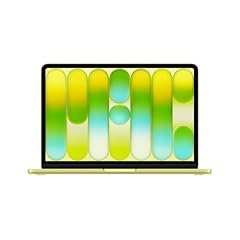
Apple 2026 MacBook Neo 13-inch Laptop with A18 Pro chip
- CPU
- Apple A18 Pro
- RAM
- 8 GB
- Storage
- 512 GB
- Screen
- 13 in
- Weight
- 1.23 kg
- OS
- macOS
$789.99 (as of 10/20/2026 15:20 PDT - Details)
The MacBook Neo is the most balanced machine in this list for everyday use: a light 13-inch body, a sharp 2408 by 1506 screen, and Apple's figure of up to 16 hours of video streaming from a 36.5 Wh battery. This is the 512GB configuration; the same laptop also appears with 256GB.
Pros
- 1.23 kg, the second lightest pick after the Zenbook 14
- Apple quotes up to 16 hours of video streaming and up to 11 hours of wireless web
- 13-inch display at 2408 by 1506 and 500 nits, per Apple
- 512GB of storage in this configuration
Cons
- 8GB of unified memory, and Apple lists no higher option
- Two USB-C ports only, and one of them runs at USB 2 speed per Apple
- Drives one external display, up to 4K at 60Hz
Good fit if
- Students and home users who live in a browser, office apps and video calls
- Buyers who want a long-running battery in a small bag
Skip if
- You need Windows-only software or PC games
- You run heavy multitasking that benefits from 16GB or more
Verdict: The safest default under $1000 if macOS and 8GB of memory suit your work.
2 Lightest pick

ASUS Zenbook 14 AI Business Laptop
- CPU
- Qualcomm Snapdragon X Plus
- Storage
- 512 GB
- Screen
- 14 in
- Weight
- 1.09 kg
- OS
- Windows 11 Home
At 1.09 kg the Zenbook 14 is the lightest laptop in this list, and the listing describes a 14-inch FHD+ OLED screen. Its Snapdragon X Plus chip belongs to a processor family Microsoft names for Copilot+ PCs. It runs Windows on Arm, so check your key apps before buying.
Pros
- 1.09 kg, the lightest stated weight among the 14 picks
- Snapdragon X Plus, one of the processor families Microsoft lists for Copilot+ PCs
- OLED panel per the listing title
- 512GB of storage
Cons
- Memory is not in the structured specs; the listing title says 16GB
- Most x64 apps run under emulation; Microsoft recommends Arm-native apps for the best performance
- No dedicated graphics card
Good fit if
- Frequent travelers who carry a laptop all day
- Office and browser users who want Windows AI features
Skip if
- You rely on older Windows drivers, niche plugins or games that lack Arm support
- You want the largest screen you can get
Verdict: The Windows pick to carry, as long as your apps run on Arm.
3 Best for Windows AI features

HP OmniBook 3 16 inch Next Gen AI PC
- CPU
- AMD Ryzen AI 5 430
- GPU
- Radeon 840M
- RAM
- 16 GB
- Storage
- 512 GB
- Screen
- 16 in
- Touchscreen
- Yes
- Weight
- 1.64 kg
- OS
- Windows 11 Home
The OmniBook 3 16 uses AMD's Ryzen AI 5 430, from the Ryzen AI 400 series that Microsoft lists among the processor families for Copilot+ PCs. It also has 16GB of memory and a 16-inch 2K touchscreen per the listing. Among the x86 Windows picks, it is the only one whose processor family appears on Microsoft's Copilot+ list.
Pros
- Ryzen AI 5 430, from a processor family Microsoft lists for Copilot+ PCs
- 16GB of memory, the amount Microsoft requires for Copilot+ PCs
- 16-inch touchscreen
- 1.64 kg, lighter than the Vivobook 16
Cons
- 512GB of storage, half of what the 1TB picks offer
- Integrated Radeon 840M graphics, no dedicated GPU
Good fit if
- Windows users who want the on-device AI features of Copilot+ PCs
- Home and school users who prefer a big touchscreen
Skip if
- You want to play recent games at high settings
- You store large media libraries on the laptop
Verdict: A current-generation 16-inch Windows laptop built around a Copilot+ processor family.
4 Best for gaming

Acer Nitro V Gaming Laptop
- CPU
- Intel Core i5-13420H
- GPU
- GeForce RTX 4050 Laptop
- RAM
- 8 GB
- Storage
- 512 GB
- Screen
- 15.6 in
- Refresh
- 165 Hz
- Weight
- 2.11 kg
$969.99 (as of 10/20/2026 15:20 PDT - Details)
The Nitro V pairs an Intel Core i5-13420H with an NVIDIA GeForce RTX 4050 Laptop GPU and a 165Hz screen, the highest refresh rate in this list. NVIDIA specifies the RTX 4050 Laptop GPU with 6GB of GDDR6 and DLSS 3 frame generation. Its weak spot is memory.
Pros
- GeForce RTX 4050 Laptop GPU with 6GB of GDDR6, per NVIDIA
- 165Hz 15.6-inch screen, the fastest refresh among the picks
- DLSS 3 frame generation support on the GPU, per NVIDIA
- 2.11 kg, lighter than the HP Victus
Cons
- 8GB of memory, low for current games with a browser and chat open
- Operating system not stated by the seller
- 512GB fills quickly with modern game installs
Good fit if
- Players of esports and current titles at 1080p
- Buyers willing to add memory later
Skip if
- You need a laptop you will carry all day
- You do not want to open the laptop to upgrade memory
Verdict: The strongest gaming graphics and fastest screen here; budget for a memory upgrade.
5 Best gaming pick with 16GB of memory

HP Victus Gaming Laptop 15.6" FHD IPS 144Hz Intel 8-core i5-13420H
- CPU
- Intel Core i5-13420H
- GPU
- GeForce RTX 4050
- GPU memory
- 6 GB
- RAM
- 16 GB
- Storage
- 512 GB
- Screen
- 15.6 in
- Refresh
- 144 Hz
- Weight
- 2.29 kg
$999.99 (as of 10/20/2026 15:21 PDT - Details)
The Victus has the same GPU class and processor as the Nitro V but ships with 16GB of memory. The trade is a 144Hz screen instead of 165Hz and a slightly heavier body. This listing comes with Windows 11 Pro.
Pros
- GeForce RTX 4050 with 6GB of video memory
- 16GB of memory, double the Nitro V
- Windows 11 Pro stated in the listing
Cons
- 144Hz screen, below the Nitro V's 165Hz
- 2.29 kg, the heaviest pick in this list
- 512GB of storage
Good fit if
- Gamers who do not want to upgrade memory on day one
- Students who game and also run heavier coursework software
Skip if
- You carry your laptop every day
- You want the fastest screen available in this list
Verdict: The ready-to-play choice when 16GB matters more than refresh rate.
6 Lightest with a dedicated GPU

Acer Aspire 5 Laptop
- CPU
- Intel Core i5-1240P
- GPU
- GeForce RTX 2050
- GPU memory
- 4 GB
- RAM
- 16 GB
- Storage
- 512 GB
- Screen
- 15.6 in
- Weight
- 1.8 kg
- OS
- Windows 11 Home
The Aspire 5 is a regular 15.6-inch laptop with a GeForce RTX 2050 inside, and at 1.8 kg it is lighter than both gaming picks. With 16GB of memory it is a middle ground for students who edit photos or play older games.
Pros
- GeForce RTX 2050 with 4GB of video memory
- 1.8 kg, the lightest pick with a dedicated GPU
- 16GB of memory
Cons
- Older-generation RTX 2050 with 4GB of video memory, versus 6GB on the RTX 4050 picks
- 12th-generation Core i5-1240P, older than most processors here
- Refresh rate not stated by the seller
Good fit if
- Students who edit photos or play lighter games
- Buyers who want some GPU acceleration without a heavy gaming chassis
Skip if
- You want to play demanding recent games
- You want the newest processor generation
Verdict: A practical all-rounder for light creative work, not a gaming machine.
7 Best 2-in-1

Lenovo IdeaPad 5 2-in-1 Convertible Laptop
- CPU
- AMD Ryzen 7 8845HS
- GPU
- Radeon 780M
- RAM
- 16 GB
- Storage
- 512 GB
- Screen
- 16 in
- Touchscreen
- Yes
- Battery
- 57 Wh
- OS
- Windows 11 Home
$869.99 (as of 10/20/2026 15:21 PDT - Details)
The IdeaPad 5 2-in-1 is the only convertible in this list: a 16-inch WUXGA touchscreen that folds back, with a Ryzen 7 8845HS and Radeon 780M graphics. It has the largest stated battery among the picks at 57 Wh.
Pros
- Convertible 16-inch touchscreen
- Ryzen 7 8845HS with Radeon 780M graphics
- 57 Wh battery, the largest stated in this list
- 16GB of memory
Cons
- Weight not stated by the seller
- 512GB of storage
Good fit if
- Note takers and people who sketch or present on the screen
- Users who want a strong processor in a touch device
Skip if
- You want a small tablet-style device
- You need to know the exact carry weight before buying
Verdict: The pick for pen and touch use, with a large screen and a strong chip.
8 Best for photo editing

Lenovo IdeaPad Slim 3 15.3" Touchscreen Laptop
- CPU
- AMD Ryzen 7 8840HS
- GPU
- Radeon 780M
- RAM
- 24 GB
- Storage
- 512 GB
- Screen
- 15.3 in
- Touchscreen
- Yes
- Weight
- 1.6 kg
- OS
- Windows 11
$919.99 (as of 10/20/2026 15:21 PDT - Details)
The IdeaPad Slim 3 combines a Ryzen 7 8840HS, Radeon 780M graphics and 24GB of memory in a 1.6 kg 15.3-inch touchscreen laptop. That memory figure is the third highest in this list, which helps with large photo libraries.
Pros
- 24GB of memory; only the two 32GB picks list more
- Ryzen 7 8840HS with Radeon 780M graphics
- 1.6 kg for a 15.3-inch screen
- Touchscreen
Cons
- 512GB of storage for a photo library
- Screen resolution and color coverage not stated by the seller
Good fit if
- Hobby photographers working in Lightroom-type apps
- Heavy multitaskers who want more than 16GB
Skip if
- You need a color-accurate panel with published coverage figures
- You keep large raw archives on the internal drive
Verdict: A strong processor and memory combination for creative hobby work.
9 Best for a big OLED screen

Acer Swift 16 AI Laptop 16" WQXGA+ 3200x2000 OLED 120Hz Intel 14-core
- CPU
- Intel Core Ultra 5 125H
- RAM
- 8 GB
- Storage
- 1000 GB
- Screen
- 16 in
- Refresh
- 120 Hz
- OS
- Windows 11 Pro
$909.00 (as of 10/20/2026 15:20 PDT - Details)
The Swift 16 AI is the only pick whose listing describes a 16-inch OLED panel at 3200 by 2000 with a 120Hz refresh rate. It also has 1TB of storage and an Intel Core Ultra 5 125H. Memory is its weak point.
Pros
- 16-inch OLED at 3200 by 2000 and 120Hz, per the listing
- 1TB of storage
- Intel Core Ultra 5 125H with 14 cores, per the listing
Cons
- 8GB of memory
- Weight not stated by the seller
- Sold by a third-party seller with Windows 11 Pro installed; confirm warranty terms
Good fit if
- Viewers and writers who want a large high-resolution screen
- Users who keep many files locally
Skip if
- You run heavy multitasking or creative apps that need 16GB or more
- You need a known carry weight
Verdict: The screen-first pick, held back by 8GB of memory.
10 Best for heavy multitasking on the go

Lenovo V14 G5 14" FHD Anti-Glare Laptop for Home & Work
- CPU
- Intel Core 7 240H
- RAM
- 32 GB
- Storage
- 1000 GB
- Screen
- 14 in
- Weight
- 1.37 kg
- Battery
- 47 Wh
- OS
- Windows 11 Home
$969.99 (as of 10/20/2026 15:22 PDT - Details)
The V14 G5 puts an Intel Core 7 240H, 32GB of memory and 1TB of storage in a 14-inch body that weighs 1.37 kg. No other pick combines 32GB with a weight under 1.5 kg.
Pros
- 32GB of memory, tied for the most in this list
- 1TB of storage
- 1.37 kg, the third lightest pick
- Anti-glare 14-inch FHD screen per the listing
Cons
- 47 Wh battery, smaller than the IdeaPad 5 2-in-1's 57 Wh
- No dedicated GPU
Good fit if
- Developers, analysts and office users with many apps open
- Commuters who need desktop-class memory in a small bag
Skip if
- You want an OLED or high-refresh screen
- You play games
Verdict: The most memory per kilogram in this list.
11 Best big screen

HP 17" Copilot AI Business Laptop
- CPU
- Intel Core Ultra 5 255U
- RAM
- 32 GB
- Storage
- 1000 GB
- Screen
- 17 in
- Weight
- 2.08 kg
- OS
- Windows 11 Home
$999.00 (as of 10/20/2026 15:21 PDT - Details)
The HP 17 is the largest screen among these picks and pairs it with 32GB of memory and 1TB of storage. It suits a desk more than a backpack at 2.08 kg.
Pros
- 17-inch screen, the largest in this list
- 32GB of memory, tied for the most here
- 1TB of storage
- Intel Core Ultra 5 255U
Cons
- The title says Copilot AI, but the Core Ultra 5 255U is not in the processor families Microsoft lists for Copilot+ PCs
- 2.08 kg
- Refresh rate and resolution beyond FHD not stated by the seller
Good fit if
- Home office users who want a big screen without a monitor
- Spreadsheet and trading users who keep many windows open
Skip if
- You travel with your laptop
- You specifically want Copilot+ features
Verdict: A roomy desk laptop with plenty of memory.
12 Best under $700

Dell 15.6 Laptop
- CPU
- Intel Core Ultra 5 225U
- RAM
- 16 GB
- Storage
- 512 GB
- Screen
- 15 in
- Weight
- 1.66 kg
- OS
- Windows 11 Home
$719.99 (as of 10/20/2026 15:20 PDT - Details)
The Dell 15 brings a current Intel Core Ultra 5 225U, 16GB of memory and 512GB of storage to an FHD 15-inch-class laptop at 1.66 kg. It is the plain, no-compromise Windows choice for school and office work.
Pros
- Intel Core Ultra 5 225U
- 16GB of memory
- 1.66 kg
Cons
- No touchscreen stated
- Screen size is 15 inches in the specs and 15.6 in the listing name
Good fit if
- Students and families who need a dependable Windows laptop
- Office users moving up from an 8GB machine
Skip if
- You want OLED, touch or a high refresh rate
- You game
Verdict: A sensible Windows default that skips the 8GB trap.
13 Best under $600

ASUS Vivobook 16 Laptop
- CPU
- AMD Ryzen 5 150
- RAM
- 8 GB
- Storage
- 512 GB
- Screen
- 16 in
- Weight
- 1.88 kg
- OS
- Windows 11 Home
$571.81 (as of 10/20/2026 15:20 PDT - Details)
The Vivobook 16 gives you a 16-inch 1920 by 1200 screen and an AMD Ryzen 5 150 with 512GB of storage.
Pros
- 16-inch WUXGA 16:10 screen per the listing
- AMD Ryzen 5 150 rather than an entry-level Celeron or N-series chip
- 512GB of storage
Cons
- 8GB of memory
- 1.88 kg, heavy for a laptop without a dedicated GPU
Good fit if
- Home users who browse, stream and write
- Students who prefer a large screen
Skip if
- You keep dozens of tabs and apps open
- You carry your laptop all day
Verdict: A large-screen everyday laptop with a real Ryzen 5 processor.
14 Best Chromebook

Acer Chromebook Plus 514 Laptop with Google AI
- CPU
- Intel Core i3-1315U
- RAM
- 8 GB
- Storage
- 256 GB
- Screen
- 14 in
- Weight
- 1.41 kg
- OS
- ChromeOS
$599.99 (as of 10/20/2026 15:20 PDT - Details)
The Chromebook Plus 514 runs ChromeOS on an Intel Core i3-1315U with 8GB of memory and 256GB of storage, while 8 of the 12 Chromebooks in the pool use a Celeron N4500. At 1.41 kg it is easy to carry.
Pros
- Intel Core i3-1315U, not a Celeron
- 8GB of memory and 256GB of storage, generous for ChromeOS
- 1.41 kg
Cons
- ChromeOS does not run Windows desktop apps
- 256GB is the smallest storage among the picks
Good fit if
- Students whose school runs on Google Workspace
- Web-first users who want simple updates and few settings
Skip if
- You need Windows or macOS software
- You play PC games
Verdict: The ChromeOS pick with enough processor and memory for heavy browser use.
Side by side
| # | Laptop | CPU | GPU | GPU memory | Rentable GPU model | RAM | Storage |
|---|---|---|---|---|---|---|---|
| 1 | Apple 2026 MacBook Neo 13-inch Laptop with A18 Pro chip | Apple A18 Pro | not stated | not stated | not stated | 8 GB | 512 GB |
| 2 | ASUS Zenbook 14 AI Business Laptop | Qualcomm Snapdragon X Plus | not stated | not stated | not stated | not stated | 512 GB |
| 3 | HP OmniBook 3 16 inch Next Gen AI PC | AMD Ryzen AI 5 430 | Radeon 840M | not stated | not stated | 16 GB | 512 GB |
| 4 | Acer Nitro V Gaming Laptop | Intel Core i5-13420H | GeForce RTX 4050 Laptop | not stated | not stated | 8 GB | 512 GB |
| 5 | HP Victus Gaming Laptop 15.6" FHD IPS 144Hz Intel 8-core i5-13420H | Intel Core i5-13420H | GeForce RTX 4050 | 6 GB | not stated | 16 GB | 512 GB |
| 6 | Acer Aspire 5 Laptop | Intel Core i5-1240P | GeForce RTX 2050 | 4 GB | not stated | 16 GB | 512 GB |
| 7 | Lenovo IdeaPad 5 2-in-1 Convertible Laptop | AMD Ryzen 7 8845HS | Radeon 780M | not stated | not stated | 16 GB | 512 GB |
| 8 | Lenovo IdeaPad Slim 3 15.3" Touchscreen Laptop | AMD Ryzen 7 8840HS | Radeon 780M | not stated | not stated | 24 GB | 512 GB |
| 9 | Acer Swift 16 AI Laptop 16" WQXGA+ 3200x2000 OLED 120Hz Intel 14-core | Intel Core Ultra 5 125H | not stated | not stated | not stated | 8 GB | 1000 GB |
| 10 | Lenovo V14 G5 14" FHD Anti-Glare Laptop for Home & Work | Intel Core 7 240H | not stated | not stated | not stated | 32 GB | 1000 GB |
| 11 | HP 17" Copilot AI Business Laptop | Intel Core Ultra 5 255U | not stated | not stated | not stated | 32 GB | 1000 GB |
| 12 | Dell 15.6 Laptop | Intel Core Ultra 5 225U | not stated | not stated | not stated | 16 GB | 512 GB |
| 13 | ASUS Vivobook 16 Laptop | AMD Ryzen 5 150 | not stated | not stated | not stated | 8 GB | 512 GB |
| 14 | Acer Chromebook Plus 514 Laptop with Google AI | Intel Core i3-1315U | not stated | not stated | not stated | 8 GB | 256 GB |
How we picked
How we picked: the catalogue held 209 laptops listed under $1000 when the data was read. We removed listings that do not state a processor, listings built on Celeron, Pentium or Intel N-series chips (74 of the 209), and renewed units, then kept one listing per model where the same machine appeared several times (the MacBook Neo appears four times, for example). From what was left we chose one strong machine per common need: everyday use, light weight, Windows AI features, gaming, 2-in-1 use, large screens and ChromeOS. Prices on this page are live and read from the store listing, with the time they were read. Nobody at wikilaptop.org tested these units; every claim comes from the listing's specifications or the linked maker pages.
How to choose
Memory: why 8GB is the floor
Memory decides how many apps and browser tabs stay responsive at once. In this pool, 38 of the 209 listings have only 4GB, which is the Windows 11 minimum and nothing more. Treat 8GB as the floor for light use and 16GB as the comfortable amount for Windows in 2026.
Microsoft requires 16GB for its Copilot+ PC label. If you keep many tabs open, run video calls while working, or play games, pick a machine with 16GB or more, or confirm that the memory can be upgraded.
Processor: skip the entry-level chips
The lower end of this price range is crowded with Celeron, Pentium and Intel N-series processors: 74 of the 209 listings here use one. None of them made this list.
Look instead for Intel Core Ultra, Core 5 or 7, AMD Ryzen 5 or 7, Snapdragon X, or Apple chips.
Graphics: when you need a dedicated GPU
Most people do not need a separate graphics card. Integrated graphics, such as AMD's Radeon 780M and 840M in three of the picks, are enough for video playback and everyday photo apps.
If you play current games, look for an NVIDIA GeForce RTX card. The RTX 4050 in the two gaming picks has 6GB of video memory and supports DLSS 3 frame generation, per NVIDIA. The RTX 2050 in the Aspire 5 is an older-generation card with 4GB of video memory. Only 17 of the 209 listings in the pool pair a dedicated GPU with a screen of 120Hz or faster.
Windows, macOS, ChromeOS or Windows on Arm
Pick the operating system first, because it decides which software you can run. macOS on the MacBook Neo runs Apple and Mac App Store software. ChromeOS is simple and web-first but does not run Windows desktop programs.
Windows on Arm, used by the Snapdragon-based Zenbook 14, runs Arm-native apps natively and most x86 and x64 apps under emulation. Microsoft recommends Arm-native apps for the best performance and battery life, and points to a compatibility site for checking specific apps and games.
Read the listing carefully
Many listings in this price range come from third-party sellers who configure the machines themselves. In this pool, 31 of the 209 listings do not state a processor and 47 do not state an operating system. When a spec is missing, ask the seller or pick another listing.
Also check whether the unit is new or renewed, and whether the seller's upgrades (extra memory or a second drive) keep the maker's warranty. None of the picks here is listed as renewed.
Questions
Is 8GB of memory enough for a laptop under $1000?
For browsing, office work and streaming, 8GB works, and the MacBook Neo, Nitro V, Swift 16, Vivobook 16 and Chromebook Plus 514 in this list ship with it. For Windows with many apps open, games or Copilot+ AI features, 16GB is the better target; Microsoft sets 16GB as the minimum for Copilot+ PCs. If you choose an 8GB Windows laptop, check whether memory can be added later.
Can I play games on a laptop under $1000?
Yes, if it has a dedicated GPU. The Acer Nitro V and HP Victus in this list both use an RTX 4050, which NVIDIA specifies with 6GB of video memory and DLSS 3 frame generation, and both have screens of 144Hz or faster. The Aspire 5's RTX 2050 is an older-generation card with 4GB of video memory, suited to lighter games. Laptops with only integrated graphics are better suited to casual titles.
What is a Copilot+ PC, and do I need one?
Copilot+ is Microsoft's label for Windows laptops with an NPU of 40 or more TOPS, at least 16GB of memory and a 256GB or larger SSD. It unlocks a set of on-device AI features in Windows. You do not need one for everyday work. In this list, the OmniBook 3 16 and the Snapdragon-based Zenbook 14 use processor families Microsoft names for Copilot+ PCs.
Should I buy a MacBook or a Windows laptop under $1000?
Choose by software. The MacBook Neo is light, has a long maker-quoted battery life and runs macOS, but it has 8GB of memory and two USB-C ports. Windows picks in this list offer 16GB to 32GB of memory, larger screens, touch and dedicated graphics. If you need Windows-only apps or PC games, a Windows laptop is the only practical choice.
How much storage do I need?
For a laptop that relies on cloud storage, 256GB is workable, and it is what the Chromebook Plus 514 offers. For Windows with local photos, projects or a few games, 512GB is a sensible minimum, and 10 of the 14 picks here have exactly that. Three picks, the Swift 16, V14 G5 and HP 17, have 1TB for larger libraries.
Recent updates
- : First published.