
Best Laptops for Writers in 2026: 14 Portable Picks on Specs
The 2026 Microsoft Surface Laptop with the Snapdragon X2 Elite is our top pick for writers: its listing states a 13.8-inch touchscreen at 120Hz, 16GB of memory, 1TB of storage and 1.36kg, which is plenty for long manuscripts, research tabs and a writing app in a light body. If you want the lightest machine, the ASUS Zenbook 14 states 1.09kg. Every pick was chosen from stated specifications and makers' published information; nobody at wikilaptop has used these units.
14 picks from 108 laptops that match this guide with a price we can quote today. Every price below is live and carries the moment it was read.
The picks at a glance
Which one should you buy?
- For novelists and long-form writers: The 2026 Surface Laptop states a 13.8-inch 120Hz touchscreen, 16GB and 1TB at 1.36kg, a light Windows machine with room for years of drafts. See pick 1
- For writing on the move: The ASUS Zenbook 14 is the lightest pick at a stated 1.09kg, with a 14-inch OLED screen and a Snapdragon X Plus. See pick 2
- For journalists and freelancers on deadline: The ThinkPad T14 Gen 5 states the largest battery among the picks, 52.5Wh, plus 32GB, 1TB and Windows 11 Pro at 1.38kg. See pick 4
- For distraction-free writing in the browser: The Acer Chromebook Plus 514 runs ChromeOS with 8GB of memory and 512GB of storage, and Google Docs works offline on ChromeOS by default. See pick 11
The 14 picks
1 Best overall

Microsoft Surface Laptop
- CPU
- Qualcomm Snapdragon X2 Elite
- RAM
- 16 GB
- Storage
- 1000 GB
- Screen
- 13.8 in
- Refresh
- 120 Hz
- Touchscreen
- Yes
- Weight
- 1.36 kg
- OS
- Windows 11
$1,689.00 (as of 10/20/2026 15:22 PDT - Details)
It pairs a 13.8-inch touchscreen at 120Hz with 16GB of memory and 1TB of storage at a stated 1.36kg, and it is the only pick with the Snapdragon X2 Elite. For writers, that means a light body with ample room for manuscripts, research files and backups. Choose it over the Surface Laptop 7 if you want the newer 2026 model.
Pros
- 13.8-inch touchscreen at 120Hz, per the listing
- 16GB of memory and 1TB of storage
- Stated weight of 1.36kg
- Snapdragon X2 Elite, the only one among the picks
Cons
- Windows on Arm: some x64 apps run under emulation, so check your writing app
- Battery capacity not stated by the seller
- Windows edition not stated by the seller
Good fit if
- Novelists and long-form writers who want a light Windows laptop
- Writers who mark up drafts with touch
Skip if
- Your writing or reference software has no Arm version and struggles under emulation
- You need Windows 11 Pro confirmed
Verdict: A light, well-equipped Windows laptop for writers who want the newest Surface.
2 Lightest pick

ASUS Zenbook 14 AI Business Laptop
- CPU
- Qualcomm Snapdragon X Plus
- Storage
- 512 GB
- Screen
- 14 in
- Weight
- 1.09 kg
- OS
- Windows 11 Home
At a stated 1.09kg the Zenbook 14 is the lightest laptop in this pool and in this list, and it has a 14-inch FHD+ OLED screen with a Snapdragon X Plus. Its listing title gives 16GB of memory, though the spec fields leave memory out.
Pros
- Stated weight of 1.09kg, the lightest in this list
- 14-inch FHD+ OLED screen, per the listing
- Snapdragon X Plus processor
- 512GB of storage
Cons
- Memory is given only in the listing title (16GB), not in the spec fields
- Windows on Arm: check that your writing apps run on it
- Battery capacity not stated by the seller
Good fit if
- Writers who carry a laptop every day
- Travel writers who work from hotels and trains
Skip if
- You keep large audio or video research files locally
- You rely on an x64-only Windows tool
Verdict: The pick for writers who count every gram.
3 Best Surface alternative

Microsoft Surface Laptop 7 AI Copilot+ PC for Business
- CPU
- Qualcomm Snapdragon X Plus
- RAM
- 16 GB
- Storage
- 1000 GB
- Screen
- 13.8 in
- Refresh
- 120 Hz
- Touchscreen
- Yes
- Weight
- 1.34 kg
- OS
- Windows 11 Home
$1,049.99 (as of 10/20/2026 15:22 PDT - Details)
The Surface Laptop 7 shares the 13.8-inch 120Hz touchscreen, 16GB and 1TB of the 2026 model, with a Snapdragon X Plus instead of the X2 Elite. It states 1.34kg, slightly lighter than the 2026 Surface, and Windows 11 Home.
Pros
- 13.8-inch 2K+ touchscreen at 120Hz, per the listing
- 16GB of memory and 1TB of storage
- Stated weight of 1.34kg
Cons
- Windows 11 Home
- Windows on Arm: some x64 apps run under emulation
- Battery capacity not stated by the seller
Good fit if
- Writers who want the Surface form factor from the earlier generation
- Writers who work in Word, Docs or browser tools
Skip if
- You want the X2 Elite of the 2026 model
- Your tools need x64 Windows
Verdict: A Surface for writers that gives up only the newer chip.
4 Largest stated battery

Lenovo 2024 Laptop
- CPU
- Intel Core Ultra 7 155U
- RAM
- 32 GB
- Storage
- 1000 GB
- Screen
- 14 in
- Touchscreen
- Yes
- Weight
- 1.38 kg
- Battery
- 52.5 Wh
- OS
- Windows 11 Pro
$1,639.00 (as of 10/20/2026 15:21 PDT - Details)
The ThinkPad T14 Gen 5 states a 52.5Wh battery, the largest of the three picks that state one, with 32GB of memory, 1TB of storage and a 14-inch 1920 x 1200 touchscreen at 1.38kg. It runs an Intel Core Ultra 7 155U with Windows 11 Pro, so x64 Windows apps run natively.
Pros
- Stated 52.5Wh battery, the largest stated in this list
- 32GB of memory and 1TB of storage
- 14-inch 1920 x 1200 touchscreen, per the listing
- Intel processor, so x64 Windows apps run natively
Cons
- A 2024 generation, per the listing
- Refresh rate not stated by the seller
Good fit if
- Journalists and freelancers who write away from outlets
- Writers who use x64 Windows apps such as Scrivener for Windows
Skip if
- You want the lightest laptop possible
- You only need a browser, where a Chromebook is simpler
Verdict: The ThinkPad for writers who want a stated battery and native Windows app support.
5 Most memory at under 1.3kg

Lenovo ThinkPad P14s Gen 7 AMD Ryzen AI 9 PRO 470
- CPU
- AMD Ryzen AI 9 PRO 470
- GPU
- Radeon 890M
- RAM
- 64 GB
- Storage
- 2000 GB
- Screen
- 14 in
- Refresh
- 60 Hz
- Weight
- 1.29 kg
- OS
- Windows 11 Pro
$3,199.00 (as of 10/20/2026 15:22 PDT - Details)
The ThinkPad P14s Gen 7 states 64GB of memory and 2TB of storage at 1.29kg, the second-lightest pick. That is far more than writing needs, but it suits writers who also edit podcasts, keep large research archives or run heavy reference tools.
Pros
- Stated weight of 1.29kg, second-lightest here
- 64GB of memory and 2TB of storage, tied for the most here
- AMD Ryzen AI 9 PRO 470 with Radeon 890M graphics
- Windows 11 Pro
Cons
- Battery capacity not stated by the seller
- 60Hz screen at 1920 x 1200, per the listing
- More memory and storage than writing alone needs
Good fit if
- Writers who also edit audio or keep large archives
- Researchers and academics with big reference libraries
Skip if
- You only write and browse
- You want a stated battery capacity
Verdict: A light workstation for writers whose work goes beyond text.
6 64GB with a touchscreen
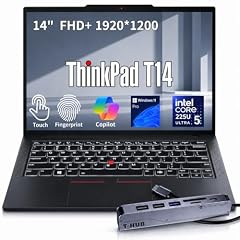
Lenovo ThinkPad T14 Business AI Laptop
- CPU
- Intel Core Ultra 5 225U
- RAM
- 64 GB
- Storage
- 2000 GB
- Screen
- 14 in
- Touchscreen
- Yes
- Weight
- 1.46 kg
- OS
- Windows 11 Pro
$2,149.00 (as of 10/20/2026 15:22 PDT - Details)
This ThinkPad T14 states 64GB of memory, 2TB of storage, a 14-inch FHD+ touchscreen and a fingerprint reader at 1.46kg. It is the touchscreen alternative to the P14s Gen 7 for writers with large archives.
Pros
- 64GB of memory and 2TB of storage
- 14-inch FHD+ touchscreen, per the listing
- Fingerprint reader, per the listing
- Windows 11 Pro
Cons
- Stated weight of 1.46kg, heavier than most picks
- Battery capacity not stated by the seller
Good fit if
- Writers who keep years of research and media locally
- Writers who sign in many times a day and want a fingerprint reader
Skip if
- You only need a word processor
- You want the lightest machine
Verdict: A roomy, touch-enabled ThinkPad for archive-heavy writers.
7 Best Acer
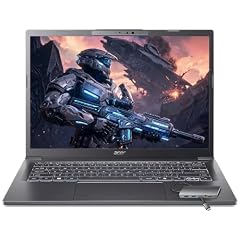
Acer Aspire Laptop 2026
- CPU
- Intel Core Ultra 7 258V
- RAM
- 32 GB
- Storage
- 1000 GB
- Screen
- 14 in
- Touchscreen
- Yes
- Weight
- 1.4 kg
- OS
- Windows 11 Home
$1,149.99 (as of 10/20/2026 15:20 PDT - Details)
The Acer Aspire states an Intel Core Ultra 7 258V, 32GB of memory, 1TB of storage and a 14-inch touchscreen at 1.4kg. Its Intel chip runs x64 Windows apps natively, which avoids the Arm compatibility question of the Surface picks.
Pros
- Intel Core Ultra 7 258V
- 32GB of memory and 1TB of storage
- 14-inch touchscreen, per the listing
- Stated weight of 1.4kg
Cons
- Windows 11 Home
- Battery capacity not stated by the seller
Good fit if
- Writers who want an Intel machine with a touchscreen
- Writers who use Scrivener or other x64 Windows apps
Skip if
- You need Windows 11 Pro
- You want a stated battery capacity
Verdict: A straightforward Windows touchscreen laptop with plenty of memory for writing.
8 Best Dell

Dell Precision 3490 Mobile Workstation Laptop
- CPU
- Intel Core Ultra 5 135H
- RAM
- 32 GB
- Storage
- 1000 GB
- Screen
- 14 in
- Weight
- 1.4 kg
- OS
- Windows 11 Pro
The Dell Precision 3490 is a 14-inch mobile workstation at a stated 1.4kg with 32GB of memory, 1TB of storage and Windows 11 Pro. It suits writers whose employer standardizes on Dell or who want a Pro edition with an Intel chip.
Pros
- Stated weight of 1.4kg
- 32GB of memory and 1TB of storage
- Windows 11 Pro
Cons
- 14-inch FHD screen, per the listing, with no touch stated
- Battery capacity not stated by the seller
Good fit if
- Staff writers on company-managed Dell fleets
- Writers who want Windows Pro and an Intel processor
Skip if
- You want a touchscreen
- You want a higher-refresh screen
Verdict: A plain, light Dell for writers in Windows Pro workplaces.
9 Best anti-glare screen

Lenovo V14 G5 14" FHD Anti-Glare Laptop for Home & Work
- CPU
- Intel Core 7 240H
- RAM
- 32 GB
- Storage
- 1000 GB
- Screen
- 14 in
- Weight
- 1.37 kg
- Battery
- 47 Wh
- OS
- Windows 11 Home
$969.99 (as of 10/20/2026 15:22 PDT - Details)
The Lenovo V14 G5 is the only pick whose listing names an anti-glare screen, useful for writing near windows and outdoors. It states an Intel Core 7 240H, 32GB of memory, 1TB of storage and a 47Wh battery at 1.37kg.
Pros
- 14-inch FHD anti-glare screen, per the listing
- Stated 47Wh battery
- Stated weight of 1.37kg
- 32GB of memory and 1TB of storage
Cons
- Windows 11 Home
- No touchscreen stated
Good fit if
- Writers who work in bright cafes or outdoors
- Writers who want a stated battery on a plain Windows laptop
Skip if
- You want a touchscreen
- You need Windows 11 Pro
Verdict: A light, practical Windows laptop with a screen made for bright places.
10 Most memory on an entry-level chip

HP Laptop for Everyday Use • 2026 Edition • 32GB RAM • 1TB SSD • Copilot
- CPU
- Intel N150
- RAM
- 32 GB
- Storage
- 1000 GB
- Screen
- 14 in
- Weight
- 1.41 kg
- OS
- Windows 11
This HP 14-inch pairs a basic Intel N150 with 32GB of memory and 1TB of storage at 1.41kg, and its listing includes one year of Microsoft 365. The processor is entry-level, but word processing and research tabs are light work.
Pros
- 32GB of memory and 1TB of storage
- Stated weight of 1.41kg
- One year of Microsoft 365 included, per the listing
Cons
- Intel N150, an entry-level processor
- Windows edition not stated by the seller
- Battery capacity not stated by the seller
Good fit if
- Writers who keep many browser tabs open
- Writers who work in Microsoft Word
Skip if
- You also edit audio or video
- You want a touchscreen
Verdict: A basic-chip laptop with generous memory and storage for text work.
11 Best Chromebook

Acer Chromebook Plus 514 Laptop
- CPU
- Intel Core i3-N355
- RAM
- 8 GB
- Storage
- 512 GB
- Screen
- 14 in
- Touchscreen
- Yes
- Weight
- 1.4 kg
- OS
- ChromeOS
$499.98 (as of 10/20/2026 15:20 PDT - Details)
The Acer Chromebook Plus 514 has the most storage among the three Chromebooks here, 512GB, and 8GB of memory (tied with the ASUS CX14), with an Intel Core i3-N355 and a 14-inch touchscreen at 1.4kg. On ChromeOS, Google Docs offline access is turned on automatically.
Pros
- 512GB of storage, the most among the Chromebooks
- Intel Core i3-N355
- 14-inch touchscreen, per the listing
- Google Docs works offline on ChromeOS by default
Cons
- No Scrivener: Literature and Latte lists versions for macOS, Windows and iOS only
- Battery capacity not stated by the seller
Good fit if
- Writers who work in Google Docs
- Writers who want a simple, distraction-free machine
Skip if
- You write in Scrivener or other Windows or Mac desktop apps
- You need Microsoft Word desktop features
Verdict: The Chromebook for writers who live in Google Docs.
12 Budget touchscreen Chromebook

ASUS Chromebook CX14 Laptop
- CPU
- Intel Celeron N4500
- RAM
- 8 GB
- Storage
- 128 GB
- Screen
- 14 in
- Touchscreen
- Yes
- Weight
- 1.39 kg
- OS
- ChromeOS
$389.99 (as of 10/20/2026 15:20 PDT - Details)
The ASUS Chromebook CX14 states an Intel Celeron N4500, 8GB of memory and a 14-inch touchscreen at 1.39kg. It has twice the memory of the HP Chromebook 14 with the same processor.
Pros
- 8GB of memory, double the HP Chromebook 14
- 14-inch touchscreen, per the listing
- Stated weight of 1.39kg
Cons
- 128GB of storage
- Intel Celeron N4500, an entry-level processor
- No Scrivener on ChromeOS
Good fit if
- Students and new writers working in Google Docs
- A second laptop for drafting away from home
Skip if
- You need desktop writing software
- You store many large files locally
Verdict: A basic touchscreen Chromebook for browser-based writing.
13 Most basic Chromebook

HP Chromebook 14 Laptop
- CPU
- Intel Celeron N4500
- RAM
- 4 GB
- Storage
- 128 GB
- Screen
- 14 in
- Weight
- 1.52 kg
- OS
- ChromeOS
$269.99 (as of 10/20/2026 15:21 PDT - Details)
The HP Chromebook 14 states an Intel Celeron N4500, 4GB of memory and 128GB of storage on a 14-inch HD screen at 1.52kg. It covers drafting in Google Docs and little else, which some writers want.
Pros
- ChromeOS with Google Docs offline by default
- Intel Celeron N4500, the same processor as the ASUS CX14
- 14-inch screen for drafting
Cons
- 4GB of memory, tied for the least here
- 14-inch HD screen, per the listing, not FHD
- Stated weight of 1.52kg, the heaviest in this list
Good fit if
- Writers who want a single-purpose drafting machine
- A spare laptop for travel
Skip if
- You keep many research tabs open
- You want a sharper screen for long sessions
Verdict: A bare-bones Chromebook for drafting only.
14 Basic Windows with a stated battery

HP 14-DQ600 2025 Laptop
- CPU
- Intel N150
- RAM
- 4 GB
- Storage
- 128 GB
- Screen
- 14 in
- Weight
- 1.47 kg
- Battery
- 41 Wh
- OS
- Windows 11 Home
$269.00 (as of 10/20/2026 15:21 PDT - Details)
The HP 14-DQ600 runs Windows 11 Home on an Intel N150 with 4GB of memory and 128GB of storage, and it states a 41Wh battery at 1.47kg. It meets Microsoft's 4GB minimum for Windows 11 exactly, so it suits light word processing only.
Pros
- Stated 41Wh battery
- Windows 11 Home runs x64 Windows apps natively
- Stated weight of 1.47kg
Cons
- 4GB of memory, Microsoft's minimum for Windows 11
- 128GB of storage
- 14-inch WXGA HD screen, per the listing
Good fit if
- Writers who need a basic Windows machine for Word
- A backup laptop for travel
Skip if
- You keep many apps or tabs open
- You want a sharp screen for long reading
Verdict: A minimal Windows laptop for light writing.
Side by side
| # | Laptop | CPU | GPU | GPU memory | Rentable GPU model | RAM | Storage |
|---|---|---|---|---|---|---|---|
| 1 | Microsoft Surface Laptop | Qualcomm Snapdragon X2 Elite | not stated | not stated | not stated | 16 GB | 1000 GB |
| 2 | ASUS Zenbook 14 AI Business Laptop | Qualcomm Snapdragon X Plus | not stated | not stated | not stated | not stated | 512 GB |
| 3 | Microsoft Surface Laptop 7 AI Copilot+ PC for Business | Qualcomm Snapdragon X Plus | not stated | not stated | not stated | 16 GB | 1000 GB |
| 4 | Lenovo 2024 Laptop | Intel Core Ultra 7 155U | not stated | not stated | not stated | 32 GB | 1000 GB |
| 5 | Lenovo ThinkPad P14s Gen 7 AMD Ryzen AI 9 PRO 470 | AMD Ryzen AI 9 PRO 470 | Radeon 890M | not stated | not stated | 64 GB | 2000 GB |
| 6 | Lenovo ThinkPad T14 Business AI Laptop | Intel Core Ultra 5 225U | not stated | not stated | not stated | 64 GB | 2000 GB |
| 7 | Acer Aspire Laptop 2026 | Intel Core Ultra 7 258V | not stated | not stated | not stated | 32 GB | 1000 GB |
| 8 | Dell Precision 3490 Mobile Workstation Laptop | Intel Core Ultra 5 135H | not stated | not stated | not stated | 32 GB | 1000 GB |
| 9 | Lenovo V14 G5 14" FHD Anti-Glare Laptop for Home & Work | Intel Core 7 240H | not stated | not stated | not stated | 32 GB | 1000 GB |
| 10 | HP Laptop for Everyday Use • 2026 Edition • 32GB RAM • 1TB SSD • Copilot | Intel N150 | not stated | not stated | not stated | 32 GB | 1000 GB |
| 11 | Acer Chromebook Plus 514 Laptop | Intel Core i3-N355 | not stated | not stated | not stated | 8 GB | 512 GB |
| 12 | ASUS Chromebook CX14 Laptop | Intel Celeron N4500 | not stated | not stated | not stated | 8 GB | 128 GB |
| 13 | HP Chromebook 14 Laptop | Intel Celeron N4500 | not stated | not stated | not stated | 4 GB | 128 GB |
| 14 | HP 14-DQ600 2025 Laptop | Intel N150 | not stated | not stated | not stated | 4 GB | 128 GB |
How we picked
How we picked: we started from the 25 laptops in our catalogue whose listing states a screen of 14 inches or less and a weight under 1.8kg, because a writing laptop travels to cafes, libraries and trains. Not every listing states a weight, so this pool is the portable machines we can prove, not every portable machine. We dropped near-duplicate listings, skipped two unbranded 14-inch models in favor of established makers, and chose picks across Windows, Windows on Arm and ChromeOS, from 64GB workstations to basic 4GB machines. Keyboard feel, which matters most to many writers, cannot be read from a spec sheet, so we do not rank on it. Prices on this page are live and read from the store listing with the time shown. Nobody tested these units.
How to choose
Keyboard and screen: what a spec sheet cannot tell you
Most writers care first about how the keyboard feels over a long session. Key travel and feel are rarely stated in a listing, so we did not rank on them; if you can, type on the model in a store before you buy.
What the listings do state is screen size, resolution and touch. Two picks (the Surface models) state a 120Hz screen, the Zenbook 14 states an OLED panel, the V14 G5 states an anti-glare finish, and two entry-level HP picks state HD rather than FHD screens. For hours of reading your own text, favor FHD or higher.
Operating system: Windows, Windows on Arm or ChromeOS
Eleven picks run Windows and three run ChromeOS. Three of the Windows picks use Qualcomm Snapdragon chips. Microsoft states that Windows 11 on Arm runs many unmodified x64 apps under emulation, and that Arm-native apps give the best performance and battery life, so check that your writing and reference tools run well on Arm.
Scrivener, a popular long-form writing app, is listed by Literature and Latte for macOS, 64-bit Windows 10 or later, and iOS; it has no ChromeOS version. No Mac appears in this pool. On ChromeOS, Google states that offline access to Docs is turned on automatically.
Memory and storage: writing needs little
Text files are small, so writing itself needs little memory or storage. Browser tabs, research PDFs, reference managers and video calls add up. In this list, 2 picks have 4GB, 2 have 8GB, 2 have 16GB, 5 have 32GB and 2 have 64GB; the Zenbook 14 states memory only in its title (16GB).
Microsoft lists 4GB of memory and 64GB of storage as the minimum for Windows 11. For a Windows writing laptop, 8GB or more gives comfortable headroom. Storage ranges from 128GB to 2TB here; 512GB is ample for text, research and backups.
Weight and battery: portability you can check
Every laptop in this pool has a screen of 14 inches or less and a stated weight under 1.8kg. Among the picks, stated weights range from 1.09kg (Zenbook 14) to 1.52kg (HP Chromebook 14).
Only three picks state a battery capacity: the ThinkPad T14 Gen 5 (52.5Wh), the Lenovo V14 G5 (47Wh) and the HP 14-DQ600 (41Wh). Watt-hours measure capacity, not runtime, so compare them between machines rather than as a promise of hours.
Questions
What is the best laptop for writers?
In this list, the 2026 Microsoft Surface Laptop: its listing states a 13.8-inch 120Hz touchscreen, 16GB of memory, 1TB of storage and 1.36kg. If you need x64 Windows apps to run natively, the ThinkPad T14 Gen 5 or the Acer Aspire with Intel chips avoid the Arm question. For browser-only writing, the Acer Chromebook Plus 514 is the simplest choice.
Is a Chromebook good for writing?
Yes, if you write in Google Docs or other web tools. Google states that Docs offline access is turned on automatically on ChromeOS, so you can keep drafting without a connection. The limit is software: Literature and Latte lists no ChromeOS version of Scrivener. Three Chromebooks are in this list, with 4GB to 8GB of memory.
Can I run Scrivener on a Windows on Arm laptop?
Literature and Latte lists Scrivener for 64-bit Windows 10 or later and does not mention Arm on its overview page. Microsoft states that Windows 11 on Arm runs many unmodified x64 apps under emulation. Before buying a Snapdragon laptop, check Literature and Latte's support pages for Arm, or choose one of the Intel or AMD picks, which run x64 apps natively.
How much memory does a writing laptop need?
Writing itself needs very little, but a browser full of research tabs, a reference manager and video calls add up. Microsoft lists 4GB as the minimum for Windows 11, and two picks here sit exactly at that level. We suggest 8GB or more for a Windows writing laptop; five picks here have 32GB and two have 64GB.
Why don't you rate keyboards or battery life?
Because we did not use these laptops, and neither keyboard feel nor runtime can be read reliably from a spec sheet. We show battery capacity in watt-hours where a listing states it, which only three picks do. For the keyboard, we suggest trying the model in a store before you buy.
Recent updates
- : First published.