
Best Laptops for Architecture in 2026: 13 Picks Compared on Specs
Our top pick for architecture is the Dell Precision 7780 with an NVIDIA RTX 3500 Ada: it lists 128GB of RAM, 4TB of storage and 12GB of GPU memory behind a 17.3-inch screen, a workstation balance suited to large BIM and 3D models. The RTX 5090 machines go further on GPU memory for rendering, and lighter 18-inch picks follow for students. Picks are based on stated specifications and published software requirements, not on our own testing.
13 picks from 35 laptops that match this guide with a price we can quote today. Every price below is live and carries the moment it was read.
The picks at a glance
Which one should you buy?
- For BIM and large project files: The Dell Precision 7780 with an RTX 3500 Ada lists 128GB of RAM, 4TB of storage and 12GB of GPU memory on a 17.3-inch screen. See pick 1
- For real-time rendering and visualization: The Lenovo Legion 9i 18 carries an RTX 5090 with 24GB of GPU memory, tied for the most in this list, plus 64GB of RAM. See pick 3
- For architecture students: The ASUS TUF 18 is the lightest pick at 2.6 kg and lists an RTX 5060 with 8GB of GPU memory, 32GB of RAM and 1TB of storage. See pick 13
- For big storage with a lighter 18-inch body: The MSI Stealth A18 AI+ reseller build lists an RTX 5080, 128GB of RAM and 8TB of storage at 2.9 kg. See pick 6
The 13 picks
1 Best overall

Dell Precision 7780 Laptop
- CPU
- Intel Core i9-13950HX
- GPU
- RTX 3500 Ada
- GPU memory
- 12 GB
- RAM
- 128 GB
- Storage
- 4000 GB
- Screen
- 17.3 in
- Weight
- 3.05 kg
- OS
- Windows 11 Pro
$6,299.99 (as of 10/20/2026 15:21 PDT - Details)
It is the only pick that combines a professional NVIDIA GPU, 128GB of RAM and 4TB of storage. The RTX 3500 Ada lists 12GB of GPU memory, above SketchUp's 8GB recommendation and three times the 4GB Rhino recommends.
Pros
- 128GB of RAM, tied for the most in this list
- 4TB of storage
- NVIDIA RTX 3500 Ada with 12GB of GPU memory
- 17.3-inch screen and Windows 11 Pro
Cons
- 3.05 kg
- 13th-generation Intel Core i9-13950HX, older than the Core Ultra 200 chips here
- Screen resolution and refresh rate not stated by the seller
Good fit if
- Architects working on large BIM and 3D models
- Firms that standardize on Dell Precision workstations
Skip if
- You render mostly on the GPU and want the most GPU memory
- You carry your laptop to class every day
Verdict: The most balanced workstation here for large project files.
2 Best professional GPU

Dell Precision 7780 Laptop
- CPU
- Intel Core i9-13950HX
- GPU
- RTX 4000 Ada
- GPU memory
- 12 GB
- RAM
- 32 GB
- Storage
- 2000 GB
- Screen
- 17.3 in
- Weight
- 3.05 kg
- OS
- Windows 11 Pro
$4,399.99 (as of 10/20/2026 15:21 PDT - Details)
This Precision 7780 configuration swaps in an NVIDIA RTX 4000 Ada with 12GB of GPU memory, the higher-numbered of the two Ada cards here. It lists 32GB of RAM and 2TB of storage, so it trades memory for the GPU.
Pros
- NVIDIA RTX 4000 Ada with 12GB of GPU memory
- 2TB of storage
- 17.3-inch screen and Windows 11 Pro
Cons
- 32GB of RAM, a quarter of the RTX 3500 Ada configuration
- 3.05 kg
- 13th-generation Intel processor
Good fit if
- Offices that want a professional GPU in a 17-inch Dell
- Designers who plan to add memory later
Skip if
- Your models already need more than 32GB
- You want a current-generation GPU
Verdict: A professional-GPU Dell for teams that value the workstation line.
3 Best for GPU rendering

Lenovo Legion 9i 18" WQUXGA IPS 240Hz Gaming Notebook Intel Core Ultra 9
- CPU
- Intel Core Ultra 9 290HX
- GPU
- GeForce RTX 5090
- RAM
- 64 GB
- Storage
- 2000 GB
- Screen
- 18 in
- Refresh
- 240 Hz
- Weight
- 3.49 kg
$6,099.99 (as of 10/20/2026 15:21 PDT - Details)
Its GeForce RTX 5090 carries 24GB of GPU memory, tied with the MSI Titan 18 for the most in this list, and it lists 64GB of RAM, 2TB of storage and an 18-inch WQXGA 240Hz screen. At 3.49 kg it is lighter than the Titan.
Pros
- RTX 5090 with 24GB of GPU memory
- 64GB of RAM and 2TB of storage
- 18-inch WQXGA screen per the listing
- Intel Core Ultra 9 290HX Plus
Cons
- 3.49 kg
- Windows 11 Home rather than Pro
- Battery capacity not stated by the seller
Good fit if
- Visualization work in real-time renderers such as Enscape, Lumion or Twinmotion
- Architects who render on the GPU
Skip if
- Your work is mostly 2D drafting
- You need a laptop under 3 kg
Verdict: The most GPU memory in this list with a slightly lighter body than the Titan.
4 Best RTX 5090 with Windows 11 Pro

msi Titan 18" Gaming Laptop
- CPU
- Intel Core Ultra 9 290HX
- GPU
- GeForce RTX 5090
- GPU memory
- 24 GB
- RAM
- 64 GB
- Storage
- 2000 GB
- Screen
- 18 in
- Refresh
- 120 Hz
- Weight
- 3.6 kg
$7,699.00 (as of 10/20/2026 15:22 PDT - Details)
It matches the Legion 9i on GPU (RTX 5090, 24GB), RAM (64GB) and storage (2TB, a Gen5 SSD per the listing), and adds Windows 11 Pro. It is heavier at 3.6 kg and its screen is listed at 120Hz.
Pros
- RTX 5090 with 24GB of GPU memory
- 64GB of RAM and a 2TB Gen5 SSD per the listing
- Windows 11 Pro
- Intel Core Ultra 9 290HX Plus
Cons
- 3.6 kg
- Screen resolution not stated in the seller's spec data
- Battery capacity not stated by the seller
Good fit if
- Firms that require Windows 11 Pro on every machine
- GPU rendering and large scenes
Skip if
- You move the laptop between home, office and site often
- Your models fit comfortably in 8GB of GPU memory
Verdict: Top-tier GPU and Windows 11 Pro in one 18-inch desk machine.
5 Most memory and storage with a GeForce GPU

2026 Alien.ware 18 Area-51 Gaming Laptop AI PC
- CPU
- Intel Core Ultra 9 275HX
- GPU
- GeForce RTX 5080
- GPU memory
- 16 GB
- RAM
- 128 GB
- Storage
- 8000 GB
- Screen
- 18 in
- Refresh
- 300 Hz
- Weight
- 4.35 kg
$7,499.00 (as of 10/20/2026 15:20 PDT - Details)
It lists 128GB of RAM and 8TB of storage with a GeForce RTX 5080 (16GB), the most storage of any pick not upgraded by a reseller. It is also the heaviest pick at 4.35 kg.
Pros
- 128GB of RAM and 8TB of storage
- RTX 5080 with 16GB of GPU memory
- 18-inch WQXGA screen per the listing
- Intel Core Ultra 9 275HX
Cons
- 4.35 kg, the heaviest pick
- Windows 11 Home rather than Pro
- Battery capacity not stated by the seller
Good fit if
- Architects who keep entire project archives on the laptop
- Heavy scenes that need both memory and GPU
Skip if
- You carry your laptop regularly
- You need a professional GPU line
Verdict: A desktop replacement with room for every project you have.
6 Lightest RTX 5080 pick
![EXCaliberPC [2025] MSI Stealth A18 AI+ A3HWIG-028US](https://m.media-amazon.com/images/I/31qXTThEtyL._SL240_.jpg)
EXCaliberPC [2025] MSI Stealth A18 AI+ A3HWIG-028US
- CPU
- AMD Ryzen AI 9 365
- GPU
- GeForce RTX 5080
- GPU memory
- 16 GB
- RAM
- 128 GB
- Storage
- 8000 GB
- Screen
- 18 in
- Refresh
- 120 Hz
- Weight
- 2.9 kg
$7,495.00 (as of 10/20/2026 15:21 PDT - Details)
This is a reseller configuration of the MSI Stealth A18 AI+, upgraded to 128GB of RAM and 8TB of storage. At 2.9 kg it is the lightest RTX 5080 laptop here, well under the Alienware's 4.35 kg with the same RAM and storage.
Pros
- 2.9 kg with an RTX 5080 (16GB)
- 128GB of RAM and 8TB of storage
- AMD Ryzen AI 9 365
- Windows 11 Pro
Cons
- Reseller-upgraded configuration, not a stock MSI model
- Screen listed at 120Hz, resolution not stated in the seller's spec data
- Battery capacity not stated by the seller
Good fit if
- Architects who travel with a large-memory machine
- Users who want top storage without a 4 kg body
Skip if
- You prefer a stock configuration from the maker
- You do not need 128GB of RAM
Verdict: The lightest way here to get RTX 5080 power with maximum memory.
7 Only 4K Mini LED screen
![HIDevolution [2026] ASUS ROG Strix Scar 18 G835LWG 18" 4K 240Hz Mini LED](https://m.media-amazon.com/images/I/315rWBM99pL._SL240_.jpg)
HIDevolution [2026] ASUS ROG Strix Scar 18 G835LWG 18" 4K 240Hz Mini LED
- CPU
- Intel Core Ultra 9
- GPU
- RTX 5080
- GPU memory
- 16 GB
- RAM
- 128 GB
- Storage
- 16000 GB
- Screen
- 18 in
- Refresh
- 240 Hz
- Weight
- 3.7 kg
$10,889.00 (as of 10/20/2026 15:21 PDT - Details)
This reseller configuration of the ASUS ROG Strix Scar 18 is the only pick whose listing states a 4K Mini LED screen. It is upgraded to 128GB of RAM and 16TB of storage, the most storage in this list, with an RTX 5080.
Pros
- 18-inch 4K Mini LED screen per the listing
- 16TB of storage, the most here
- 128GB of RAM
- RTX 5080 with 16GB of GPU memory
Cons
- Reseller-upgraded configuration, not a stock ASUS model
- 3.7 kg
- Processor stated only as Intel Core Ultra 9 (the listing name says 290HX Plus)
Good fit if
- Presentation work where a sharp, bright screen matters
- Studios that archive large render outputs locally
Skip if
- You prefer a stock configuration from the maker
- You carry the laptop daily
Verdict: The screen and storage pick for visualization-heavy practices.
8 Best 17-inch GeForce pick

GIGABYTE - AORUS 17X
- CPU
- Intel Core i9-14900HX
- GPU
- GeForce RTX 4090
- GPU memory
- 16 GB
- RAM
- 32 GB
- Storage
- 2000 GB
- Screen
- 17.3 in
- Refresh
- 240 Hz
- Weight
- 2.8 kg
$3,429.21 (as of 10/20/2026 15:21 PDT - Details)
Its GeForce RTX 4090 has 16GB of GPU memory, matching the RTX 5080 picks, in a 17.3-inch body at 2.8 kg. It lists 32GB of RAM and 2TB of storage on a 2560x1440 screen.
Pros
- RTX 4090 with 16GB of GPU memory
- 2.8 kg, second lightest here
- 17.3-inch 2560x1440 screen per the listing
- 2TB of storage
Cons
- 32GB of RAM
- Previous-generation RTX 40 GPU and Core i9-14900HX
- Windows 11 Home rather than Pro
Good fit if
- Architects who want 16GB of GPU memory without an 18-inch body
- GPU rendering on a smaller desk
Skip if
- Your BIM models need 64GB or more
- You want the newest GPU generation
Verdict: Plenty of GPU memory in the lightest 17-inch class machine here.
9 Best RTX 5070 Ti pick

ASUS ROG Strix G18 18” Gaming Laptop
- CPU
- Intel Core Ultra 9 275HX
- GPU
- RTX 5070 Ti
- GPU memory
- 12 GB
- RAM
- 32 GB
- Storage
- 2000 GB
- Screen
- 18 in
- Refresh
- 240 Hz
- Weight
- 3 kg
$3,199.99 (as of 10/20/2026 15:20 PDT - Details)
It lists an RTX 5070 Ti with 12GB of GPU memory, 32GB of RAM and 2TB of storage at 3 kg. That puts its GPU memory level with the Precision workstations, one step below the RTX 5080 picks.
Pros
- RTX 5070 Ti with 12GB of GPU memory
- 2TB of storage
- Intel Core Ultra 9 275HX
- 18-inch 240Hz screen
Cons
- 32GB of RAM
- Operating system not stated by the seller
- Screen resolution not stated in the seller's spec data
Good fit if
- Students and early-career architects who render in real time
- Users who want 12GB of GPU memory in an 18-inch screen
Skip if
- You need 64GB of RAM for large BIM files
- You need a laptop under 3 kg
Verdict: A middle-tier GPU pick with a good storage allowance.
10 Best 64GB pick with an RTX 5070

ASUS ROG Strix G18 G815 Gaming AI Laptop | 18" WUXGA 144Hz
- CPU
- Intel Core i9-14900HX
- GPU
- GeForce RTX 5070
- GPU memory
- 8 GB
- RAM
- 64 GB
- Storage
- 2000 GB
- Screen
- 18 in
- Refresh
- 144 Hz
- Weight
- 3.2 kg
It lists 64GB of RAM and 2TB of storage with an RTX 5070 (8GB) and an Intel Core i9-14900HX, and its 18-inch WUXGA screen is stated at 100% sRGB. It suits memory-heavy modeling more than GPU rendering.
Pros
- 64GB of RAM and 2TB of storage
- 18-inch WUXGA screen, 100% sRGB per the listing
- Windows 11 Pro
Cons
- 8GB of GPU memory, SketchUp's recommended minimum
- 3.2 kg
- 144Hz WUXGA screen, lower resolution than the WQXGA picks
Good fit if
- Architects with large Revit or Rhino models but moderate rendering
- Offices that need Windows 11 Pro
Skip if
- You render heavy scenes on the GPU
- You want the sharpest screen
Verdict: More memory than GPU, which suits modeling-heavy work.
11 Best wide-gamut screen claim

MSI Crosshair 18 HX AI Gaming Laptop 18" QHD+ 240Hz
- CPU
- Intel Core Ultra 9 275HX
- GPU
- GeForce RTX 5070
- GPU memory
- 8 GB
- RAM
- 64 GB
- Storage
- 1000 GB
- Screen
- 18 in
- Refresh
- 240 Hz
- OS
- Windows 11
$2,499.00 (as of 10/20/2026 15:22 PDT - Details)
Its listing states an 18-inch QHD+ 240Hz screen with 100% DCI-P3 coverage, the widest color claim in this list, useful for presentation boards and renders. It pairs that with an RTX 5070 (8GB), 64GB of RAM and 1TB of storage.
Pros
- 100% DCI-P3 screen per the listing
- 64GB of RAM
- Intel Core Ultra 9 275HX
Cons
- Weight not stated by the seller
- 1TB of storage
- 8GB of GPU memory
Good fit if
- Architects who prepare color-critical presentations
- Designers who also work in Photoshop or InDesign
Skip if
- You need to know the weight before buying
- You render large scenes on the GPU
Verdict: The color-focused pick, with enough memory for modeling.
12 Best 17.3-inch RTX 5070 pick
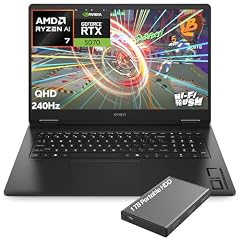
HP OMEN Gaming Laptop
- CPU
- AMD Ryzen AI 7 350
- GPU
- GeForce RTX 5070
- GPU memory
- 8 GB
- RAM
- 32 GB
- Storage
- 1000 GB
- Screen
- 17.3 in
- Refresh
- 240 Hz
- Weight
- 2.95 kg
$2,249.99 (as of 10/20/2026 15:21 PDT - Details)
It lists a 17.3-inch 2K QHD 240Hz screen, an RTX 5070 with 8GB of GPU memory and 32GB of RAM at 2.95 kg. It is the only RTX 50 pick with a 17.3-inch screen; the others are 18-inch.
Pros
- 17.3-inch 2K QHD screen per the listing
- RTX 5070 with 8GB of GPU memory
- 32GB of RAM
- 2.95 kg
Cons
- 1TB of storage
- AMD Ryzen AI 7 350, not an HX-series chip like most picks here
Good fit if
- Students who want a 17-inch screen with a current GPU
- SketchUp and Rhino modeling with moderate rendering
Skip if
- You need more than 8GB of GPU memory
- You keep large archives internally
Verdict: A sensible 17-inch middle ground.
13 Lightest pick

ASUS TUF 18 AI Gaming Laptop
- CPU
- AMD Ryzen 7 260
- GPU
- GeForce RTX 5060
- GPU memory
- 8 GB
- RAM
- 32 GB
- Storage
- 1000 GB
- Screen
- 18 in
- Refresh
- 144 Hz
- Weight
- 2.6 kg
$1,929.00 (as of 10/20/2026 15:20 PDT - Details)
At 2.6 kg it is the lightest laptop in this list, and it still lists an RTX 5060 with 8GB of GPU memory, 32GB of RAM and 1TB of storage on an 18-inch WUXGA 100% sRGB screen. It is the entry point to this group.
Pros
- 2.6 kg, the lightest pick
- RTX 5060 with 8GB of GPU memory
- 32GB of RAM
- 18-inch WUXGA screen, 100% sRGB per the listing
Cons
- RTX 5060, the lowest GPU tier here
- 1TB of storage
- AMD Ryzen 7 260, an 8-core chip rather than an HX-series processor
Good fit if
- Architecture students on their first 3D laptop
- SketchUp, Rhino and AutoCAD work with light rendering
Skip if
- You render complex scenes often
- You need 64GB of RAM
Verdict: The easiest 18-inch pick to carry, with enough GPU for coursework.
Side by side
| # | Laptop | CPU | GPU | GPU memory | Rentable GPU model | RAM | Storage |
|---|---|---|---|---|---|---|---|
| 1 | Dell Precision 7780 Laptop | Intel Core i9-13950HX | RTX 3500 Ada | 12 GB | not stated | 128 GB | 4000 GB |
| 2 | Dell Precision 7780 Laptop | Intel Core i9-13950HX | RTX 4000 Ada | 12 GB | not stated | 32 GB | 2000 GB |
| 3 | Lenovo Legion 9i 18" WQUXGA IPS 240Hz Gaming Notebook Intel Core Ultra 9 | Intel Core Ultra 9 290HX | GeForce RTX 5090 | not stated | not stated | 64 GB | 2000 GB |
| 4 | msi Titan 18" Gaming Laptop | Intel Core Ultra 9 290HX | GeForce RTX 5090 | 24 GB | not stated | 64 GB | 2000 GB |
| 5 | 2026 Alien.ware 18 Area-51 Gaming Laptop AI PC | Intel Core Ultra 9 275HX | GeForce RTX 5080 | 16 GB | not stated | 128 GB | 8000 GB |
| 6 | EXCaliberPC [2025] MSI Stealth A18 AI+ A3HWIG-028US | AMD Ryzen AI 9 365 | GeForce RTX 5080 | 16 GB | not stated | 128 GB | 8000 GB |
| 7 | HIDevolution [2026] ASUS ROG Strix Scar 18 G835LWG 18" 4K 240Hz Mini LED | Intel Core Ultra 9 | RTX 5080 | 16 GB | not stated | 128 GB | 16000 GB |
| 8 | GIGABYTE - AORUS 17X | Intel Core i9-14900HX | GeForce RTX 4090 | 16 GB | not stated | 32 GB | 2000 GB |
| 9 | ASUS ROG Strix G18 18” Gaming Laptop | Intel Core Ultra 9 275HX | RTX 5070 Ti | 12 GB | not stated | 32 GB | 2000 GB |
| 10 | ASUS ROG Strix G18 G815 Gaming AI Laptop | 18" WUXGA 144Hz | Intel Core i9-14900HX | GeForce RTX 5070 | 8 GB | not stated | 64 GB | 2000 GB |
| 11 | MSI Crosshair 18 HX AI Gaming Laptop 18" QHD+ 240Hz | Intel Core Ultra 9 275HX | GeForce RTX 5070 | 8 GB | not stated | 64 GB | 1000 GB |
| 12 | HP OMEN Gaming Laptop | AMD Ryzen AI 7 350 | GeForce RTX 5070 | 8 GB | not stated | 32 GB | 1000 GB |
| 13 | ASUS TUF 18 AI Gaming Laptop | AMD Ryzen 7 260 | GeForce RTX 5060 | 8 GB | not stated | 32 GB | 1000 GB |
How we picked
How we picked: the catalogue held 38 laptops that match our architecture group, which covers listings with a screen of 17 inches or more, dedicated graphics with at least 8GB of memory and at least 1TB of storage. Many are the same model in several memory and storage configurations, so we kept one or two versions of each model. We read the SketchUp and Rhino 8 hardware recommendations, then favored GPU memory, system memory, storage and weight, and aimed to cover every GPU tier from RTX 5060 to RTX 5090 plus professional RTX Ada cards. Two picks are reseller-upgraded configurations, labeled as such. Prices are live and read from the store listing, with the time shown next to each one. Nobody at wikilaptop.org has tested these units.
How to choose
GPU memory: what SketchUp and Rhino ask for
SketchUp recommends a discrete graphics card with at least 8GB of GPU memory, and at least 32GB when working with materials that use PBR texture maps, ambient occlusion and image-based lighting. No laptop here reaches 32GB; the most is 24GB. Rhino 8 for Windows recommends at least 4GB of video memory and an OpenGL 4.5 capable card.
In this list, two RTX 5090 picks have 24GB, four picks (RTX 5080 and RTX 4090) have 16GB, three have 12GB (RTX 5070 Ti, RTX 3500 Ada, RTX 4000 Ada) and four have 8GB. Real-time rendering and large textured scenes are where more GPU memory pays off.
RAM: plan for large models
SketchUp and Rhino both list at least 8GB of RAM as recommended, but that figure covers the application, not a large building model with linked files and a renderer open. Every pick here has at least 32GB: five have 32GB, four have 64GB and four have 128GB. For large BIM projects, 64GB or more is the safer choice. Check Autodesk's requirements page for your Revit version before buying.
Workstation or gaming laptop
Two picks, both Dell Precision 7780 configurations, use NVIDIA's professional RTX Ada cards; the other eleven use GeForce gaming GPUs. Gaming laptops here offer more GPU memory, up to 24GB, while the Precision models come in a business workstation line. If your firm standardizes on workstation-class hardware, start with the Precision; otherwise the GeForce picks give more GPU for a given tier.
Screen and weight: the cost of 17 and 18 inches
Every pick has a 17.3-inch or 18-inch screen, which is the point of this group: more drawing area on the go. Nine picks are 18-inch and four are 17.3-inch. Stated weights run from 2.6 kg (ASUS TUF 18) to 4.35 kg (Alienware 18 Area-51), and the MSI Crosshair 18 does not state its weight. Three listings state screen color coverage: the Crosshair 18 at 100% DCI-P3, and the ROG Strix G18 G815 and TUF 18 at 100% sRGB.
Storage and reseller builds
Three picks list 1TB, six list 2TB, one lists 4TB, two list 8TB and one lists 16TB. Two picks (the MSI Stealth A18 AI+ and the ROG Strix Scar 18) are reseller-upgraded configurations sold by two resellers. They add memory and storage to the maker's base model; check how the reseller handles warranty before choosing one.
Questions
How much RAM does an architecture laptop need?
SketchUp and Rhino 8 each list at least 8GB of RAM as recommended, but real projects with linked files, several apps and a renderer open need far more. Every pick here has at least 32GB, which is a sensible floor for students. For large BIM projects, look at the 64GB and 128GB picks: four of each appear in this list.
Is a gaming laptop good for architecture?
Often yes. SketchUp recommends a discrete GPU with 8GB or more of memory, and gaming laptops with RTX 5060 to RTX 5090 GPUs meet that. Eleven of the thirteen picks here are gaming-branded models chosen for GPU memory, RAM and storage. Their drawbacks for architecture are weight, since most weigh around 3 kg or more, and screens tuned for refresh rate rather than color.
Do I need an 18-inch laptop for architecture?
Not necessarily, but a large screen helps with drawings, toolbars and model views at once. This guide covers laptops with 17-inch or larger screens because they give the most drawing area without an external monitor. If you mainly work at a desk with a monitor, a smaller and lighter laptop can make more sense.
Why is there no MacBook in this list?
This guide covers laptops in our catalogue with a 17-inch or larger screen and a dedicated GPU with at least 8GB of memory; no MacBook matches that rule. Software support also matters: Rhino 8 runs on macOS, but check whether the tools your course or firm uses, such as Revit, run natively on a Mac before choosing one.
Which laptop is best for architecture students?
On the stated specs, the ASUS TUF 18 is the easiest to carry at 2.6 kg and still lists an RTX 5060 with 8GB of GPU memory, 32GB of RAM and 1TB of storage. The HP OMEN 17.3 and ROG Strix G18 with an RTX 5070 Ti step up in GPU. Heavier desktop-replacement picks suit a studio desk better than a campus bag.
Recent updates
- : First published.