
Best Laptops for Engineering in 2026: 13 Picks Compared on Specs
For most engineering work, the Lenovo ThinkPad P16 Gen 3 with an NVIDIA RTX PRO 4000 is the machine to beat in this list: 16GB of ECC graphics memory, 128GB of system memory and 4TB of storage in a 16-inch workstation. If you need less weight, a bigger screen, or a gaming-class laptop that doubles for coursework, the other 12 picks cover those needs. Every pick was chosen from stated specifications, maker pages and software vendors' published requirements, not from testing.
13 picks from 72 laptops that match this guide with a price we can quote today. Every price below is live and carries the moment it was read.
The picks at a glance
Which one should you buy?
- For simulation and large assemblies: The ThinkPad P16 Gen 3 has the most GPU and system memory in this list, which is what large meshes and assemblies consume first. See pick 1
- For engineers who carry a laptop to site or class: The HP ZBook X G1i has a professional RTX PRO 1000 GPU and 64GB of memory at a stated 2.04 kg, the lightest among the workstation picks with a stated weight. See pick 3
- For BIM and drawing on a large screen: The Dell Precision 7780 gives you a 17.3-inch screen and an RTX 4000 Ada with 12GB of ECC memory. See pick 2
- For students who also game: The HP OMEN 16 pairs a GeForce RTX 5070 with 32GB of memory and a 240Hz screen, useful for CAD coursework and games alike. See pick 10
The 13 picks
1 Best overall mobile workstation

Lenovo ThinkPad P16 Gen 3
- CPU
- Intel Core Ultra 9 285HX
- GPU
- RTX PRO 4000
- GPU memory
- 16 GB
- RAM
- 128 GB
- Storage
- 4000 GB
- Screen
- 16 in
- Refresh
- 120 Hz
- Touchscreen
- Yes
$7,899.00 (as of 10/20/2026 15:22 PDT - Details)
This ThinkPad P16 Gen 3 combines an Intel Core Ultra 9 285HX with an NVIDIA RTX PRO 4000 Blackwell, which NVIDIA lists with 16GB of ECC GDDR7. It also has 128GB of system memory and 4TB of storage, the most of both among these picks. For simulation work, that is the most headroom in this list.
Pros
- RTX PRO 4000 with 16GB of ECC GDDR7, per NVIDIA
- 128GB of system memory, the most among the picks
- 4TB of storage, the most among the picks
- 16-inch touchscreen at 120Hz
Cons
- 2.54 kg
- Sold by a third-party seller; confirm Lenovo warranty coverage
Good fit if
- Simulation users running Ansys Fluent or similar GPU solvers on large models
- Engineers working with very large CAD assemblies
Skip if
- Your coursework is light 2D drafting
- You need the lightest workstation you can carry
Verdict: The most capable engineering laptop in this list on every stated spec that matters for large models.
2 Best 17-inch workstation

Dell Precision 7780 Laptop
- CPU
- Intel Core i9-13950HX
- GPU
- RTX 4000 Ada
- GPU memory
- 12 GB
- RAM
- 32 GB
- Storage
- 2000 GB
- Screen
- 17.3 in
- Weight
- 3.05 kg
- OS
- Windows 11 Pro
$4,399.99 (as of 10/20/2026 15:21 PDT - Details)
The Precision 7780 is the 17.3-inch workstation in this list, with an Intel Core i9-13950HX and an RTX 4000 Ada that NVIDIA lists with 12GB of ECC GDDR6. It suits desk-based BIM and drawing work that benefits from screen area.
Pros
- 17.3-inch screen
- RTX 4000 Ada with 12GB of ECC memory, per NVIDIA
- 2TB of storage
- Windows 11 Pro
Cons
- 3.05 kg, the heaviest pick in this list
- 32GB of system memory, the minimum of this page's rule
- Refresh rate not stated by the seller
Good fit if
- Civil and architectural engineers working in BIM
- Users who want a large screen without an external monitor
Skip if
- You carry your laptop daily
- You need more than 32GB of memory out of the box
Verdict: A big-screen professional workstation, best kept on a desk.
3 Lightest workstation pick

HP ZBook X G1i Laptop
- CPU
- Intel Core Ultra 7 265H
- GPU
- RTX PRO 1000
- GPU memory
- 8 GB
- RAM
- 64 GB
- Storage
- 2000 GB
- Screen
- 16 in
- Weight
- 2.04 kg
- Battery
- 83 Wh
$5,099.00 (as of 10/20/2026 15:21 PDT - Details)
The ZBook X G1i pairs an Intel Core Ultra 7 265H with an RTX PRO 1000 Blackwell, which NVIDIA lists with 8GB of GDDR7. At 2.04 kg it is the lightest of the workstation picks with a stated weight, and it has 64GB of memory and an 83 Wh battery.
Pros
- 2.04 kg, lightest stated weight among the professional-GPU picks
- 64GB of system memory
- 2TB of storage
- 83 Wh battery
Cons
- RTX PRO 1000 is one of the lower models in NVIDIA's RTX PRO laptop line
- 8GB of GPU memory limits GPU-solver model size
Good fit if
- Engineers who move between office, site and class
- CAD users who want a professional GPU in a lighter body
Skip if
- You run large GPU-accelerated simulations
- You want a high refresh rate screen
Verdict: The portable workstation pick, with enough memory for serious CAD.
4 Largest stated battery

Lenovo ThinkPad P16v Gen 2 Mobile Workstation Laptop
- CPU
- Intel Core Ultra 7 165H
- GPU
- RTX 2000 Ada
- GPU memory
- 8 GB
- RAM
- 64 GB
- Storage
- 1000 GB
- Screen
- 16 in
- Refresh
- 60 Hz
- Battery
- 90 Wh
$2,999.99 (as of 10/20/2026 15:22 PDT - Details)
The ThinkPad P16v Gen 2 has an Intel Core Ultra 7 165H, an RTX 2000 Ada with 8GB and 64GB of system memory. Its 90 Wh battery is the largest stated among these picks.
Pros
- 90 Wh battery, the largest stated in this list
- 64GB of system memory
- RTX 2000 Ada professional GPU with 8GB, per NVIDIA
Cons
- 60Hz screen
- Weight not stated by the seller
- 1TB of storage
Good fit if
- Engineers who work away from a charger
- CAD users who want a professional GPU and 64GB
Skip if
- You need more than 8GB of GPU memory
- You want to know the carry weight before buying
Verdict: A balanced workstation with the biggest battery here.
5 Lighter alternative to the Precision 7680
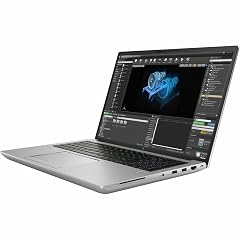
HP ZBook Fury G10 16" Mobile Workstation
- CPU
- Intel Core i7-13700HX
- GPU
- RTX 2000 Ada
- GPU memory
- 8 GB
- RAM
- 32 GB
- Storage
- 1000 GB
- Screen
- 16 in
- Weight
- 2.4 kg
$2,639.21 (as of 10/20/2026 15:21 PDT - Details)
The ZBook Fury G10 has the same RTX 2000 Ada GPU, 32GB of memory and 1TB of storage as the Precision 7680, with an Intel Core i7-13700HX. It weighs 2.4 kg against the Dell's 2.68 kg.
Pros
- RTX 2000 Ada professional GPU with 8GB
- 2.4 kg, lighter than the Precision 7680
- 16-inch WUXGA screen per the listing
Cons
- Operating system not stated by the seller
- 32GB of memory and 1TB of storage, the minimum of this page's rule
Good fit if
- CAD users who prefer HP's workstation line
- Buyers who want a professional GPU at a moderate weight
Skip if
- You need a stated operating system and license
- You run memory-hungry simulations
Verdict: A solid professional-GPU configuration; confirm the OS with the seller.
6 Best Dell 16-inch workstation

Dell Precision 7680 Laptop
- CPU
- Intel Core i7-13850HX
- GPU
- RTX 2000 Ada
- GPU memory
- 8 GB
- RAM
- 32 GB
- Storage
- 1000 GB
- Screen
- 16 in
- Weight
- 2.68 kg
- OS
- Windows 11 Pro
$2,599.99 (as of 10/20/2026 15:21 PDT - Details)
The Precision 7680 pairs an Intel Core i7-13850HX with an RTX 2000 Ada and 32GB of memory, with Windows 11 Pro stated. It is the 16-inch counterpart of the Precision 7780 in this list.
Pros
- RTX 2000 Ada professional GPU with 8GB
- Intel Core i7-13850HX
- Windows 11 Pro
Cons
- 2.68 kg
- 32GB of memory and 1TB of storage
- Refresh rate not stated by the seller
Good fit if
- Engineers in organizations that standardize on Dell workstations
- CAD work that needs a professional GPU in a 16-inch body
Skip if
- You want the lightest workstation
- You need more GPU memory for simulation
Verdict: A conventional 16-inch professional workstation.
7 Best gaming-class pick for GPU simulation

Lenovo Legion Pro 7i Gen 10 16" Gaming Laptop
- CPU
- Intel Core Ultra 9 275HX
- GPU
- GeForce RTX 5080
- GPU memory
- 16 GB
- RAM
- 64 GB
- Storage
- 2000 GB
- Screen
- 16 in
- Refresh
- 240 Hz
- OS
- Windows 11 Pro
$4,398.00 (as of 10/20/2026 15:21 PDT - Details)
The Legion Pro 7i Gen 10 pairs an Intel Core Ultra 9 275HX with a GeForce RTX 5080 with 16GB and 64GB of system memory. That is the same GPU memory as the ThinkPad P16 Gen 3, in a gaming chassis.
Pros
- GeForce RTX 5080 with 16GB of GPU memory, tied for the most here
- 64GB of system memory
- 2TB of storage
- 240Hz 16-inch screen
Cons
- GeForce card, not a professional RTX PRO GPU
- Weight not stated by the seller
Good fit if
- Students and researchers running GPU solvers or CUDA code
- Engineers who also want high-refresh gaming
Skip if
- Your employer requires a professional GPU
- You need a known carry weight
Verdict: The most GPU memory you can get outside a workstation in this list.
8 Best 17-inch pick with 16GB of GPU memory

GIGABYTE - AORUS 17X
- CPU
- Intel Core i9-14900HX
- GPU
- GeForce RTX 4090
- GPU memory
- 16 GB
- RAM
- 32 GB
- Storage
- 2000 GB
- Screen
- 17.3 in
- Refresh
- 240 Hz
- Weight
- 2.8 kg
$3,429.21 (as of 10/20/2026 15:21 PDT - Details)
The AORUS 17X combines a 17.3-inch 2560 by 1440 240Hz screen (per the listing) with a GeForce RTX 4090 with 16GB and an Intel Core i9-14900HX. It is the only 17-inch pick with 16GB of GPU memory.
Pros
- GeForce RTX 4090 with 16GB of GPU memory
- 17.3-inch 240Hz screen
- 2TB of storage
- 2.8 kg, lighter than the Precision 7780
Cons
- 32GB of system memory
- GeForce card rather than a professional GPU
- Previous-generation 2024 model
Good fit if
- Engineers who want a large screen and a strong GPU
- Rendering and visualization work alongside CAD
Skip if
- You need a professional GPU for your employer's software policy
- You carry your laptop daily
Verdict: A large-screen GPU powerhouse from a previous generation.
9 Lightest pick with 12GB of GPU memory

acer Predator Helios Neo 16S AI Gaming Laptop
- CPU
- Intel Core Ultra 9 275HX
- GPU
- GeForce RTX 5070 Ti
- GPU memory
- 12 GB
- RAM
- 32 GB
- Storage
- 1000 GB
- Screen
- 16 in
- Refresh
- 240 Hz
- Weight
- 2.3 kg
The Predator Helios Neo 16S AI pairs an Intel Core Ultra 9 275HX with a GeForce RTX 5070 Ti with 12GB. At 2.3 kg it is lighter than the other 12GB pick, the Precision 7780.
Pros
- GeForce RTX 5070 Ti with 12GB of GPU memory
- 2.3 kg
- Intel Core Ultra 9 275HX
- 240Hz 16-inch screen
Cons
- 32GB of system memory
- 1TB of storage
Good fit if
- Students who need more than 8GB of GPU memory
- Engineers who move the laptop often
Skip if
- You need a professional GPU
- You work with very large assemblies that want 64GB or more
Verdict: A lighter route to 12GB of GPU memory.
10 Best for CAD students who also game
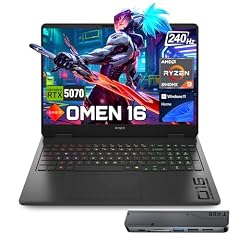
HP OMEN 16 RTX 5070 AMD Ryzen 9 8940HX 240Hz Gaming Laptop
- CPU
- AMD Ryzen 9 8940HX
- GPU
- RTX 5070
- GPU memory
- 8 GB
- RAM
- 32 GB
- Storage
- 1000 GB
- Screen
- 16 in
- Refresh
- 240 Hz
- Weight
- 2.45 kg
$2,199.00 (as of 10/20/2026 15:21 PDT - Details)
The OMEN 16 has an AMD Ryzen 9 8940HX, a GeForce RTX 5070 with 8GB and a 240Hz screen. It meets every part of this page's rule and doubles as a gaming laptop.
Pros
- GeForce RTX 5070 with 8GB
- AMD Ryzen 9 8940HX
- 240Hz 16-inch screen
- 32GB of memory
Cons
- 8GB of GPU memory limits GPU-solver model size
- Windows 11 Home rather than Pro
- 1TB of storage
Good fit if
- Engineering students running SolidWorks or Fusion coursework
- Users who want one machine for work and games
Skip if
- You run large simulations
- Your organization requires Windows Pro features
Verdict: A capable all-rounder for coursework and gaming.
11 Best HX-class processor with an 8GB GPU

Lenovo Legion 5 16" WQXGA 240Hz Gaming Laptop
- CPU
- Intel Core Ultra 9 275HX
- GPU
- GeForce RTX 5060
- GPU memory
- 8 GB
- RAM
- 32 GB
- Storage
- 1000 GB
- Screen
- 16 in
- Refresh
- 240 Hz
$2,249.00 (as of 10/20/2026 15:21 PDT - Details)
The Legion 5 pairs an Intel Core Ultra 9 275HX, the same processor as the Legion Pro 7i and Predator Helios, with a GeForce RTX 5060 with 8GB. It suits CPU-heavy work where the GPU mostly drives the viewport.
Pros
- Intel Core Ultra 9 275HX
- GeForce RTX 5060 with 8GB
- 16-inch WQXGA 240Hz screen per the listing
Cons
- Operating system not stated by the seller
- RTX 5060 is the lowest-numbered GeForce model in this list
- 32GB of memory and 1TB of storage
Good fit if
- CAD users whose workload leans on the processor
- Students who want a strong CPU in a gaming laptop
Skip if
- You rely on GPU-accelerated solvers
- You need a stated OS license
Verdict: A processor-first pick with a modest GPU.
12 Lightest pick

Lenovo Yoga Pro 9i
- CPU
- Intel Core Ultra 9 285H
- GPU
- GeForce RTX 5060
- GPU memory
- 8 GB
- RAM
- 32 GB
- Storage
- 1000 GB
- Screen
- 16 in
- Refresh
- 120 Hz
- Weight
- 1.93 kg
$3,449.99 (as of 10/20/2026 15:22 PDT - Details)
The Yoga Pro 9i is the lightest laptop in this list at 1.93 kg, with a GeForce RTX 5060 with 8GB, 32GB of memory and a 3.2K tandem OLED screen per the listing. It is a creator laptop rather than a workstation.
Pros
- 1.93 kg, the lightest pick
- 3.2K tandem OLED screen at 120Hz per the listing
- GeForce RTX 5060 with 8GB
- Windows 11 Pro
Cons
- Processor listed only as Intel Core Ultra 9, model not stated by the seller
- 32GB of memory and 1TB of storage
Good fit if
- Engineers who carry a laptop every day
- Design work where screen quality matters
Skip if
- You run heavy simulations
- You need a professional GPU
Verdict: The pick for portability, with enough GPU for CAD viewports.
13 Biggest screen

ASUS TUF 18 AI Gaming Laptop
- CPU
- AMD Ryzen 7 260
- GPU
- GeForce RTX 5060
- GPU memory
- 8 GB
- RAM
- 32 GB
- Storage
- 1000 GB
- Screen
- 18 in
- Refresh
- 144 Hz
- Weight
- 2.6 kg
$1,909.00 (as of 10/20/2026 15:20 PDT - Details)
The TUF 18 AI is the only 18-inch pick, with an AMD Ryzen 7 260, a GeForce RTX 5060 with 8GB and a WUXGA 144Hz screen per the listing. At 2.6 kg it is lighter than both 17.3-inch picks.
Pros
- 18-inch screen, the largest in this list
- 2.6 kg, lighter than both 17.3-inch picks
- GeForce RTX 5060 with 8GB
Cons
- WUXGA (1920 by 1200) per the listing, fewer pixels than the QHD-class panels of the Legion 5 and AORUS 17X
- 8GB of GPU memory
- Sold by a third-party seller that lists eight configurations of this model
Good fit if
- Users who want a large screen for drawings
- Students who work mainly at a desk
Skip if
- You want a sharp high-resolution screen
- You need more than 8GB of GPU memory
Verdict: The most screen area in this list, at a moderate weight.
Side by side
| # | Laptop | CPU | GPU | GPU memory | Rentable GPU model | RAM | Storage |
|---|---|---|---|---|---|---|---|
| 1 | Lenovo ThinkPad P16 Gen 3 | Intel Core Ultra 9 285HX | RTX PRO 4000 | 16 GB | not stated | 128 GB | 4000 GB |
| 2 | Dell Precision 7780 Laptop | Intel Core i9-13950HX | RTX 4000 Ada | 12 GB | not stated | 32 GB | 2000 GB |
| 3 | HP ZBook X G1i Laptop | Intel Core Ultra 7 265H | RTX PRO 1000 | 8 GB | not stated | 64 GB | 2000 GB |
| 4 | Lenovo ThinkPad P16v Gen 2 Mobile Workstation Laptop | Intel Core Ultra 7 165H | RTX 2000 Ada | 8 GB | not stated | 64 GB | 1000 GB |
| 5 | HP ZBook Fury G10 16" Mobile Workstation | Intel Core i7-13700HX | RTX 2000 Ada | 8 GB | not stated | 32 GB | 1000 GB |
| 6 | Dell Precision 7680 Laptop | Intel Core i7-13850HX | RTX 2000 Ada | 8 GB | not stated | 32 GB | 1000 GB |
| 7 | Lenovo Legion Pro 7i Gen 10 16" Gaming Laptop | Intel Core Ultra 9 275HX | GeForce RTX 5080 | 16 GB | not stated | 64 GB | 2000 GB |
| 8 | GIGABYTE - AORUS 17X | Intel Core i9-14900HX | GeForce RTX 4090 | 16 GB | not stated | 32 GB | 2000 GB |
| 9 | acer Predator Helios Neo 16S AI Gaming Laptop | Intel Core Ultra 9 275HX | GeForce RTX 5070 Ti | 12 GB | not stated | 32 GB | 1000 GB |
| 10 | HP OMEN 16 RTX 5070 AMD Ryzen 9 8940HX 240Hz Gaming Laptop | AMD Ryzen 9 8940HX | RTX 5070 | 8 GB | not stated | 32 GB | 1000 GB |
| 11 | Lenovo Legion 5 16" WQXGA 240Hz Gaming Laptop | Intel Core Ultra 9 275HX | GeForce RTX 5060 | 8 GB | not stated | 32 GB | 1000 GB |
| 12 | Lenovo Yoga Pro 9i | Intel Core Ultra 9 285H | GeForce RTX 5060 | 8 GB | not stated | 32 GB | 1000 GB |
| 13 | ASUS TUF 18 AI Gaming Laptop | AMD Ryzen 7 260 | GeForce RTX 5060 | 8 GB | not stated | 32 GB | 1000 GB |
How we picked
How we picked: 80 laptops in the catalogue meet this page's rule, a dedicated GPU with at least 8GB of its own memory, 32GB of system memory, a screen of 16 inches or more and 1TB of storage. CAD, simulation and BIM software asks for all four together. We then set aside listings from system builders that resell heavily modified configurations (15 of the 80 come from just two resellers), listings whose title contradicts their own spec data, and near-duplicate configurations of the same model. From the rest we chose workstations with professional NVIDIA GPUs and gaming-class laptops with NVIDIA GeForce GPUs, covering different screen sizes, weights and GPU memory. Prices are live and read from the store listing. Nobody at wikilaptop.org tested these units.
How to choose
Professional GPU or gaming GPU
26 of the 80 laptops that meet this page's rule use a professional NVIDIA GPU (RTX Ada or RTX PRO); the rest use gaming GeForce cards, plus one AMD Radeon. NVIDIA lists ECC memory on its higher professional laptop GPUs, including the RTX PRO 4000 and RTX 4000 Ada in this list, but not on the RTX PRO 1000 or RTX 2000 Ada.
Gaming cards can run engineering software. Ansys says in its Fluent GPU buying guide that it does not test gaming cards, but that Fluent will most likely run on one that meets the minimum requirements. If your employer or course requires a certified configuration, check the software vendor's certification list before buying.
GPU memory: size it to your models
For GPU solvers, graphics memory sets the largest model you can run. Ansys's Fluent guide estimates 1.0 to 5.6 GB per million cells depending on mesh type and precision. By that arithmetic, an 8GB card holds roughly 1.4 to 8 million cells and a 16GB card roughly twice that.
Ansys also advises system memory at least equal to the total GPU memory. Every pick here meets that. In the pool, 40 of the 80 laptops have 8GB of GPU memory, 14 have 12GB, 15 have 16GB and 10 have 24GB.
NVIDIA or AMD graphics
MathWorks lists only NVIDIA GPUs for MATLAB GPU computing, with compute capability 7.5 to 12.x. Ansys Fluent supports AMD GPUs for its GPU solver only on Linux from the 2025 R1 release, per its buying guide.
If you use MATLAB, CUDA code or Fluent on Windows, choose NVIDIA. Every pick in this list has an NVIDIA GPU; only 1 of the 80 laptops in the pool uses an AMD Radeon GPU.
Operating system: engineering runs on Windows
SOLIDWORKS is Windows-only, per the SOLIDWORKS blog, and much other engineering software is built for Windows first. Every pick here ships with Windows or is a Windows laptop; two listings, the Legion 5 and ZBook Fury G10, do not state the operating system, so confirm it with the seller.
Windows 11 Pro adds management features some employers and universities require. Eight of the 13 picks list Windows 11 Pro.
Memory, storage, screen and weight
This page's rule starts at 32GB and 1TB. In the pool, 30 laptops have exactly 32GB and 21 have 128GB. Large assemblies and simulations use memory quickly, so 64GB is worth it if your models are large.
Screens run from 16 inches (47 of the 80) to 17.3 inches (7) and 18 inches (26). Bigger screens add weight: the picks range from 1.93 kg (Yoga Pro 9i) to 3.05 kg (Precision 7780).
Questions
Do I need a workstation GPU for engineering?
Not always. Gaming GeForce cards run most CAD and simulation software, and Ansys says Fluent will most likely run on untested gaming cards that meet its minimums. A professional RTX PRO or RTX Ada card makes sense when your employer requires a certified configuration or you want ECC graphics memory, which NVIDIA lists on its higher professional laptop GPUs such as the RTX PRO 4000 and RTX 4000 Ada.
How much memory does an engineering laptop need?
This page's rule starts at 32GB, and 9 of the 13 picks have exactly that. Choose 64GB or more for large assemblies, FEA or CFD. Ansys advises system memory at least equal to total GPU memory for its GPU solver. The ThinkPad P16 Gen 3 here has 128GB; the P16v Gen 2, ZBook X G1i and Legion Pro 7i have 64GB.
Can I use a MacBook for engineering?
For many courses, no. SOLIDWORKS is Windows-only per its maker, and MATLAB GPU computing is listed for NVIDIA GPUs only. Some engineering tools run on macOS, but if your course or employer uses SOLIDWORKS or Windows-only simulation packages, a Windows laptop avoids workarounds. None of the 80 laptops in this pool is a Mac.
Is 8GB of GPU memory enough?
For CAD modeling and drawing, 8GB is usually workable. For GPU-accelerated simulation, it limits model size: by Ansys's Fluent sizing figures, 8GB holds roughly 1.4 to 8 million cells depending on mesh and precision. If you run large GPU simulations, look at the 12GB and 16GB picks, such as the Precision 7780, Helios Neo 16S, Legion Pro 7i, AORUS 17X and ThinkPad P16 Gen 3.
Is a gaming laptop good for engineering students?
Often yes. Gaming laptops in this list pair NVIDIA GPUs with 32GB or more of memory and large screens, which covers most coursework. The trade-offs are weight, consumer GeForce cards rather than professional GPUs, and fewer certified configurations. The OMEN 16 and Legion 5 are the gaming-class picks aimed at students here.
Recent updates
- : First published.