
Best Windows 11 Home Laptops in 2026: 14 Picks Compared on Specs
Our top pick is the Acer Swift Go 16 with a Ryzen AI 9 465: it pairs 32GB of memory and 1TB of storage with a 120Hz touch screen, weighs 1.6 kg and is the only pick with a stated battery size (65Wh). The other 13 picks run from a 1.09 kg Zenbook 14 to gaming laptops with an RTX 5070 Ti and an RTX 4090. Every laptop here ships with Windows 11 Home, and we chose them from stated specifications, not from lab tests.
14 picks from 118 laptops that match this guide with a price we can quote today. Every price below is live and carries the moment it was read.
The picks at a glance
Which one should you buy?
- For most homes and students: The Swift Go 16 gives you 32GB of memory, 1TB of storage and a 16-inch 120Hz touch screen at 1.6 kg. See pick 1
- For carrying every day: The Zenbook 14 weighs 1.09 kg, the lightest laptop in this list, with a 14-inch OLED screen and a Snapdragon X Plus. See pick 2
- For a first gaming laptop: The Acer Nitro V 15 brings a current RTX 5050 with 8GB of graphics memory and a 165Hz screen. See pick 11
- For a big home screen: The HP 17 puts a 17-inch display in front of 32GB of memory and 1TB of storage. See pick 6
The 14 picks
1 Best overall

Acer Swift Go 16 Business Laptop
- CPU
- AMD Ryzen AI 9 465
- GPU
- Radeon 880M
- RAM
- 32 GB
- Storage
- 1000 GB
- Screen
- 16 in
- Refresh
- 120 Hz
- Touchscreen
- Yes
- Weight
- 1.6 kg
$1,269.00 (as of 10/20/2026 15:20 PDT - Details)
It covers the widest range of home use in one machine: 32GB of memory and 1TB of storage, a 16-inch 120Hz touch screen and a Ryzen AI 9 465 with Radeon 880M graphics. At 1.6 kg it is lighter than the other 16-inch everyday picks, the Vivobook 16 (1.88 kg) and the Dell 16 (1.9 kg).
Pros
- 32GB of memory and 1TB of storage
- 16-inch 1920x1200 touch screen at 120Hz
- 65Wh battery, the only stated battery size among the picks
- 1.6 kg, light for a 16-inch laptop in this list
Cons
- Integrated Radeon 880M graphics, no separate GPU for demanding games
- Listing is named for business, but it ships with Home, not Pro
Good fit if
- Families and students who want one laptop for schoolwork, media and multitasking
- Buyers who want a large touch screen without a heavy chassis
Skip if
- You play recent games at high settings: pick one of the RTX laptops
- Your employer requires Windows 11 Pro for device management
Verdict: The most complete everyday Windows 11 Home laptop in this list.
2 Lightest pick

ASUS Zenbook 14 AI Business Laptop
- CPU
- Qualcomm Snapdragon X Plus
- Storage
- 512 GB
- Screen
- 14 in
- Weight
- 1.09 kg
- OS
- Windows 11 Home
At 1.09 kg it is the lightest laptop here, 0.25 kg below the Surface Laptop 7. It uses a Snapdragon X Plus, an Arm processor, with a 14-inch OLED screen and 512GB of storage.
Pros
- 1.09 kg, the lightest in this list
- 14-inch FHD+ OLED screen
- Snapdragon X Plus: Windows on Arm runs many x64 apps under emulation, per Microsoft
Cons
- Memory not stated in the spec data (the listing title gives 16GB)
- 512GB of storage, half of the 1TB picks
- Some apps and drivers may not support Arm: check yours first
Good fit if
- Commuters and travelers who carry a laptop all day
- Writers and students who live in a browser and office apps
Skip if
- You rely on older Windows software or hardware drivers that may not support Arm
- You need a larger screen for spreadsheets or photo work
Verdict: The pick for buyers who want the least weight in the bag.
3 Best compact touch screen

Microsoft Surface Laptop 7 AI Copilot+ PC for Business
- CPU
- Qualcomm Snapdragon X Plus
- RAM
- 16 GB
- Storage
- 1000 GB
- Screen
- 13.8 in
- Refresh
- 120 Hz
- Touchscreen
- Yes
- Weight
- 1.34 kg
- OS
- Windows 11 Home
$1,049.99 (as of 10/20/2026 15:22 PDT - Details)
Microsoft's own Surface Laptop 7 pairs a 13.8-inch touch screen at 120Hz with 16GB of memory and 1TB of storage, twice the Zenbook 14's storage, at 1.34 kg. Like the Zenbook it runs a Snapdragon X Plus on Windows on Arm.
Pros
- 13.8-inch 2K+ touch screen at 120Hz
- 1TB of storage and 16GB of memory
- 1.34 kg, second lightest in this list
Cons
- Arm processor: check app and driver support before buying
- 13.8-inch screen, the smallest among the picks
Good fit if
- Buyers who want a small touch laptop with room for files
- Students who take notes and read on the go
Skip if
- You run specialist x64 software that is not listed as working on Arm
- Your work IT team needs Windows 11 Pro features
Verdict: A compact, touch-first Windows 11 Home laptop with generous storage.
4 Best 14-inch x86 laptop
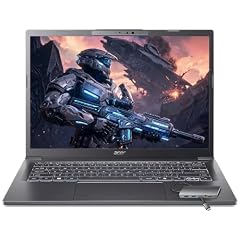
Acer Aspire Laptop 2026
- CPU
- Intel Core Ultra 7 258V
- RAM
- 32 GB
- Storage
- 1000 GB
- Screen
- 14 in
- Touchscreen
- Yes
- Weight
- 1.4 kg
- OS
- Windows 11 Home
$1,149.99 (as of 10/20/2026 15:20 PDT - Details)
It gives a light 14-inch touch laptop an Intel Core Ultra 7 258V, 32GB of memory and 1TB of storage, so it avoids the app compatibility questions of the Arm picks. At 1.4 kg it is only 0.06 kg heavier than the Surface Laptop 7.
Pros
- 32GB of memory, the most among the 14-inch picks
- 1TB of storage
- Intel x86 processor: runs standard Windows apps natively
- 1.4 kg with a touch screen
Cons
- Screen resolution and refresh rate not stated by the seller
- No battery size stated by the seller
Good fit if
- Students and home workers who want a light laptop with lots of memory
- Buyers who want a 14-inch machine with no Arm compatibility checks
Skip if
- You want a larger 16-inch or 17-inch screen
- You want a separate graphics card for games
Verdict: The light 14-inch pick with the most memory and no Arm caveats.
5 Best 16-inch for home office

Dell 16 Laptop DC16251-16.0-inch 16
- CPU
- Intel Core 7 150U
- RAM
- 16 GB
- Storage
- 1000 GB
- Screen
- 16 in
- Touchscreen
- Yes
- Weight
- 1.9 kg
- OS
- Windows 11 Home
$1,079.86 (as of 10/20/2026 15:20 PDT - Details)
It combines a 16-inch 2K touch screen in a 16:10 shape with 16GB of memory and 1TB of storage, driven by an Intel Core 7 150U. That screen gives more vertical room for documents than the FHD and 1920x1200 panels on the Lenovo 15.6-inch and the Vivobook 16.
Pros
- 16-inch 2K touch screen in a 16:10 shape
- 1TB of storage
- 16GB of memory
Cons
- 1.9 kg, heavier than the 16-inch Swift Go at 1.6 kg
- 16GB of memory, half of the Swift Go 16's
Good fit if
- Home office users working in documents and spreadsheets
- Families who want a shared laptop with a large touch screen
Skip if
- You carry the laptop daily
- You want 32GB of memory for heavy multitasking
Verdict: A solid big-screen home office laptop with ample storage.
6 Best 17-inch everyday laptop

HP 17" Copilot AI Business Laptop
- CPU
- Intel Core Ultra 5 255U
- RAM
- 32 GB
- Storage
- 1000 GB
- Screen
- 17 in
- Weight
- 2.08 kg
- OS
- Windows 11 Home
$999.00 (as of 10/20/2026 15:21 PDT - Details)
It is the only non-gaming pick with a 17-inch screen, and it pairs that screen with 32GB of memory, 1TB of storage and an Intel Core Ultra 5 255U. At 2.08 kg it is 0.41 kg lighter than the 17.3-inch MSI Cyborg 17.
Pros
- 17-inch screen, the largest among the everyday picks
- 32GB of memory and 1TB of storage
- 2.08 kg, lighter than both 17-inch gaming picks
Cons
- No touch screen stated by the seller
- Integrated graphics only, no separate GPU
Good fit if
- Buyers who want a desk-bound laptop with a large screen
- Home users who keep many browser tabs and apps open
Skip if
- You travel with your laptop often
- You want to play recent games
Verdict: The pick for a large screen and plenty of memory at a desk.
7 Best entry 16-inch

ASUS Vivobook 16 Laptop
- CPU
- AMD Ryzen 5 150
- RAM
- 8 GB
- Storage
- 512 GB
- Screen
- 16 in
- Weight
- 1.88 kg
- OS
- Windows 11 Home
$571.81 (as of 10/20/2026 15:20 PDT - Details)
It brings a 16-inch 1920x1200 screen and 512GB of storage with an AMD Ryzen 5 150, a step up in storage from the Lenovo 15.6-inch with its 128GB. It suits browsing, video and schoolwork on a larger screen.
Pros
- 16-inch 1920x1200 screen in a 16:10 shape
- 512GB of storage, four times the Lenovo 15.6-inch's
- AMD Ryzen 5 150 processor
Cons
- 8GB of memory, the least among the everyday picks along with the Lenovo 15.6-inch
- 1.88 kg, heavier than the Swift Go 16
Good fit if
- Students who need a large screen for classes and assignments
- Households who browse, stream and write documents
Skip if
- You keep many apps open at once: 16GB or more fits better
- You want a touch screen
Verdict: A simple large-screen laptop for everyday home use.
8 Best for basic web and documents

Lenovo Business 15.6" FHD Laptop
- CPU
- Intel N150
- RAM
- 8 GB
- Storage
- 128 GB
- Screen
- 15.6 in
- Weight
- 1.55 kg
- OS
- Windows 11 Home
$429.99 (as of 10/20/2026 15:21 PDT - Details)
It is the simplest machine here: an Intel N150, 8GB of DDR5 memory and a 15.6-inch FHD screen at 1.55 kg. It covers browsing, email and documents; for anything heavier, the Vivobook 16 or the Dell 16 are the next steps up.
Pros
- Intel N150, a low-power processor for light tasks
- 15.6-inch FHD screen
- 1.55 kg, the lightest 15.6-inch pick
Cons
- 128GB of storage, the least in this list; Windows needs 64GB per Microsoft
- 8GB of memory
Good fit if
- A second household laptop for web, email and video calls
- Younger students with light schoolwork
Skip if
- You store photos, videos or games locally
- You edit photos or run demanding apps
Verdict: A basic Windows 11 Home laptop for light, browser-based use.
9 Best for creative work and casual gaming

Lenovo IdeaPad Pro 5-2025
- CPU
- AMD Ryzen AI 7 350
- GPU
- GeForce RTX 5050
- RAM
- 16 GB
- Storage
- 1000 GB
- Screen
- 16 in
- Refresh
- 120 Hz
- Weight
- 1.78 kg
- OS
- Windows 11 Home
It pairs a 16-inch 2880x1800 OLED screen at 120Hz with a GeForce RTX 5050 and a Ryzen AI 7 350, at 1.78 kg. That makes it the lightest pick with a separate NVIDIA GPU, 0.12 kg below the AERO X16.
Pros
- 16-inch 2880x1800 OLED screen at 120Hz
- GeForce RTX 5050 with 8GB of GDDR7, per NVIDIA
- 1.78 kg, the lightest pick with a separate GPU
- 1TB of storage
Cons
- 16GB of memory, half of the AERO X16's
- 120Hz screen, slower than the 165Hz and 240Hz gaming picks
Good fit if
- Photo editors and hobby video editors who want an OLED screen
- Casual players who also want a portable everyday laptop
Skip if
- You play competitive games and want a high-refresh screen
- You need 32GB of memory for large projects
Verdict: The most portable way to get an OLED screen and an RTX GPU in this list.
10 Best for creators

GIGABYTE AERO X16
- CPU
- AMD Ryzen AI 9 HX 370
- GPU
- GeForce RTX 5070
- RAM
- 32 GB
- Storage
- 1000 GB
- Screen
- 16 in
- Weight
- 1.9 kg
- OS
- Windows 11 Home
It carries a GeForce RTX 5070 with 32GB of memory and 1TB of storage at 1.9 kg, far lighter than the gaming picks with the same GPU tier or above. The AMD Ryzen AI 9 HX 370 is a high-power chip aimed at performance.
Pros
- GeForce RTX 5070 at 1.9 kg
- 32GB of memory and 1TB of storage
- AMD Ryzen AI 9 HX 370 processor
Cons
- Refresh rate not stated by the seller
- No battery size stated by the seller
- Graphics memory not stated; NVIDIA lists the RTX 5070 with 8GB or 12GB
Good fit if
- Video and photo editors who travel with their laptop
- Students in design or engineering courses
Skip if
- You want a gaming screen with a stated high refresh rate
- You need more than 1TB of storage for large media libraries
Verdict: The creator pick that keeps an RTX 5070 under 2 kg.
11 Best first gaming laptop

acer Nitro V 15.6” FHD IPS 165Hz Gaming Laptop
- CPU
- Intel Core i5-13420H
- GPU
- GeForce RTX 5050
- GPU memory
- 8 GB
- RAM
- 16 GB
- Storage
- 512 GB
- Screen
- 15.6 in
- Refresh
- 165 Hz
- Weight
- 2.11 kg
$1,049.99 (as of 10/20/2026 15:20 PDT - Details)
It brings a current RTX 5050 with 8GB of GDDR7 graphics memory, a 15.6-inch 165Hz screen and 16GB of memory with an Intel Core i5-13420H. It is the entry point to the gaming picks here.
Pros
- GeForce RTX 5050 with 8GB of GDDR7
- 15.6-inch FHD screen at 165Hz
- 16GB of memory
Cons
- 512GB of storage fills quickly with modern games
- 2.11 kg, heavier than the IdeaPad Pro 5 with the same GPU
Good fit if
- Players starting out with esports and popular titles
- Students who want one laptop for study and games
Skip if
- You want high settings at high resolution: the RTX 5070 Ti and RTX 4090 picks sit above
- You want a lighter laptop for daily carrying
Verdict: A straightforward entry into RTX 50 gaming on Windows 11 Home.
12 Best 17-inch gaming laptop
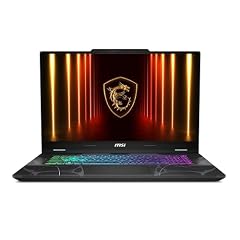
msi Cyborg 17 17.3" FHD 144Hz Gaming Laptop
- GPU
- GeForce RTX 5060
- RAM
- 16 GB
- Storage
- 1000 GB
- Screen
- 17.3 in
- Refresh
- 144 Hz
- Weight
- 2.49 kg
- OS
- Windows 11 Home
It puts a GeForce RTX 5060 behind a 17.3-inch 144Hz screen, with 16GB of memory, 1TB of storage and an Intel Core 7 240H named in the listing title. It is the 17-inch option below the much heavier AORUS 17X.
Pros
- 17.3-inch FHD screen at 144Hz
- GeForce RTX 5060 with 8GB of GDDR7, per NVIDIA
- 1TB of storage
- 2.49 kg, 0.31 kg lighter than the AORUS 17X
Cons
- FHD resolution on a 17.3-inch panel
- 16GB of memory, half of the AORUS 17X's
Good fit if
- Players who want a large screen at a desk
- Buyers who want a gaming laptop that doubles as a home computer
Skip if
- You carry your laptop daily
- You want a sharper QHD screen
Verdict: The large-screen gaming pick with a current mid-range GPU.
13 Best gaming performance

ASUS ROG Strix G16
- CPU
- Intel Core Ultra 9 275HX
- GPU
- GeForce RTX 5070 Ti
- RAM
- 32 GB
- Storage
- 1000 GB
- Screen
- 16 in
- Refresh
- 240 Hz
- Weight
- 2.65 kg
- OS
- Windows 11 Home
It is the only pick with an RTX 5070 Ti, which NVIDIA lists with 12GB of GDDR7, paired with an Intel Core Ultra 9 275HX, 32GB of memory and a 16-inch 2.5K screen at 240Hz. It sits one GPU tier above the RTX 5070 in the AERO X16.
Pros
- GeForce RTX 5070 Ti with 12GB of GDDR7, per NVIDIA
- 16-inch 2.5K screen at 240Hz, tied for the fastest refresh here
- 32GB of memory and 1TB of storage
Cons
- 2.65 kg, the second heaviest pick
- HX processor aimed at performance, not battery life
Good fit if
- Players who want high frame rates at 2.5K resolution
- Streamers and editors who need a fast GPU and 32GB of memory
Skip if
- You want a light laptop you carry every day
- You mostly browse and stream: this is far more than you need
Verdict: The strongest current-generation gaming pick on Windows 11 Home here.
14 Most graphics memory

GIGABYTE - AORUS 17X
- CPU
- Intel Core i9-14900HX
- GPU
- GeForce RTX 4090
- GPU memory
- 16 GB
- RAM
- 32 GB
- Storage
- 2000 GB
- Screen
- 17.3 in
- Refresh
- 240 Hz
- Weight
- 2.8 kg
$3,429.21 (as of 10/20/2026 15:21 PDT - Details)
It carries a GeForce RTX 4090, from NVIDIA's previous Ada Lovelace generation, with 16GB of graphics memory, the most among the picks. It adds an Intel Core i9-14900HX, 32GB of memory, 2TB of storage and a 17.3-inch QHD screen at 240Hz.
Pros
- 16GB of graphics memory, the most in this list
- 2TB of storage, the most among the picks
- 17.3-inch 2560x1440 screen at 240Hz
- 32GB of memory
Cons
- 2.8 kg, the heaviest pick
- Previous-generation RTX 40 GPU
- HX processor aimed at performance, not battery life
Good fit if
- Players with large game libraries who want a big QHD screen
- Buyers who run 3D or AI tools that use a lot of graphics memory
Skip if
- You want a portable laptop
- You prefer a current RTX 50 GPU
Verdict: A desktop-replacement pick for buyers who value graphics memory and storage.
Side by side
| # | Laptop | CPU | GPU | GPU memory | Rentable GPU model | RAM | Storage |
|---|---|---|---|---|---|---|---|
| 1 | Acer Swift Go 16 Business Laptop | AMD Ryzen AI 9 465 | Radeon 880M | not stated | not stated | 32 GB | 1000 GB |
| 2 | ASUS Zenbook 14 AI Business Laptop | Qualcomm Snapdragon X Plus | not stated | not stated | not stated | not stated | 512 GB |
| 3 | Microsoft Surface Laptop 7 AI Copilot+ PC for Business | Qualcomm Snapdragon X Plus | not stated | not stated | not stated | 16 GB | 1000 GB |
| 4 | Acer Aspire Laptop 2026 | Intel Core Ultra 7 258V | not stated | not stated | not stated | 32 GB | 1000 GB |
| 5 | Dell 16 Laptop DC16251-16.0-inch 16 | Intel Core 7 150U | not stated | not stated | not stated | 16 GB | 1000 GB |
| 6 | HP 17" Copilot AI Business Laptop | Intel Core Ultra 5 255U | not stated | not stated | not stated | 32 GB | 1000 GB |
| 7 | ASUS Vivobook 16 Laptop | AMD Ryzen 5 150 | not stated | not stated | not stated | 8 GB | 512 GB |
| 8 | Lenovo Business 15.6" FHD Laptop | Intel N150 | not stated | not stated | not stated | 8 GB | 128 GB |
| 9 | Lenovo IdeaPad Pro 5-2025 | AMD Ryzen AI 7 350 | GeForce RTX 5050 | not stated | not stated | 16 GB | 1000 GB |
| 10 | GIGABYTE AERO X16 | AMD Ryzen AI 9 HX 370 | GeForce RTX 5070 | not stated | not stated | 32 GB | 1000 GB |
| 11 | acer Nitro V 15.6” FHD IPS 165Hz Gaming Laptop | Intel Core i5-13420H | GeForce RTX 5050 | 8 GB | not stated | 16 GB | 512 GB |
| 12 | msi Cyborg 17 17.3" FHD 144Hz Gaming Laptop | not stated | GeForce RTX 5060 | not stated | not stated | 16 GB | 1000 GB |
| 13 | ASUS ROG Strix G16 | Intel Core Ultra 9 275HX | GeForce RTX 5070 Ti | not stated | not stated | 32 GB | 1000 GB |
| 14 | GIGABYTE - AORUS 17X | Intel Core i9-14900HX | GeForce RTX 4090 | 16 GB | not stated | 32 GB | 2000 GB |
How we picked
How we picked: our catalogue lists 86 laptops that ship with Windows 11 Home, and we worked from a pool of 60 of them. Windows edition does not change what a laptop can do for home use, so we shortlisted on hardware and kept one strong option per use: everyday work, light travel, big screens, creative work and gaming. We preferred established makers sold new and skipped reseller configurations. We also skipped listings whose data contradicts itself: a Dell 16 Plus and a Lenovo 15.6-inch whose titles state less memory and storage than their specs, an HP Victus listed at 3.22 kg, and a 2026 ROG Strix G16 whose title and specs disagree on refresh rate. Edition facts come from Microsoft. Prices are live, read from the store listing and shown with their time. Nobody at wikilaptop.org has tested these units.
How to choose
Home or Pro: what the edition changes
Windows 11 Home runs the same apps and games as Pro. The differences are management and business features. Microsoft lists BitLocker Drive Encryption as a Pro feature, Hyper-V virtual machines cannot be installed on Home, and a Home PC cannot act as the host for a Remote Desktop connection (it can still connect to other PCs).
If the laptop is for your own use, Home covers it. If it is for work, ask your IT team first, since many organizations require Pro.
Upgrading later
Buying Home does not lock you in. Microsoft lets you upgrade an activated Windows 11 Home to Pro from Settings, under System and Activation, either with a product key or through the Microsoft Store, without reinstalling Windows. That makes the hardware the real decision.
Processor: x86 or Arm
Two picks here, the Zenbook 14 and the Surface Laptop 7, use a Qualcomm Snapdragon X Plus, an Arm processor. Microsoft says Windows 11 on Arm runs many unmodified x64 apps under emulation, and Arm-native apps run best. Check specialist software, games with anti-cheat, and hardware drivers before buying.
The other 12 picks use Intel or AMD processors that run standard Windows apps natively. Chips with HX in the name are high-power parts aimed at performance, not battery life.
Memory and storage
Microsoft's minimum for Windows 11 is 4GB of memory and 64GB of storage, so any laptop here meets it. For comfort, 16GB suits most home use and 32GB suits heavy multitasking, photo work and editing. Six of the 14 picks list 32GB.
Storage matters more than people expect: 128GB leaves little room after Windows and updates, while 1TB or more holds photo libraries and several games.
Screen, weight and graphics
Pick the screen size first. A 13.8-inch or 14-inch laptop at 1.09 to 1.4 kg travels easily; 16-inch and 17-inch laptops trade weight for room to work. If you play games, look at the GPU: NVIDIA lists 8GB of graphics memory for the RTX 5050 and RTX 5060 and 12GB for the RTX 5070 Ti. A refresh rate of 144Hz or more only matters for games and fast motion.
Setup requirements
Microsoft states that Windows 11 Home needs an internet connection and a Microsoft account during first setup. Plan for that before you unbox the laptop, for example when setting one up for a child or an older relative.
Questions
What is the difference between Windows 11 Home and Pro?
Both run the same apps and games. Pro adds business features: Microsoft lists BitLocker Drive Encryption as a Pro feature, Hyper-V virtual machines need Pro or Enterprise, and only Pro can host Remote Desktop connections. For personal, family and school use, Home covers what most people do on a laptop.
Can I upgrade Windows 11 Home to Pro later?
Yes. On an activated copy of Windows 11 Home, open Settings, then System and Activation, and either enter a Pro product key or buy the upgrade through the Microsoft Store. Microsoft describes this as an in-place upgrade followed by a restart, not a reinstall. It is only worth doing if you need the Pro features.
Is Windows 11 Home good for gaming?
Yes. Games run the same on Home and Pro. Gaming performance depends on the graphics card, processor, memory and screen. In this list, the gaming picks range from an RTX 5050 in the Acer Nitro V 15 to an RTX 5070 Ti in the ROG Strix G16 and an RTX 4090 in the AORUS 17X.
Do I need a Microsoft account to set up Windows 11 Home?
Microsoft's Windows 11 specifications page states that Windows 11 Home requires internet connectivity and a Microsoft account during initial device setup. Have your Wi-Fi password and account details ready before you start, and create an account in advance if you are setting up the laptop for someone else.
Should I avoid a Windows 11 Home laptop for work?
Only if your employer manages its laptops centrally. Many IT teams require Pro for device management and encryption tools. If the laptop is yours and you use it for freelance work, writing, study or creative projects, Home is enough, and you can upgrade to Pro later without replacing the laptop.
Recent updates
- : First published.
Sources
- Microsoft: Compare Windows 11 Home and Pro
- Microsoft: Windows 11 specifications and system requirements
- Microsoft Support: Upgrade Windows Home to Windows Pro
- Microsoft Learn: Install Hyper-V in Windows (edition requirements)
- Microsoft Support: How to use Remote Desktop
- Microsoft Learn: Windows on Arm documentation
- NVIDIA GeForce RTX 50 Series laptops: GPU specifications