
Best Laptops for Programming in 2026: 14 Picks Compared on Specs
The Lenovo ThinkPad P14s Gen 6 with the Core Ultra 9 285H is our top pick for programming: its listing states 64GB of memory, 2TB of storage, Windows 11 Pro and a weight of 1.31kg, which covers containers, a local Linux environment and several large checkouts in a bag-friendly 14.5-inch machine. If you build for iPhone or Mac, start with the 14.2-inch MacBook Pro instead. Every pick was chosen from stated specifications and makers' published information; nobody at wikilaptop has used these units.
14 picks from 260 laptops that match this guide with a price we can quote today. Every price below is live and carries the moment it was read.
The picks at a glance
Which one should you buy?
- For containers and big monorepos: The ThinkPad P14s Gen 6 (Intel) pairs 64GB of memory with 2TB of storage and Windows 11 Pro, so Hyper-V and Windows containers are available alongside WSL 2. See pick 1
- For iPhone, iPad and Mac apps: Xcode runs on a Mac, so an Apple platform developer needs one. The 14.2-inch MacBook Pro with M5 Max, 36GB and 2TB is the portable choice here. See pick 3
- For machine learning with CUDA: The ROG Zephyrus G14 has an RTX 5070 Ti with 12GB of GPU memory at a stated 1.57kg, the lightest dedicated-GPU laptop in the pool among listings that state a weight. See pick 11
- For coding on the road: The ThinkPad P14s Gen 7 (AMD) is the lightest listing in the pool with a stated weight, 1.29kg, and still carries 64GB and 2TB. See pick 2
The 14 picks
1 Best overall

Lenovo ThinkPad P14s Gen 6 Intel Core Ultra 9 285H
- CPU
- Intel Core Ultra 9 285H
- RAM
- 64 GB
- Storage
- 2000 GB
- Screen
- 14.5 in
- Refresh
- 60 Hz
- Touchscreen
- No
- Weight
- 1.31 kg
- OS
- Windows 11 Pro
$2,895.00 (as of 10/20/2026 15:22 PDT - Details)
It combines the things that matter most for day-to-day development: 64GB of memory, 2TB of storage and a 14.5-inch body at a stated 1.31kg. Only its AMD sibling below is lighter in this list, and nothing lighter has more memory. Windows 11 Pro means Hyper-V and Windows containers are available if your work needs them.
Pros
- 64GB of memory and 2TB of storage, double the 32GB and 1TB floor of this pool
- Stated weight of 1.31kg, second-lightest in this list
- Intel Core Ultra 9 285H, the listing states 16 cores
- Windows 11 Pro, so Hyper-V can be enabled
Cons
- Battery capacity not stated by the seller
- No dedicated GPU, so no local CUDA work
- 1920 x 1200 non-touch panel at 60Hz, per the listing
Good fit if
- Backend and full-stack developers running several containers at once
- Anyone who wants one laptop for both desk and travel
Skip if
- You train models locally and need an NVIDIA GPU
- You build Apple platform apps, which need a Mac
Verdict: The most balanced programming machine in the pool: plenty of memory and storage in one of its lightest bodies.
2 Lightest in the pool

Lenovo ThinkPad P14s Gen 7 AMD Ryzen AI 9 PRO 470
- CPU
- AMD Ryzen AI 9 PRO 470
- GPU
- Radeon 890M
- RAM
- 64 GB
- Storage
- 2000 GB
- Screen
- 14 in
- Refresh
- 60 Hz
- Weight
- 1.29 kg
- OS
- Windows 11 Pro
$3,199.00 (as of 10/20/2026 15:22 PDT - Details)
At a stated 1.29kg it is the lightest of the laptops in this pool that list a weight at all, and it still carries 64GB of memory and 2TB of storage. The AMD Ryzen AI 9 PRO 470 belongs to AMD's PRO line, which adds the manageability features company IT departments look for. Choose it over the Intel Gen 6 if weight matters more to you than the Intel toolchain.
Pros
- Stated weight of 1.29kg, the lightest in this list and in the pool
- 64GB of memory and 2TB of storage
- AMD PRO processor with Radeon 890M integrated graphics
- Windows 11 Pro
Cons
- Battery capacity not stated by the seller
- No dedicated GPU
- 60Hz panel at 1920 x 1200, per the listing
Good fit if
- Developers who carry their laptop every day
- Contractors whose clients manage devices through company IT
Skip if
- You need CUDA for machine learning work
- You want a screen larger than 14 inches
Verdict: Pick this when every gram counts and you still want 64GB for containers and virtual machines.
3 Best for Apple platform development

Apple 2026 MacBook Pro Laptop
- CPU
- Apple M5 Max
- RAM
- 36 GB
- Storage
- 2000 GB
- Screen
- 14.2 in
- Weight
- 1.63 kg
- OS
- macOS
$3,844.99 (as of 10/20/2026 15:20 PDT - Details)
Apple's Xcode runs on a Mac, so anyone building for iPhone, iPad or Mac needs one, and this is the lighter of the two MacBook Pros here. The listing states an M5 Max chip with an 18-core CPU and 32-core GPU, 36GB of memory and 2TB of storage at 1.63kg.
Pros
- Runs Xcode for iPhone, iPad and Mac development
- M5 Max with an 18-core CPU, per the listing
- 2TB of storage
- Stated weight of 1.63kg for a 14.2-inch machine
Cons
- 36GB of memory, less than the 64GB of the ThinkPad P14s picks
- Battery capacity not stated by the seller
Good fit if
- iOS and macOS developers
- Web developers who prefer a Unix-like desktop
Skip if
- Your toolchain needs Windows or CUDA
- You plan to run large local AI models that need more than 36GB
Verdict: The portable Mac for anyone who ships to Apple platforms.
4 Most memory in a Mac

Apple MacBook Pro Laptop with M5 Max
- CPU
- Apple M5 Max
- RAM
- 128 GB
- Storage
- 2000 GB
- Screen
- 16.2 in
- OS
- macOS
$6,999.00 (as of 10/20/2026 15:20 PDT - Details)
The 16.2-inch MacBook Pro in this listing states 128GB of memory, tied with the ThinkPad P16 Gen 3 for the most in this list, with an M5 Max (18-core CPU, 40-core GPU) and 2TB of storage. That much memory matters for large local language models and heavy virtual machine setups on a Mac.
Pros
- 128GB of memory, tied for the most in this list
- M5 Max with a 40-core GPU, per the listing
- 16.2-inch screen, the largest among the picks
- Runs Xcode
Cons
- Weight not stated by the seller
- 2TB of storage, half the ThinkPad P16 Gen 3's 4TB
- Battery capacity not stated by the seller
Good fit if
- Apple platform developers who also run local AI models
- Developers who want a large screen on a Mac
Skip if
- You need CUDA, which needs an NVIDIA GPU
- 36GB is enough for you: the 14.2-inch model is the lighter choice
Verdict: The Mac for memory-hungry work, if weight and portability come second.
5 Best everyday 14-inch ThinkPad

Lenovo 2024 Laptop
- CPU
- Intel Core Ultra 7 155U
- RAM
- 32 GB
- Storage
- 1000 GB
- Screen
- 14 in
- Touchscreen
- Yes
- Weight
- 1.38 kg
- Battery
- 52.5 Wh
- OS
- Windows 11 Pro
$1,639.00 (as of 10/20/2026 15:21 PDT - Details)
The ThinkPad T14 Gen 5 is the mainstream business ThinkPad, and this listing is one of the few here that states both weight and battery: 1.38kg and 52.5Wh. With 32GB of memory and 1TB of storage it meets the pool floor rather than exceeding it.
Pros
- Stated battery of 52.5Wh and weight of 1.38kg
- 1920 x 1200 touchscreen, per the listing
- Windows 11 Pro
- Intel Core Ultra 7 155U
Cons
- 32GB and 1TB, half the memory and storage of the P14s picks
- No dedicated GPU
- A 2024 generation, older than the T16 Gen 4 below
Good fit if
- Web and mobile developers with moderate container use
- Buyers who want a stated battery capacity before they buy
Skip if
- You run many services locally and need 64GB
- You need a larger screen
Verdict: A sensible, portable ThinkPad for everyday coding with the basics clearly stated.
6 Best 16-inch ThinkPad

Lenovo 2026 Laptop
- CPU
- Intel Core Ultra 7 255H
- RAM
- 32 GB
- Storage
- 1000 GB
- Screen
- 16 in
- Touchscreen
- Yes
- Weight
- 1.79 kg
- Battery
- 52.5 Wh
- OS
- Windows 11 Pro
$2,019.00 (as of 10/20/2026 15:21 PDT - Details)
The T16 Gen 4 gives you a 16-inch 1920 x 1200 touchscreen for side-by-side editor and terminal work, with a Core Ultra 7 255H in a 2026 listing, against the T14's 2024 listing. It states the same 52.5Wh battery as the T14 at 1.79kg.
Pros
- 16-inch touchscreen, per the listing
- Intel Core Ultra 7 255H, an H-series chip
- Stated 52.5Wh battery
- Windows 11 Pro
Cons
- 32GB and 1TB, the pool minimum
- 1.79kg, heavier than every 14-inch pick
Good fit if
- Developers who work mostly at a desk but travel sometimes
- Anyone who wants more screen without a gaming laptop
Skip if
- You carry the laptop daily and want the lightest option
- You need 64GB or more
Verdict: A roomy ThinkPad for long sessions that still states its battery and weight.
7 Best compact Dell

Dell Precision 3490 Mobile Workstation Laptop
- CPU
- Intel Core Ultra 5 135H
- RAM
- 32 GB
- Storage
- 1000 GB
- Screen
- 14 in
- Weight
- 1.4 kg
- OS
- Windows 11 Pro
Dell's Precision 3490 is a 14-inch mobile workstation at a stated 1.4kg, with 32GB of memory, 1TB of storage and Windows 11 Pro. It is the Dell alternative to the T14 for developers whose company standardizes on Dell.
Pros
- Stated weight of 1.4kg
- Windows 11 Pro
- 32GB of DDR5 memory and 1TB of storage
Cons
- The only Core Ultra 5 among the picks (Core Ultra 5 135H)
- Battery capacity not stated by the seller
- No dedicated GPU
Good fit if
- Developers in Dell-standard workplaces
- Students and juniors who want a light Windows Pro machine
Skip if
- You compile large C++ or Rust projects all day and want a higher-tier chip
- You need more than 32GB
Verdict: A light, straightforward Windows Pro laptop for everyday development.
8 Best HP 14-inch
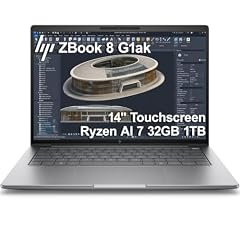
HP ZBook 8 G1ak Laptop
- CPU
- AMD Ryzen AI 7 PRO 350
- GPU
- Radeon 860M
- RAM
- 32 GB
- Storage
- 1000 GB
- Screen
- 14 in
- Touchscreen
- Yes
- Weight
- 1.44 kg
- OS
- Windows 11 Pro
$1,699.99 (as of 10/20/2026 15:21 PDT - Details)
HP's ZBook 8 G1ak is a 14-inch touchscreen workstation at a stated 1.44kg with an AMD Ryzen AI 7 PRO 350 and Radeon 860M graphics. Like the P14s Gen 7, it uses an AMD PRO processor, which suits company-managed laptops.
Pros
- Stated weight of 1.44kg
- AMD Ryzen AI 7 PRO 350, part of AMD's PRO line
- 14-inch touchscreen, per the listing
- Windows 11 Pro
Cons
- 32GB and 1TB, the pool minimum
- Battery capacity not stated by the seller
Good fit if
- Developers whose employer standardizes on HP
- Anyone who wants a light AMD machine with Windows Pro
Skip if
- You need 64GB for virtual machines
- You need an NVIDIA GPU
Verdict: A light HP workstation for company-managed development work.
9 Lightest 16-inch pick

Acer Swift 16 AI Laptop 16" WUXGA 120Hz Touchscreen
- CPU
- AMD Ryzen AI 9 465
- GPU
- Radeon 880M
- RAM
- 32 GB
- Storage
- 1000 GB
- Screen
- 16 in
- Refresh
- 120 Hz
- Touchscreen
- Yes
- Weight
- 1.6 kg
$1,241.49 (as of 10/20/2026 15:20 PDT - Details)
At a stated 1.6kg the Swift 16 AI is the lightest 16-inch laptop in this list, and it adds a 120Hz touchscreen. Its AMD Ryzen AI 9 465 (the listing states 10 cores) with Radeon 880M graphics and Windows 11 Pro make it a light big-screen option.
Pros
- Stated weight of 1.6kg, the lightest 16-inch pick
- 16-inch 1920 x 1200 touchscreen at 120Hz, per the listing
- Windows 11 Pro
Cons
- 32GB and 1TB, the pool minimum
- Battery capacity not stated by the seller
- No dedicated GPU
Good fit if
- Developers who want a big screen without extra weight
- Frontend developers who test touch input
Skip if
- You need more than 32GB
- You prefer the ThinkPad keyboard and service network
Verdict: The easy-to-carry 16-inch choice in this list.
10 Best no-frills 14-inch

Lenovo V14 G5 14" FHD Anti-Glare Laptop for Home & Work
- CPU
- Intel Core 7 240H
- RAM
- 32 GB
- Storage
- 1000 GB
- Screen
- 14 in
- Weight
- 1.37 kg
- Battery
- 47 Wh
- OS
- Windows 11 Home
$969.99 (as of 10/20/2026 15:22 PDT - Details)
The Lenovo V14 G5 is a plain 14-inch laptop with an Intel Core 7 240H, 32GB of memory and 1TB of storage at a stated 1.37kg with a 47Wh battery. It is the most basic machine in this list, which is the point: enough memory for a typical web stack without workstation extras.
Pros
- Stated weight of 1.37kg
- Stated 47Wh battery
- Intel Core 7 240H, the listing states 10 cores and 16 threads
Cons
- Windows 11 Home: Hyper-V cannot be installed and Docker Desktop runs Linux containers only
- 47Wh, smaller than the 52.5Wh of the ThinkPad T picks
- 1920 x 1080 anti-glare panel, per the listing
Good fit if
- Students and self-taught developers
- Web developers whose containers are all Linux
Skip if
- You need Hyper-V or Windows containers
- You want a touchscreen or a higher-resolution screen
Verdict: A simple, light Windows laptop that meets the 32GB bar without paying for extras you may not use.
11 Lightest with a dedicated GPU

ASUS ROG Zephyrus G14 14" 3K OLED 120Hz Copilot+ PC Gaming Laptop
- CPU
- AMD Ryzen AI 9 HX 370
- GPU
- GeForce RTX 5070 Ti
- GPU memory
- 12 GB
- RAM
- 32 GB
- Storage
- 1000 GB
- Screen
- 14 in
- Refresh
- 120 Hz
- Weight
- 1.57 kg
If your code runs on a GPU, you need an NVIDIA card for CUDA, and the Zephyrus G14 is the lightest laptop with a dedicated GPU among pool listings that state a weight, at 1.57kg. Its RTX 5070 Ti has 12GB of GPU memory, and CUDA also works inside WSL 2 on Windows.
Pros
- NVIDIA GeForce RTX 5070 Ti with 12GB of GPU memory
- Stated 1.57kg, lightest dedicated-GPU listing with a stated weight
- AMD Ryzen AI 9 HX 370
- 14-inch 3K OLED at 120Hz, per the listing
Cons
- Windows edition not stated by the seller
- 32GB and 1TB, the pool minimum
- Battery capacity not stated by the seller
Good fit if
- Machine learning and data science students
- Developers who build GPU-accelerated or graphics code
Skip if
- You never run GPU workloads: a lighter or simpler laptop serves you better
- You need Windows 11 Pro confirmed before you buy
Verdict: The portable way to get CUDA on a programming laptop.
12 Largest stated battery

HP ZBook X G1i Laptop
- CPU
- Intel Core Ultra 7 265H
- GPU
- RTX PRO 1000
- GPU memory
- 8 GB
- RAM
- 64 GB
- Storage
- 2000 GB
- Screen
- 16 in
- Weight
- 2.04 kg
- Battery
- 83 Wh
$5,099.00 (as of 10/20/2026 15:21 PDT - Details)
The ZBook X G1i states an 83Wh battery, the largest among these picks, plus 64GB of memory, 2TB of storage and an NVIDIA RTX PRO 1000 with 8GB of GPU memory. It is a 16-inch workstation for developers who need a professional NVIDIA GPU and long unplugged sessions.
Pros
- Stated 83Wh battery, the largest in this list
- 64GB of memory and 2TB of storage
- NVIDIA RTX PRO 1000 with 8GB of GPU memory
- Windows 11 Pro
Cons
- Stated weight of 2.04kg
- 8GB of GPU memory, less than the Zephyrus G14 (12GB) and ThinkPad P16 (16GB)
Good fit if
- Developers who need CUDA and Windows Pro on a company laptop
- Engineers who work away from power outlets
Skip if
- You want a laptop under 2kg
- Your models need more than 8GB of GPU memory
Verdict: A long-running 16-inch workstation with a professional NVIDIA GPU.
13 Best for local AI models

Lenovo ThinkPad P16 Gen 3
- CPU
- Intel Core Ultra 9 285HX
- GPU
- RTX PRO 4000
- GPU memory
- 16 GB
- RAM
- 128 GB
- Storage
- 4000 GB
- Screen
- 16 in
- Refresh
- 120 Hz
- Touchscreen
- Yes
$7,899.00 (as of 10/20/2026 15:22 PDT - Details)
This ThinkPad P16 Gen 3 states 128GB of memory, 4TB of storage and an NVIDIA RTX PRO 4000 with 16GB of GPU memory, the most GPU memory in this list. That combination matters for running large language models and heavy data work locally rather than in the cloud.
Pros
- 16GB of GPU memory, the most in this list
- 128GB of memory, tied for the most in this list
- 4TB of storage, the most in this list
- Intel Core Ultra 9 285HX and Windows 11 Pro
Cons
- Stated weight of 2.54kg, the heaviest pick
- Battery capacity not stated by the seller
Good fit if
- AI engineers who run models locally
- Developers who keep many virtual machines on one laptop
Skip if
- You carry your laptop every day
- Your work does not use a GPU
Verdict: The desk-bound powerhouse for local AI and large data sets.
14 64GB in a 16-inch under 2kg

HP OmniBook 7 16" 2K OLED Touchscreen Laptop
- CPU
- Intel Core 9 270H
- RAM
- 64 GB
- Storage
- 1000 GB
- Screen
- 16 in
- Refresh
- 120 Hz
- Touchscreen
- Yes
- Weight
- 1.92 kg
- OS
- Windows 11 Pro
The OmniBook 7 is the only 16-inch pick with 64GB or more that states a weight under 2kg (1.92kg). It pairs an Intel Core 9 270H (the listing states 14 cores) with a 16-inch 2K OLED touchscreen at 120Hz and Windows 11 Pro.
Pros
- 64GB of memory
- 16-inch 2K OLED touchscreen at 120Hz, per the listing
- Stated weight of 1.92kg
- Windows 11 Pro
Cons
- 1TB of storage, half of the other 64GB picks
- Battery capacity not stated by the seller
- No dedicated GPU
Good fit if
- Developers who want a large screen and 64GB without a GPU
- Full-stack developers running several services locally
Skip if
- You need more than 1TB of local storage
- You need CUDA
Verdict: A big-screen, big-memory laptop that stays under 2kg.
Side by side
| # | Laptop | CPU | GPU | GPU memory | Rentable GPU model | RAM | Storage |
|---|---|---|---|---|---|---|---|
| 1 | Lenovo ThinkPad P14s Gen 6 Intel Core Ultra 9 285H | Intel Core Ultra 9 285H | not stated | not stated | not stated | 64 GB | 2000 GB |
| 2 | Lenovo ThinkPad P14s Gen 7 AMD Ryzen AI 9 PRO 470 | AMD Ryzen AI 9 PRO 470 | Radeon 890M | not stated | not stated | 64 GB | 2000 GB |
| 3 | Apple 2026 MacBook Pro Laptop | Apple M5 Max | not stated | not stated | not stated | 36 GB | 2000 GB |
| 4 | Apple MacBook Pro Laptop with M5 Max | Apple M5 Max | not stated | not stated | not stated | 128 GB | 2000 GB |
| 5 | Lenovo 2024 Laptop | Intel Core Ultra 7 155U | not stated | not stated | not stated | 32 GB | 1000 GB |
| 6 | Lenovo 2026 Laptop | Intel Core Ultra 7 255H | not stated | not stated | not stated | 32 GB | 1000 GB |
| 7 | Dell Precision 3490 Mobile Workstation Laptop | Intel Core Ultra 5 135H | not stated | not stated | not stated | 32 GB | 1000 GB |
| 8 | HP ZBook 8 G1ak Laptop | AMD Ryzen AI 7 PRO 350 | Radeon 860M | not stated | not stated | 32 GB | 1000 GB |
| 9 | Acer Swift 16 AI Laptop 16" WUXGA 120Hz Touchscreen | AMD Ryzen AI 9 465 | Radeon 880M | not stated | not stated | 32 GB | 1000 GB |
| 10 | Lenovo V14 G5 14" FHD Anti-Glare Laptop for Home & Work | Intel Core 7 240H | not stated | not stated | not stated | 32 GB | 1000 GB |
| 11 | ASUS ROG Zephyrus G14 14" 3K OLED 120Hz Copilot+ PC Gaming Laptop | AMD Ryzen AI 9 HX 370 | GeForce RTX 5070 Ti | 12 GB | not stated | 32 GB | 1000 GB |
| 12 | HP ZBook X G1i Laptop | Intel Core Ultra 7 265H | RTX PRO 1000 | 8 GB | not stated | 64 GB | 2000 GB |
| 13 | Lenovo ThinkPad P16 Gen 3 | Intel Core Ultra 9 285HX | RTX PRO 4000 | 16 GB | not stated | 128 GB | 4000 GB |
| 14 | HP OmniBook 7 16" 2K OLED Touchscreen Laptop | Intel Core 9 270H | not stated | not stated | not stated | 64 GB | 1000 GB |
How we picked
How we picked: we started from the 257 laptops in our catalogue whose listing states at least 32GB of memory and a terabyte of storage, which is what a container stack, an IDE and a few repositories ask for. From those we preferred machines from established makers in new condition, dropped near-duplicate listings of the same model, and then chose one laptop for each common programming situation: a portable all-rounder, Apple platform work, a 16-inch desk machine, local GPU work, and large local AI models. Weight, battery capacity, operating system edition and GPU memory were read from the listing; where a listing leaves a value out, we say it is not stated by the seller. Prices on this page are live and read from the store listing with the time shown. Nobody tested these units: the ranking is a comparison of stated specifications against the published requirements of common developer tools.
How to choose
Memory: why this list starts at 32GB
Every laptop in this pool states at least 32GB. Tool vendors publish much lower minimums, but each covers one tool on its own: JetBrains lists 8GB of total memory for IntelliJ IDEA, and Docker lists 8GB of system memory for Docker Desktop on Windows. A real session stacks an IDE, a browser, containers and often WSL 2, which Microsoft describes as a Linux kernel running inside a lightweight utility virtual machine, and that virtual machine needs memory of its own.
In this list, 7 of the 14 picks have 32GB, one has 36GB, 4 have 64GB and 2 have 128GB. Choose 64GB if you run many services, virtual machines or local AI models; 32GB covers a typical web or mobile stack.
Operating system: Mac, Windows Pro or Windows Home
If you build apps for iPhone, iPad or Mac, you need a Mac, because Apple's Xcode runs on a Mac. Two picks here are MacBook Pros.
On Windows, the edition matters more than most listings admit. Microsoft states that Hyper-V cannot be installed on Windows 11 Home, and Docker states that Windows containers need a Pro or Enterprise edition, while Home only runs Linux containers. 10 of the 14 picks state Windows 11 Pro. The Lenovo V14 G5 states Home, and the ASUS Zephyrus G14 listing does not state the edition.
Do you need a dedicated GPU?
For web, mobile, backend and most desktop development, no: integrated graphics drive the screen and your editor. A dedicated NVIDIA GPU matters when your code runs on it, for example machine learning with CUDA. NVIDIA supports CUDA inside WSL 2, so a Windows laptop can run the same Linux-based ML tooling.
Three picks have a dedicated NVIDIA GPU: the Zephyrus G14 (12GB of GPU memory), the ZBook X G1i (8GB) and the ThinkPad P16 Gen 3 (16GB). GPU memory limits the size of models you can load, so compare that number first.
Storage: 1TB is the floor
Container images, package caches, SDKs and several checked-out repositories fill a drive quickly, which is why this pool starts at 1TB. Six of the 14 picks state 2TB or more, and the ThinkPad P16 Gen 3 states 4TB. If you work with large data sets or keep many Android or iOS simulators, favor 2TB.
Weight and battery: read what the listing states
Listings often leave these out: 52 of the 257 laptops in this pool do not state a weight, and most of our picks do not state a battery capacity. Only four picks do: the ZBook X G1i (83Wh), the ThinkPad T14 Gen 5 and T16 Gen 4 (52.5Wh each) and the Lenovo V14 G5 (47Wh). Watt-hours measure capacity, not runtime, so treat them as a comparison between machines rather than a promise of hours.
For a laptop you carry every day, the stated weights here range from 1.29kg (ThinkPad P14s Gen 7) to 2.54kg (ThinkPad P16 Gen 3).
Questions
Is a MacBook or a Windows laptop better for programming?
It depends on what you build. Apple platform apps need a Mac because Xcode runs on macOS. For web, backend and data work, both are fine: macOS is Unix-like, and Windows runs Linux tools through WSL 2. If your work depends on NVIDIA CUDA, choose a Windows laptop with an NVIDIA GPU, since none of the Macs here has one.
Is 16GB of memory enough for programming?
For learning and small projects, often yes: JetBrains and Docker both list 8GB as a minimum for their tools. But those minimums cover one tool at a time. Once you run an IDE, a browser, several containers and WSL 2 together, memory fills quickly. That is why every laptop in this list has at least 32GB.
Do I need Windows 11 Pro for development?
Only for some tools. Microsoft states that Hyper-V cannot be installed on Windows 11 Home, and Docker Desktop on Home runs Linux containers only, not Windows containers. Docker Desktop still runs Linux containers on Home, which covers most web and backend stacks. If you use Hyper-V virtual machines or Windows containers, choose a Pro pick.
Do I need a dedicated graphics card for coding?
Not for most programming. A dedicated NVIDIA GPU pays off for machine learning with CUDA, GPU computing or game engine work. NVIDIA supports CUDA inside WSL 2 on Windows. Three picks here have one; the rest rely on integrated graphics, which saves weight.
Why don't you list battery life in hours?
Because we did not measure it, and runtime depends heavily on what you run and on the screen. Where a listing states battery capacity in watt-hours, we show it, since that is a fixed number you can compare. Most listings in this pool do not state capacity at all, and we say so in each pick.
Should I look at a desktop instead of a laptop for programming?
This site lists laptops only. If you write code at one desk most of the time, it is worth comparing laptops and desktops for software development, compared side by side, with each price shown beside the moment it was read.
Recent updates
- : Added a question on choosing a desktop instead.
- : First published.