
Best Laptops Under $300 in 2026: 12 Honest Picks by Spec
For most people, the Lenovo IdeaPad Slim 3i with an Intel N100 is the laptop to start with under $300: a 15.6-inch Full HD screen, a four-core chip from Intel's current N-series, and a maker most buyers know. Be clear about the ceiling, though. Ten of these 12 picks have 4GB of memory, which suits browsing, documents and video calls, not heavy multitasking. The list was built from stated specifications and maker information; nobody tested the units.
12 picks from 56 laptops that match this guide with a price we can quote today. Every price below is live and carries the moment it was read.
The picks at a glance
Which one should you buy?
- For schoolwork and browsing on Windows: The IdeaPad Slim 3i gives you a 15.6-inch Full HD screen and an Intel N100. Keep a few tabs open at a time, since it has 4GB of memory. See pick 1
- For a child's first laptop: The Acer Chromebook 315 runs ChromeOS, which Google lists for updates until June 2031, and has a 15.6-inch Full HD screen. See pick 9
- For office work with many windows open: The renewed Dell Latitude 5410 is the only pick with 16GB of memory and a Core i5. It is a used business machine, so check the seller's warranty. See pick 8
- For carrying to class every day: The ASUS Vivobook 14 is the lightest pick at 1.3 kg and has 256GB of storage, double most Windows picks here. See pick 3
The 12 picks
1 Best overall under $300
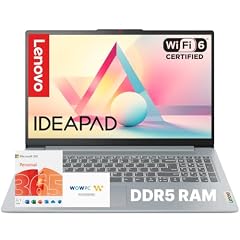
Lenovo IdeaPad Slim 3i • 15.6" FHD Laptop
- CPU
- Intel N100
- RAM
- 4 GB
- Screen
- 15.6 in
- Weight
- 1.68 kg
- OS
- Windows 11
$339.99 (as of 10/20/2026 15:21 PDT - Details)
Outside this guide's budget at today's price.
The IdeaPad Slim 3i pairs a 15.6-inch Full HD screen with an Intel N100, a four-core chip that Intel launched in 2023, and DDR5 memory. Most Windows picks here use two-core Celeron chips or a lower-resolution screen, so this is the most balanced new Windows machine in the list. The listing title says Microsoft Office is included.
Pros
- Intel N100 with four cores, per Intel, versus two cores on the Celeron picks
- 15.6-inch Full HD screen
- Maker-branded Lenovo IdeaPad model
- Microsoft Office included, per the listing title
Cons
- 4GB of memory
- 128GB of storage
- 1.68 kg, the heaviest pick that states Windows
Good fit if
- Students writing papers and joining video classes
- Home users who want a big screen for browsing and streaming
Skip if
- You keep dozens of browser tabs open
- You carry the laptop all day
Verdict: The safest new Windows laptop in this list for everyday light work.
2 Best 14-inch Windows pick

HP HP-14-DQ6015DX 14" WXGA HD
- CPU
- Intel N150
- RAM
- 4 GB
- Storage
- 128 GB
- Screen
- 14 in
- Weight
- 1.47 kg
- Battery
- 41 Wh
- OS
- Windows 11 Home
$269.00 (as of 10/20/2026 15:21 PDT - Details)
The HP 14 uses the Intel N150, the newest processor among these picks (Intel lists a 2025 launch), with four cores and a turbo frequency of up to 3.6 GHz. Its weak point is the screen: the listing states 1366 by 768, below the Full HD panels on most other picks.
Pros
- Intel N150, launched in 2025 per Intel, the newest chip in this list
- 41 Wh battery, the second largest stated among the picks
- 1.47 kg
- Wi-Fi 6, per the listing title
Cons
- 1366 by 768 screen, per the listing title
- 4GB of memory and 128GB of storage
Good fit if
- Buyers who want a current Intel chip in a compact 14-inch body
- Students who mostly write and browse
Skip if
- You watch a lot of video and want a sharp screen
- You need room for local files
Verdict: The newest processor under $300, held back by its low-resolution screen.
3 Lightest pick

ASUS Vivobook 14" FHD Laptop
- CPU
- Intel Celeron N5030
- RAM
- 4 GB
- Storage
- 256 GB
- Screen
- 14 in
- Weight
- 1.3 kg
$309.99 (as of 10/20/2026 15:20 PDT - Details)
Outside this guide's budget at today's price.
At 1.3 kg the Vivobook 14 is the lightest laptop in this list, and it has 256GB of storage with a 14-inch Full HD screen. It runs a two-core Celeron N4500, so it is a machine for light tasks.
Pros
- 1.3 kg, the lightest stated weight among the 12 picks
- 256GB of storage, tied for the most internal storage here
- 14-inch Full HD screen
Cons
- Celeron N4500 with two cores, per Intel
- 4GB of memory
- Battery capacity not stated by the seller
Good fit if
- Students who carry a laptop between classes
- Writers who want a small, light Windows machine
Skip if
- You run several apps at once
- You want the newest processor available here
Verdict: The one to carry, as long as the work stays light.
4 Largest stated battery

ASUS 15.6” Vivobook Go Slim Laptop
- CPU
- Intel Celeron N4500
- RAM
- 4 GB
- Storage
- 128 GB
- Screen
- 15.6 in
- Refresh
- 60 Hz
- Weight
- 1.57 kg
- Battery
- 42 Wh
- OS
- Windows 11
$279.99 (as of 10/20/2026 15:20 PDT - Details)
The Vivobook Go 15 has a 42 Wh battery, the largest capacity stated among these picks, in a 15.6-inch body. It uses the same two-core Celeron N4500 as the Vivobook 14 but trades weight for a bigger screen.
Pros
- 42 Wh battery, the largest stated in this list
- 15.6-inch screen
- Windows 11 stated in the listing
Cons
- Celeron N4500 with two cores, per Intel
- 4GB of memory and 128GB of storage
- 1.57 kg, heavier than the 14-inch picks
Good fit if
- Users who work away from an outlet for part of the day
- Home users who prefer a larger screen
Skip if
- You need more than basic browsing and documents
- Weight is your first concern
Verdict: A 15.6-inch ASUS with the biggest stated battery here.
5 Smallest screen

Acer TravelMate B3 11 TMB311-34 TMB311-34-C6MZ 11.6" Notebook
- CPU
- Intel N150
- RAM
- 4 GB
- Screen
- 11.6 in
- Refresh
- 60 Hz
- Weight
- 1.45 kg
The TravelMate B3 11 is an 11.6-inch Acer notebook with the four-core Intel N150. It is the only pick under 14 inches, which makes it the easiest to fit in a small backpack.
Pros
- Intel N150 with four cores, per Intel
- 11.6-inch screen, the smallest in this list
- 1.45 kg
Cons
- HD resolution, per the listing title, not Full HD
- Operating system not stated by the seller
- 4GB of memory; storage appears only in the title (128GB)
Good fit if
- Younger students who need a compact machine
- Travelers who want a small second laptop
Skip if
- You work with side-by-side windows
- You need to know the operating system before buying
Verdict: A compact N150 notebook; confirm the operating system with the seller.
6 Windows in S mode for young users

ASUS 15.6” FHD Laptop
- CPU
- Intel Celeron N4020
- RAM
- 4 GB
- Storage
- 128 GB
- Screen
- 15.6 in
- Weight
- 1.57 kg
- OS
- Windows 11 Home
$220.00 (as of 10/20/2026 15:20 PDT - Details)
This ASUS ships with Windows 11 Home in S mode, per the listing title. Microsoft says S mode installs apps only from the Microsoft Store and requires Microsoft Edge for browsing; switching out is free but one-way, per Microsoft.
Pros
- Windows 11 Home in S mode, per the listing title
- 15.6-inch Full HD screen
- ASUS-branded machine
Cons
- Celeron N4020 with two cores, launched in 2019 per Intel, the oldest chip in this list
- 4GB of memory and 128GB of storage
Good fit if
- Parents who want app installs limited to the Microsoft Store
- Users who only browse, stream and write
Skip if
- You need desktop programs from outside the Store
- You want a processor from the 2020s
Verdict: A simple big-screen Windows machine, built on an older chip.
7 Most memory in a new unit

BiTECOOL 15.6 FHD Laptop
- CPU
- Intel N95
- RAM
- 12 GB
- Storage
- 256 GB
- Screen
- 15.6 in
- Weight
- 1.58 kg
- OS
- Windows 11
$289.00 (as of 10/20/2026 15:20 PDT - Details)
The BiTECOOL has 12GB of LPDDR5 memory and 256GB of storage, three times the memory of most picks. It comes from a lesser-known brand, and the operating system is not stated, so read the listing and warranty closely.
Pros
- 12GB of memory, the most among new units in this list
- 256GB of storage
- Fingerprint reader, per the listing title
- 15.6-inch Full HD screen
Cons
- Lesser-known brand
- Operating system not stated by the seller
Good fit if
- Users who keep many tabs open and want a new machine
- Buyers comfortable checking a smaller brand's support terms
Skip if
- You want an established maker's warranty
- You need the operating system confirmed up front
Verdict: The most memory you can get new here, from a brand to vet first.
8 Best renewed pick

Dell Latitude 5410 14" 16GB 256GB SSD Core™ i5-10310U 1.7GHz WIN11P
- CPU
- Intel Core i5-10310U
- RAM
- 16 GB
- Storage
- 256 GB
- Screen
- 14 in
- Weight
- 1.5 kg
- OS
- Windows 11 Pro
The Latitude 5410 is a renewed Dell business laptop with a 10th generation Core i5-10310U, 16GB of memory and Windows 11 Pro. That is the most memory and the only Core i5 in this list. Tenth generation Core chips are on Microsoft's supported processor list for Windows 11.
Pros
- 16GB of memory, the most in this list
- Core i5-10310U, a generation on Microsoft's Windows 11 processor list
- Windows 11 Pro
- 256GB of storage
Cons
- Renewed unit sold by a refurbisher, not new
- Battery capacity and condition not stated by the seller
Good fit if
- Office users who switch between many apps
- Buyers who accept a used business machine
Skip if
- You want a new laptop with the maker's full warranty
- You need a known battery capacity
Verdict: The most capable machine in this list, if a renewed unit is acceptable.
9 Best Chromebook under $300

acer Chromebook 315 CB315-4H-C0BR 15.6" Full HD Laptop
- CPU
- Intel Celeron N4500
- RAM
- 4 GB
- Storage
- 64 GB
- Screen
- 15.6 in
- OS
- ChromeOS
$218.99 (as of 10/20/2026 15:20 PDT - Details)
The Chromebook 315 has a 15.6-inch Full HD screen, and Google lists the CB315-4H for ChromeOS updates until June 2031. ChromeOS runs well on modest hardware, which makes the 4GB of memory less of a limit than on Windows.
Pros
- ChromeOS updates until June 2031 for the CB315-4H, per Google
- 15.6-inch Full HD screen
- Model number stated in the listing, so its update date is checkable
Cons
- 64GB of eMMC storage
- Weight not stated by the seller
- Does not run Windows desktop programs
Good fit if
- Students whose schoolwork lives in Google apps
- Families who want a low-maintenance shared laptop
Skip if
- You need Windows programs
- You store many files offline
Verdict: A big-screen Chromebook with a published update date.
10 Lightest Chromebook

ASUS CX14 14'' FHD Chromebook Laptop
- CPU
- Intel Celeron N4500
- RAM
- 4 GB
- Storage
- 64 GB
- Screen
- 14 in
- Refresh
- 60 Hz
- Weight
- 1.39 kg
- OS
- ChromeOS
$239.00 (as of 10/20/2026 15:20 PDT - Details)
The CX14 is the lightest Chromebook in this list at 1.39 kg, with a 14-inch Full HD screen. It uses the same Celeron N4500 and 64GB of eMMC storage as the Chromebook 315, in a smaller body.
Pros
- 1.39 kg, the lightest Chromebook here
- 14-inch Full HD screen
- ASUS-branded Chromebook
Cons
- 64GB of eMMC storage
- 4GB of memory
Good fit if
- Students who carry a Chromebook daily
- Web-first users who want a smaller screen
Skip if
- You need Windows software
- You want the largest screen
Verdict: The Chromebook to pick when weight matters most.
11 Chromebook with the most built-in storage

Acer Gateway Chromebook 314 CBO314 Intel Celeron N4500 14" Full HD
- CPU
- Intel Celeron N4500
- RAM
- 4 GB
- Storage
- 128 GB
- Screen
- 14 in
- OS
- ChromeOS
The Gateway Chromebook 314 doubles the internal storage of the other Chromebook picks to 128GB of eMMC and keeps a 14-inch Full HD screen. The listing also states LPDDR4X memory and Wi-Fi 5.
Pros
- 128GB of eMMC storage, double the 64GB on the other Chromebooks
- 14-inch Full HD screen
- Celeron N4500 with LPDDR4X memory, per the listing
Cons
- Weight not stated by the seller
- 4GB of memory
- Wi-Fi 5, an older standard than the HP 14's Wi-Fi 6
Good fit if
- Chromebook users who download files for offline use
- Students who want a 14-inch Full HD Chromebook
Skip if
- You need a confirmed weight before buying
- You need Windows programs
Verdict: The Chromebook pick for people who keep files on the machine.
12 Only touchscreen

Lenovo IdeaPad Slim 3 Chromebook
- RAM
- 4 GB
- Storage
- 576 GB
- Screen
- 14 in
- Touchscreen
- Yes
- Weight
- 2.09 kg
- OS
- ChromeOS
$319.99 (as of 10/20/2026 15:21 PDT - Details)
Outside this guide's budget at today's price.
This IdeaPad Slim 3 Chromebook is the only touchscreen in the list, with a 14-inch WUXGA panel. The listing sells it with a docking set and counts 512GB of that in its storage figure; the laptop itself has 64GB of eMMC.
Pros
- 14-inch WUXGA touchscreen, the only touch pick here
- Docking set with 512GB included, per the listing title
- Lenovo IdeaPad Chromebook
Cons
- Processor not stated by the seller
- 2.09 kg as stated, the heaviest pick
- 64GB of built-in eMMC storage
Good fit if
- Younger users who prefer tapping to a trackpad
- Chromebook users who want a sharper 16:10 screen
Skip if
- You need to know the processor
- You want a light machine
Verdict: The touchscreen option, with gaps in the listing to check.
Side by side
| # | Laptop | CPU | GPU | GPU memory | Rentable GPU model | RAM | Storage |
|---|---|---|---|---|---|---|---|
| 1 | Lenovo IdeaPad Slim 3i • 15.6" FHD Laptop | Intel N100 | not stated | not stated | not stated | 4 GB | not stated |
| 2 | HP HP-14-DQ6015DX 14" WXGA HD | Intel N150 | not stated | not stated | not stated | 4 GB | 128 GB |
| 3 | ASUS Vivobook 14" FHD Laptop | Intel Celeron N5030 | not stated | not stated | not stated | 4 GB | 256 GB |
| 4 | ASUS 15.6” Vivobook Go Slim Laptop | Intel Celeron N4500 | not stated | not stated | not stated | 4 GB | 128 GB |
| 5 | Acer TravelMate B3 11 TMB311-34 TMB311-34-C6MZ 11.6" Notebook | Intel N150 | not stated | not stated | not stated | 4 GB | not stated |
| 6 | ASUS 15.6” FHD Laptop | Intel Celeron N4020 | not stated | not stated | not stated | 4 GB | 128 GB |
| 7 | BiTECOOL 15.6 FHD Laptop | Intel N95 | not stated | not stated | not stated | 12 GB | 256 GB |
| 8 | Dell Latitude 5410 14" 16GB 256GB SSD Core™ i5-10310U 1.7GHz WIN11P | Intel Core i5-10310U | not stated | not stated | not stated | 16 GB | 256 GB |
| 9 | acer Chromebook 315 CB315-4H-C0BR 15.6" Full HD Laptop | Intel Celeron N4500 | not stated | not stated | not stated | 4 GB | 64 GB |
| 10 | ASUS CX14 14'' FHD Chromebook Laptop | Intel Celeron N4500 | not stated | not stated | not stated | 4 GB | 64 GB |
| 11 | Acer Gateway Chromebook 314 CBO314 Intel Celeron N4500 14" Full HD | Intel Celeron N4500 | not stated | not stated | not stated | 4 GB | 128 GB |
| 12 | Lenovo IdeaPad Slim 3 Chromebook | not stated | not stated | not stated | not stated | 4 GB | 576 GB |
How we picked
How we picked: 62 laptops were listed under $300 when the data was read. Of those, 36 have 4GB of memory, 18 do not state a processor and 16 do not state an operating system. We favored laptops from Lenovo, HP, ASUS, Acer and Dell, dropped listings with no stated processor where a maker-branded alternative existed, dropped renewed units with 6th or 7th generation Core chips (Microsoft's Windows 11 processor list starts at 8th generation), and kept one listing per model. One lesser-known brand made the list because it offers 12GB of memory in a new unit. Prices on this page are live and read from the store listing, with the time they were read. Nobody at wikilaptop.org tested these laptops; every claim comes from the listing or the linked maker pages.
How to choose
What under $300 buys in 2026
This budget buys a laptop for browsing, email, documents, streaming and video calls. It does not buy a machine for games, photo or video editing, or heavy multitasking. In this pool, 36 of the 62 listings have 4GB of memory, which is exactly the Windows 11 minimum Microsoft publishes.
If you need more headroom, your options are a lesser-known brand with more memory, a renewed business laptop, or a larger budget.
Processor: N-series versus older Celeron chips
Most laptops here use Intel's low-power chips. Intel's current N-series (N100, N150) has four cores, while the Celeron N4500 and N4020 have two, per Intel's specification pages. The N150 launched in 2025, the N4500 in 2021 and the N4020 in 2019.
More cores help when a browser, a video call and a document run at the same time. If two picks look alike, prefer the N-series chip.
Chromebook or Windows
ChromeOS is web-first and light, which is why 4GB and 64GB feel less tight on a Chromebook than on Windows. It does not run Windows desktop programs. Before buying, look up the model on Google's Auto Update policy page: every Chromebook has an end date for updates, and the Acer Chromebook 315 CB315-4H in this list is listed until June 2031.
Choose Windows if you need specific desktop software or a school requires it. Windows 11 Home in S mode, used on one pick here, only installs apps from the Microsoft Store until you switch out of it.
Storage: eMMC, SSD and cloud bundles
Listings at this price often use eMMC flash storage of 64GB or 128GB. Microsoft sets 64GB as the minimum storage for Windows 11, so a 64GB Windows laptop leaves little room for updates. Ten of the 62 listings here have 64GB or less.
Several titles add cloud storage or an SD card to their headline figure. Read the storage line carefully and count only the built-in drive.
Renewed laptops and older business models
A renewed business laptop can offer more memory and a Core-class processor. Check the processor generation first: Microsoft's list of supported Intel processors for Windows 11 starts at the 8th generation of Core chips, so 6th and 7th generation machines were left out of this list.
Also check the seller's warranty and whether the battery condition is stated.
Questions
Is 4GB of memory enough for a laptop under $300?
For one task at a time, such as writing a document, browsing a few tabs or streaming, 4GB works, and it meets Microsoft's minimum for Windows 11. It gets tight with many tabs or a video call running alongside other apps. Ten of the 12 picks here have 4GB; the BiTECOOL has 12GB and the renewed Dell Latitude 5410 has 16GB.
Should I buy a Chromebook or a Windows laptop under $300?
If your work happens in a browser and in Google or web apps, a Chromebook uses modest hardware more efficiently and needs little upkeep. Check its update end date on Google's policy page. If you need Windows desktop software, pick a Windows laptop, ideally one with an Intel N100 or N150 rather than an older two-core Celeron.
Can I play games on a laptop under $300?
Only browser games and very light titles. None of the 12 picks has a dedicated graphics card, and the pool did not list one under $300. If gaming matters, a larger budget is the realistic answer.
Is a renewed laptop a good idea at this price?
It can be, if the processor is recent enough for Windows 11 and the seller offers a warranty. The Dell Latitude 5410 in this list has a 10th generation Core i5, a generation on Microsoft's supported list, and 16GB of memory. Renewed units with 6th or 7th generation Core chips were left out because those generations are not on that list.
Why do some listings not state the processor or operating system?
Many listings at this price come from smaller sellers who describe the machine loosely. In this pool, 18 of 62 listings do not state a processor and 16 do not state an operating system. When a key spec is missing, ask the seller or choose a listing that states it.
Recent updates
- : First published.
Sources
- Microsoft: Windows 11 specifications and system requirements
- Microsoft Learn: Windows 11 supported Intel processors
- Intel Processor N-series (N100, N150) specifications
- Intel Celeron N4500 specifications
- Intel Celeron N4020 specifications
- Google: ChromeOS Auto Update policy
- Microsoft Support: Windows in S mode FAQ