
Best 13-Inch Laptops in 2026: 6 Picks Compared on Specs
Our top pick is the MacBook Air 13-inch with M5, 16GB of memory and 512GB of storage: Apple lists a 13.6-inch 2560 x 1664 display, a 53.8Wh battery and 1.23 kg. The other five picks are two larger Air configurations, two MacBook Neo models with the A18 Pro chip, and the Dell XPS 13 with Snapdragon X Elite for Windows users. We chose them from stated specifications and the makers' own spec pages, not from lab tests.
6 picks from 21 laptops that match this guide with a price we can quote today. Every price below is live and carries the moment it was read.
The picks at a glance
| # | Pick | Laptop | Price |
|---|---|---|---|
| 1 | Best overall | Apple 2026 MacBook Air 13-inch Laptop with M5 chip | $1,149.00 (as of 10/20/2026 15:20 PDT - Details) |
| 2 | Most memory among the Macs | Apple 2026 MacBook Air 13-inch Laptop with M5 chip | $1,649.00 (as of 10/20/2026 15:20 PDT - Details) |
| 3 | Most storage with 16GB of memory | Apple 2026 MacBook Air 13-inch Laptop with M5 chip | $1,518.00 (as of 10/20/2026 15:20 PDT - Details) |
| 4 | Best Windows pick and lightest | Dell XPS 13" Laptop | $1,399.99 (as of 10/20/2026 15:21 PDT - Details) |
| 5 | Entry-level Mac | Apple 2026 MacBook Neo 13-inch Laptop with A18 Pro chip | $689.99 (as of 10/20/2026 15:20 PDT - Details) |
| 6 | MacBook Neo with more storage | Apple 2026 MacBook Neo 13-inch Laptop with A18 Pro chip | $789.99 (as of 10/20/2026 15:20 PDT - Details) |
Which one should you buy?
- For most students and travelers: The MacBook Air M5 with 16GB and 512GB covers everyday work with room for files, at 1.23 kg per Apple. See pick 1
- For Windows users: The Dell XPS 13 is the only Windows pick, with 32GB of memory, a 120Hz screen and the lowest weight here. See pick 4
- For a first Mac for light tasks: The MacBook Neo with 256GB gives macOS on Apple's A18 Pro chip for browsing, documents and streaming. See pick 5
- For heavier multitasking on a Mac: The MacBook Air M5 with 24GB of memory and 1TB of storage leaves the most headroom among the Macs here. See pick 2
The 6 picks
1 Best overall
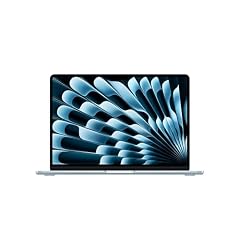
Apple 2026 MacBook Air 13-inch Laptop with M5 chip
- CPU
- Apple M5
- RAM
- 16 GB
- Storage
- 512 GB
- Screen
- 13 in
- Weight
- 1.23 kg
- OS
- macOS
$1,149.00 (as of 10/20/2026 15:20 PDT - Details)
It pairs Apple's M5 chip with 16GB of memory, twice the MacBook Neo's 8GB, and 512GB of storage. Apple lists a 13.6-inch 2560 x 1664 display, two Thunderbolt 4 ports plus MagSafe charging, and a 53.8Wh battery, larger than the Neo's 36.5Wh.
Pros
- Apple M5 with 16GB of unified memory
- 13.6-inch 2560 x 1664 display per Apple
- 53.8Wh battery per Apple, larger than the MacBook Neo's 36.5Wh
- Two Thunderbolt 4 ports and MagSafe 3 per Apple
Cons
- 512GB of storage, half of the 1TB Air configurations
- 16GB of memory, half of the XPS 13's 32GB
Good fit if
- Students and travelers who want one laptop for everything
- Buyers moving up from an older Mac
Skip if
- You need Windows software
- You keep large photo or video libraries on the laptop
Verdict: The configuration that covers the most buyers without paying for extra storage.
2 Most memory among the Macs
Apple 2026 MacBook Air 13-inch Laptop with M5 chip
- CPU
- Apple M5
- RAM
- 24 GB
- Storage
- 1000 GB
- Screen
- 13 in
- Weight
- 1.23 kg
- OS
- macOS
$1,649.00 (as of 10/20/2026 15:20 PDT - Details)
It raises the M5 MacBook Air to 24GB of memory and 1TB of storage, the most of any Mac in this list. The extra memory helps when you keep many apps, browser tabs or photo edits open at once.
Pros
- 24GB of unified memory, the most among the Mac picks
- 1TB of storage, tied for the most in this list
- Same 13.6-inch display and 53.8Wh battery as the other Air models per Apple
Cons
- Still less memory than the XPS 13's 32GB
- Same weight and screen as the base Air, so you pay only for capacity
Good fit if
- Photographers and developers who multitask on a Mac
- Buyers who keep a laptop for many years
Skip if
- Your work is browsing and documents, where 16GB is enough
- You need Windows
Verdict: The Mac to choose when memory headroom matters more than anything else.
3 Most storage with 16GB of memory
Apple 2026 MacBook Air 13-inch Laptop with M5 chip
- CPU
- Apple M5
- RAM
- 16 GB
- Storage
- 1000 GB
- Screen
- 13 in
- Weight
- 1.23 kg
- OS
- macOS
$1,518.00 (as of 10/20/2026 15:20 PDT - Details)
It keeps 16GB of memory but doubles storage to 1TB. That suits people whose files, not their apps, fill the laptop: photo libraries, offline media and large course materials.
Pros
- 1TB of storage, tied for the most in this list
- Apple M5 with 16GB of unified memory
- 1.23 kg per Apple
Cons
- Same 16GB of memory as the base Air
- Same chip and memory as the base Air: only storage changes
Good fit if
- People who keep photo libraries or offline video on the laptop
- Buyers who want to avoid external drives
Skip if
- Your files live in cloud storage
- You multitask heavily, where the 24GB model fits better
Verdict: The Air for large file collections rather than heavy multitasking.
4 Best Windows pick and lightest

Dell XPS 13" Laptop
- CPU
- Qualcomm Snapdragon X Elite
- RAM
- 32 GB
- Storage
- 512 GB
- Screen
- 13 in
- Refresh
- 120 Hz
- Touchscreen
- No
- Weight
- 1.19 kg
- Battery
- 55 Wh
$1,399.99 (as of 10/20/2026 15:21 PDT - Details)
It is the only Windows laptop here, with a Qualcomm Snapdragon X Elite, 32GB of memory (the most in this list) and a 120Hz screen. At 1.19 kg it is also the lightest pick, slightly below the 1.23 kg of the Apple models.
Pros
- 32GB of memory, the most in this list
- 1.19 kg, the lightest pick
- 120Hz screen, the only stated high refresh rate here
- Snapdragon X Elite with 12 cores per Dell's XPS 13 9345 page
Cons
- 512GB of storage
- The listing states a 55Wh battery while Dell lists 52Wh for the XPS 13 9345; confirm before buying
- Windows on Arm: check that your key apps and drivers support it
Good fit if
- Windows users who want the lightest 13-inch option
- People who keep many apps open and want 32GB
Skip if
- You rely on older x86-only Windows software or drivers
- You prefer macOS
Verdict: The Windows choice, with the most memory and the lowest weight in this list.
5 Entry-level Mac

Apple 2026 MacBook Neo 13-inch Laptop with A18 Pro chip
- CPU
- Apple A18 Pro
- RAM
- 8 GB
- Storage
- 256 GB
- Screen
- 13 in
- Weight
- 1.23 kg
- OS
- macOS
$689.99 (as of 10/20/2026 15:20 PDT - Details)
The MacBook Neo uses Apple's A18 Pro chip, which Apple lists with a 6-core CPU and 5-core GPU, and 8GB of memory. It is the lightest route into macOS for browsing, documents and streaming, at the same 1.23 kg as the Air.
Pros
- Apple A18 Pro chip with a 6-core CPU per Apple
- 13.0-inch 2408 x 1506 display per Apple
- 1.23 kg, same as the MacBook Air
Cons
- 8GB of memory, the least in this list
- 256GB of storage, the least in this list
- 36.5Wh battery per Apple, smaller than the Air's 53.8Wh
Good fit if
- Students who work mostly in the browser
- Buyers who want macOS for light tasks
Skip if
- You edit photos or video
- You keep many apps open at once
Verdict: A simple macOS laptop for light work; the Air is the step up.
6 MacBook Neo with more storage
Apple 2026 MacBook Neo 13-inch Laptop with A18 Pro chip
- CPU
- Apple A18 Pro
- RAM
- 8 GB
- Storage
- 512 GB
- Screen
- 13 in
- Weight
- 1.23 kg
- OS
- macOS
$789.99 (as of 10/20/2026 15:20 PDT - Details)
It is the same MacBook Neo with the A18 Pro and 8GB of memory, but with 512GB of storage instead of 256GB. Choose it if you want the Neo and keep files locally.
Pros
- 512GB of storage, double the base Neo
- Apple A18 Pro chip
- 1.23 kg per Apple
Cons
- 8GB of memory, tied for the least in this list
- Same 36.5Wh battery as the base Neo per Apple
Good fit if
- Neo buyers who store music, photos or downloads locally
- Students who work offline
Skip if
- You need more than 8GB of memory: the Air starts at 16GB
- Your files live in the cloud, where 256GB is enough
Verdict: Pick it over the base Neo only if you need local storage.
Side by side
| # | Laptop | CPU | GPU | GPU memory | Rentable GPU model | RAM | Storage |
|---|---|---|---|---|---|---|---|
| 1 | Apple 2026 MacBook Air 13-inch Laptop with M5 chip | Apple M5 | not stated | not stated | not stated | 16 GB | 512 GB |
| 2 | Apple 2026 MacBook Air 13-inch Laptop with M5 chip | Apple M5 | not stated | not stated | not stated | 24 GB | 1000 GB |
| 3 | Apple 2026 MacBook Air 13-inch Laptop with M5 chip | Apple M5 | not stated | not stated | not stated | 16 GB | 1000 GB |
| 4 | Dell XPS 13" Laptop | Qualcomm Snapdragon X Elite | not stated | not stated | not stated | 32 GB | 512 GB |
| 5 | Apple 2026 MacBook Neo 13-inch Laptop with A18 Pro chip | Apple A18 Pro | not stated | not stated | not stated | 8 GB | 256 GB |
| 6 | Apple 2026 MacBook Neo 13-inch Laptop with A18 Pro chip | Apple A18 Pro | not stated | not stated | not stated | 8 GB | 512 GB |
How we picked
How we picked: our catalogue currently holds six listings with a 13-inch class screen, and this guide covers all six, since a shorter list than usual still beats padding it with other sizes. Three are MacBook Air M5 configurations, two are MacBook Neo configurations and one is a Dell XPS 13. Because several share a model, we treat each as a configuration choice and explain which buyer each memory and storage step suits. Chip, display, battery and port facts come from Apple's and Dell's specification pages. Prices on this page are live: each one is read from the store listing and shown with the time it was read. Nobody at wikilaptop.org has tested these units; every comparison below is drawn from stated specifications.
How to choose
What 13-inch really means
The size class covers a few different panels. In this list, Apple lists the MacBook Air at 13.6 inches and the MacBook Neo at 13.0 inches, and Dell lists the XPS 13 at 13.4 inches. All three weigh between 1.19 kg and 1.23 kg, so the choice is mostly about chip, memory and software, not size.
A 13-inch screen is comfortable for documents, email and the browser. For side-by-side windows or wide spreadsheets, plan on an external monitor at your desk.
Memory: 8GB, 16GB, 24GB or 32GB
Memory on all these laptops is chosen at purchase: Apple sells it as a configuration option, and Dell lists the XPS 13 9345 memory as integrated. So pick for the next several years, not for today.
8GB (MacBook Neo) suits browsing, documents and streaming. 16GB (base MacBook Air) handles most students and office workers. 24GB and 32GB help with photo editing, development and many open apps.
Chip and operating system
The MacBook Air uses Apple's M5 and the MacBook Neo uses the A18 Pro, which Apple lists with a 6-core CPU and 5-core GPU. The Dell XPS 13 uses Qualcomm's Snapdragon X Elite and runs Windows on Arm.
Windows on Arm runs most current apps, but some older software, games with anti-cheat and certain device drivers may not work. Check your must-have apps before choosing it.
Battery capacity and ports
Apple lists a 53.8Wh battery for the MacBook Air and 36.5Wh for the MacBook Neo. The XPS 13 listing states 55Wh, while Dell's page for the XPS 13 9345 lists 52Wh, so confirm on the listing. Capacity is a better comparison than hours, since usage varies.
Small laptops have few ports. Apple lists two Thunderbolt 4 ports and MagSafe charging on the Air. Budget for a USB-C hub if you use HDMI displays, USB-A drives or card readers.
Storage
Storage in this list runs from 256GB to 1TB. Choose 256GB only if your files live in cloud storage. 512GB suits most people, and 1TB suits photo libraries and offline media. Storage is chosen with the configuration here, so plan for it at purchase and treat external drives as the fallback.
Questions
Is a 13-inch laptop too small for work?
For email, documents, the browser and video calls, no. The screens here run from 13.0 to 13.6 inches with sharp resolutions per the makers. For wide spreadsheets, several windows side by side or photo timelines, the space feels tight, so many people add an external monitor at their desk and keep the 13-inch for travel.
MacBook Air or MacBook Neo?
The Air has Apple's M5 chip, 16GB or 24GB of memory in this list and a 53.8Wh battery per Apple. The Neo has the A18 Pro, 8GB of memory and a 36.5Wh battery. Both weigh 1.23 kg. Pick the Neo for browsing and documents; pick the Air if you edit photos, code or keep many apps open.
Can the Dell XPS 13 run all Windows apps?
It runs Windows on Arm with a Snapdragon X Elite. Most current apps run, either natively or through Microsoft's emulation, but some older programs, certain drivers and some games with anti-cheat do not. Check your essential software and peripherals before buying.
Which 13-inch laptop is lightest?
The Dell XPS 13 at 1.19 kg, per the listing and Dell's page for the 9345 model. The MacBook Air and MacBook Neo both weigh 1.23 kg per Apple. The difference of 40 grams is small, so choose on chip, memory and operating system first.
Did you test these laptops?
No. Nobody at wikilaptop.org has tested these units. We chose them from the specifications on each listing, cross-checked with Apple's and Dell's specification pages. We do not describe keyboard feel, speakers or build quality, because those claims need testing we have not done.
Recent updates
- : First published.