
Best AMD Ryzen AI 7 PRO 350 Laptops in 2026: 5 Picks Compared
Our top pick is the Lenovo ThinkPad P14s Gen 6 with 32GB of memory and 1TB of storage: at 1.39 kg it is the lightest laptop here, and it runs Windows 11 Pro. For more memory, the 64GB P14s Gen 6 with a 2.8K OLED touchscreen doubles it. The catalogue holds five laptops with this business processor, from Lenovo and HP, and this page lists all five, compared on their stated specifications and Microsoft's published requirements, not on lab tests.
5 picks from 5 laptops that match this guide with a price we can quote today. Every price below is live and carries the moment it was read.
The picks at a glance
| # | Pick | Laptop | Price |
|---|---|---|---|
| 1 | Best overall | Lenovo Copilot+ PC ThinkPad P14s Gen 6 Mobile Workstation | $1,629.99 (as of 10/20/2026 16:21 PDT - Details) |
| 2 | Most memory | Lenovo ThinkPad P14s Gen 6 with 64GB DDR5 Memory | |
| 3 | Best 14-inch touchscreen with full specs | HP ZBook 8 G1ak Laptop | $1,699.99 (as of 10/20/2026 16:21 PDT - Details) |
| 4 | Best 16-inch with a stated weight | Lenovo ThinkPad P16s Gen 4 21QR001QUS 16" Copilot+ PC Mobile Workstation | $1,829.00 (as of 10/20/2026 16:22 PDT - Details) |
| 5 | 4K OLED touchscreen option | Lenovo ThinkPad P16s Gen 4 | $2,089.99 (as of 10/20/2026 16:22 PDT - Details) |
Which one should you buy?
- For daily travel: The ThinkPad P14s Gen 6 with 32GB weighs 1.39 kg, the lightest stated weight in this list. See pick 1
- For heavy multitasking and local AI tools: The P14s Gen 6 with 64GB has double the memory of every other pick. See pick 2
- For touch input on a 14-inch screen: The HP ZBook 8 G1ak adds a touchscreen at 1.44 kg with 32GB and 1TB. See pick 3
- For a larger workspace: The ThinkPad P16s Gen 4 gives you a 16-inch WUXGA screen at 1.71 kg. See pick 4
The 5 picks
1 Best overall
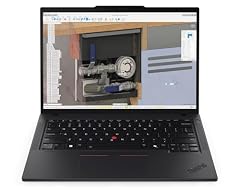
Lenovo Copilot+ PC ThinkPad P14s Gen 6 Mobile Workstation
- CPU
- AMD Ryzen AI 7 PRO 350
- RAM
- 32 GB
- Storage
- 1000 GB
- Screen
- 14 in
- Touchscreen
- No
- Weight
- 1.39 kg
- OS
- Windows 11 Pro
$1,629.99 (as of 10/20/2026 16:21 PDT - Details)
It combines the lightest stated weight here, 1.39 kg, with 32GB of memory, 1TB of storage and Windows 11 Pro, and its listing states every one of those figures. The other 14-inch picks either weigh more (ZBook 8 G1ak) or leave weight and storage unstated (64GB P14s).
Pros
- 1.39 kg, the lightest stated weight here
- 32GB of memory and 1TB of storage
- Windows 11 Pro
Cons
- No touchscreen, unlike three other picks
- Screen resolution and refresh rate not stated by the seller
Good fit if
- Professionals who carry a laptop every day
- IT teams that want Windows 11 Pro and a fully stated configuration
Skip if
- You want a touchscreen
- You need more than 32GB of memory
Verdict: The lightest fully specified pick, with memory and storage to spare.
2 Most memory
Lenovo ThinkPad P14s Gen 6 with 64GB DDR5 Memory
- CPU
- AMD Ryzen AI 7 PRO 350
- RAM
- 64 GB
- Screen
- 14 in
- Refresh
- 120 Hz
- Touchscreen
- Yes
It has 64GB of memory, double every other pick, plus a 14-inch 2.8K OLED touchscreen at 120Hz, the only refresh rate stated in this list. Its listing does not state storage, weight or operating system.
Pros
- 64GB of memory, the most here
- 14-inch 2.8K OLED touchscreen per the listing
- 120Hz, the only stated refresh rate here
Cons
- Storage not stated by the seller
- Weight and operating system not stated by the seller
Good fit if
- Developers and analysts who run virtual machines or local AI models
- Users who want an OLED touchscreen in a 14-inch size
Skip if
- You need every spec confirmed before buying
- 32GB is enough for your work
Verdict: The memory-first pick, with gaps in the listing to check.
3 Best 14-inch touchscreen with full specs
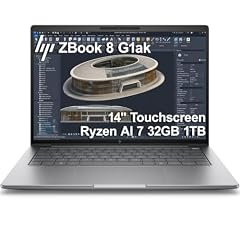
HP ZBook 8 G1ak Laptop
- CPU
- AMD Ryzen AI 7 PRO 350
- GPU
- Radeon 860M
- RAM
- 32 GB
- Storage
- 1000 GB
- Screen
- 14 in
- Touchscreen
- Yes
- Weight
- 1.44 kg
- OS
- Windows 11 Pro
$1,699.99 (as of 10/20/2026 16:21 PDT - Details)
Of the three touchscreen picks, it is the only one whose listing states weight, storage and operating system: 1.44 kg, 1TB and Windows 11 Pro. It is also the only pick outside Lenovo, and its listing names the Radeon 860M integrated graphics.
Pros
- 14-inch touchscreen
- 1.44 kg
- 32GB of memory and 1TB of storage
- Windows 11 Pro
Cons
- Slightly heavier than the 1.39 kg P14s Gen 6
- Screen resolution not stated by the seller
Good fit if
- Users who sign documents or annotate by touch
- Offices that standardize on HP
Skip if
- You want the lightest pick
- You want 64GB of memory
Verdict: The complete touchscreen option in a 14-inch size.
4 Best 16-inch with a stated weight

Lenovo ThinkPad P16s Gen 4 21QR001QUS 16" Copilot+ PC Mobile Workstation
- CPU
- AMD Ryzen AI 7 PRO 350
- RAM
- 32 GB
- Storage
- 512 GB
- Screen
- 16 in
- Weight
- 1.71 kg
$1,829.00 (as of 10/20/2026 16:22 PDT - Details)
It is the only pick whose specifications state a 16-inch screen, a WUXGA panel per the listing, and it weighs 1.71 kg. It has 32GB of memory but 512GB of storage, the least in this list.
Pros
- 16-inch screen, the largest stated size here
- 1.71 kg for a 16-inch laptop
- 32GB of memory
Cons
- 512GB of storage, the least in this list
- Operating system not stated by the seller
Good fit if
- Users who want more screen area for spreadsheets and code
- Workers whose files live mostly on network or cloud storage
Skip if
- You keep large local files
- You need a confirmed Windows license
Verdict: A bigger screen at a modest weight, with limited storage.
5 4K OLED touchscreen option

Lenovo ThinkPad P16s Gen 4
- CPU
- AMD Ryzen AI 7 PRO 350
- RAM
- 32 GB
- Storage
- 1000 GB
- Touchscreen
- Yes
- OS
- Windows 11 Pro
$2,089.99 (as of 10/20/2026 16:22 PDT - Details)
Its listing describes a 4K OLED touchscreen, the highest resolution named in this list, with 32GB of memory and 1TB of storage. The specifications do not state screen size, weight or operating system, so confirm them with the seller.
Pros
- 4K OLED touchscreen per the listing
- 32GB of memory and 1TB of storage
- Touch input
Cons
- Screen size and weight not stated in the specifications
- Operating system not stated by the seller
Good fit if
- Photo and design work where a high-resolution OLED helps
- Users who want touch on a larger ThinkPad
Skip if
- You need a confirmed weight for travel
- You want every spec stated on the listing
Verdict: The high-resolution screen pick, with specs to confirm first.
Side by side
| # | Laptop | CPU | GPU | GPU memory | Rentable GPU model | RAM | Storage |
|---|---|---|---|---|---|---|---|
| 1 | Lenovo Copilot+ PC ThinkPad P14s Gen 6 Mobile Workstation | AMD Ryzen AI 7 PRO 350 | not stated | not stated | not stated | 32 GB | 1000 GB |
| 2 | Lenovo ThinkPad P14s Gen 6 with 64GB DDR5 Memory | AMD Ryzen AI 7 PRO 350 | not stated | not stated | not stated | 64 GB | not stated |
| 3 | HP ZBook 8 G1ak Laptop | AMD Ryzen AI 7 PRO 350 | Radeon 860M | not stated | not stated | 32 GB | 1000 GB |
| 4 | Lenovo ThinkPad P16s Gen 4 21QR001QUS 16" Copilot+ PC Mobile Workstation | AMD Ryzen AI 7 PRO 350 | not stated | not stated | not stated | 32 GB | 512 GB |
| 5 | Lenovo ThinkPad P16s Gen 4 | AMD Ryzen AI 7 PRO 350 | not stated | not stated | not stated | 32 GB | 1000 GB |
How we picked
How we picked: five laptops in our catalogue state an AMD Ryzen AI 7 PRO 350, and since that is fewer than 12, this page shows every one. Four are Lenovo ThinkPad mobile workstations (two P14s Gen 6 and two P16s Gen 4) and one is an HP ZBook 8 G1ak. All five are listed under the maker's name. Several listings leave out screen size, weight, storage or operating system, and we say so in each entry instead of guessing. Copilot+ PC and Windows facts come from Microsoft. Prices on this page are live: each one is read from the store listing and shown with the time it was read. Nobody at wikilaptop.org has tested these units; every comparison below is drawn from the stated specifications.
How to choose
What the Ryzen AI 7 PRO 350 is for
It is a business processor from AMD's Ryzen AI PRO line: CPU cores, integrated Radeon graphics and an NPU for on-device AI features, plus AMD PRO technologies that IT departments use for security and remote management. It suits office work, coding, video calls and light creative work in thin laptops. It is not a gaming chip: the picks here rely on integrated graphics.
Copilot+ PC features and the NPU
Microsoft says many Copilot+ PC features need an NPU that runs at more than 40 trillion operations per second (TOPS), and it names AMD Ryzen AI 300 series devices among Copilot+ PCs. Apps must be written to use the NPU, so the benefit depends on your software. Check that the listing or maker page calls the model a Copilot+ PC if those features matter to you.
Memory: 32GB or 64GB
Four picks come with 32GB and one with 64GB. Thin business laptops often have soldered memory, so choose the amount you need for the life of the laptop; check the maker's specifications before counting on an upgrade. 64GB suits virtual machines and local AI models; 32GB covers most office and development work.
Screen size, touch and weight
Three picks state a 14-inch screen and one a 16-inch screen; the P16s OLED listing does not state a size. Three picks have a touchscreen. Stated weights run from 1.39 kg to 1.71 kg, and two listings do not state a weight at all.
Windows 11 Pro
Two picks state Windows 11 Pro; the other three do not state an operating system, so confirm the license with the seller. Microsoft includes BitLocker drive encryption in Windows 11 Pro, which many company IT policies expect alongside the PRO processor's management features.
Questions
What does the NPU do in everyday use?
The NPU runs on-device AI tasks such as background blur, noise suppression and other Windows Studio Effects using less power than the CPU or GPU. Microsoft says many Copilot+ PC features need an NPU with more than 40 TOPS. Apps must support the NPU, so the benefit depends on the software you use.
What does PRO add over a standard Ryzen AI chip?
AMD PRO technologies add business security and manageability features, such as support for remote management and longer platform stability for company fleets. For everyday speed, the PRO chip is aimed at the same work as its non-PRO sibling. If you are a single user without an IT department, the PRO features matter less than memory, screen and weight.
Can I play games on a laptop with this processor?
Light and older games run on the integrated Radeon graphics at modest settings. None of the five picks here lists a dedicated graphics card, so for modern AAA games choose a laptop with a separate GPU instead.
Did you test these laptops?
No. Nobody at wikilaptop.org has used these units. We compared them from the specifications stated on each listing and Microsoft's published requirements. We do not describe heat, noise, battery runtime or keyboard feel, because those claims need testing we have not done.
Why do prices on this page change?
Each price is read live from the store listing and shown with the time it was read. Business laptop prices move with configurations and stock, so we never write price comparisons into the text. Check the time next to each price and open the listing to confirm the configuration before you buy.
Recent updates
- : First published.