
Best 60Hz Laptops in 2026: 14 Picks Compared on Specs
Our top pick among 60Hz laptops is the Lenovo ThinkPad P14s Gen 7 AMD: it pairs a Ryzen AI 9 PRO 470 with 64GB of memory and 2TB of storage at 1.29 kg, the lightest laptop in this list. A 60Hz screen is the standard for office, study and technical work, so the choice comes down to processor, memory, storage and weight. We chose all 14 from stated specifications and the makers' published data, not from lab tests.
14 picks from 34 laptops that match this guide with a price we can quote today. Every price below is live and carries the moment it was read.
The picks at a glance
Which one should you buy?
- For travel and heavy multitasking: The ThinkPad P14s Gen 7 AMD weighs 1.29 kg and carries 64GB of memory and 2TB of storage. See pick 1
- For office work on a large screen: The HP ProBook 4 G1i puts 32GB of memory and 2TB of storage behind a 16-inch WUXGA screen at 1.72 kg. See pick 6
- For CAD and professional graphics: The ThinkPad P16 Gen 3 pairs an RTX PRO 3000 with a Core Ultra 7 255HX and 64GB of memory. See pick 10
- For basic schoolwork: The ASUS CX14 Chromebook runs ChromeOS on a 14-inch FHD screen at 1.39 kg. See pick 13
The 14 picks
1 Best overall

Lenovo ThinkPad P14s Gen 7 AMD Ryzen AI 9 PRO 470
- CPU
- AMD Ryzen AI 9 PRO 470
- GPU
- Radeon 890M
- RAM
- 64 GB
- Storage
- 2000 GB
- Screen
- 14 in
- Refresh
- 60 Hz
- Weight
- 1.29 kg
- OS
- Windows 11 Pro
$3,199.00 (as of 10/20/2026 16:22 PDT - Details)
It is the lightest laptop here at 1.29 kg and still carries 64GB of memory, 2TB of storage and an AMD Ryzen AI 9 PRO 470 with Radeon 890M graphics. The listing also names a 14-inch WUXGA touchscreen at 500 nits.
Pros
- 1.29 kg, the lightest pick
- 64GB of memory, tied for the most in this list
- 2TB of storage, tied for the most in this list
- 14-inch WUXGA touchscreen at 500 nits, per the listing
Cons
- No battery size stated by the seller
- Integrated Radeon 890M graphics, no dedicated GPU
Good fit if
- Consultants and engineers who travel with heavy workloads
- Developers who run containers or virtual machines
Skip if
- You need a dedicated GPU for 3D work
- You want a screen larger than 14 inches
Verdict: The most capable laptop per kilogram in this list.
2 Best Intel ultralight

Lenovo ThinkPad P14s Gen 6 Intel Core Ultra 9 285H
- CPU
- Intel Core Ultra 9 285H
- RAM
- 64 GB
- Storage
- 2000 GB
- Screen
- 14.5 in
- Refresh
- 60 Hz
- Touchscreen
- No
- Weight
- 1.31 kg
- OS
- Windows 11 Pro
$2,895.00 (as of 10/20/2026 16:22 PDT - Details)
It matches our top pick on memory and storage, 64GB and 2TB, with an Intel Core Ultra 9 285H and a 14.5-inch WUXGA non-touch screen at 400 nits per the listing. At 1.31 kg it is the second lightest pick.
Pros
- 1.31 kg, the second lightest pick
- 64GB of memory and 2TB of storage
- Intel Core Ultra 9 285H
- 14.5-inch screen, slightly larger than the 14-inch picks
Cons
- Non-touch screen at 400 nits, dimmer than the P14s Gen 7's stated 500
- No battery size stated by the seller
Good fit if
- Buyers who prefer an Intel platform
- Travelers who want a non-glare, non-touch panel
Skip if
- You want a touchscreen
- You need a dedicated GPU
Verdict: The Intel twin of our top pick.
3 Light workstation with a stated battery

Lenovo ThinkPad P14s Gen 6 14" FHD+ Laptop
- CPU
- AMD Ryzen AI 7 350
- GPU
- Radeon 860M
- RAM
- 16 GB
- Storage
- 512 GB
- Screen
- 14 in
- Refresh
- 60 Hz
- Weight
- 1.45 kg
- Battery
- 57 Wh
$1,149.99 (as of 10/20/2026 16:22 PDT - Details)
It pairs a Ryzen AI 7 350 and Radeon 860M graphics with 16GB of memory, 512GB of storage and a stated 57Wh battery at 1.45 kg. It is the lighter-spec entry into the P14s line.
Pros
- 57Wh battery stated
- 1.45 kg
- Ryzen AI 7 350 with Radeon 860M graphics
- Windows 11 Pro stated
Cons
- 16GB of memory, a quarter of the other P14s picks
- 512GB of storage
Good fit if
- Business users who want a known battery capacity
- Students in technical fields who carry a laptop daily
Skip if
- You run virtual machines or large datasets
- You keep large files locally
Verdict: The entry P14s for lighter technical work.
4 Best 14-inch business pick

Lenovo ThinkPad E14 Gen 7 14" FHD+ Display Ryzen 7 250 32GB RAM
- CPU
- AMD Ryzen 7 250
- RAM
- 32 GB
- Storage
- 1000 GB
- Screen
- 14 in
- Refresh
- 60 Hz
- OS
- Windows 11 Pro
$1,399.99 (as of 10/20/2026 16:22 PDT - Details)
It brings an AMD Ryzen 7 250, 32GB of memory and 1TB of storage to a 14-inch FHD+ business laptop with Windows 11 Pro. It suits office users who want more memory than the typical 16GB.
Pros
- 32GB of memory
- 1TB of storage
- AMD Ryzen 7 250
- Windows 11 Pro stated
Cons
- Weight not stated by the seller
- No battery size stated by the seller
Good fit if
- Office workers who keep many apps and tabs open
- Small businesses standardizing on ThinkPads
Skip if
- You want a known weight before buying
- You need a dedicated GPU
Verdict: A well-equipped 14-inch ThinkPad for everyday business.
5 Best 16-inch ThinkPad

Lenovo ThinkPad E16 Gen 2 Business Laptop
- CPU
- Intel Core Ultra 5 125H
- RAM
- 32 GB
- Storage
- 1000 GB
- Screen
- 16 in
- Refresh
- 60 Hz
- Weight
- 1.81 kg
- Battery
- 47 Wh
- OS
- Windows 11 Pro
$1,409.00 (as of 10/20/2026 16:22 PDT - Details)
It pairs an Intel Core Ultra 5 125H with 32GB of memory and 1TB of storage on a 16-inch 1920 x 1200 screen at 1.81 kg. It also states a 47Wh battery.
Pros
- 16-inch 1920 x 1200 screen
- 32GB of memory and 1TB of storage
- Intel Core Ultra 5 125H
- Windows 11 Pro stated
Cons
- 47Wh battery, the smallest stated in this list
- 1.81 kg
Good fit if
- Office users who want a large screen for spreadsheets
- Buyers who work mostly at a desk
Skip if
- You work unplugged for long stretches
- You want a lighter laptop
Verdict: A large-screen ThinkPad for desk-based office work.
6 Best 16-inch business laptop
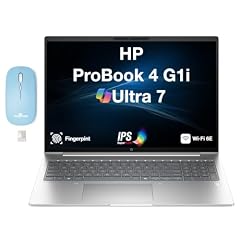
HP ProBook 4 G1i AI Business Laptop 16.0" 60Hz IPS WUXGA
- CPU
- Intel Core Ultra 7
- RAM
- 32 GB
- Storage
- 2000 GB
- Screen
- 16 in
- Refresh
- 60 Hz
- Weight
- 1.72 kg
- Battery
- 56 Wh
- OS
- Windows 11 Pro
$1,967.99 (as of 10/20/2026 16:21 PDT - Details)
It carries 32GB of memory and 2TB of storage with an Intel Core Ultra 7 and Windows 11 Pro, plus a stated 56Wh battery at 1.72 kg. HP sells the same laptop in four other memory and storage configurations; we list one.
Pros
- 32GB of memory and 2TB of storage
- 56Wh battery stated
- 1.72 kg, light for a 16-inch laptop
- 16-inch WUXGA IPS screen
Cons
- Exact Core Ultra 7 model not stated by the seller
- No dedicated GPU
Good fit if
- Office and finance users who keep files locally
- Company buyers who need Windows 11 Pro
Skip if
- You need a GPU for creative work
- You want a 14-inch laptop
Verdict: The best-equipped 16-inch business pick here.
7 16-inch AMD business basic

HP ProBook 4 G1a Laptop
- CPU
- AMD Ryzen 5 230
- GPU
- Radeon 760M
- RAM
- 16 GB
- Storage
- 512 GB
- Screen
- 16 in
- Refresh
- 60 Hz
- Weight
- 1.75 kg
- OS
- Windows 11 Pro
$899.99 (as of 10/20/2026 16:21 PDT - Details)
It pairs an AMD Ryzen 5 230 with Radeon 760M graphics, 16GB of memory and 512GB of storage on a 16-inch FHD+ screen at 1.75 kg. It covers standard office work.
Pros
- 16-inch FHD+ screen
- Ryzen 5 230 with Radeon 760M graphics
- 1.75 kg
- Windows 11 Pro stated
Cons
- 16GB of memory and 512GB of storage, half the ProBook G1i pick's memory
- No battery size stated by the seller
Good fit if
- Office staff working in documents and web apps
- Companies buying standard laptops in volume
Skip if
- You keep large files locally
- You run memory-heavy software
Verdict: A plain AMD business laptop for everyday tasks.
8 Largest stated battery without a dedicated GPU
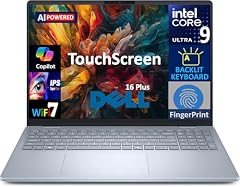
Dell 16 Plus AI Powered Laptop 16.0" Touchscreen IPS WUXGA Display
- CPU
- Intel Core Ultra 9
- RAM
- 32 GB
- Storage
- 2000 GB
- Screen
- 16 in
- Refresh
- 60 Hz
- Touchscreen
- Yes
- Battery
- 64 Wh
- OS
- Windows 11 Pro
$1,619.00 (as of 10/20/2026 16:20 PDT - Details)
It states a 64Wh battery, the largest here among laptops without a dedicated GPU, with a 16-inch WUXGA touchscreen, 32GB of memory and 2TB of storage. The listing title names the Intel Core Ultra 9 288V; the specifications say only Core Ultra 9.
Pros
- 64Wh battery stated
- 16-inch touchscreen
- 32GB of memory and 2TB of storage
- Windows 11 Pro stated
Cons
- Weight not stated by the seller
- Processor model named only in the title
Good fit if
- Home and office users who want a large touchscreen
- Buyers who want a bigger battery for time away from the outlet
Skip if
- You want a known weight
- You need a dedicated GPU
Verdict: A large-screen touch laptop with generous storage and battery.
9 15.6-inch touchscreen pick
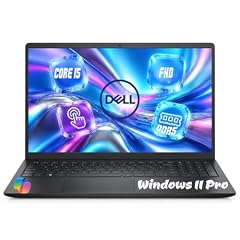
Dell 15.6" FHD Touchscreen Laptop
- CPU
- Intel Core i5-1334U
- RAM
- 32 GB
- Storage
- 1000 GB
- Screen
- 15.6 in
- Refresh
- 60 Hz
- Touchscreen
- Yes
- Weight
- 1.94 kg
- OS
- Windows 11 Pro
$1,129.00 (as of 10/20/2026 16:20 PDT - Details)
It pairs an Intel Core i5-1334U, a low-power U-series chip, with 32GB of memory, 1TB of storage and a 15.6-inch FHD touchscreen. It is the only 15.6-inch pick.
Pros
- 15.6-inch FHD touchscreen
- 32GB of memory and 1TB of storage
- Windows 11 Pro stated
Cons
- 1.94 kg, heavier than the 16-inch business picks
- Older 13th-generation Intel chip
- No battery size stated by the seller
Good fit if
- Home users who want touch and plenty of memory
- Students who work at a desk
Skip if
- You carry your laptop daily
- You want a current-generation processor
Verdict: A roomy touchscreen laptop for home and study.
10 Most powerful GPU

Lenovo ThinkPad P16 Gen 3 w/Ultra 7 255HX
- CPU
- Intel Core Ultra 7 255HX
- GPU
- RTX PRO 3000
- GPU memory
- 12 GB
- RAM
- 64 GB
- Storage
- 2000 GB
- Screen
- 16 in
- Refresh
- 60 Hz
- Touchscreen
- No
$4,999.98 (as of 10/20/2026 16:22 PDT - Details)
It carries an RTX PRO 3000, an NVIDIA Blackwell professional GPU, with an Intel Core Ultra 7 255HX, 64GB of memory and 2TB of storage. It is the newest GPU generation among the three workstations with a dedicated GPU.
Pros
- RTX PRO 3000, NVIDIA's Blackwell professional generation
- 64GB of memory and 2TB of storage
- Core Ultra 7 255HX, an HX-class performance chip
Cons
- 2.72 kg, the heaviest pick
- Screen size, graphics memory and operating system not stated by the seller
Good fit if
- Engineers and architects using certified CAD software
- 3D artists who work mostly at a desk
Skip if
- You carry your laptop often
- You do not use professional graphics software
Verdict: The current-generation workstation in this list.
11 Best Dell workstation

Dell Precision 7680 Laptop
- CPU
- Intel Core i9-13950HX
- GPU
- RTX 2000 Ada
- GPU memory
- 8 GB
- RAM
- 64 GB
- Storage
- 1000 GB
- Screen
- 16 in
- Refresh
- 60 Hz
- Weight
- 2.68 kg
$3,899.99 (as of 10/20/2026 16:21 PDT - Details)
It pairs an RTX 2000 Ada (Ada Lovelace generation) with 8GB of graphics memory, an Intel Core i9-13950HX and 64GB of memory on a 16-inch screen. It weighs 2.68 kg.
Pros
- RTX 2000 Ada with 8GB of graphics memory
- Core i9-13950HX, an HX-class performance chip
- 64GB of memory
- Windows 11 Pro stated
Cons
- 2.68 kg
- 1TB of storage, half the P16 Gen 3's 2TB
Good fit if
- Engineers who need certified drivers and a strong CPU
- IT departments standardizing on Dell Precision
Skip if
- You want the current Blackwell professional GPUs
- You need a light laptop
Verdict: A CPU-strong Dell workstation with an entry professional GPU.
12 Largest stated battery

Lenovo ThinkPad P16v Gen 2 Mobile Workstation Laptop
- CPU
- Intel Core Ultra 7 165H
- GPU
- RTX 2000 Ada
- GPU memory
- 8 GB
- RAM
- 64 GB
- Storage
- 1000 GB
- Screen
- 16 in
- Refresh
- 60 Hz
- Battery
- 90 Wh
$2,999.99 (as of 10/20/2026 16:22 PDT - Details)
It states a 90Wh battery, the largest in this list, with an Intel Core Ultra 7 165H, an RTX 2000 Ada with 8GB and 64GB of memory. The 165H is an H-series chip rather than HX, a middle ground between office and workstation parts.
Pros
- 90Wh battery, the largest stated in this list
- RTX 2000 Ada with 8GB of graphics memory
- 64GB of memory
- Windows 11 Pro stated
Cons
- Weight not stated by the seller
- 1TB of storage
Good fit if
- Engineers who need a professional GPU and a large battery
- Site workers who are away from outlets
Skip if
- You want a known weight
- You need the fastest professional GPU
Verdict: The workstation for longer stretches unplugged.
13 Best Chromebook

ASUS CX14 14'' FHD Chromebook Laptop
- CPU
- Intel Celeron N4500
- RAM
- 4 GB
- Storage
- 64 GB
- Screen
- 14 in
- Refresh
- 60 Hz
- Weight
- 1.39 kg
- OS
- ChromeOS
$239.00 (as of 10/20/2026 16:20 PDT - Details)
It is the only ChromeOS pick: an Intel Celeron N4500 with 4GB of memory and 64GB of eMMC storage on a 14-inch FHD screen at 1.39 kg. ChromeOS works mostly in the browser, which keeps its needs modest.
Pros
- ChromeOS, the only one in this list
- 14-inch FHD screen
- 1.39 kg
Cons
- 4GB of memory, tied for the least here
- 64GB of eMMC storage, the least in this list
Good fit if
- Students whose schools use Google tools
- Home users who browse, stream and write
Skip if
- You need Windows or macOS apps
- You keep many tabs open at once
Verdict: A basic browser-first laptop.
14 Smallest screen

Acer TravelMate B3 11 TMB311-34 TMB311-34-C6MZ 11.6" Notebook
- CPU
- Intel N150
- RAM
- 4 GB
- Screen
- 11.6 in
- Refresh
- 60 Hz
- Weight
- 1.45 kg
It has an 11.6-inch HD screen, the smallest here, with an Intel N150 and 4GB of memory at 1.45 kg. Acer's TravelMate B3 line is aimed at education; the listing title names 128GB of flash storage.
Pros
- 11.6-inch screen, the most compact in this list
- Intel N150 processor
- 1.45 kg
Cons
- 4GB of memory, the Windows 11 minimum per Microsoft
- HD resolution, below the FHD of other picks
- Operating system and storage not stated in the seller's specifications
Good fit if
- Schools buying small laptops for younger students
- Buyers who want a very compact device for basic tasks
Skip if
- You multitask or run heavy apps
- You want a sharp screen
Verdict: A small classroom laptop for light tasks.
Side by side
| # | Laptop | CPU | GPU | GPU memory | Rentable GPU model | RAM | Storage |
|---|---|---|---|---|---|---|---|
| 1 | Lenovo ThinkPad P14s Gen 7 AMD Ryzen AI 9 PRO 470 | AMD Ryzen AI 9 PRO 470 | Radeon 890M | not stated | not stated | 64 GB | 2000 GB |
| 2 | Lenovo ThinkPad P14s Gen 6 Intel Core Ultra 9 285H | Intel Core Ultra 9 285H | not stated | not stated | not stated | 64 GB | 2000 GB |
| 3 | Lenovo ThinkPad P14s Gen 6 14" FHD+ Laptop | AMD Ryzen AI 7 350 | Radeon 860M | not stated | not stated | 16 GB | 512 GB |
| 4 | Lenovo ThinkPad E14 Gen 7 14" FHD+ Display Ryzen 7 250 32GB RAM | AMD Ryzen 7 250 | not stated | not stated | not stated | 32 GB | 1000 GB |
| 5 | Lenovo ThinkPad E16 Gen 2 Business Laptop | Intel Core Ultra 5 125H | not stated | not stated | not stated | 32 GB | 1000 GB |
| 6 | HP ProBook 4 G1i AI Business Laptop 16.0" 60Hz IPS WUXGA | Intel Core Ultra 7 | not stated | not stated | not stated | 32 GB | 2000 GB |
| 7 | HP ProBook 4 G1a Laptop | AMD Ryzen 5 230 | Radeon 760M | not stated | not stated | 16 GB | 512 GB |
| 8 | Dell 16 Plus AI Powered Laptop 16.0" Touchscreen IPS WUXGA Display | Intel Core Ultra 9 | not stated | not stated | not stated | 32 GB | 2000 GB |
| 9 | Dell 15.6" FHD Touchscreen Laptop | Intel Core i5-1334U | not stated | not stated | not stated | 32 GB | 1000 GB |
| 10 | Lenovo ThinkPad P16 Gen 3 w/Ultra 7 255HX | Intel Core Ultra 7 255HX | RTX PRO 3000 | 12 GB | not stated | 64 GB | 2000 GB |
| 11 | Dell Precision 7680 Laptop | Intel Core i9-13950HX | RTX 2000 Ada | 8 GB | not stated | 64 GB | 1000 GB |
| 12 | Lenovo ThinkPad P16v Gen 2 Mobile Workstation Laptop | Intel Core Ultra 7 165H | RTX 2000 Ada | 8 GB | not stated | 64 GB | 1000 GB |
| 13 | ASUS CX14 14'' FHD Chromebook Laptop | Intel Celeron N4500 | not stated | not stated | not stated | 4 GB | 64 GB |
| 14 | Acer TravelMate B3 11 TMB311-34 TMB311-34-C6MZ 11.6" Notebook | Intel N150 | not stated | not stated | not stated | 4 GB | not stated |
How we picked
How we picked: 24 laptops in our catalogue state a 60Hz screen and had a current listing when we read the data. We skipped two NewLenovo ThinkPad P16 Gen 2 listings, which are sold under a seller label rather than as Lenovo's own configurations, a ThinkPad P1 Gen 8 listing that states neither memory nor GPU, and a second P14s Gen 6 listing that omits memory. The pool holds five HP ProBook 4 G1i listings that differ only in memory and storage, so we kept one. We also kept the ThinkPad E16 line to one listing and chose two basic 4GB machines rather than three. We checked the remaining listings for contradictions between title and specifications and found none that changed a pick. GPU facts come from NVIDIA, Windows facts from Microsoft. Prices are live, read from the store listing and shown with the time read. Nobody at wikilaptop.org has tested these units.
How to choose
Is 60Hz enough?
A 60Hz screen redraws the image 60 times per second. For writing, spreadsheets, browsing, video calls and video, that is enough, and it is the standard on business and education laptops. Scrolling and fast motion look less fluid than on 120Hz or faster panels, and fast competitive games benefit from a higher refresh rate.
None of the picks here is a gaming laptop. If you play fast games, look at laptops with 120Hz or faster screens and a gaming GPU.
Look at the rest of the screen
Since every pick shares the refresh rate, compare resolution, size, brightness and touch. Most picks here use FHD or WUXGA-class panels; the TravelMate B3 11 uses HD. Three picks have touchscreens. Two listings state brightness: 500 nits for the P14s Gen 7 and 400 nits for the P14s Gen 6 Intel. A brighter panel helps near windows and outdoors.
Processor and memory for your work
Five picks have 64GB of memory, five have 32GB, two have 16GB and two have 4GB. Microsoft lists 4GB as the Windows 11 minimum, so the 4GB machines suit only light tasks. For office work, 16GB is a comfortable floor; 32GB and 64GB serve developers, analysts and engineers.
Three picks carry NVIDIA professional GPUs for CAD and 3D work: the RTX PRO 3000 (Blackwell) and two RTX 2000 Ada (Ada Lovelace) models. NVIDIA positions these for design and engineering software; check your software's certified hardware list.
Weight and battery
Weight runs from 1.29 kg (ThinkPad P14s Gen 7) to 2.72 kg (ThinkPad P16 Gen 3). Five sellers state a battery, from 47Wh to 90Wh. A 60Hz panel draws less power than a faster one at the same brightness, but battery size, processor and brightness still decide most of the runtime. HX-class chips favor performance, not battery life.
Windows 11 Pro or Home
Most Windows picks here state Windows 11 Pro. Microsoft lists BitLocker device encryption, mobile device management and Active Directory support for Pro, which company IT teams often require. For a personal laptop, Home covers everyday needs.
Questions
Is 60Hz good enough for a laptop?
For office work, browsing, streaming and video calls, yes. It is the standard refresh rate on business and education laptops. Scrolling and fast motion look less smooth than on 120Hz panels, and people used to fast phone screens may notice the difference, but it does not slow down work.
Is 60Hz good for gaming?
It works for casual and slower games. Fast action and competitive games look and feel smoother on 120Hz or faster screens paired with a capable GPU. The picks here are office, education and workstation laptops; none is built for gaming, and three carry professional GPUs aimed at design work.
Does a 60Hz screen save battery?
A panel that redraws less often uses less power than a faster one at the same brightness, so it can help. Battery size, the processor and brightness still matter more. In this list, the stated batteries run from 47Wh to 90Wh, and nine sellers state no size at all.
Why do workstations still use 60Hz screens?
Many engineering and business configurations favor resolution, color and brightness over refresh rate, since CAD, code and documents do not need fast motion. The three workstations here pair 60Hz screens with professional GPUs. If you also want smooth motion, check the maker's spec page for higher-refresh panel options.
Did you test these laptops?
No. Nobody at wikilaptop.org has used these units. We chose them from the specifications stated on each listing, cross-checked with NVIDIA and Microsoft published data. We do not describe screen quality, heat, noise or battery hours, because those claims need testing we have not done.
Recent updates
- : First published.