
Best 165Hz Laptops in 2026: 12 Picks Compared on Specs
Our top pick among 165Hz laptops is the Acer Predator Helios Neo 14 AI with an RTX 5070: it has the strongest GPU tier in this list, 32GB of memory, and at 1.9 kg it is the lightest pick. A 165Hz screen only pays off when the GPU can deliver high frame rates, so the other 11 picks are sorted by what feeds the screen, from an RTX 4050 to four RTX 5070 machines and one AMD Radeon option. We chose all 12 from stated specifications and the makers' published data, not from lab tests.
12 picks from 44 laptops that match this guide with a price we can quote today. Every price below is live and carries the moment it was read.
The picks at a glance
Which one should you buy?
- For most players: The Helios Neo 14 AI puts an RTX 5070 and 32GB of memory in a 1.9 kg body, the lightest in this list. See pick 1
- For an OLED screen at 165Hz: The Legion 5a has a 2560 x 1600 OLED, an RTX 5060 and an 80Wh battery. See pick 5
- For gaming plus heavy CPU work: The MSI Katana 15 HX pairs an RTX 5070 with a Core i9-14900HX, which Intel lists with 24 cores and 32 threads. See pick 2
- For a first gaming laptop: The Acer Nitro V with an RTX 5050 brings NVIDIA's current generation and 8GB of GDDR7 to a 15.6-inch 165Hz screen. See pick 11
The 12 picks
1 Best overall

Acer Predator Helios Neo 14 AI Gaming Laptop
- CPU
- Intel Core Ultra 9 285H
- GPU
- GeForce RTX 5070
- RAM
- 32 GB
- Storage
- 1000 GB
- Screen
- 14.5 in
- Refresh
- 165 Hz
- Weight
- 1.9 kg
$1,897.49 (as of 10/20/2026 15:20 PDT - Details)
It carries an RTX 5070, the highest GPU tier among the picks (shared with three others), with 32GB of memory and 1TB of storage, and at 1.9 kg it is lighter than any other laptop here. The Intel Core Ultra 9 285H is an H-series chip rather than a high-power HX part, which suits a smaller body.
Pros
- RTX 5070, tied for the highest GPU tier in this list
- 1.9 kg, the lightest pick
- 32GB of memory and 1TB of storage
- 14.5-inch 165Hz screen
Cons
- Operating system, battery size and graphics memory not stated by the seller
- 14.5-inch screen, the smallest in this list
Good fit if
- Players who carry their laptop to class or work
- Buyers who want RTX 5070 frame rates without a 16-inch body
Skip if
- You want a large screen for long sessions at a desk
- You want a known battery capacity
Verdict: The best mix of GPU tier, memory and portability for a 165Hz screen.
2 Best 15.6-inch RTX 5070 pick

msi Katana 15 HX 15.6” 165Hz QHD+ Gaming Laptop
- CPU
- Intel Core i9-14900HX
- GPU
- GeForce RTX 5070
- RAM
- 32 GB
- Storage
- 1000 GB
- Screen
- 15.6 in
- Refresh
- 165 Hz
- Weight
- 2.25 kg
- OS
- Windows 11 Home
$2,129.00 (as of 10/20/2026 15:22 PDT - Details)
It pairs an RTX 5070 with an Intel Core i9-14900HX, which Intel lists with 24 cores, 32 threads and 55W base power. Its 15.6-inch QHD+ screen is sharper than the FHD panels of the Nitro V picks, and it has 32GB of memory.
Pros
- Core i9-14900HX: 24 cores and 32 threads per Intel
- RTX 5070 with a 15.6-inch QHD+ 165Hz screen
- 32GB of memory and 1TB of storage
- Windows 11 Home
Cons
- 2.25 kg, heavier than the Helios Neo 14 AI with the same GPU
- HX processor designed for plugged-in performance, not battery life
- Graphics memory and battery size not stated by the seller
Good fit if
- Players who also compile code, render or stream
- Buyers who want a sharp 15.6-inch screen
Skip if
- You game unplugged often
- You want the lightest RTX 5070 laptop
Verdict: The RTX 5070 pick for people who also need a strong CPU.
3 Only OLED with an RTX 5070

Lenovo Legion 5i
- CPU
- Intel Core i7-14700HX
- GPU
- GeForce RTX 5070
- RAM
- 16 GB
- Storage
- 1000 GB
- Screen
- 15 in
- Refresh
- 165 Hz
- Weight
- 2 kg
$2,699.99 (as of 10/20/2026 15:21 PDT - Details)
It combines an RTX 5070 with a 15-inch 2.5K WQXGA OLED screen at 165Hz, the only OLED paired with an RTX 5070 in this list. The Intel Core i7-14700HX has 20 cores and 28 threads per Intel, and the laptop weighs 2.0 kg.
Pros
- 15-inch 2.5K OLED at 165Hz
- RTX 5070
- Core i7-14700HX: 20 cores and 28 threads per Intel
- 2.0 kg, third lightest pick
Cons
- 16GB of memory, half the Helios Neo 14 AI and Katana 15 HX
- Operating system and battery size not stated by the seller
Good fit if
- Players who want deep blacks and high contrast in story-driven games
- Creators who want an OLED panel and GPU acceleration
Skip if
- You want 32GB of memory out of the box
- You need long battery life: HX chips are made for plugged-in use
Verdict: The screen-first RTX 5070 choice.
4 Best 16-inch RTX 5070 pick

ASUS ROG Strix G16
- CPU
- AMD Ryzen 9 9955HX
- GPU
- GeForce RTX 5070
- RAM
- 16 GB
- Storage
- 1000 GB
- Screen
- 16 in
- Refresh
- 165 Hz
- Weight
- 2.5 kg
- OS
- Windows 11 Home
$1,899.99 (as of 10/20/2026 15:20 PDT - Details)
It is the only 16-inch pick with an RTX 5070, paired with an AMD Ryzen 9 9955HX and a 16:10 FHD+ 165Hz screen. For players who want the larger screen, it is the strongest GPU at that size in this list.
Pros
- RTX 5070 in a 16-inch body
- AMD Ryzen 9 9955HX processor
- 16-inch FHD+ 165Hz screen, 3ms response per the listing
- Windows 11 Home and 1TB of storage
Cons
- 2.5 kg, the heaviest pick
- 16GB of memory
- FHD+ resolution, below the QHD+ of the Katana 15 HX
Good fit if
- Players who mostly game at a desk on a 16-inch screen
- Buyers who want a high-end AMD CPU with an RTX 5070
Skip if
- You carry your laptop daily
- You want a higher-resolution screen
Verdict: The big-screen RTX 5070 option.
5 Best OLED with an RTX 5060

Lenovo Legion 5a Gaming Laptop
- CPU
- AMD Ryzen 7 250
- GPU
- GeForce RTX 5060
- GPU memory
- 8 GB
- RAM
- 32 GB
- Storage
- 1000 GB
- Screen
- 15.3 in
- Refresh
- 165 Hz
- Weight
- 2.27 kg
$1,999.99 (as of 10/20/2026 15:21 PDT - Details)
Its 15.3-inch 2560 x 1600 OLED runs at 165Hz, and its 80Wh battery is the second largest stated among the picks after the TUF F16's 90Wh. It has an RTX 5060 with 8GB of graphics memory and 32GB of system memory.
Pros
- 15.3-inch 2560 x 1600 OLED at 165Hz
- 80Wh battery stated
- RTX 5060 with 8GB of GDDR7 per NVIDIA
- 32GB of memory
Cons
- RTX 5060, one tier below the RTX 5070 picks
- 1TB of storage
Good fit if
- Players who want OLED contrast at a mid GPU tier
- Buyers who want a known battery capacity
Skip if
- You want RTX 5070 frame rates at high settings
- You want the lightest possible gaming laptop
Verdict: The best-balanced RTX 5060 machine here.
6 Most memory under 2 kg

Lenovo LOQ 15.3" AMD Ryzen 7 250 RTX 5060 Gaming Laptop
- CPU
- AMD Ryzen 7 250
- GPU
- RTX 5060
- GPU memory
- 8 GB
- RAM
- 64 GB
- Storage
- 4000 GB
- Screen
- 15.3 in
- Refresh
- 165 Hz
- Weight
- 1.98 kg
It lists 64GB of memory and 4TB of storage in a 1.98 kg body, the second lightest pick. The RTX 5060 comes with 8GB of graphics memory, the same tier as the Legion 5a.
Pros
- 64GB of memory and 4TB of storage
- 1.98 kg, second lightest pick
- RTX 5060 with 8GB of graphics memory
- Windows 11 Home
Cons
- Screen resolution and battery size not stated by the seller
- RTX 5060, one tier below the RTX 5070 picks
Good fit if
- Players who also run memory-heavy tools
- Buyers with large game libraries who travel
Skip if
- You want an OLED screen
- You only game, where 64GB goes unused
Verdict: Plenty of memory and storage in a light 165Hz machine.
7 Best with Windows 11 Pro

Dell Alienware 15 AI Gaming Laptop 15.3" WUXGA 165Hz FreeSync AMD 8-core
- CPU
- AMD Ryzen 7 260
- GPU
- GeForce RTX 5060
- GPU memory
- 8 GB
- RAM
- 64 GB
- Storage
- 2000 GB
- Screen
- 15.3 in
- Refresh
- 165 Hz
- Weight
- 2.25 kg
$2,749.00 (as of 10/20/2026 15:20 PDT - Details)
It is the only pick listing Windows 11 Pro, with an RTX 5060, an 8-core AMD Ryzen 7 260, 64GB of memory and 2TB of storage. The 15.3-inch WUXGA screen runs at 165Hz with FreeSync per the listing.
Pros
- Windows 11 Pro per the listing
- 64GB of memory and 2TB of storage
- RTX 5060 with 8GB of graphics memory
- 165Hz screen with FreeSync per the listing
Cons
- 2.25 kg, heavier than the LOQ with the same GPU and memory
- Battery size not stated by the seller
Good fit if
- Freelancers who need Windows 11 Pro and also game
- Buyers who want a 64GB configuration from a major maker
Skip if
- You want a sharper screen than WUXGA
- You want the lightest 64GB option: the LOQ weighs 1.98 kg
Verdict: A well-equipped RTX 5060 laptop for work and play.
8 Best 16-inch RTX 5060 pick
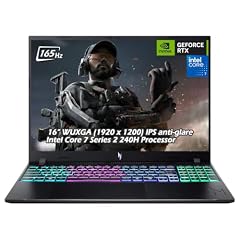
Acer Nitro V 16" WUXGA 165Hz Gaming Laptop
- CPU
- Intel Core 7 240H
- GPU
- GeForce RTX 5060
- RAM
- 32 GB
- Storage
- 2000 GB
- Screen
- 16 in
- Refresh
- 165 Hz
- Weight
- 2.1 kg
- OS
- Windows 11
$2,079.95 (as of 10/20/2026 15:20 PDT - Details)
It puts an RTX 5060 behind a 16-inch WUXGA 165Hz screen with 32GB of memory and 2TB of storage, at 2.1 kg. Acer sells this Nitro V 16 in several configurations; this one is among the best equipped of those in our catalogue.
Pros
- 16-inch WUXGA screen at 165Hz
- RTX 5060 with 8GB of GDDR7 per NVIDIA
- 32GB of memory and 2TB of storage
- 2.1 kg, light for a 16-inch pick
Cons
- WUXGA resolution, below the 2560 x 1600 of the OLED picks
- Battery size not stated by the seller
Good fit if
- Players who want a 16-inch screen without much weight
- Buyers with large game libraries
Skip if
- You want OLED
- You want an RTX 5070
Verdict: A light, well-stocked 16-inch RTX 5060 option.
9 Largest stated battery

ASUS TUF F16 Gaming Laptop RTX 5050 115W
- CPU
- Intel Core i5-13450HX
- GPU
- RTX 5050
- RAM
- 32 GB
- Storage
- 2000 GB
- Screen
- 16 in
- Refresh
- 165 Hz
- Weight
- 2.18 kg
- Battery
- 90 Wh
$1,699.99 (as of 10/20/2026 15:20 PDT - Details)
Its 90Wh battery is the largest stated among the picks. The listing names an RTX 5050 at 115W, a MUX switch and G-SYNC on a 16-inch WUXGA 165Hz screen with 100% sRGB, plus 32GB of memory and 2TB of storage.
Pros
- 90Wh battery, the largest stated in this list
- 32GB of memory and 2TB of storage
- G-SYNC and a MUX switch per the listing
- 2.18 kg
Cons
- RTX 5050, the entry tier of the RTX 50 series
- Intel Core i5-13450HX, an HX chip that favors plugged-in performance
Good fit if
- Players who want adaptive sync on a budget GPU tier
- Buyers who want the largest stated battery here
Skip if
- You play demanding new releases at high settings
- You want a current-generation CPU
Verdict: An entry-tier GPU with the best battery and screen features on paper.
10 Only AMD Radeon GPU

ASUS TUF Gaming A16 Laptop 16" WUXGA 165Hz 100% sRGB AMD 8-core Ryzen 7
- CPU
- AMD Ryzen 7 7735HS
- GPU
- Radeon RX 7700S
- GPU memory
- 8 GB
- RAM
- 32 GB
- Storage
- 1000 GB
- Screen
- 16 in
- Refresh
- 165 Hz
- Weight
- 2.2 kg
$1,659.00 (as of 10/20/2026 15:20 PDT - Details)
It is the only pick with an AMD graphics chip, the Radeon RX 7700S with 8GB, paired with 32GB of memory and a 16-inch WUXGA 165Hz screen with 100% sRGB per the listing. It suits buyers who prefer AMD's software stack.
Pros
- Radeon RX 7700S with 8GB of graphics memory
- 32GB of memory and 1TB of storage
- 100% sRGB screen per the listing
- 2.2 kg
Cons
- No NVIDIA DLSS, which is an NVIDIA feature
- Ryzen 7 7735HS, an older generation than the Ryzen 200-series picks
Good fit if
- Buyers who want an AMD GPU
- Players who value an accurate sRGB screen
Skip if
- You rely on DLSS in supported games
- You want a current-generation processor
Verdict: The AMD alternative in a mid-weight 16-inch body.
11 Entry RTX 50 pick

acer Nitro V 15.6” FHD IPS 165Hz Gaming Laptop
- CPU
- Intel Core i5-13420H
- GPU
- GeForce RTX 5050
- GPU memory
- 8 GB
- RAM
- 16 GB
- Storage
- 512 GB
- Screen
- 15.6 in
- Refresh
- 165 Hz
- Weight
- 2.11 kg
$1,049.99 (as of 10/20/2026 15:20 PDT - Details)
It brings an RTX 5050 with 8GB of GDDR7 to a 15.6-inch FHD 165Hz screen, the least demanding resolution for a GPU to fill at high frame rates. It is a sensible starting point for esports titles.
Pros
- RTX 5050 with 8GB of GDDR7 per the listing and NVIDIA
- 15.6-inch FHD IPS screen at 165Hz
- Windows 11 Home
- 2.11 kg
Cons
- 512GB of storage, the least in this list
- 16GB of memory
- Intel Core i5-13420H, an older 13th-generation chip
Good fit if
- First-time buyers who play esports titles at 1080p
- Students who want current-generation graphics
Skip if
- You install many large games
- You want 1440p gaming
Verdict: A current-generation starting point for a 165Hz screen.
12 Best Nitro V RTX 4050 configuration

Acer Nitro V Gaming Laptop
- CPU
- Intel Core i7-13620H
- GPU
- GeForce RTX 4050 Laptop
- RAM
- 16 GB
- Storage
- 1000 GB
- Screen
- 15.6 in
- Refresh
- 165 Hz
- Weight
- 2.11 kg
$1,299.99 (as of 10/20/2026 15:20 PDT - Details)
Among the Acer Nitro V RTX 4050 listings in our catalogue, this one has the most memory and storage: 16GB and 1TB, where the other two have 8GB and 512GB. The RTX 4050 is an Ada Lovelace generation chip that NVIDIA lists with 6GB of graphics memory.
Pros
- 16GB of memory and 1TB of storage
- 15.6-inch FHD IPS screen at 165Hz
- Intel Core i7-13620H
- 2.11 kg
Cons
- RTX 4050 with 6GB of graphics memory, the lowest GPU tier in this list
- Previous-generation RTX 40 series
- Operating system not stated by the seller
Good fit if
- Players of esports and older titles
- Buyers who want a 165Hz screen at the entry GPU tier
Skip if
- You play new releases at high settings
- You want current RTX 50 features
Verdict: The best-equipped Nitro V RTX 4050, but the oldest GPU generation here.
Side by side
| # | Laptop | CPU | GPU | GPU memory | Rentable GPU model | RAM | Storage |
|---|---|---|---|---|---|---|---|
| 1 | Acer Predator Helios Neo 14 AI Gaming Laptop | Intel Core Ultra 9 285H | GeForce RTX 5070 | not stated | not stated | 32 GB | 1000 GB |
| 2 | msi Katana 15 HX 15.6” 165Hz QHD+ Gaming Laptop | Intel Core i9-14900HX | GeForce RTX 5070 | not stated | not stated | 32 GB | 1000 GB |
| 3 | Lenovo Legion 5i | Intel Core i7-14700HX | GeForce RTX 5070 | not stated | not stated | 16 GB | 1000 GB |
| 4 | ASUS ROG Strix G16 | AMD Ryzen 9 9955HX | GeForce RTX 5070 | not stated | not stated | 16 GB | 1000 GB |
| 5 | Lenovo Legion 5a Gaming Laptop | AMD Ryzen 7 250 | GeForce RTX 5060 | 8 GB | not stated | 32 GB | 1000 GB |
| 6 | Lenovo LOQ 15.3" AMD Ryzen 7 250 RTX 5060 Gaming Laptop | AMD Ryzen 7 250 | RTX 5060 | 8 GB | not stated | 64 GB | 4000 GB |
| 7 | Dell Alienware 15 AI Gaming Laptop 15.3" WUXGA 165Hz FreeSync AMD 8-core | AMD Ryzen 7 260 | GeForce RTX 5060 | 8 GB | not stated | 64 GB | 2000 GB |
| 8 | Acer Nitro V 16" WUXGA 165Hz Gaming Laptop | Intel Core 7 240H | GeForce RTX 5060 | not stated | not stated | 32 GB | 2000 GB |
| 9 | ASUS TUF F16 Gaming Laptop RTX 5050 115W | Intel Core i5-13450HX | RTX 5050 | not stated | not stated | 32 GB | 2000 GB |
| 10 | ASUS TUF Gaming A16 Laptop 16" WUXGA 165Hz 100% sRGB AMD 8-core Ryzen 7 | AMD Ryzen 7 7735HS | Radeon RX 7700S | 8 GB | not stated | 32 GB | 1000 GB |
| 11 | acer Nitro V 15.6” FHD IPS 165Hz Gaming Laptop | Intel Core i5-13420H | GeForce RTX 5050 | 8 GB | not stated | 16 GB | 512 GB |
| 12 | Acer Nitro V Gaming Laptop | Intel Core i7-13620H | GeForce RTX 4050 Laptop | not stated | not stated | 16 GB | 1000 GB |
How we picked
How we picked: 33 laptops in our catalogue state a 165Hz screen. We removed three reseller builds (two configurations from one reseller and a build from another reseller) and preferred established makers, because their models covered the same ground. We also skipped listings whose data contradicts itself: an HP HyperX OMEN 16 whose title says 2TB while its specifications say 1TB, a Lenovo Legion 5i listed with 32GB of graphics memory on an RTX 4060 (NVIDIA lists 8GB), and an Alienware 15 whose specifications give a 16-inch screen. From repeated models (several Acer Nitro V, ASUS ROG Strix G16 and MSI Katana configurations) we kept one per GPU tier. GPU facts come from NVIDIA and CPU facts from Intel. Prices on this page are live: each one is read from the store listing and shown with the time it was read. Nobody at wikilaptop.org has tested these units.
How to choose
Does 165Hz make sense for you?
A 165Hz screen can show up to 165 frames per second, where a 60Hz panel shows up to 60. The extra smoothness matters most in fast games, and scrolling also looks smoother in everyday use. The step from 144Hz to 165Hz is small; the step from 60Hz is large.
The screen only shows what the GPU produces. If a game runs at 70 frames per second, a 165Hz panel displays 70. That is why this guide ranks laptops by the GPU behind the screen first.
Match the GPU to the screen
In this list, four picks have an RTX 5070, four an RTX 5060, two an RTX 5050, one an RTX 4050 and one a Radeon RX 7700S. NVIDIA lists 8GB of GDDR7 for the RTX 5050 and RTX 5060, 8GB or 12GB for the RTX 5070, and 6GB of GDDR6 for the RTX 4050. RTX 50 laptop GPUs belong to NVIDIA's Blackwell generation; the RTX 4050 is Ada Lovelace.
For esports titles at FHD or WUXGA resolution, the RTX 5050 and RTX 5060 picks can aim at high frame rates. For recent single-player games at high settings, the RTX 5070 picks give the most headroom. NVIDIA's DLSS upscaling, supported on RTX 40 and RTX 50 GPUs, helps raise frame rates in games that offer it.
Resolution and panel type
Most picks use FHD (1920 x 1080) or WUXGA and FHD+ (1920 x 1200) panels, which are the easiest for a GPU to fill at 165Hz. The Katana 15 HX lists QHD+, and the Legion 5i and Legion 5a list 2560 x 1600 OLED panels; those look sharper but ask more of the GPU. Adaptive sync (FreeSync on the Alienware 15 AI, G-SYNC on the TUF F16, per their listings) reduces tearing when frame rates fall below the refresh rate.
Processor: H or HX
Four picks use HX processors: the Katana 15 HX (Core i9-14900HX), the Legion 5i (Core i7-14700HX), the ROG Strix G16 (Ryzen 9 9955HX) and the TUF F16 (Core i5-13450HX). Intel lists 55W base power for the i9-14900HX and i7-14700HX; these chips favor performance on mains power and are not a choice for battery life.
H-series and Ryzen 200-series chips appear in the lighter picks. For gaming alone, the GPU usually matters more than the CPU.
Memory, storage, battery and weight
Six picks have 32GB of memory, two have 64GB and four have 16GB. Storage runs from 512GB to 4TB. Only two listings state a battery size: 90Wh for the TUF F16 and 80Wh for the Legion 5a.
Weights run from 1.9 kg (Helios Neo 14 AI) to 2.5 kg (ROG Strix G16). Remember that a gaming laptop's power adapter adds weight on top of the stated figure.
Questions
Is 165Hz better than 144Hz?
Only slightly. The difference between 144 and 165 frames per second is small, and few people notice it in daily use. Both are a clear step up from a 60Hz screen. Choose between laptops on the rest of the specification instead: the GPU that feeds the screen, memory, panel type and weight.
Do I need a powerful GPU for a 165Hz screen?
To use the full refresh rate in games, yes. The RTX 5050 and RTX 5060 picks here suit esports titles at FHD or WUXGA resolution. For demanding releases at high settings, the four RTX 5070 picks give the most headroom. In desktop use and light games, any GPU benefits from the smoother scrolling.
Is a 165Hz laptop good for work?
It works well, and scrolling looks smooth. The trade-off is that 165Hz screens mostly come with gaming hardware, which adds weight: every pick here weighs 1.9 kg or more. Four picks also use HX processors, which are designed for plugged-in performance rather than battery life.
Did you test these laptops?
No. Nobody at wikilaptop.org has used these units. We chose them from the specifications stated on each listing, cross-checked with NVIDIA and Intel published data. We do not describe heat, noise, keyboard feel or frame rates, because those claims need testing we have not done.
Why do prices on this page change?
Each price is read live from the store listing and shown with the time it was read. Gaming laptop prices move often, so we never write price comparisons into the text. Check the time next to each price and open the listing to confirm the configuration before you buy.
Recent updates
- : First published.