
Best Intel Core Ultra 9 285HX Laptops: 4 Picks Compared on Specs
Our top pick is the ThinkPad P16 Gen 3 with the RTX PRO 4000: 16GB of ECC graphics memory, 128GB of system memory and 4TB of storage in a 2.54 kg workstation sold as a standard configuration. Every 285HX laptop in our catalogue is a ThinkPad P16 Gen 3, so the real choice is the graphics tier, from the RTX PRO 2000 to the RTX PRO 5000. We compared the four on stated specifications and Intel and NVIDIA data, not on lab tests.
4 picks from 3 laptops that match this guide with a price we can quote today. Every price below is live and carries the moment it was read.
The picks at a glance
| # | Pick | Laptop | Price |
|---|---|---|---|
| 1 | Best overall | Lenovo ThinkPad P16 Gen 3 | $7,899.00 (as of 10/20/2026 16:22 PDT - Details) |
| 2 | Most graphics and system memory | Mavark Lenovo ThinkPad P16 Gen 3 Mobile Workstation | |
| 3 | Best mid-tier GPU configuration | Lenovo ThinkPad P16 Gen 3 with Ultra 9 285HX vPro 24-Core | $6,499.00 (as of 10/20/2026 16:22 PDT - Details) |
| 4 | Best for CPU-heavy work | Lenovo ThinkPad P16 Gen 3 Intel |
Which one should you buy?
- For most CAD and 3D work: The RTX PRO 4000 configuration balances 16GB of ECC graphics memory with 128GB of system memory and 4TB of storage. See pick 1
- For the largest scenes and models: The reseller build carries the RTX PRO 5000 with 24GB of ECC GDDR7 per NVIDIA and 192GB of system memory. See pick 2
- For simulation and data work with a mid-tier GPU: The RTX PRO 3000 configuration keeps 128GB of memory and 4TB of storage with 12GB of ECC graphics memory. See pick 3
- For CPU-heavy work with an OLED screen: The RTX PRO 2000 configuration lists a 3.2K OLED touch screen, for work where the processor matters more than the GPU. See pick 4
The 4 picks
1 Best overall

Lenovo ThinkPad P16 Gen 3
- CPU
- Intel Core Ultra 9 285HX
- GPU
- RTX PRO 4000
- GPU memory
- 16 GB
- RAM
- 128 GB
- Storage
- 4000 GB
- Screen
- 16 in
- Refresh
- 120 Hz
- Touchscreen
- Yes
$7,899.00 (as of 10/20/2026 16:22 PDT - Details)
It sits one tier below the top card with an RTX PRO 4000, which NVIDIA lists with 16GB of ECC GDDR7, and keeps 128GB of memory and 4TB of storage. Unlike the RTX PRO 5000 option, it is sold under the Lenovo name rather than as a reseller build, and its listing states the weight.
Pros
- RTX PRO 4000: 16GB of ECC GDDR7 per NVIDIA
- 128GB of memory and 4TB of storage
- 16-inch touch screen at 120Hz
- 2.54 kg stated weight
Cons
- 16GB of graphics memory, below the RTX PRO 5000's 24GB
- Screen resolution not stated in the specifications
Good fit if
- Engineers and 3D artists with medium to large scenes
- Buyers who want the strongest GPU in a standard Lenovo configuration here
Skip if
- Your scenes already exceed 16GB of graphics memory
- Your work is mostly CPU-bound and does not need a large GPU
Verdict: The most balanced of the four P16 builds for professional graphics work.
2 Most graphics and system memory

Mavark Lenovo ThinkPad P16 Gen 3 Mobile Workstation
- CPU
- Intel Core Ultra 9 285HX
- GPU
- RTX PRO 5000
- GPU memory
- 24 GB
- RAM
- 192 GB
- Storage
- 2000 GB
- Screen
- 16 in
- Refresh
- 120 Hz
- Touchscreen
- Yes
This reseller build of the ThinkPad P16 Gen 3 has the RTX PRO 5000, the only 24GB card here per NVIDIA, and 192GB of system memory, 64GB more than any other pick. It is a reseller configuration, so check who handles the warranty and support before you buy.
Pros
- RTX PRO 5000: 24GB of ECC GDDR7 per NVIDIA, the most here
- 192GB of memory, the most here
- 16-inch 3.2K OLED touch screen at 120Hz per the listing
Cons
- A reseller's configuration, not a standard Lenovo listing
- 2TB of storage, half of the other three
- Weight not stated by the seller
Good fit if
- Visual effects and simulation users whose scenes need 24GB of graphics memory
- Data professionals who keep very large datasets in memory
Skip if
- You want the warranty to come straight from Lenovo
- You need more than 2TB of internal storage from day one
Verdict: The top of the range on memory, as long as the reseller's warranty terms suit you.
3 Best mid-tier GPU configuration

Lenovo ThinkPad P16 Gen 3 with Ultra 9 285HX vPro 24-Core
- CPU
- Intel Core Ultra 9 285HX
- GPU
- RTX PRO 3000
- GPU memory
- 12 GB
- RAM
- 128 GB
- Storage
- 4000 GB
- Screen
- 16 in
- Refresh
- 120 Hz
- Weight
- 2.54 kg
$6,499.00 (as of 10/20/2026 16:22 PDT - Details)
It keeps the 128GB of memory and 4TB of storage of our top pick but steps down to the RTX PRO 3000, which NVIDIA lists with 12GB of ECC GDDR7. That suits work where memory and CPU cores matter more than the largest graphics card.
Pros
- RTX PRO 3000: 12GB of ECC GDDR7 per NVIDIA
- 128GB of memory and 4TB of storage
- 16-inch screen at 120Hz
- 2.54 kg stated weight
Cons
- 12GB of graphics memory, a tier below the RTX PRO 4000
- Touch and screen resolution not stated in the specifications
Good fit if
- Engineers running simulations that lean on CPU and system memory
- CAD users with moderate model sizes
Skip if
- You render large GPU scenes
- You want a touch screen confirmed in the listing
Verdict: A sensible middle step when 12GB of graphics memory covers your models.
4 Best for CPU-heavy work
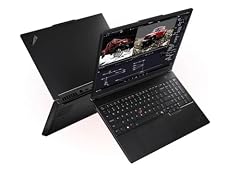
Lenovo ThinkPad P16 Gen 3 Intel
- CPU
- Intel Core Ultra 9 285HX
- GPU
- RTX PRO 2000
- GPU memory
- 8 GB
- RAM
- 128 GB
- Storage
- 4000 GB
- Screen
- 16 in
- Weight
- 2.54 kg
- OS
- Windows 11 Pro
It pairs the 285HX with the entry RTX PRO 2000, which NVIDIA lists with 8GB of GDDR7, and still carries 128GB of memory and 4TB of storage. The listing describes a 16-inch 3.2K (3200 x 2000) OLED touch screen.
Pros
- 128GB of memory and 4TB of storage
- 16-inch 3.2K OLED touch screen per the listing
- 2.54 kg stated weight
Cons
- RTX PRO 2000: 8GB of graphics memory, the least here and without ECC per NVIDIA
- Refresh rate not stated by the seller
Good fit if
- Developers compiling large codebases or running many virtual machines
- Photographers and editors who want an OLED screen and lots of memory
Skip if
- You render or simulate on the GPU
- You need ECC graphics memory
Verdict: The pick when the 24-core processor and memory do the heavy lifting.
Side by side
| # | Laptop | CPU | GPU | GPU memory | Rentable GPU model | RAM | Storage |
|---|---|---|---|---|---|---|---|
| 1 | Lenovo ThinkPad P16 Gen 3 | Intel Core Ultra 9 285HX | RTX PRO 4000 | 16 GB | not stated | 128 GB | 4000 GB |
| 2 | Mavark Lenovo ThinkPad P16 Gen 3 Mobile Workstation | Intel Core Ultra 9 285HX | RTX PRO 5000 | 24 GB | not stated | 192 GB | 2000 GB |
| 3 | Lenovo ThinkPad P16 Gen 3 with Ultra 9 285HX vPro 24-Core | Intel Core Ultra 9 285HX | RTX PRO 3000 | 12 GB | not stated | 128 GB | 4000 GB |
| 4 | Lenovo ThinkPad P16 Gen 3 Intel | Intel Core Ultra 9 285HX | RTX PRO 2000 | 8 GB | not stated | 128 GB | 4000 GB |
How we picked
How we picked: our catalogue holds four laptops whose listing states the Intel Core Ultra 9 285HX, and all four appear here. They are configurations of one model, the Lenovo ThinkPad P16 Gen 3, so we ranked them by what separates them: the NVIDIA RTX PRO graphics card, memory, storage and the screen details each listing states. One listing comes from a reseller that builds on the Lenovo machine; we label it and explain what to check. Processor facts come from Intel's specification page, graphics memory from NVIDIA's comparison of its professional laptop GPUs. Prices on this page are live: each one is read from the store listing and shown with the time it was read. Nobody at wikilaptop.org has tested these units; every comparison below is drawn from stated specifications.
How to choose
What the Core Ultra 9 285HX is
Intel lists the Core Ultra 9 285HX with 24 cores (8 performance cores and 16 efficient cores), 24 threads, a maximum turbo frequency of 5.5 GHz, 36MB of cache, 55W base power and 160W maximum turbo power. Intel describes the HX suffix as highest performance with all SKUs unlocked.
Intel also lists Intel vPro Enterprise eligibility for this chip, which matters to companies that manage laptops remotely. The 285HX is a chip for plugged-in workstation use.
Pick the graphics tier first
All four laptops here are the same ThinkPad P16 Gen 3, so the graphics card is the main decision. NVIDIA lists 8GB of GDDR7 for the RTX PRO 2000, 12GB with ECC for the RTX PRO 3000, 16GB with ECC for the RTX PRO 4000 and 24GB with ECC for the RTX PRO 5000.
Graphics memory sets how large a scene, model or dataset you can keep on the GPU. If your software vendor publishes certified GPU lists, check them before choosing.
Memory and storage
Intel lists up to 256GB of DDR5 at up to 6400 MT/s for the 285HX. Three picks here come with 128GB and the reseller build with 192GB, all within that limit. That is far more than office or gaming use needs; it pays off for simulations, large datasets and many virtual machines.
Three picks have 4TB of storage and the reseller build has 2TB.
Reseller configurations
One reseller sells a ThinkPad P16 Gen 3 fitted with its own choice of memory and storage. Before buying such a build, check who provides the warranty (the reseller, Lenovo or both), how long it lasts, who handles repairs, and whether upgraded parts are covered. The base laptop is made by Lenovo; the configuration is the reseller's.
Screen, weight and power
Listings for this model describe a 16-inch 3.2K OLED touch screen at 120Hz, though not every listing states every detail; check the configuration you open. Lenovo sellers state 2.54 kg for three of these builds, and the reseller listing states no weight.
With a 160W maximum turbo processor and a workstation GPU, plan to work near an outlet. None of the listings states a battery capacity.
Questions
Is the Core Ultra 9 285HX good for gaming?
The processor is fast enough for any current game, but every 285HX laptop in our catalogue is a ThinkPad P16 workstation with an RTX PRO card aimed at professional software. If games are your main use, a gaming laptop with a GeForce card and a high-refresh screen is the better match; our Core Ultra 9 275HX guide covers those.
How does the 285HX compare with the 275HX?
Intel lists both with 24 cores, 24 threads, 36MB of cache, 55W base power and 160W maximum turbo power. The 285HX turbos to 5.5 GHz against 5.4 GHz for the 275HX, and Intel lists vPro Enterprise eligibility for the 285HX. For most buyers the graphics card and memory in the laptop matter more than this difference.
Which RTX PRO card do I need?
Match graphics memory to your largest projects. NVIDIA lists 8GB for the RTX PRO 2000, 12GB for the RTX PRO 3000, 16GB for the RTX PRO 4000 and 24GB for the RTX PRO 5000, with ECC on the top three. CAD with moderate models runs on the lower tiers; large renders and simulations benefit from 16GB or 24GB.
Is 128GB of memory overkill?
For email, office work or games, yes. It makes sense for large simulations, data analysis, many virtual machines or heavy multi-application creative work. Intel lists a 256GB maximum for the 285HX. If your projects never fill 64GB, the extra memory will not make your work faster.
Did you test these laptops?
No. Nobody at wikilaptop.org has used these units. We compared them on the specifications stated in each listing, checked against Intel and NVIDIA published data. We do not describe heat, noise or build quality, because those claims need testing we have not done.
Recent updates
- : First published.