
Best Lenovo Laptops for Photo Editing in 2026: 12 Picks on Specs
Our top Lenovo pick for photo editing is the ThinkPad P16 Gen 3: its listing combines a 16-inch 3200x2000 OLED touch screen with 128GB of RAM, 4TB of storage and an NVIDIA RTX PRO 2000 with 8GB of GPU memory. The ThinkPad P1 Gen 8 is the lighter alternative, and the Legion, LOQ and IdeaPad picks cover gaming-class GPUs and smaller budgets. Picks are based on stated specifications and published software requirements, not on our own testing.
12 picks from 14 laptops that match this guide with a price we can quote today. Every price below is live and carries the moment it was read.
The picks at a glance
Which one should you buy?
- For professional retouching: The ThinkPad P16 Gen 3 lists 128GB of RAM, 4TB of storage and a 3200x2000 OLED touch screen, the most complete editing spec sheet in this list. See pick 1
- For photographers on the road: The ThinkPad P1 Gen 8 keeps 64GB of RAM and a 16-inch OLED touch screen at 1.84 kg. See pick 2
- For editing plus gaming: The Legion 5 15IRX10 pairs a 15.1-inch WQXGA OLED screen with a GeForce RTX 5070 and 8GB of GPU memory. See pick 6
- For hobbyists starting out: The IdeaPad Slim 3 15.3 lists 24GB of RAM and a touch screen at 1.6 kg, enough for Lightroom edits on single images. See pick 10
The 12 picks
1 Best overall
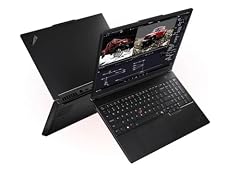
Lenovo ThinkPad P16 Gen 3 Intel
- CPU
- Intel Core Ultra 9 285HX
- GPU
- RTX PRO 2000
- GPU memory
- 8 GB
- RAM
- 128 GB
- Storage
- 4000 GB
- Screen
- 16 in
- Weight
- 2.54 kg
- OS
- Windows 11 Pro
No other Lenovo here comes close on memory and storage: 128GB of RAM and 4TB, twice the next best. The listing states a 16-inch 3200x2000 OLED touch screen, and the RTX PRO 2000 with 8GB of GPU memory matches Adobe's figure for full GPU acceleration in Lightroom Classic.
Pros
- 128GB of RAM and 4TB of storage, the most in this list
- 16-inch 3200x2000 OLED touch screen per the listing
- RTX PRO 2000 with 8GB of GPU memory
- Intel Core Ultra 9 285HX and Windows 11 Pro
Cons
- 2.54 kg, the heaviest pick with a stated weight
- Battery capacity and color gamut not stated by the seller
Good fit if
- Professional retouchers and studio photographers
- Photographers who keep their whole archive on the laptop
Skip if
- You want a laptop under 2 kg
- Your edits are light and your library is small
Verdict: The Lenovo to buy if memory, storage and a sharp OLED screen all matter.
2 Best for travel

Lenovo 2026 ThinkPad P1 Gen 8 w Core Ultra 9 285H
- CPU
- Intel Core Ultra 9 285H
- GPU
- RTX PRO 2000
- RAM
- 64 GB
- Screen
- 16 in
- Refresh
- 120 Hz
- Touchscreen
- Yes
- Weight
- 1.84 kg
$4,548.80 (as of 10/20/2026 16:21 PDT - Details)
It is the lightest Lenovo here that combines 64GB of RAM with an OLED screen, at 1.84 kg, and its listing states a 16-inch OLED touch screen and an NVIDIA RTX PRO 2000. Storage and GPU memory are not stated, which is the main reason it sits behind the P16 Gen 3.
Pros
- 64GB of RAM at 1.84 kg
- 16-inch OLED touch screen per the listing
- Intel Core Ultra 9 285H with RTX PRO 2000 graphics
Cons
- Storage size not stated by the seller
- GPU memory and operating system not stated by the seller
Good fit if
- Wedding and event photographers who edit between shoots
- Editors who want OLED in a light 16-inch ThinkPad
Skip if
- You need the storage size confirmed before buying
- You want the most GPU memory
Verdict: The lightest route to 64GB and OLED among these Lenovos.
3 Sharpest stated screen

Lenovo ThinkPad P16v Mobile Workstation
- CPU
- Intel Core Ultra 7 165H
- GPU
- RTX 2000 Ada
- GPU memory
- 8 GB
- RAM
- 32 GB
- Storage
- 1000 GB
- Screen
- 16 in
- Weight
- 1.68 kg
- OS
- Windows 11 Pro
$2,599.99 (as of 10/20/2026 16:22 PDT - Details)
Its listing names a 3840x2400 screen, more pixels than any other Lenovo here, with an RTX 2000 Ada carrying 8GB of GPU memory. At 1.68 kg it is also the lightest pick with a professional NVIDIA GPU and a stated weight.
Pros
- 16-inch 3840x2400 screen per the listing
- RTX 2000 Ada with 8GB of GPU memory
- 1.68 kg
- Windows 11 Pro
Cons
- 32GB of RAM
- 1TB of storage
- Intel Core Ultra 7 165H, a generation older than the P16 Gen 3 and P1 Gen 8 chips
Good fit if
- Retouchers who inspect fine detail
- Editors who want 4K-class resolution without a heavy body
Skip if
- You want an OLED panel
- You need 64GB or more of RAM
Verdict: The best screen resolution here in a light workstation.
4 Only RTX 3000 Ada pick

Lenovo ThinkPad P1 Gen 7
- CPU
- Intel Core Ultra 7 165H
- GPU
- RTX 3000 Ada
- GPU memory
- 8 GB
- RAM
- 32 GB
- Storage
- 1000 GB
- Screen
- 16 in
- Touchscreen
- No
- Weight
- 1.86 kg
$2,998.03 (as of 10/20/2026 16:22 PDT - Details)
It lists an NVIDIA RTX 3000 Ada with 8GB of GPU memory, a 16-inch 2.8K screen and 32GB of RAM at 1.86 kg. Compared with the P1 Gen 8, it states its GPU memory but not its storage.
Pros
- RTX 3000 Ada with 8GB of GPU memory
- 16-inch 2.8K screen per the listing
- 1.86 kg
Cons
- Storage size not stated by the seller
- Processor stated only as Intel Core Ultra 7
- 32GB of RAM, half of the P1 Gen 8
Good fit if
- Photographers who want a confirmed 8GB pro GPU in a light ThinkPad
- Editors moving up from an older ThinkPad P model
Skip if
- You want to confirm storage and the exact processor
- You work with very large layered files
Verdict: A light ThinkPad P with a stated 8GB GPU and a few blanks.
5 Most GPU power

Lenovo Legion Pro 7i Gen 10 w/Ultra 9
- CPU
- Intel Core Ultra 9 275HX
- GPU
- GeForce RTX 5090
- GPU memory
- 24 GB
- RAM
- 64 GB
- Storage
- 2000 GB
- Screen
- 16 in
- Refresh
- 240 Hz
- OS
- Windows 11 Home
$6,989.99 (as of 10/20/2026 16:22 PDT - Details)
Its GeForce RTX 5090 is listed by NVIDIA with 24GB of GPU memory, the most of any Lenovo here, and it adds 64GB of RAM, 2TB of storage and a 16-inch OLED screen. That GPU headroom helps GPU-heavy tools such as AI Denoise more than everyday edits.
Pros
- RTX 5090, 24GB of GPU memory per NVIDIA
- 64GB of RAM and 2TB of storage
- 16-inch OLED screen per the listing
Cons
- Weight not stated by the seller
- Processor stated only as Intel Core Ultra 9
- Operating system not stated by the seller
Good fit if
- Photographers who run AI Denoise on large batches
- Creators who also edit video or play games
Skip if
- You mostly make single-image edits
- You want a known weight before buying
Verdict: The most GPU in this list for AI-heavy editing.
6 Best OLED gaming laptop for editing

Lenovo Legion 5 15IRX10 15.1" WQXGA OLED
- CPU
- Intel Core i9
- GPU
- GeForce RTX 5070
- GPU memory
- 8 GB
- RAM
- 32 GB
- Storage
- 1000 GB
- Screen
- 15.1 in
- Weight
- 1.9 kg
- OS
- Windows 11 Home
$2,459.00 (as of 10/20/2026 16:21 PDT - Details)
It pairs a 15.1-inch WQXGA OLED screen with a GeForce RTX 5070 (8GB) and 32GB of RAM at 1.9 kg. It is the smaller OLED alternative to the Legion Pro 7i.
Pros
- 15.1-inch WQXGA OLED screen per the listing
- RTX 5070 with 8GB of GPU memory
- 32GB of RAM
- 1.9 kg
Cons
- 1TB of storage
- Processor stated only as Intel Core i9 (the listing name says 14900HX)
Good fit if
- Hobbyists who edit and game on one machine
- Editors who want OLED contrast in a compact body
Skip if
- You want a 16-inch screen
- You need more than 1TB internally
Verdict: A compact OLED Legion with enough GPU for AI tools.
7 Most memory in a 15.6-inch ThinkPad

Lenovo ThinkPad P15 Mobile Workstation
- CPU
- Intel Core i7-11850H
- GPU
- RTX A2000
- GPU memory
- 4 GB
- RAM
- 64 GB
- Storage
- 2000 GB
- Screen
- 15.6 in
- Weight
- 1.81 kg
- OS
- Windows 11 Pro
$2,988.00 (as of 10/20/2026 16:22 PDT - Details)
It lists 64GB of RAM and 2TB of storage at 1.81 kg, with an NVIDIA RTX A2000 carrying 4GB of GPU memory. Its Intel Core i7-11850H is the oldest processor in this list, so it suits memory-heavy editing more than GPU-heavy AI tools.
Pros
- 64GB of RAM and 2TB of storage
- 1.81 kg
- RTX A2000 with 4GB of GPU memory, the 4GB Adobe lists for 4K displays
Cons
- 11th-generation Intel processor, the oldest here
- 15.6-inch Full HD screen
- 4GB of GPU memory, half of Adobe's figure for full GPU acceleration
Good fit if
- Photographers who need lots of memory for panoramas and stacks
- Editors who work on an external monitor
Skip if
- You rely on AI Denoise or other GPU-heavy tools
- You want a high-resolution built-in screen
Verdict: Plenty of memory and storage on an older platform.
8 Lightest Lenovo with a dedicated GPU

Lenovo LOQ 15.6" Full HD Gaming Laptop
- CPU
- AMD Ryzen 5 7235HS
- GPU
- GeForce RTX 4050
- RAM
- 16 GB
- Storage
- 512 GB
- Screen
- 15.6 in
- Weight
- 1.36 kg
$1,055.00 (as of 10/20/2026 16:22 PDT - Details)
At 1.36 kg it is the lightest pick, and it has a GeForce RTX 4050, which NVIDIA lists with 6GB of GPU memory. The rest is entry level: 16GB of RAM, 512GB of storage and a 15.6-inch Full HD screen.
Pros
- 1.36 kg, the lightest pick
- GeForce RTX 4050, 6GB per NVIDIA
- 16GB of RAM, Adobe's recommended amount
Cons
- 512GB of storage
- 15.6-inch Full HD screen
- Operating system not stated by the seller
Good fit if
- Beginners who want a dedicated GPU for AI tools
- Students who edit and game
Skip if
- You shoot large RAW batches
- You want a sharp, high-resolution screen
Verdict: The lightest entry into GPU-accelerated editing among these Lenovos.
9 Best integrated-graphics ThinkPad

Lenovo ThinkPad E16 Gen 2 FHD+ 16" Ryzen 7 7735HS 32GB DDR5 1TB SSD
- CPU
- AMD Ryzen 7 7735HS
- GPU
- Radeon 680M
- RAM
- 32 GB
- Storage
- 1000 GB
- Screen
- 16 in
- OS
- Windows 11 Pro
$1,399.99 (as of 10/20/2026 16:22 PDT - Details)
It lists 32GB of RAM and 1TB of storage on a 16-inch FHD+ screen, the most memory among the integrated-graphics picks. Its Radeon 680M shares system memory, and Adobe states 16GB of shared memory is enough for full GPU acceleration in Lightroom Classic.
Pros
- 32GB of RAM
- 1TB of storage
- Windows 11 Pro
Cons
- Integrated Radeon 680M graphics
- Weight not stated by the seller
- 16-inch FHD+ screen, lower resolution than the P16 Gen 3, P16v and P1 Gen 7
Good fit if
- Office users who also edit photos
- Editors who connect to an external monitor
Skip if
- You need a dedicated GPU
- You want a color-focused built-in screen
Verdict: A business ThinkPad with enough memory for everyday editing.
10 Best light integrated-graphics pick

Lenovo IdeaPad Slim 3 15.3" Touchscreen Laptop
- CPU
- AMD Ryzen 7 8840HS
- GPU
- Radeon 780M
- RAM
- 24 GB
- Storage
- 512 GB
- Screen
- 15.3 in
- Touchscreen
- Yes
- Weight
- 1.6 kg
- OS
- Windows 11
$919.99 (as of 10/20/2026 16:21 PDT - Details)
It lists 24GB of RAM, a 15.3-inch touch screen and an AMD Ryzen 7 8840HS with Radeon 780M graphics at 1.6 kg, the lightest integrated-graphics Lenovo here with a stated weight. The 512GB drive is the limit.
Pros
- 24GB of RAM
- 1.6 kg
- 15.3-inch touch screen per the listing
Cons
- 512GB of storage
- Integrated Radeon 780M graphics
Good fit if
- Hobbyists editing phone and camera photos
- Students who need one light laptop for everything
Skip if
- You run AI Denoise on large batches
- You keep a large RAW library internally
Verdict: A light everyday laptop that handles single-image edits.
11 Best 2-in-1

Lenovo IdeaPad 5 2-in-1 Convertible Laptop
- CPU
- AMD Ryzen 7 8845HS
- GPU
- Radeon 780M
- RAM
- 16 GB
- Storage
- 512 GB
- Screen
- 16 in
- Touchscreen
- Yes
- Battery
- 57 Wh
- OS
- Windows 11 Home
$869.99 (as of 10/20/2026 16:21 PDT - Details)
It is the only convertible in this list, with a 16-inch WUXGA IPS touch screen, an AMD Ryzen 7 8845HS and a 57Wh battery, the only battery capacity stated here. It has 16GB of RAM and 512GB of storage.
Pros
- Convertible 16-inch WUXGA IPS touch screen per the listing
- 57Wh battery, the only one stated here
- AMD Ryzen 7 8845HS
Cons
- 16GB of RAM and 512GB of storage
- Integrated Radeon 780M graphics
- Weight not stated by the seller
Good fit if
- Editors who like to retouch with a touch screen
- Casual photographers who also want a tablet mode
Skip if
- You work with large layered files
- You need a dedicated GPU
Verdict: The flexible pick for touch-based editing.
12 Renewed ThinkPad option

Lenovo Thinkpad P16S G1 16" Laptop Ryzen 7 PRO 6850U 16GB Ram 512GB SSD
- CPU
- AMD Ryzen 7 PRO 6850U
- GPU
- Radeon 680M
- RAM
- 16 GB
- Storage
- 512 GB
- Screen
- 16 in
- Weight
- 1.86 kg
$973.99 (as of 10/20/2026 16:22 PDT - Details)
This is a renewed (refurbished) unit, not new, and it is here because it is a mobile-workstation-line ThinkPad with an AMD Ryzen 7 PRO 6850U, 16GB of RAM and 512GB of storage at 1.86 kg. It uses integrated Radeon 680M graphics.
Pros
- ThinkPad P16s line
- 16GB of RAM, Adobe's recommended amount
- 1.86 kg
Cons
- Renewed unit, not new
- 512GB of storage
- Integrated Radeon 680M graphics
Good fit if
- Buyers comfortable with refurbished hardware
- Light Lightroom work with an external drive
Skip if
- You want a new unit with a full new-product warranty
- You need a dedicated GPU
Verdict: A renewed ThinkPad for light editing.
Side by side
| # | Laptop | CPU | GPU | GPU memory | Rentable GPU model | RAM | Storage |
|---|---|---|---|---|---|---|---|
| 1 | Lenovo ThinkPad P16 Gen 3 Intel | Intel Core Ultra 9 285HX | RTX PRO 2000 | 8 GB | not stated | 128 GB | 4000 GB |
| 2 | Lenovo 2026 ThinkPad P1 Gen 8 w Core Ultra 9 285H | Intel Core Ultra 9 285H | RTX PRO 2000 | not stated | not stated | 64 GB | not stated |
| 3 | Lenovo ThinkPad P16v Mobile Workstation | Intel Core Ultra 7 165H | RTX 2000 Ada | 8 GB | not stated | 32 GB | 1000 GB |
| 4 | Lenovo ThinkPad P1 Gen 7 | Intel Core Ultra 7 165H | RTX 3000 Ada | 8 GB | not stated | 32 GB | 1000 GB |
| 5 | Lenovo Legion Pro 7i Gen 10 w/Ultra 9 | Intel Core Ultra 9 275HX | GeForce RTX 5090 | 24 GB | not stated | 64 GB | 2000 GB |
| 6 | Lenovo Legion 5 15IRX10 15.1" WQXGA OLED | Intel Core i9 | GeForce RTX 5070 | 8 GB | not stated | 32 GB | 1000 GB |
| 7 | Lenovo ThinkPad P15 Mobile Workstation | Intel Core i7-11850H | RTX A2000 | 4 GB | not stated | 64 GB | 2000 GB |
| 8 | Lenovo LOQ 15.6" Full HD Gaming Laptop | AMD Ryzen 5 7235HS | GeForce RTX 4050 | not stated | not stated | 16 GB | 512 GB |
| 9 | Lenovo ThinkPad E16 Gen 2 FHD+ 16" Ryzen 7 7735HS 32GB DDR5 1TB SSD | AMD Ryzen 7 7735HS | Radeon 680M | not stated | not stated | 32 GB | 1000 GB |
| 10 | Lenovo IdeaPad Slim 3 15.3" Touchscreen Laptop | AMD Ryzen 7 8840HS | Radeon 780M | not stated | not stated | 24 GB | 512 GB |
| 11 | Lenovo IdeaPad 5 2-in-1 Convertible Laptop | AMD Ryzen 7 8845HS | Radeon 780M | not stated | not stated | 16 GB | 512 GB |
| 12 | Lenovo Thinkpad P16S G1 16" Laptop Ryzen 7 PRO 6850U 16GB Ram 512GB SSD | AMD Ryzen 7 PRO 6850U | Radeon 680M | not stated | not stated | 16 GB | 512 GB |
How we picked
How we picked: the catalogue held 15 Lenovo laptops that match our photo editing group, which covers listings with at least 16GB of memory, a screen of 16 inches or less and no gaming refresh rate. We kept 12. We left out a listing that does not name its Lenovo model, and two more configurations of the ThinkPad E16, keeping only the 32GB version. We compared the rest against Adobe's Lightroom Classic and Photoshop requirements and Capture One's recommended specs, favoring stated screen quality, GPU memory, system memory, storage and weight. One pick is a renewed unit, and it is labeled as such. Prices are live and read from the store listing, with the time shown next to each one. Nobody at wikilaptop.org has tested these units.
How to choose
ThinkPad P, Legion, LOQ or IdeaPad: which line fits photo work
In this list, the ThinkPad P models (P16 Gen 3, P1 Gen 8, P16v, P1 Gen 7, P15) carry NVIDIA professional GPUs and the most memory, up to 128GB. The Legion and LOQ models carry GeForce gaming GPUs, including the RTX 5090 with the most GPU memory here. The IdeaPad and ThinkPad E models use integrated Radeon graphics and suit lighter editing.
For most photographers, the ThinkPad P line is the natural fit because four of the five state a screen above Full HD or an OLED panel. The Legion models make sense if you also game or rely on GPU-heavy AI tools.
Screen: OLED, resolution and calibration
Four picks state an OLED screen (P16 Gen 3, P1 Gen 8, Legion Pro 7i, Legion 5), and the ThinkPad P16v states the highest resolution at 3840x2400. None of these listings states a color gamut figure. Capture One lists a calibrated monitor among its minimum requirements, so plan on a hardware calibrator whichever model you choose.
GPU memory: 8GB is Adobe's target for AI features
Adobe's Lightroom Classic requirements list 2GB of GPU memory as the minimum, 4GB for 4K displays and 8GB of dedicated memory (or 16GB of shared memory) for full GPU acceleration and AI features such as Denoise. Capture One recommends 8GB or more on Windows. Four picks state 8GB, the P15 states 4GB, NVIDIA lists 24GB for the Legion Pro 7i's RTX 5090 and 6GB for the LOQ's RTX 4050, the P1 Gen 8 does not state its GPU memory, and four picks use integrated graphics.
RAM and storage
Adobe recommends 16GB or more of RAM for Lightroom Classic and Photoshop. Every pick meets that: three have 16GB, one has 24GB, four have 32GB, three have 64GB and one has 128GB. Storage is the weaker spot. Four picks list 512GB, three list 1TB, two list 2TB, one lists 4TB and two do not state it. Photoshop's recommended spec alone calls for 100GB of free space, so most photographers will want an external SSD for their library.
Questions
Are Lenovo laptops good for photo editing?
Lenovo sells laptops across the range that photo editing needs. In our catalogue, the ThinkPad P workstations list professional NVIDIA GPUs, up to 128GB of RAM and OLED or high-resolution screens, while Legion models add gaming GPUs with more GPU memory. Lower-end IdeaPad and ThinkPad E models handle lighter edits. Check each listing for screen details, since color gamut is rarely stated.
Which Lenovo is best for Lightroom?
On the stated specs, the ThinkPad P16 Gen 3 is the strongest match: 128GB of RAM, 4TB of storage, an OLED touch screen and 8GB of GPU memory, in line with Adobe's figure for full GPU acceleration. If weight matters more, the ThinkPad P1 Gen 8 lists 64GB and an OLED screen at 1.84 kg, though its storage is not stated.
ThinkPad or Legion for photo editing?
Choose a ThinkPad P model for more memory, professional GPUs and screens aimed at work, such as the P16v's 3840x2400 panel. Choose a Legion if you also game or want the most GPU memory for AI tools: the Legion Pro 7i's RTX 5090 is listed by NVIDIA with 24GB. Both Legion picks here state OLED screens.
Is 16GB of RAM enough for photo editing on a Lenovo?
Adobe recommends 16GB or more for Lightroom Classic and Photoshop, so 16GB works for single-image edits and moderate libraries. Capture One suggests doubling base specs for 4K monitors, which points to 32GB. Three picks here have 16GB; if you build panoramas, focus stacks or many Photoshop layers, look at the 32GB, 64GB and 128GB models instead.
Recent updates
- : First published.
Sources
- Adobe: Lightroom Classic technical requirements (version 15.0 and later)
- Adobe: Photoshop on desktop technical requirements (version 27.x)
- Capture One: System requirements and OS compatibility
- NVIDIA: GeForce RTX 50 Series laptops (GPU memory by model)
- NVIDIA: GeForce RTX 40 Series laptops (GPU memory by model)