
Best 1.39kg Laptops in 2026: 4 Picks Compared on Specs
Our top pick at 1.39 kg is the Lenovo ThinkPad P14s Gen 6 with an AMD Ryzen AI 7 PRO 350, 32GB of memory and 1TB of storage: it has the most memory and storage of the four laptops that state this weight. All four have 14-inch screens, but they cover very different jobs, from business work on Windows 11 Pro to light browsing on ChromeOS. We compared them on stated specifications and published maker data, not lab tests.
4 picks from 5 laptops that match this guide with a price we can quote today. Every price below is live and carries the moment it was read.
The picks at a glance
| # | Pick | Laptop | Price |
|---|---|---|---|
| 1 | Best overall | Lenovo Copilot+ PC ThinkPad P14s Gen 6 Mobile Workstation | $1,629.99 (as of 10/20/2026 18:21 PDT - Details) |
| 2 | Best for office work | Lenovo ThinkPad T14 Gen 6 Laptop | |
| 3 | Best Chromebook at this weight | ASUS Chromebook CX14 Laptop | $389.99 (as of 10/20/2026 18:20 PDT - Details) |
| 4 | Most basic configuration | ASUS CX14 14'' FHD Chromebook Laptop | $239.00 (as of 10/20/2026 18:20 PDT - Details) |
Which one should you buy?
- For demanding work on the move: The ThinkPad P14s Gen 6 pairs a Ryzen AI 7 PRO 350 with 32GB of memory and 1TB of storage, the most in this list. See pick 1
- For company-managed office work: The ThinkPad T14 Gen 6 brings an Intel Core Ultra 5 225U, 16GB of memory and Windows 11 Pro in the same 1.39 kg. See pick 2
- For browsing and schoolwork: The Chromebook CX14 with 8GB and a touchscreen is the more comfortable of the two ChromeOS options here. See pick 3
The 4 picks
1 Best overall
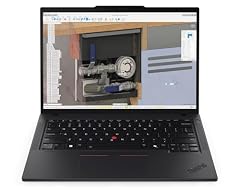
Lenovo Copilot+ PC ThinkPad P14s Gen 6 Mobile Workstation
- CPU
- AMD Ryzen AI 7 PRO 350
- RAM
- 32 GB
- Storage
- 1000 GB
- Screen
- 14 in
- Touchscreen
- No
- Weight
- 1.39 kg
- OS
- Windows 11 Pro
$1,629.99 (as of 10/20/2026 18:21 PDT - Details)
It has the strongest stated configuration at this weight: an AMD Ryzen AI 7 PRO 350, 32GB of memory and 1TB of storage, double the T14 Gen 6 in both. The listing calls it a mobile workstation and a Copilot+ PC, and it ships with Windows 11 Pro.
Pros
- 32GB of memory, the most in this list
- 1TB of storage, the most in this list
- Windows 11 Pro, which adds BitLocker, Group Policy and domain join per Microsoft
- Sold under the Lenovo brand, not a reseller name
Cons
- Not a touchscreen, per the listing
- Battery size not stated by the seller
Good fit if
- Engineers, developers and analysts who run heavy apps away from a desk
- Business users who need a company-managed Windows 11 Pro laptop
Skip if
- Your work is web, email and documents, where a Chromebook or the T14 is enough
- You want a touchscreen
Verdict: The most capable laptop that states 1.39 kg.
2 Best for office work
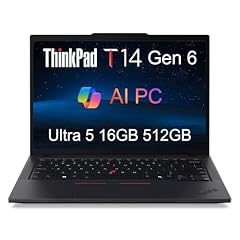
Lenovo ThinkPad T14 Gen 6 Laptop
- CPU
- Intel Core Ultra 5 225U
- RAM
- 16 GB
- Storage
- 512 GB
- Screen
- 14 in
- Weight
- 1.39 kg
- OS
- Windows 11 Pro
It is a 14-inch ThinkPad with an Intel Core Ultra 5 225U, 16GB of memory, 512GB of storage and Windows 11 Pro, a solid business configuration. It is listed by a reseller, so it is a reseller configuration of a Lenovo laptop rather than a Lenovo-branded listing.
Pros
- Intel Core Ultra 5 225U processor
- 16GB of memory, double the better Chromebook's 8GB
- Windows 11 Pro for company-managed devices
- 512GB of storage
Cons
- Reseller configuration: confirm whether Lenovo's warranty applies
- Half the memory and storage of the P14s Gen 6
- Battery size not stated by the seller
Good fit if
- Hybrid office workers who carry a laptop daily
- Small businesses that need Windows 11 Pro features
Skip if
- You want the maker's own listing and warranty terms without checking a reseller
- You need more than 16GB of memory
Verdict: A capable business ThinkPad, once you have confirmed the reseller's warranty terms.
3 Best Chromebook at this weight

ASUS Chromebook CX14 Laptop
- CPU
- Intel Celeron N4500
- RAM
- 8 GB
- Storage
- 128 GB
- Screen
- 14 in
- Touchscreen
- Yes
- Weight
- 1.39 kg
- OS
- ChromeOS
$389.99 (as of 10/20/2026 18:20 PDT - Details)
Of the two ASUS CX14 Chromebooks, this one has twice the memory (8GB against 4GB), twice the storage (128GB against 64GB) and a touchscreen. Both use the Intel Celeron N4500, which Intel lists with 2 cores and 2 threads.
Pros
- 8GB of memory, double the other Chromebook
- 128GB of storage, double the other Chromebook
- Touchscreen, the only one in this list
Cons
- Intel Celeron N4500, an entry chip with 2 cores per Intel
- ChromeOS does not run Windows desktop software
Good fit if
- Students who work in web apps and Google's services
- Home users who browse, stream and write
Skip if
- You need Windows software for school or work
- You run heavy apps or many tabs at once
Verdict: The better of the two Chromebooks here for everyday light use.
4 Most basic configuration

ASUS CX14 14'' FHD Chromebook Laptop
- CPU
- Intel Celeron N4500
- RAM
- 4 GB
- Storage
- 64 GB
- Screen
- 14 in
- Refresh
- 60 Hz
- Weight
- 1.39 kg
- OS
- ChromeOS
$239.00 (as of 10/20/2026 18:20 PDT - Details)
It is the same ASUS CX14 Chromebook model with the same Celeron N4500, but with 4GB of memory and 64GB of eMMC storage, the least in this list. The listing states a 14-inch FHD screen at 60Hz.
Pros
- 14-inch FHD screen, per the listing
- ChromeOS devices receive 10 years of updates from platform release, per Google
- Same 1.39 kg weight as the business picks
Cons
- 4GB of memory, the least in this list
- 64GB of eMMC storage, the least in this list
- No touchscreen stated, unlike the 8GB CX14
Good fit if
- A second laptop for browsing and video
- Children or students with light web-based schoolwork
Skip if
- You keep many tabs open
- You want local storage for files and downloads
Verdict: A basic ChromeOS laptop; the 8GB CX14 is the safer choice.
Side by side
| # | Laptop | CPU | GPU | GPU memory | Rentable GPU model | RAM | Storage |
|---|---|---|---|---|---|---|---|
| 1 | Lenovo Copilot+ PC ThinkPad P14s Gen 6 Mobile Workstation | AMD Ryzen AI 7 PRO 350 | not stated | not stated | not stated | 32 GB | 1000 GB |
| 2 | Lenovo ThinkPad T14 Gen 6 Laptop | Intel Core Ultra 5 225U | not stated | not stated | not stated | 16 GB | 512 GB |
| 3 | ASUS Chromebook CX14 Laptop | Intel Celeron N4500 | not stated | not stated | not stated | 8 GB | 128 GB |
| 4 | ASUS CX14 14'' FHD Chromebook Laptop | Intel Celeron N4500 | not stated | not stated | not stated | 4 GB | 64 GB |
How we picked
How we picked: 4 laptops in our catalogue state a weight of 1.39 kg, so every one of them appears here: two Lenovo ThinkPads and two configurations of the ASUS Chromebook CX14. The two Chromebooks share a model and processor but differ in memory, storage and touch support, and the pool has nothing else at this weight, so both stay and we say which one to prefer. The ThinkPad T14 Gen 6 is sold by a reseller as its own configuration of a Lenovo laptop, and we label it as such. Processor facts come from Intel, and operating system facts from Microsoft and Google. Prices on this page are live: each one is read from the store listing and shown with the time it was read. Nobody at wikilaptop.org has tested these units; every comparison below is drawn from the stated specifications.
How to choose
What 1.39 kg means to carry
At 1.39 kg a laptop is comfortable to carry every day, and it usually leaves room for a full keyboard and a 14-inch screen, which all four picks here have. That suits students, hybrid office workers and business travelers. Add the charger's weight when you compare what you actually carry.
This weight class is made of thin-and-light and business laptops, not gaming machines. None of the picks lists a dedicated graphics card.
Windows 11 Pro or ChromeOS
The two ThinkPads run Windows 11 Pro, which Microsoft describes as adding BitLocker drive encryption, Group Policy and domain join on top of Windows 11 Home. Those matter most on company-managed laptops.
The two ASUS Chromebooks run ChromeOS, which works best with web apps and Google's services and does not run Windows desktop software. Google publishes an Auto Update Expiration date for each ChromeOS device, so check how long your model will get updates before you buy.
Processor and memory together
The processors here range from the Intel Celeron N4500 (2 cores and 2 threads per Intel) in the Chromebooks to the Intel Core Ultra 5 225U and AMD Ryzen AI 7 PRO 350 in the ThinkPads. Memory runs from 4GB to 32GB.
For browsing and documents on ChromeOS, 8GB is a comfortable level. For Windows business work with many apps open, 16GB is a sensible floor, and 32GB suits heavier technical work.
Storage: size and type
Storage in this list runs from 64GB of eMMC in the most basic Chromebook to 1TB in the P14s Gen 6. Chromebooks lean on cloud storage, so a small drive is less limiting there than on Windows. For Windows laptops, 512GB leaves room for apps and updates.
Resellers and warranty
The ThinkPad T14 Gen 6 here is sold by a reseller. A reseller configuration can be a sound machine, but confirm three things before buying: whether the unit is new, whether the maker's warranty applies or the reseller provides its own, and who handles support. The maker of the base laptop is Lenovo.
Questions
Is 1.39 kg light enough to carry daily?
Yes. It is in the comfortable range for daily commuting and travel, especially with a compact charger. All four laptops here have 14-inch screens, a common size at this weight that balances a readable display with a manageable bag. If you mostly work at a desk, weight matters less than screen and performance.
What is the difference between Windows 11 Pro and Home?
Microsoft lists BitLocker drive encryption, Group Policy and domain join among the features Windows 11 Pro adds. Home users rarely need them, but company-managed devices often do. Both ThinkPads in this list ship with Windows 11 Pro; the two Chromebooks run ChromeOS instead.
Should I choose a Chromebook or a Windows laptop at this weight?
Choose a Chromebook if your work lives in a browser and Google's services, and you want a simple machine. Choose Windows if you need desktop software for school or work. Before buying a Chromebook, check its Auto Update Expiration date on Google's published list so you know how long it will receive updates.
Can a laptop this light handle gaming?
Light and older games, depending on the processor, but none of these four lists a dedicated graphics card. Demanding modern games need a separate GPU and stronger cooling, which usually come with more weight. The picks here are built for office work, study and everyday tasks.
Did you test these laptops?
No. Nobody at wikilaptop.org has used these units. We compared them from the specifications stated on each listing, with processor facts from Intel and operating system facts from Microsoft and Google. We do not describe keyboards, screens or heat, because those claims need testing we have not done.
Recent updates
- : First published.