
Best 1.4kg Laptops in 2026: 6 Picks Compared on Specs
Our top pick among laptops that state 1.4 kg is the Acer Aspire 14-inch touchscreen with an Intel Core Ultra 7 258V: it pairs 32GB of memory with 1TB of storage, the most in this list together with the Dell Precision 3490. At 1.4 kg (about 3.1 lb) any of these six is an easy daily carry, but the weight says nothing about speed, so we compared them on the specifications each listing states, not on lab tests.
6 picks from 9 laptops that match this guide with a price we can quote today. Every price below is live and carries the moment it was read.
The picks at a glance
| # | Pick | Laptop | Price |
|---|---|---|---|
| 1 | Best overall | Acer Aspire Laptop 2026 | $1,149.99 (as of 10/20/2026 18:20 PDT - Details) |
| 2 | Best for business | Dell Precision 3490 Mobile Workstation Laptop | |
| 3 | Best Chromebook | Acer Chromebook Plus 514 Laptop | $499.98 (as of 10/20/2026 18:20 PDT - Details) |
| 4 | Largest screen | Laptop 16-inch 8GB DDR 256GB SSD portable laptop computer | |
| 5 | Most basic Windows pick from a major maker | HP 14-dq3000dx 14" HD Laptop | $229.99 (as of 10/20/2026 18:21 PDT - Details) |
| 6 | Only 15.6-inch pick | 15.6 inch Laptop Computer |
Which one should you buy?
- For most people: The Acer Aspire touchscreen gives you a current Core Ultra 7 258V, 32GB of memory and 1TB of storage on a 14-inch screen. See pick 1
- For office and IT-managed work: The Dell Precision 3490 ships with Windows 11 Pro, 32GB of memory and 1TB of storage in a 14-inch mobile workstation. See pick 2
- For browser-first students: The Acer Chromebook Plus 514 runs ChromeOS on a 14-inch touchscreen with 512GB of storage in this reseller configuration. See pick 3
- For the biggest screen at this weight: The Morostron 16-inch has the largest display in this list, with 8GB of memory and 256GB of storage. See pick 4
The 6 picks
1 Best overall
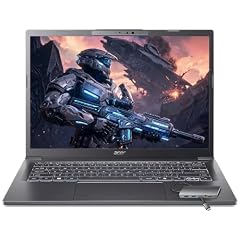
Acer Aspire Laptop 2026
- CPU
- Intel Core Ultra 7 258V
- RAM
- 32 GB
- Storage
- 1000 GB
- Screen
- 14 in
- Touchscreen
- Yes
- Weight
- 1.4 kg
- OS
- Windows 11 Home
$1,149.99 (as of 10/20/2026 18:20 PDT - Details)
It is the only pick with a current Intel Core Ultra 7 258V, which Intel lists with 8 cores and an NPU of 47 TOPS. It ties the Dell Precision 3490 for the most memory and storage here, 32GB and 1TB, and adds a touchscreen.
Pros
- Intel Core Ultra 7 258V: 8 cores and a 47 TOPS NPU per Intel
- 32GB of memory, tied for the most in this list
- 1TB of storage, tied for the most in this list
- 14-inch touchscreen
Cons
- Intel lists 32GB as the maximum memory for this chip, so there is no room to grow
- Windows 11 Home rather than Pro
Good fit if
- Students and remote workers who want one laptop for years of daily carrying
- Anyone who wants a touchscreen with enough memory for many open apps
Skip if
- Your employer requires Windows 11 Pro
- You want a screen larger than 14 inches
Verdict: The most complete 1.4 kg machine here: current chip, 32GB and 1TB on a touchscreen.
2 Best for business

Dell Precision 3490 Mobile Workstation Laptop
- CPU
- Intel Core Ultra 5 135H
- RAM
- 32 GB
- Storage
- 1000 GB
- Screen
- 14 in
- Weight
- 1.4 kg
- OS
- Windows 11 Pro
It matches the Acer Aspire's 32GB of memory and 1TB of storage and is the only pick that ships with Windows 11 Pro. It uses an Intel Core Ultra 5 135H on a 14-inch FHD screen.
Pros
- Windows 11 Pro, the only Pro edition in this list
- 32GB of memory, tied for the most in this list
- 1TB of storage, tied for the most in this list
- 14-inch FHD screen
Cons
- No touchscreen stated by the seller
- Graphics not stated by the seller
Good fit if
- Office workers whose company manages laptops with Pro features
- Buyers who want a workstation-class model at an everyday weight
Skip if
- You want a touchscreen
- You want the newer Core Ultra 7 258V of the Acer Aspire
Verdict: The Pro-edition choice for work, with the same memory and storage as the top pick.
3 Best Chromebook

Acer Chromebook Plus 514 Laptop
- CPU
- Intel Core i3-N355
- RAM
- 8 GB
- Storage
- 512 GB
- Screen
- 14 in
- Touchscreen
- Yes
- Weight
- 1.4 kg
- OS
- ChromeOS
$499.98 (as of 10/20/2026 18:20 PDT - Details)
It is the only ChromeOS laptop here, with an Intel Core i3-N355, 8GB of memory and a 14-inch touchscreen. The listing comes from a reseller that sells upgraded configurations, which explains the 512GB of storage.
Pros
- ChromeOS, which Google supports with 10 years of updates from the platform release
- 512GB of storage in this configuration
- 14-inch touchscreen
- Intel Core i3-N355
Cons
- Sold as a reseller configuration, not by Acer directly
- 8GB of memory, a quarter of the top two picks
Good fit if
- Students who work mostly in a browser and web apps
- Families who want a simple, managed laptop
Skip if
- You need Windows desktop software
- You want the original maker's warranty terms without a reseller in between
Verdict: The pick for browser-first users, with more storage than a Chromebook usually needs.
4 Largest screen

Laptop 16-inch 8GB DDR 256GB SSD portable laptop computer
- RAM
- 8 GB
- Storage
- 256 GB
- Screen
- 16 in
- Weight
- 1.4 kg
Its 16-inch screen is the largest in this list, at the same stated 1.4 kg as the 14-inch picks. The listing title names an AMD A9-9400 with Radeon R5 graphics, 8GB of memory and 256GB of storage, expandable to 1TB per the title.
Pros
- 16-inch screen, the largest in this list
- 8GB of memory, double the two 4GB picks
- 256GB of storage, expandable to 1TB per the listing title
Cons
- Processor named only in the title; the CPU field is not stated by the seller
- Operating system not stated by the seller
- Small maker: check warranty length and where support is handled before buying
Good fit if
- Home users who want a large screen for browsing and video
- Buyers who plan to add storage later
Skip if
- You need a stated operating system and a stated processor
- You want an established maker's support network
Verdict: The big-screen option at this weight, from a small maker with sparse specifications.
5 Most basic Windows pick from a major maker

HP 14-dq3000dx 14" HD Laptop
- CPU
- Intel Celeron N4500
- RAM
- 4 GB
- Storage
- 64 GB
- Screen
- 14 in
- Weight
- 1.4 kg
- OS
- Windows 11 Home
$229.99 (as of 10/20/2026 18:21 PDT - Details)
It is the only HP here and a plain Windows 11 Home laptop with an Intel Celeron N4500. Its 4GB of memory and 64GB eMMC storage sit exactly at the minimums Microsoft lists for Windows 11.
Pros
- Established maker (HP)
- Windows 11 Home stated on the listing
- 14-inch screen
Cons
- 64GB of eMMC storage, the least in this list and the Windows 11 minimum
- 4GB of memory, the Windows 11 minimum
- HD screen resolution
Good fit if
- Buyers who need a light laptop for email, video calls and documents
- A spare laptop that mostly stays on cloud storage
Skip if
- You keep files locally or install many apps
- You work with many browser tabs open
Verdict: A minimum Windows machine: fine for light use, with no headroom.
6 Only 15.6-inch pick

15.6 inch Laptop Computer
- CPU
- Intel Celeron N3450
- RAM
- 4 GB
- Storage
- 192 GB
- Screen
- 15.6 in
- Weight
- 1.4 kg
- OS
- Windows 11
It is the only 15.6-inch laptop here, with an FHD screen per the listing title, an Intel Celeron N3450, 4GB of memory and 192GB of storage. It comes from Morostron, the same small maker as the 16-inch pick.
Pros
- 15.6-inch FHD screen per the listing title
- 192GB of storage, three times the HP 14's 64GB
- Windows 11 stated on the listing
Cons
- 4GB of memory, the Windows 11 minimum
- Intel Celeron N3450, a basic processor
- Small maker: check warranty and support terms
Good fit if
- Buyers who want a full-size 15.6-inch screen at 1.4 kg
- Light home use: browsing, email and video
Skip if
- You multitask or keep many tabs open
- You want an established maker's support
Verdict: A basic 15.6-inch option; the memory limits it to light tasks.
Side by side
| # | Laptop | CPU | GPU | GPU memory | Rentable GPU model | RAM | Storage |
|---|---|---|---|---|---|---|---|
| 1 | Acer Aspire Laptop 2026 | Intel Core Ultra 7 258V | not stated | not stated | not stated | 32 GB | 1000 GB |
| 2 | Dell Precision 3490 Mobile Workstation Laptop | Intel Core Ultra 5 135H | not stated | not stated | not stated | 32 GB | 1000 GB |
| 3 | Acer Chromebook Plus 514 Laptop | Intel Core i3-N355 | not stated | not stated | not stated | 8 GB | 512 GB |
| 4 | Laptop 16-inch 8GB DDR 256GB SSD portable laptop computer | not stated | not stated | not stated | not stated | 8 GB | 256 GB |
| 5 | HP 14-dq3000dx 14" HD Laptop | Intel Celeron N4500 | not stated | not stated | not stated | 4 GB | 64 GB |
| 6 | 15.6 inch Laptop Computer | Intel Celeron N3450 | not stated | not stated | not stated | 4 GB | 192 GB |
How we picked
How we picked: the pool for this page holds six current listings that state a weight of 1.4 kg, and because it holds fewer than twelve, all six appear here. We ordered them by how well their stated processor, memory and storage suit everyday work, and we flag what each listing leaves out. Two picks come from a small maker (Morostron) whose listings name the processor only in the title, and the Chromebook is a configuration sold by a reseller rather than by Acer directly. Windows requirements come from Microsoft and processor facts from Intel. Prices on this page are live: each one is read from the store listing and shown with the time it was read. Nobody at wikilaptop.org has tested these units; every comparison is drawn from stated specifications.
How to choose
What 1.4 kg means to carry
A stated 1.4 kg is about 3.1 lb, light enough for a daily commute or a campus bag. Most picks here have a 14-inch screen, but the list also holds a 15.6-inch and a 16-inch model at the same stated weight, so a larger screen does not have to mean a heavier bag.
The stated figure is the laptop alone. The charger adds to what you carry, and makers and sellers do not always measure weight the same way, so treat small differences between listings as approximate.
Weight says nothing about speed
The six picks share a weight but not a class. The Acer Aspire and Dell Precision 3490 carry 32GB of memory and 1TB of storage, while the HP 14 and the 15.6-inch Morostron have 4GB of memory. Compare processor, memory and storage first, then use weight to break ties.
Memory and storage: Windows 11 minimums
Microsoft lists 4GB of memory and 64GB of storage as the minimum for Windows 11. Two picks here sit at 4GB, and the HP 14 also sits at 64GB. A laptop at the minimum installs and runs Windows, but leaves little room for updates, apps and many browser tabs; 8GB or more is a more comfortable baseline.
Also check the storage type. The HP 14 lists eMMC, which is soldered flash storage common in basic laptops; four of the other listings name an SSD, and the Chromebook listing does not state the storage type.
Operating system: Windows, Pro or ChromeOS
Three picks run Windows 11 Home or an unspecified edition of Windows 11, the Dell Precision 3490 runs Windows 11 Pro, and the Acer Chromebook Plus 514 runs ChromeOS. One pick, the 16-inch Morostron, has no operating system stated by the seller.
ChromeOS suits browser-based work, and Google publishes how long each model receives automatic updates. Windows is the choice if you need desktop software.
Small makers and resellers
Three of the six listings do not come directly from a laptop maker: two are from Morostron, a small brand, and the Chromebook is an upgraded configuration from a reseller. Before buying from a small maker or reseller, check the warranty length, who handles repairs, whether the keyboard layout matches your region, and who made the base laptop.
Questions
Is 1.4 kg a light laptop?
Yes, for most buyers. At about 3.1 lb it is comfortable to carry every day, and in this list it covers screens from 14 to 16 inches. Dedicated ultralight models go lower, and gaming laptops with a separate graphics card are usually much heavier. Remember to add the charger when you think about the total weight in your bag.
Is 4GB of memory enough at this weight?
It meets the Windows 11 minimum that Microsoft lists, and two of the six picks here ship with exactly 4GB. It is enough for email, documents and video, but it limits how many apps and browser tabs you can keep open. If you plan to use the laptop for several years, 8GB or more is the safer choice.
Should I worry about lesser-known laptop brands?
Not necessarily, but read the listing closely. The two Morostron picks name the processor only in the title, and one does not state an operating system. Check the warranty terms, where support and repairs happen, and whether the keyboard layout matches your region before you buy.
Did you test these laptops?
No. Nobody at wikilaptop.org has used these units. We chose and compared them from the specifications each listing states, checked against Intel, Microsoft and Google documentation. We do not describe screen quality, keyboard feel or battery runtime, because those claims need testing we have not done.
Why do prices on this page change?
Each price is read live from the store listing and shown with the time it was read. Prices move often, so we never write price comparisons into the text. Check the time next to each price and open the listing to confirm the configuration before you buy.
Recent updates
- : First published.