
Best 1.23kg Laptops in 2026: 5 Configurations Compared on Specs
Our top pick at 1.23 kg is the MacBook Air 13-inch with the M5 chip, 24GB of memory and 1TB of storage: it has the most memory and storage of the five configurations here. Every laptop in our catalogue that states this weight comes from Apple, which lists both the 13-inch MacBook Air and the MacBook Neo at 2.7 pounds (1.23 kg). So the real choice is between two models and their memory and storage options. We compared them on stated specifications and Apple's own spec pages, not lab tests.
5 picks from 15 laptops that match this guide with a price we can quote today. Every price below is live and carries the moment it was read.
The picks at a glance
| # | Pick | Laptop | Price |
|---|---|---|---|
| 1 | Best overall | Apple 2026 MacBook Air 13-inch Laptop with M5 chip | $1,649.00 (as of 10/20/2026 18:20 PDT - Details) |
| 2 | Most storage with 16GB | Apple 2026 MacBook Air 13-inch Laptop with M5 chip | $1,449.00 (as of 10/20/2026 18:20 PDT - Details) |
| 3 | Best balanced MacBook Air | Apple 2026 MacBook Air 13-inch Laptop with M5 chip | $1,254.00 (as of 10/20/2026 18:20 PDT - Details) |
| 4 | Best MacBook Neo configuration | Apple 2026 MacBook Neo 13-inch Laptop with A18 Pro chip | $789.99 (as of 10/20/2026 18:20 PDT - Details) |
| 5 | Entry configuration | Apple 2026 MacBook Neo 13-inch Laptop with A18 Pro chip | $699.00 (as of 10/20/2026 18:20 PDT - Details) |
Which one should you buy?
- For heavy multitasking on the go: The MacBook Air M5 with 24GB of memory and 1TB of storage has the most headroom of the five, for many apps, browser tabs and large files at once. See pick 1
- For most students and office work: The MacBook Air M5 with 16GB and 512GB keeps the M5 chip and Apple's base Air memory in the same 1.23 kg body. See pick 3
- For light use and simple tasks: The MacBook Neo with 512GB gives you the A18 Pro chip and 8GB of memory, enough for browsing, documents and video at the same weight. See pick 4
The 5 picks
1 Best overall
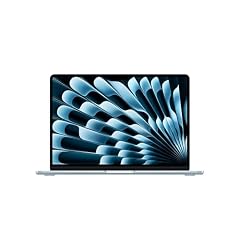
Apple 2026 MacBook Air 13-inch Laptop with M5 chip
- CPU
- Apple M5
- RAM
- 24 GB
- Storage
- 1000 GB
- Screen
- 13 in
- Weight
- 1.23 kg
- OS
- macOS
$1,649.00 (as of 10/20/2026 18:20 PDT - Details)
It is the most capable configuration at this weight: the M5 chip with 24GB of unified memory and 1TB of storage, the most memory and storage in this list. Apple offers the 13-inch Air with 16GB, 24GB or 32GB, so this sits one step below the top memory option.
Pros
- 24GB of unified memory, the most among the five picks
- 1TB of storage, tied for the most in this list
- Apple M5 with a 10-core CPU and 8-core GPU per Apple
- 13.6-inch display at 2560 by 1664 per Apple
Cons
- Memory is not upgradeable later, so this is the ceiling for the machine's life
- Apple also sells a 32GB option that is not in our catalogue at this weight
Good fit if
- People who keep many apps and browser tabs open while traveling
- Buyers who want the machine to stay comfortable for several years
Skip if
- Your work is mostly web, email and documents, where 16GB is enough
- You want a screen larger than 13.6 inches
Verdict: The configuration with the most headroom among 1.23 kg laptops.
2 Most storage with 16GB

Apple 2026 MacBook Air 13-inch Laptop with M5 chip
- CPU
- Apple M5
- RAM
- 16 GB
- Storage
- 1000 GB
- Screen
- 13 in
- Weight
- 1.23 kg
- OS
- macOS
$1,449.00 (as of 10/20/2026 18:20 PDT - Details)
It pairs the M5 chip and 16GB of memory with 1TB of storage, the same storage as our top pick but with less memory. It suits people whose files, photos or offline media take more room than their workload needs memory.
Pros
- 1TB of storage, tied for the most in this list
- Apple M5 chip with 16GB of unified memory
- Same 13.6-inch display and 1.23 kg weight as the other Air picks
Cons
- 16GB of memory, less than the 24GB Air configuration
- Neither memory nor storage can be added later
Good fit if
- Photographers and students with large local libraries
- Travelers who keep films and files offline
Skip if
- You run many heavy apps at once and would benefit from 24GB
- 512GB covers your files and a cloud service covers the rest
Verdict: The Air to choose when storage matters more than memory.
3 Best balanced MacBook Air

Apple 2026 MacBook Air 13-inch Laptop with M5 chip
- CPU
- Apple M5
- RAM
- 16 GB
- Storage
- 512 GB
- Screen
- 13 in
- Weight
- 1.23 kg
- OS
- macOS
$1,254.00 (as of 10/20/2026 18:20 PDT - Details)
It is the base memory configuration Apple lists for the 13-inch Air, 16GB, with 512GB of storage and the same M5 chip as the other Air picks. It gives up storage, not chip or memory, compared with the 1TB version.
Pros
- Apple M5 chip, the same as every Air pick here
- 16GB of unified memory, double the MacBook Neo's 8GB
- Apple lists up to 18 hours of video streaming for the 13-inch Air
Cons
- 512GB of storage, half of the 1TB Air configurations
- 16GB of memory, below the 24GB top pick
Good fit if
- Students and office workers who want the M5 chip
- People who keep most files in cloud storage
Skip if
- You store large photo or video libraries locally
- Your needs are light enough for the MacBook Neo
Verdict: The sensible middle of the MacBook Air range at this weight.
4 Best MacBook Neo configuration

Apple 2026 MacBook Neo 13-inch Laptop with A18 Pro chip
- CPU
- Apple A18 Pro
- RAM
- 8 GB
- Storage
- 512 GB
- Screen
- 13 in
- Weight
- 1.23 kg
- OS
- macOS
$789.99 (as of 10/20/2026 18:20 PDT - Details)
Of the two MacBook Neo listings it has twice the storage, 512GB against 256GB. The Neo uses the A18 Pro chip with a 6-core CPU and 8GB of memory per Apple, a lighter-duty design than the M5 Air at the same weight.
Pros
- 512GB of storage, double the other Neo listing
- Apple A18 Pro chip with a 6-core CPU per Apple
- Same 1.23 kg weight as the MacBook Air
Cons
- 8GB of memory, the least in this list and the only size Apple lists for the Neo
- 13.0-inch display per Apple, slightly smaller than the Air's 13.6 inches
Good fit if
- Students who browse, write and stream
- Buyers who want macOS for everyday tasks rather than heavy work
Skip if
- You edit photos or video or keep many apps open
- You want room to grow over several years
Verdict: The Neo to choose if you need more than 256GB of storage.
5 Entry configuration

Apple 2026 MacBook Neo 13-inch Laptop with A18 Pro chip
- CPU
- Apple A18 Pro
- RAM
- 8 GB
- Storage
- 256 GB
- Screen
- 13 in
- Weight
- 1.23 kg
- OS
- macOS
$699.00 (as of 10/20/2026 18:20 PDT - Details)
It is the smallest configuration at this weight: the MacBook Neo with 8GB of memory and 256GB of storage. It carries the same A18 Pro chip as the 512GB Neo, so the only stated difference is storage.
Pros
- Apple A18 Pro chip, the same as the other Neo pick
- Apple lists up to 16 hours of video streaming for the Neo
- Same 1.23 kg weight as every pick here
Cons
- 256GB of storage, the least in this list
- 8GB of memory, which cannot be upgraded later
Good fit if
- Buyers who keep files in the cloud
- Light users who need a portable Mac for web, mail and documents
Skip if
- You keep a large local library of photos or music
- You plan to install large creative apps
Verdict: The starting point at this weight, best kept to light tasks.
Side by side
| # | Laptop | CPU | GPU | GPU memory | Rentable GPU model | RAM | Storage |
|---|---|---|---|---|---|---|---|
| 1 | Apple 2026 MacBook Air 13-inch Laptop with M5 chip | Apple M5 | not stated | not stated | not stated | 24 GB | 1000 GB |
| 2 | Apple 2026 MacBook Air 13-inch Laptop with M5 chip | Apple M5 | not stated | not stated | not stated | 16 GB | 1000 GB |
| 3 | Apple 2026 MacBook Air 13-inch Laptop with M5 chip | Apple M5 | not stated | not stated | not stated | 16 GB | 512 GB |
| 4 | Apple 2026 MacBook Neo 13-inch Laptop with A18 Pro chip | Apple A18 Pro | not stated | not stated | not stated | 8 GB | 512 GB |
| 5 | Apple 2026 MacBook Neo 13-inch Laptop with A18 Pro chip | Apple A18 Pro | not stated | not stated | not stated | 8 GB | 256 GB |
How we picked
How we picked: 5 laptops in our catalogue state a weight of 1.23 kg, and all 5 are Apple machines: three configurations of the 2026 13-inch MacBook Air with the M5 chip and two of the MacBook Neo with the A18 Pro chip. Because the pool holds fewer than 12 laptops, every one of them appears here. They are near-duplicates by nature (the same two models with different memory and storage), and the pool has nothing else at this weight, so we rank the configurations against each other instead of dropping any. Chip, display and battery facts come from Apple's published specifications. Prices on this page are live: each one is read from the store listing and shown with the time it was read. Nobody at wikilaptop.org has tested these units; every comparison below is drawn from the stated specifications.
How to choose
What 1.23 kg means to carry
At 1.23 kg a laptop sits firmly in the ultralight range: it slips into a tote or backpack next to books and a charger and can be carried all day. Apple lists both the 13-inch MacBook Air and the MacBook Neo at 2.7 pounds (1.23 kg), which is why every laptop here is one of those two models.
The trade-offs of this size are a 13-inch class screen and limited room for ports. If you mostly sit at a desk, an external monitor makes up for the screen size.
MacBook Air or MacBook Neo
The two models weigh the same but differ in chip and memory. Apple lists the MacBook Air with the M5 chip (a 10-core CPU and 8-core GPU) and 16GB, 24GB or 32GB of memory. The MacBook Neo uses the A18 Pro chip with a 6-core CPU and 8GB of memory.
For browsing, documents and video, the Neo covers the basics. For photo editing, coding, many open apps or keeping the laptop for many years, the Air with 16GB or more is the safer choice.
Memory: buy what you need now
Apple's unified memory is part of the chip package and cannot be upgraded after purchase. In this list, memory runs from 8GB (both Neo picks) to 24GB (one Air pick). Two of the five picks have 16GB.
If you are unsure, choose more memory rather than more storage: storage can be extended with an external drive or cloud service, memory cannot.
Storage: 256GB, 512GB or 1TB
Storage in this list runs from 256GB to 1TB. Two picks have 1TB, two have 512GB and one has 256GB. A 256GB drive fills quickly with photos, offline media and large apps; 512GB is a comfortable middle for most students and office users; 1TB suits people who keep large libraries on the laptop.
Battery figures from Apple
Apple states up to 18 hours of video streaming and up to 15 hours of wireless web for the 13-inch MacBook Air, and up to 16 hours of video streaming and up to 11 hours of wireless web for the MacBook Neo. These are Apple's figures under its own test conditions; real use varies with brightness and workload. The listings in our catalogue do not state a battery size.
Questions
Is 1.23 kg light for a laptop?
Yes. It is in the ultralight range and comfortable to carry all day. Laptops for gaming or heavy workloads are usually much heavier because of larger screens, cooling and graphics cards. Remember that the charger adds to what you carry, so a compact USB-C charger keeps the total down.
Why are all the 1.23 kg laptops here Apple machines?
Because every laptop in our catalogue that states exactly 1.23 kg is either a 13-inch MacBook Air with the M5 chip or a MacBook Neo, both of which Apple lists at 2.7 pounds (1.23 kg). As the catalogue grows, laptops from other makers that state this weight will be added.
Is 8GB of memory enough on the MacBook Neo?
For web browsing, email, documents, schoolwork and video, it covers the basics. It leaves less room for many open apps, photo or video editing and future software. Since memory cannot be upgraded later, choose a MacBook Air with 16GB or more if you expect heavier work.
What do I give up in a laptop this light?
Mostly screen size, port selection and upgradeability. The picks here have 13-inch class screens, and memory and storage are fixed at purchase, so buy the configuration you will need for the life of the machine. If you use specific Windows software, confirm it runs on macOS first.
Did you test these laptops?
No. Nobody at wikilaptop.org has used these units. We chose and compared them from the specifications stated on each listing and Apple's published spec pages. We do not describe keyboard feel, heat or speakers, because those claims need testing we have not done.
Recent updates
- : First published.