
Best Intel Core Ultra 7 255U Laptops: 10 Picks Compared on Specs
Our top pick is the HP OmniBook 16 2K touchscreen with 32GB of memory and 2TB of storage: at 1.64 kg it ties for the lightest stated weight in this list and has the largest internal drive. For a compact business machine, the 14-inch ThinkPad T14 Gen 6 is the pick. The 255U is a low-power chip for office work, study and travel, not for gaming. We compared all ten on stated specifications and Intel data, not on lab tests.
10 picks from 11 laptops that match this guide with a price we can quote today. Every price below is live and carries the moment it was read.
The picks at a glance
Which one should you buy?
- For most people: The HP OmniBook 16 2K touchscreen with 32GB and 2TB gives the most storage and the lowest stated weight, 1.64 kg. See pick 1
- For a compact work laptop: The ThinkPad T14 Gen 6 is the only 14-inch pick, with 32GB of memory and Windows 11 Pro. See pick 2
- For a large screen at a desk: The HP OmniBook Next Gen Pavilion has a 17.3-inch screen with 32GB of memory and 1TB of storage. See pick 8
- For a managed business fleet: The ThinkPad T16 Gen 4 is a standard Lenovo configuration with 32GB, 1TB and Windows 11 Pro on a 16-inch screen. See pick 3
The 10 picks
1 Best overall

HP OmniBook 16" 2K Touchscreen Laptop | Intel Core Ultra 7 255U
- CPU
- Intel Core Ultra 7 255U
- RAM
- 32 GB
- Storage
- 2000 GB
- Screen
- 16 in
- Touchscreen
- Yes
- Weight
- 1.64 kg
- OS
- Windows 11
$1,239.99 (as of 10/20/2026 16:21 PDT - Details)
It combines 32GB of memory, 2TB of internal storage and a 16-inch 2K touch screen at a stated 1.64 kg, tied with its 16GB sibling for the lightest in this list. No other pick matches that storage inside the laptop itself.
Pros
- 2TB of internal storage, the most here
- 1.64 kg, tied for the lightest stated weight
- 32GB of memory
- 16-inch 2K touch screen per the listing
Cons
- Windows 11 edition not stated (Home or Pro)
- Battery capacity not stated by the seller
Good fit if
- Students and home users who keep large photo or file libraries
- Anyone who carries a 16-inch laptop daily
Skip if
- Your employer requires Windows 11 Pro out of the box
- You want a 14-inch footprint
Verdict: The most complete 255U configuration in the catalogue.
2 Best compact business pick
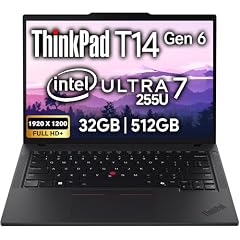
Lenovo ThinkPad T14 Gen 6 Business Laptop 14" FHD+ IPS
- CPU
- Intel Core Ultra 7 255U
- RAM
- 32 GB
- Storage
- 512 GB
- Screen
- 14 in
- Touchscreen
- No
- OS
- Windows 11 Pro
$1,639.95 (as of 10/20/2026 16:22 PDT - Details)
It is the only 14-inch laptop here, with an FHD+ IPS screen, 32GB of memory and Windows 11 Pro. The listing also names a 5MP webcam, useful for video calls.
Pros
- 14-inch screen, the smallest here
- 32GB of memory
- Windows 11 Pro
- 5MP webcam per the listing
Cons
- 512GB of storage, tied for the least here
- Weight not stated by the seller
- No touch screen
Good fit if
- Business travelers who want a smaller bag
- Remote workers on frequent video calls
Skip if
- You store large media libraries locally
- You want a touch screen
Verdict: The pick for a compact, business-ready 255U laptop.
3 Best 16-inch ThinkPad

Lenovo ThinkPad T16 Gen 4 AI Business Laptop 16" FHD+ Display
- CPU
- Intel Core Ultra 7 255U
- RAM
- 32 GB
- Storage
- 1000 GB
- Screen
- 16 in
- Touchscreen
- No
- OS
- Windows 11 Pro
$1,879.95 (as of 10/20/2026 16:22 PDT - Details)
It is the standard Lenovo 16-inch ThinkPad in this list, with 32GB of memory, 1TB of storage and Windows 11 Pro. The other 16-inch ThinkPad, the L16, is a reseller configuration.
Pros
- 32GB of memory and 1TB of storage
- 16-inch FHD+ screen
- Windows 11 Pro
Cons
- Weight not stated by the seller
- No touch screen
Good fit if
- Office workers who want a large screen for spreadsheets
- IT teams that prefer standard ThinkPad configurations
Skip if
- You want touch input
- You need a stated weight before you buy
Verdict: A straightforward 16-inch business machine with room to multitask.
4 Balanced OmniBook 16 configuration

HP OmniBook 16" 2K Touch Laptop
- CPU
- Intel Core Ultra 7 255U
- RAM
- 32 GB
- Storage
- 1000 GB
- Screen
- 16 in
- Touchscreen
- Yes
- OS
- Windows 11 Pro
$1,297.99 (as of 10/20/2026 16:21 PDT - Details)
This OmniBook 16 2K touch configuration pairs 32GB of memory with 1TB of storage, between the 2TB and 512GB versions of the same design in this list. It suits buyers who want the memory without the largest drive.
Pros
- 32GB of memory
- 1TB of storage
- 16-inch 2K touch screen per the listing
Cons
- Operating system not stated by the seller
- Weight not stated by the seller
Good fit if
- Home users who multitask with many browser tabs
- Students who want a touch screen and 32GB
Skip if
- You need more than 1TB of storage
- You need a confirmed Windows edition
Verdict: The middle OmniBook 16 option, with the same 32GB as our top pick.
5 Touch-screen ThinkPad (reseller configuration)

Lenovo ThinkPad L16 Business AI PC Laptop
- CPU
- Intel Core Ultra 7 255U
- RAM
- 32 GB
- Storage
- 1000 GB
- Screen
- 16 in
- Touchscreen
- Yes
- Weight
- 1.8 kg
- OS
- Windows 11 Pro
$1,499.99 (as of 10/20/2026 16:22 PDT - Details)
It is the only ThinkPad here with a touch screen, a 16-inch FHD+ panel, plus 32GB of memory, 1TB of storage and a stated 1.8 kg. It is sold as a configuration by a reseller, so check who provides the warranty.
Pros
- 16-inch FHD+ touch screen
- 32GB of memory and 1TB of storage
- 1.8 kg stated weight
- Windows 11 Pro
Cons
- Reseller configuration
- Heavier than the 1.64 kg OmniBook 16
Good fit if
- Business users who want a ThinkPad with touch input
- Buyers comfortable with a reseller warranty
Skip if
- You want a warranty directly from Lenovo
- You want the lightest 16-inch option
Verdict: A touch ThinkPad with 32GB, once the reseller's terms are checked.
6 Anti-glare business pick (reseller configuration)

HP EliteBook 6 G1i Business Laptop
- CPU
- Intel Core Ultra 7 255U
- RAM
- 16 GB
- Storage
- 512 GB
- Screen
- 16 in
- Weight
- 1.75 kg
- OS
- Windows 11 Pro
$1,399.99 (as of 10/20/2026 16:21 PDT - Details)
The HP EliteBook 6 G1i lists a 16-inch FHD+ anti-glare screen and two Thunderbolt 4 ports, at 1.75 kg with Windows 11 Pro. It is a configuration sold by a reseller.
Pros
- 16-inch FHD+ anti-glare screen per the listing
- Two Thunderbolt 4 ports per the listing
- 1.75 kg stated weight
- Windows 11 Pro
Cons
- 16GB of memory, among the least here
- 512GB of storage, tied for the least here
- Reseller configuration
Good fit if
- Office workers under bright lights who dislike glossy screens
- Users who connect to docks and monitors over Thunderbolt
Skip if
- You run many heavy applications at once
- You want a warranty directly from HP
Verdict: A dock-friendly business laptop with a modest memory and storage setup.
7 Only 15.6-inch pick

Dell 15.6 Touchscreen Laptop
- CPU
- Intel Core Ultra 7 255U
- RAM
- 64 GB
- Storage
- 8000 GB
- Screen
- 15.6 in
- Touchscreen
- Yes
- Weight
- 1.94 kg
- OS
- Windows 11 Pro
$999.99 (as of 10/20/2026 16:20 PDT - Details) Typical price: $1,299.99, 23% off
It is the only 15.6-inch laptop here, with a touch screen, 1TB of storage, Windows 11 Pro and a stated 1.94 kg. Its title says 16GB while its specifications say 32GB, so confirm the memory before buying.
Pros
- 15.6-inch touch screen
- 1TB of storage
- Windows 11 Pro
Cons
- Memory unclear: title states 16GB, specifications state 32GB
- 1.94 kg, heavier than the 16-inch OmniBook and ThinkPad L16
Good fit if
- Buyers who want a size between 14 and 16 inches
- Home offices that want touch input and Windows 11 Pro
Skip if
- You cannot confirm the memory size with the seller
- You carry your laptop all day
Verdict: A reasonable 15.6-inch option once the memory size is confirmed.
8 Best 17.3-inch pick

HP OmniBook (Next Gen Pavilion) 17.3" FHD IPS AI Laptop
- CPU
- Intel Core Ultra 7 255U
- RAM
- 32 GB
- Storage
- 1000 GB
- Screen
- 17.3 in
- OS
- Windows 11
$1,239.99 (as of 10/20/2026 16:21 PDT - Details)
It has the largest screen size here, 17.3 inches, with 32GB of memory and 1TB of storage, twice the memory of the other 17.3-inch pick. The listing also names Wi-Fi 7.
Pros
- 17.3-inch FHD IPS screen
- 32GB of memory and 1TB of storage
- Wi-Fi 7 per the listing
Cons
- Weight not stated by the seller
- Windows 11 edition not stated
Good fit if
- Users who work at a desk and want a large screen
- Families sharing one laptop for browsing and documents
Skip if
- You carry your laptop often
- You need Windows 11 Pro
Verdict: The big-screen 255U pick with enough memory for heavy multitasking.
9 17.3-inch with a docking station

HP OmniBook 17.3" FHD AI PC
- CPU
- Intel Core Ultra 7 255U
- RAM
- 16 GB
- Storage
- 2000 GB
- Screen
- 17.3 in
- Weight
- 2.01 kg
- OS
- Windows 11 Pro
$1,099.00 (as of 10/20/2026 16:21 PDT - Details)
It pairs a 17.3-inch FHD screen with Windows 11 Pro, and the listing's 2TB is 1TB of internal SSD plus 1TB in a bundled docking station. It weighs 2.01 kg, the heaviest stated weight here.
Pros
- 17.3-inch FHD screen
- Windows 11 Pro
- 1TB internal SSD plus 1TB in a docking station per the listing
Cons
- 16GB of memory, half the Pavilion 17's 32GB
- 2.01 kg, the heaviest stated weight here
Good fit if
- Desk users who want a dock with extra storage in the box
- Offices that need Windows 11 Pro on a large screen
Skip if
- You want 32GB of memory
- You count the 2TB as internal storage
Verdict: A large-screen Pro machine, as long as you read its storage figure correctly.
10 Entry OmniBook 16 configuration
HP OmniBook 16" 2K Touchscreen Laptop | Intel Core Ultra 7 255U
- CPU
- Intel Core Ultra 7 255U
- RAM
- 32 GB
- Storage
- 2000 GB
- Screen
- 16 in
- Touchscreen
- Yes
- Weight
- 1.64 kg
- OS
- Windows 11
$845.00 (as of 10/20/2026 16:21 PDT - Details)
It is the same OmniBook 16 2K touchscreen design as our top pick at 1.64 kg, but with 16GB of memory and 512GB of storage. It suits lighter use such as documents, browsing and video calls.
Pros
- 1.64 kg, tied for the lightest stated weight
- 16-inch 2K touch screen per the listing
- Same design as our top pick
Cons
- 16GB of memory, among the least here
- 512GB of storage, tied for the least here
Good fit if
- Students with mostly cloud-based files
- Light users who want a large touch screen
Skip if
- You keep many apps and tabs open
- You store large files locally
Verdict: The lighter-duty OmniBook 16 for buyers who do not need 32GB.
Side by side
| # | Laptop | CPU | GPU | GPU memory | Rentable GPU model | RAM | Storage |
|---|---|---|---|---|---|---|---|
| 1 | HP OmniBook 16" 2K Touchscreen Laptop | Intel Core Ultra 7 255U | Intel Core Ultra 7 255U | not stated | not stated | not stated | 32 GB | 2000 GB |
| 2 | Lenovo ThinkPad T14 Gen 6 Business Laptop 14" FHD+ IPS | Intel Core Ultra 7 255U | not stated | not stated | not stated | 32 GB | 512 GB |
| 3 | Lenovo ThinkPad T16 Gen 4 AI Business Laptop 16" FHD+ Display | Intel Core Ultra 7 255U | not stated | not stated | not stated | 32 GB | 1000 GB |
| 4 | HP OmniBook 16" 2K Touch Laptop | Intel Core Ultra 7 255U | not stated | not stated | not stated | 32 GB | 1000 GB |
| 5 | Lenovo ThinkPad L16 Business AI PC Laptop | Intel Core Ultra 7 255U | not stated | not stated | not stated | 32 GB | 1000 GB |
| 6 | HP EliteBook 6 G1i Business Laptop | Intel Core Ultra 7 255U | not stated | not stated | not stated | 16 GB | 512 GB |
| 7 | Dell 15.6 Touchscreen Laptop | Intel Core Ultra 7 255U | not stated | not stated | not stated | 64 GB | 8000 GB |
| 8 | HP OmniBook (Next Gen Pavilion) 17.3" FHD IPS AI Laptop | Intel Core Ultra 7 255U | not stated | not stated | not stated | 32 GB | 1000 GB |
| 9 | HP OmniBook 17.3" FHD AI PC | Intel Core Ultra 7 255U | not stated | not stated | not stated | 16 GB | 2000 GB |
| 10 | HP OmniBook 16" 2K Touchscreen Laptop | Intel Core Ultra 7 255U | Intel Core Ultra 7 255U | not stated | not stated | not stated | 32 GB | 2000 GB |
How we picked
How we picked: our catalogue holds ten laptops whose listing states the Intel Core Ultra 7 255U, and all ten appear here, ordered by how complete and useful each configuration is. Three are configurations of the same HP OmniBook 16 2K touchscreen; the catalogue has no other 255U models to replace them, so we kept all three and explain the differences. Two listings (a ThinkPad L16 and an HP EliteBook 6 G1i) come from a reseller, and we label them. One Dell listing states 16GB in its title and 32GB in its specifications; we flag it rather than guess. Processor facts come from Intel. Prices are live, read from the store listing and shown with their time. Nobody at wikilaptop.org has tested these units.
How to choose
What the Core Ultra 7 255U is
Intel lists the Core Ultra 7 255U with 12 cores (2 performance cores, 8 efficient cores and 2 low-power efficient cores), 14 threads, a maximum turbo frequency of 5.2 GHz, 15W base power and 57W maximum turbo power. Intel describes the U suffix as power efficient.
It uses Intel Graphics built into the chip and an NPU with 12 peak TOPS (Int8) per Intel. That makes it a chip for office work, study, browsing and video calls, not for current games or heavy video work.
Memory: 16GB or 32GB
Seven of the ten laptops here list 32GB of memory (one of them, the Dell, with a conflicting 16GB in its title) and three list 16GB. Integrated graphics share system memory, so 32GB leaves more room when many apps and browser tabs are open.
Intel lists up to 128GB for this chip, but thin laptops often solder memory to the board. Check the maker's specifications for slots before planning an upgrade.
Storage: read the listing carefully
Storage here runs from 512GB to 2TB. One HP OmniBook 17.3 listing counts 2TB, but that is 1TB inside the laptop plus 1TB in a bundled docking station. Only the OmniBook 16 2K touchscreen top pick states 2TB of internal storage.
Screen size and touch
The picks cover 14, 15.6, 16 and 17.3 inches; six are 16-inch. Five listings state a touch screen. A 14-inch model fits smaller bags, while 17.3-inch models suit desk work.
If you want less glare under office lights, the EliteBook 6 G1i listing names an anti-glare panel.
Weight, Windows edition and resellers
Only six listings state a weight, from 1.64 kg to 2.01 kg. Six state Windows 11 Pro, which adds BitLocker drive encryption per Microsoft; the rest state Windows 11 without the edition or no operating system.
Two picks are configurations sold by a reseller. For those, check who provides the warranty, its length and who handles repairs.
Questions
Is the Core Ultra 7 255U good for gaming?
Only for light or older games at low settings. It relies on Intel Graphics built into the chip, and none of the ten laptops here has a separate graphics card. If you want to play current games, choose a laptop with an NVIDIA GeForce or AMD Radeon graphics card instead.
How does the 255U differ from the Core Ultra 7 255H?
Intel lists the 255U at 15W base power and 57W maximum turbo power, with 12 cores and 14 threads. The 255H runs at 28W base and 115W maximum turbo power, with 16 cores and Intel Arc 140T graphics. The H chip is stronger for heavy work; the U chip is designed for efficiency in thin laptops.
Is 16GB enough on a 255U laptop?
For documents, browsing and video calls, usually yes. Because the built-in graphics share system memory, 32GB gives more headroom for many tabs, large spreadsheets or photo editing. Seven of the ten listings here state 32GB. If you choose 16GB, check whether the memory is soldered, since that rules out an upgrade.
How long does a 255U laptop last on battery?
It depends on the battery size and screen, and none of the ten listings here states a battery capacity. The chip itself is built for efficiency: Intel lists 15W base power. Check the maker's own specification page for the battery in Wh before you buy if unplugged time matters.
Did you test these laptops?
No. Nobody at wikilaptop.org has used these units. We compared them on the specifications stated in each listing, checked against Intel's published data. We do not describe keyboard feel, heat or battery runtime, because those claims need testing we have not done.
Recent updates
- : First published.