
Best 56Wh Battery Laptops: 5 HP ProBook 4 Configurations Compared
Our top pick among 56Wh laptops is the HP ProBook 4 G1i with 32GB of memory and 2TB of storage: it gives most office and development work room to grow without the storage jump of the 4TB versions. Every laptop in this list is a configuration of the same 16-inch ProBook 4 G1i, so battery, screen, weight and processor family match; memory and storage are what you choose. We compared them on stated specifications and published maker data, not on lab tests.
5 picks from 5 laptops that match this guide with a price we can quote today. Every price below is live and carries the moment it was read.
The picks at a glance
| # | Pick | Laptop | Price |
|---|---|---|---|
| 1 | Best overall | HP ProBook 4 G1i AI Business Laptop 16.0" 60Hz IPS WUXGA | $1,967.99 (as of 10/20/2026 19:21 PDT - Details) |
| 2 | Most memory | HP ProBook 4 G1i AI Business Laptop 16.0" 60Hz IPS 64GB/512GBSSD/W11P | $1,927.99 (as of 10/20/2026 19:21 PDT - Details) |
| 3 | Most storage with 32GB | HP ProBook 4 G1i AI Business Laptop 16.0" 60Hz IPS WUXGA | $2,317.99 (as of 10/20/2026 19:21 PDT - Details) |
| 4 | 4TB with 16GB | HP ProBook 4 G1i AI Business Laptop 16.0" 60Hz IPS WUXGA | $2,017.99 (as of 10/20/2026 19:21 PDT - Details) |
| 5 | Entry configuration | HP ProBook 4 G1i AI Business Laptop 16.0" 60Hz IPS 16GB/512GBSSD/W11P | $1,267.99 (as of 10/20/2026 19:21 PDT - Details) |
Which one should you buy?
- For most office and development work: The 32GB and 2TB configuration covers large projects and many open apps without the 4TB step. See pick 1
- For heavy multitasking and local data: The 64GB version has the most memory here, for large spreadsheets, virtual machines and many browser tabs. See pick 2
- For large local archives: The 32GB and 4TB version stores the most, for media libraries or datasets you keep offline. See pick 3
- For standard office use: The 16GB and 512GB version covers email, documents and video calls with the same screen and battery. See pick 5
The 5 picks
1 Best overall
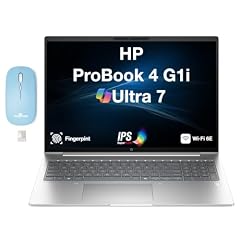
HP ProBook 4 G1i AI Business Laptop 16.0" 60Hz IPS WUXGA
- CPU
- Intel Core Ultra 7
- RAM
- 32 GB
- Storage
- 2000 GB
- Screen
- 16 in
- Refresh
- 60 Hz
- Weight
- 1.72 kg
- Battery
- 56 Wh
- OS
- Windows 11 Pro
$1,967.99 (as of 10/20/2026 19:21 PDT - Details)
It sits in the middle of the range: 32GB of memory, twice the entry version, and 2TB of storage, four times the 512GB versions. It suits most business and development buyers without paying for storage they may not fill.
Pros
- 32GB of memory
- 2TB of storage
- Windows 11 Pro, with BitLocker and device management per Microsoft
- 16-inch WUXGA IPS screen at 1.72 kg
Cons
- Exact Core Ultra 7 model not stated by the seller
- 60Hz screen, so motion looks less smooth than on faster panels
Good fit if
- Office workers and developers who keep several apps open
- Buyers who store projects locally but do not need 4TB
Skip if
- You run virtual machines or very large datasets: the 64GB version fits better
- You only need email and documents: the 16GB version covers it
Verdict: The balanced configuration of the five.
2 Most memory
HP ProBook 4 G1i AI Business Laptop 16.0" 60Hz IPS 64GB/512GBSSD/W11P
- CPU
- Intel Core Ultra 7
- RAM
- 64 GB
- Storage
- 512 GB
- Screen
- 16 in
- Refresh
- 60 Hz
- Weight
- 1.72 kg
- Battery
- 56 Wh
- OS
- Windows 11 Pro
$1,927.99 (as of 10/20/2026 19:21 PDT - Details)
It has 64GB of memory, double any other configuration here, but only 512GB of storage. It is the version for memory-hungry work rather than large files.
Pros
- 64GB of memory, the most in this list
- Windows 11 Pro
- Same 56Wh battery and 1.72 kg weight as the rest
Cons
- 512GB of storage, tied for the least in this list
- Exact Core Ultra 7 model not stated by the seller
Good fit if
- Analysts and developers who run virtual machines or containers
- Traders and power users with many windows open at once
Skip if
- You keep large media or data files on the laptop
- Your work fits comfortably in 32GB
Verdict: The memory-first version, best paired with cloud or external storage.
3 Most storage with 32GB
HP ProBook 4 G1i AI Business Laptop 16.0" 60Hz IPS WUXGA
- CPU
- Intel Core Ultra 7
- RAM
- 32 GB
- Storage
- 4000 GB
- Screen
- 16 in
- Refresh
- 60 Hz
- Weight
- 1.72 kg
- Battery
- 56 Wh
- OS
- Windows 11 Pro
$2,317.99 (as of 10/20/2026 19:21 PDT - Details)
It pairs 4TB of storage, tied for the most here, with 32GB of memory. It is the version for people who keep large archives on the machine itself.
Pros
- 4TB of storage, tied for the most in this list
- 32GB of memory
- Windows 11 Pro
Cons
- Exact Core Ultra 7 model not stated by the seller
- Half the memory of the 64GB version
Good fit if
- Buyers who keep photo, audio or document archives offline
- Users who travel without reliable internet access to cloud files
Skip if
- Your files live in the cloud
- You need more than 32GB of memory
Verdict: The large-archive choice with enough memory for most work.
4 4TB with 16GB
HP ProBook 4 G1i AI Business Laptop 16.0" 60Hz IPS WUXGA
- CPU
- Intel Core Ultra 7
- RAM
- 16 GB
- Storage
- 4000 GB
- Screen
- 16 in
- Refresh
- 60 Hz
- Weight
- 1.72 kg
- Battery
- 56 Wh
- OS
- Windows 11 Pro
$2,017.99 (as of 10/20/2026 19:21 PDT - Details)
It keeps the 4TB of storage of the version above but halves the memory to 16GB. It fits people who store a lot but run lighter apps.
Pros
- 4TB of storage, tied for the most in this list
- Windows 11 Pro
- Same screen, battery and weight as the rest
Cons
- 16GB of memory, tied for the least in this list
- Exact Core Ultra 7 model not stated by the seller
Good fit if
- Office users with large local file collections
- Buyers who need storage more than multitasking headroom
Skip if
- You keep many heavy apps open at once
- You would not fill more than 1TB
Verdict: Storage-heavy and memory-light: choose it only if that matches your work.
5 Entry configuration
HP ProBook 4 G1i AI Business Laptop 16.0" 60Hz IPS 16GB/512GBSSD/W11P
- CPU
- Intel Core Ultra 7
- RAM
- 16 GB
- Storage
- 512 GB
- Screen
- 16 in
- Refresh
- 60 Hz
- Weight
- 1.72 kg
- Battery
- 56 Wh
- OS
- Windows 11 Pro
$1,267.99 (as of 10/20/2026 19:21 PDT - Details)
It has the smallest memory and storage of the five, 16GB and 512GB, with the same 56Wh battery, 16-inch screen and Windows 11 Pro. For standard office work, that is often enough.
Pros
- 16GB of memory for everyday office apps
- Windows 11 Pro
- Same 56Wh battery and 1.72 kg weight as the rest
Cons
- 512GB of storage, tied for the least in this list
- 16GB of memory, tied for the least in this list
Good fit if
- Office staff who work in email, documents and video calls
- Companies buying several identical business laptops
Skip if
- You run virtual machines or heavy data work
- You keep large files locally
Verdict: The standard office build of the ProBook 4 G1i.
Side by side
| # | Laptop | CPU | GPU | GPU memory | Rentable GPU model | RAM | Storage |
|---|---|---|---|---|---|---|---|
| 1 | HP ProBook 4 G1i AI Business Laptop 16.0" 60Hz IPS WUXGA | Intel Core Ultra 7 | not stated | not stated | not stated | 32 GB | 2000 GB |
| 2 | HP ProBook 4 G1i AI Business Laptop 16.0" 60Hz IPS 64GB/512GBSSD/W11P | Intel Core Ultra 7 | not stated | not stated | not stated | 64 GB | 512 GB |
| 3 | HP ProBook 4 G1i AI Business Laptop 16.0" 60Hz IPS WUXGA | Intel Core Ultra 7 | not stated | not stated | not stated | 32 GB | 4000 GB |
| 4 | HP ProBook 4 G1i AI Business Laptop 16.0" 60Hz IPS WUXGA | Intel Core Ultra 7 | not stated | not stated | not stated | 16 GB | 4000 GB |
| 5 | HP ProBook 4 G1i AI Business Laptop 16.0" 60Hz IPS 16GB/512GBSSD/W11P | Intel Core Ultra 7 | not stated | not stated | not stated | 16 GB | 512 GB |
How we picked
How we picked: five laptops in our catalogue state a 56Wh battery, and all five are here, since the page covers every laptop that matches. All five are configurations of the HP ProBook 4 G1i with the same 16-inch 60Hz screen, 1.72 kg weight, Windows 11 Pro and an Intel Core Ultra 7 processor, so they are near-duplicates that differ only in memory (16GB to 64GB) and storage (512GB to 4TB). We say so plainly rather than hide it. None of the listings names the exact Core Ultra 7 model. Prices on this page are live: each one is read from the store listing and shown with the time it was read. Nobody at wikilaptop.org has tested these units, and no listing states a runtime in hours, so we do not give one.
How to choose
What 56Wh means for a 16-inch laptop
Watt-hours measure how much energy the battery stores. All five picks state 56Wh, so capacity does not separate them, and neither do screen or processor family. Runtime depends on brightness, the apps you run and the exact processor, which the listings do not name beyond Core Ultra 7.
No listing states a runtime in hours, and we do not invent one. A 16-inch screen is a large power draw, so brightness settings matter more than on a small laptop.
The 60Hz screen
Every pick has a 16-inch IPS panel at 60Hz per the listings, and three of the five name WUXGA resolution. A 60Hz panel redraws the image fewer times per second than a 120Hz or faster panel, which is fine for documents, spreadsheets, video calls and video. Scrolling and fast motion look less fluid than on high refresh rate screens, and none of these laptops is aimed at gaming.
Memory: 16GB, 32GB or 64GB
Two picks have 16GB, two have 32GB and one has 64GB. 16GB covers typical office work. 32GB gives room for large spreadsheets, many browser tabs and development tools. 64GB is for virtual machines, containers and large in-memory datasets. Confirm with the seller whether memory can be upgraded later before choosing a smaller amount.
Storage: 512GB to 4TB
Storage runs from 512GB (two picks) through 2TB (one pick) to 4TB (two picks). If your files live in the cloud, 512GB is workable. If you keep media, audio projects or data archives on the laptop, the 2TB and 4TB versions avoid juggling external drives. Keep a backup either way: internal storage is not a backup.
Windows 11 Pro for work
All five ship with Windows 11 Pro. Microsoft lists BitLocker device encryption, mobile device management and Active Directory support for Pro, features aimed at company-managed PCs. If your employer manages your laptop, Pro is usually what the IT team expects; ask them before buying.
Questions
Is a 56Wh battery good for a 16-inch laptop?
It is a mid-size capacity. A 16-inch screen draws a lot of power, so runtime depends heavily on brightness and workload, and the listings here state no hours. For office work it covers stretches away from the outlet; for long days unplugged, compare laptops with larger stated capacities and check the processor suffix.
Why are all five picks the same laptop?
Because every laptop in our catalogue that states exactly 56Wh is an HP ProBook 4 G1i configuration. The page lists them all and tells them apart by memory and storage, the only stated differences. Pick the memory and storage that match your work; the battery, screen and weight are the same.
Can I fly with a 56Wh laptop?
Yes. The TSA limits lithium-ion batteries to 100 watt-hours per battery, and 56Wh is well below that. Batteries installed in a device may go in carry-on or checked bags; spare batteries must travel in carry-on bags only. Airlines can set their own rules, so check before you fly.
Which Intel Core Ultra 7 is inside?
The listings state only Intel Core Ultra 7, without the model number. The suffix matters: Intel's U and V chips favor efficiency, while H and HX chips favor performance and draw more power. Ask the seller or check HP's specification sheet for the exact model before buying if battery life is your priority.
Did you test these laptops?
No. Nobody at wikilaptop.org has used these units. We compared them on the specifications stated on each listing and on Microsoft's published Windows information. We do not describe battery hours, keyboard feel or build quality, because those claims need testing we have not done.
Recent updates
- : First published.